 October 1, 2013 at 16:12
Watering flowers - quick and easy

Hello, dear Habrozhitel!
Recently, my father called me and told me that he has a flower that he constantly forgets to water or pours excessively much water; as a result, he either dries up or, on the contrary, suffers from an excess of moisture.
We will solve this problem using a microcontroller and C #.

After a brief consultation, it was decided to automate this process. We have identified for ourselves the basic requirements for what we would like to see:
- It should be cheap, cheaper than the counterparts on the market.
- It should be very easy to program, there should be a visual interface on the screen
- Information should be collected on the basis of sensors (that is, no nonsense on the timer - all analogues on the market at the time of writing are timer-based, or we just did not find one)
- The flower stands next to the computer, which means that you can (preferably, to avoid the power supply) use USB
Part 1. Hardware
Having asked a question on Habré ( question ), I received a lot of suggestions about Arduino and other devices, but I stopped at AVR-USB-MEGA16 (thanks to Andrey, for the advice and assistance in the development, as well as for the speed of delivery).
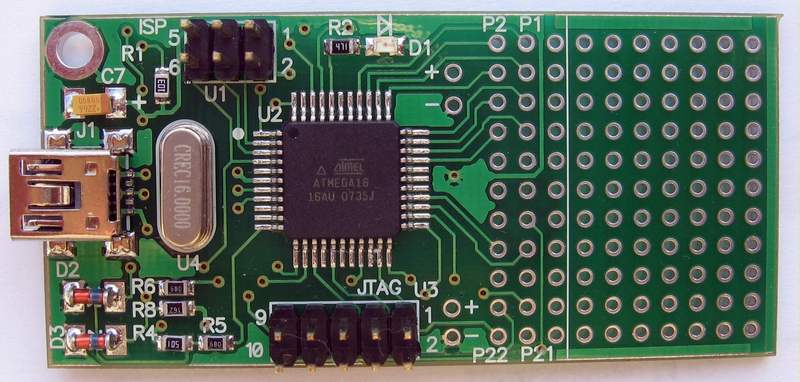
As a result, the following components were purchased:
- AVR-USB-MEGA16 - 500 rubles.
- Soil moisture sensor - 120 rubles.
- Aquarium pump at 200 l / h - 507 rub.
- Soil cleaner (needed a tube from the kit) - 330 rubles.
- Aquarium stuffer - 193 rub.
- Relay 5DC / 220AC - 170 rubles.
- Biopolar Transistor - 7.5 rubles
- Resistance - 10 p.
- Block with terminals - 100 r.
- Fuse box - 50 r.
- Fuse - 22 rubles.
- USB cable - 220 rubles.
Total, apart from all the little things, it turned out about 2200 rubles.

All parts are very compact, the biggest one is the pump:
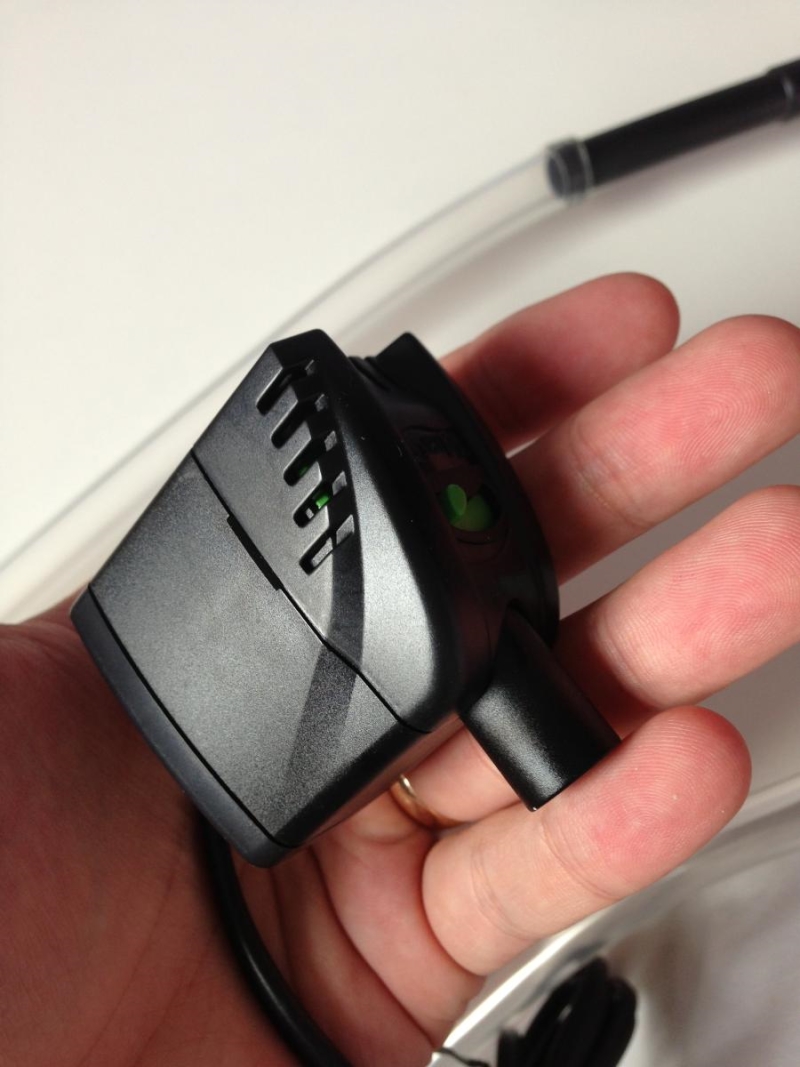
So, everything has been bought, it's time for assembly. @AlekseyNovikov advised the relay switching circuit, for which many thanks to him. Here is the diagram:
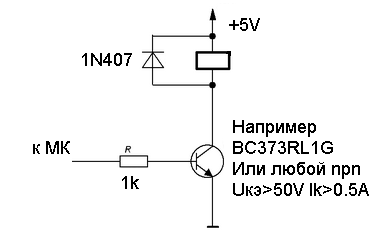
The only thing that decided to remove the diode. Having spent the evening soldering, we got a completely sane result:

Now we turn to the most interesting - the logic of work.
Part 2. Software part
Before starting this idea, the main fear or concern was the difficulty of programming microcontrollers, the lack of normal debug and other difficulties, so the main goal of this article is not to describe the idea as such, because it is not new, but to promote the simplicity of using such devices using modern languages programming such as C #.
From the board we need only two things:
- Soil moisture sensor readings
- Relay on / off
So, I used WPF in conjunction with the firmware of Kukhtetsky Sergey (more details on how this works can be found here ).
The program is a tray icon and a small unobtrusive window.
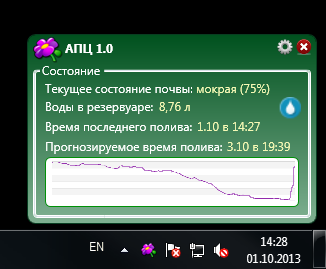
The program settings are also as simple as possible:
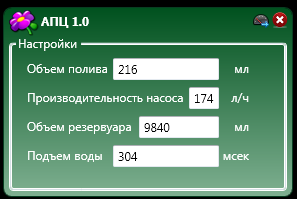
The following problems can be attributed to the main difficulties in the software operation:
- The pump performance indicated on the pump has almost nothing to do with reality
- The performance of the pump depends very much on the height of the water, for example, if the pump simply drains the water, then the performance of my pump specifically reaches 350 liters per hour, but with a lifting height of 80 cm it hardly reaches 40 liters per hour.
- It is difficult to determine the capacity of the container in which the pump will work by eye.
- Before the water reaches the flower, it must pass a difficult path up the tube.
To solve these problems, a simple algorithm based on measurements was invented. After everything is in place, water is collected in the tank:
- We determine the rate of water rise: for this it is enough to click on the corresponding field with the mouse, then press Enter, the pump will start working, as soon as the first drop of water appears, press Enter again and see the time spent on raising the water.
- We determine the pump performance at a given height: after determining the time, we find a glass whose capacity is known, I took a baby bottle for mixtures, measured risks were applied to it, set the value of “Watering Volume” to 200 ml. We click on the “Pump Performance" field with the mouse, press Enter and wait until exactly 200 ml is poured into the bottle, as soon as this happens again press Enter and voila, we have the exact pump performance.
- We determine the volume of the tank: here we need a bucket or some large capacity, by analogy, activate the desired field, press Enter and just wait for almost all the water to pour out, we need to stop at the moment when the pump is still slightly covered with water. We have a volume of water that can be used.
Everything, the system is ready to work. According to the first parameter of settings - the amount of watering, it is automatically determined based on the soil moisture sensor and optimal humidity for this type of plant (unfortunately, I did not put it into the interface, it is installed in an XML file)
The algorithm of the APC (Automatic Watering Flower) is simple:
Once every ten minutes, readings are taken from the soil moisture sensor (a series of measurements take place, the arithmetic mean is taken). Based on the evidence, a decision is made to irrigate the soil, if the deviation from the norm is more than 5%, then watering occurs. Data on all actions is recorded in the database, based on them, a forecast for irrigation is subsequently built, a schedule and the required amount of irrigation are determined. The algorithm for determining the volume of the poured liquid is also very simple. There is a certain humidity standard, say 74% (indicated in the XML file for a specific plant), the first watering with a volume of 100 ml takes place, after 10 minutes the next humidity measurement takes place and we look at the deviation from the reference humidity level, if the humidity is less than necessary, then at the next watering is added in increments depending on the deviation (100 ml, 50 ml, 10 ml, 3 ml).
Unfortunately, I don’t like flowers , I simply don’t have them, so I still couldn’t run the system on a real plant, I bought an experimental chrysanthemum that died successfully in the first week of experiments. The mechanism was successfully sent to my father (hi Russian Post, the package should have arrived in a week, it’s already been three and it’s not yet known what’s wrong with it), as soon as it installs and starts, it will definitely take a video and I will add it.
The disadvantages of this system include a lot, firstly, it depends on the PC, secondly it’s quite massive, a large tank, wires go to it, a thick tube goes to the top of the pot, wires from the sensors come out of the pot, all this plugs into an outlet, as 220V pump.
The plans for the near future to eliminate all the shortcomings, I want to draw a 3D model that will include everything in one pot - a tank, pump, water channels, sensors, LCD screen, etc., I want all this to work on batteries for at least six months , this pot will work on Arduin Pro Mini.
I’m currently mastering Blender (I have a lot of experience in 3D Max), since I decided to completely abandon pirated software, after I’ll finish, I’ll hand over the model to 3D printing, eliminate all the shortcomings, run a prototype and write the continuation of this article.
UPD: I am attaching the current device diagram (without a diode, later it needs to be added).
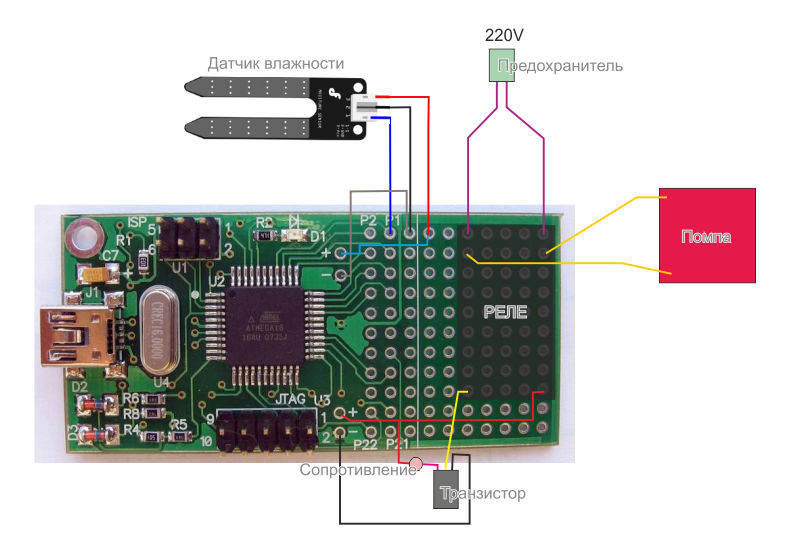
The most interesting points are the preparation of the device:
public static bool Init()
        {
            dev = new ATMega16(vid, pid);   // Создаем объект dev класса ATMega16.
            if (!dev.IsOpen())              // Если есть проблемы с USB
            {
                return false;
            }
            else                            // Если все хорошо, настроим микроконтроллер по USB
            {
                dev.DDRD |= 0x80;           // Пин 7 порта D - на вывод
                dev.PORTD &= 0x7F;          // Выключим реле на плате
                dev.ADMUX = (3 << ATMega16.REFS0); // Будем использовать внутренний источник опорного напряжения
                // Внутренняя частота АЦП не должна превышать 200 кГц. Поэтому тактовая частота микроконтроллера
                // должна быть поделена на 128 (биты ADPS0, ADPS1 и ADPS2 установим в 1). Т.о. получим 125 кГц.
                // Время преобразования будет (1/125000)*13 = 104 мкс, соответственно частота - 9.6 кГц
                // Установка бита ADEN в 1 разрешает работу АЦП
                dev.ADCSRA = (1 << ATMega16.ADEN) | (1 << ATMega16.ADPS2) | (1 << ATMega16.ADPS1) | (1 << ATMega16.ADPS0);
            }
            return true;
        }
Sensor reading:
            dev.ADMUX = (byte)((dev.ADMUX & 0xE0) | 0);     // Работает один канал - ADC0
            dev.ADCSRA |= (1 << ATMega16.ADSC);             // Запуск АЦП
            // Время преобразования мало (около 100 мкс). Поэтому просто подождем готовности в цикле
            while ((dev.ADCSRA & (1 << ATMega16.ADIF)) == 0) ;
            return (dev.ADCL + (((int)dev.ADCH) << 8));    // Формируем число
Conversion of the readings from the sensor in% humidity, and later in the lowercase value:
                var persantage = (int)(stateOfSoil / 8.4);
                if (persantage < 10) result = "критическое";
                else if (persantage < 20) result = "очень сухая";
                else if (persantage < 30) result = "сухая";
                else if (persantage < 40) result = "свежая";
                else if (persantage < 50) result = "нормальная";
                else if (persantage < 60) result = "влажная";
                else if (persantage < 70) result = "сырая";
                else if (persantage < 80) result = "мокрая";
                else if (persantage < 90) result = "водянистая";
                else result = "вода";
                return String.Format("{0} ({1}%)", result, persantage);
Pump On:
dev.PORTD |= 0x80;
Disable Pump:
dev.PORTD &= 0x7F;









