 September 19, 2013 at 13:52
802.11ac networks for the most daring

On Habré often write articles "for the smallest". We, for a change, decided to write an article “for the most daring”. For those steadfast, fearless, seasoned IT wolves who are ready to risk their budget and reputation and deploy a corporate 802.11ac network now, while the standard has not yet been ratified, and the choice of equipment is not too wide.
What for?
Indeed, why do we need these adventures when there is 802.11n? Firstly, it is possible that the facility generally does not yet have a Wi-Fi network and the temptation is great to make it immediately on the newest equipment. Secondly, the network may be, but old, at 802.11 a / b / g. Thirdly, it can be 802.11n, but single-band, only at 2.4 GHz, and this part of the spectrum is extremely congested, especially if your office is not a lonely hut in a dense forest (and even if there is external video surveillance around the hut on wireless cameras, the spectrum can be decently littered). Fourthly, the standard 802.11ac has delicious "buns" in comparison with 5-gigahertz networks 802.11n. We already wrote about the goodies in Habré in detail and competently , so we won’t repeat ourselves, but talk about practice: what to choose from and how to build.
Access points
All vendors of enterprise-class wireless equipment (we will not discuss home solutions, this is a completely different niche) are in a hurry to launch 802.11ac products on the market. The market leader, Cisco, was in such a hurry to stake a seat that it launched the Cisco Aironet 3600 Series a year ago, announcing 802.11ac support at these access points, but without including the appropriate radio module in them. They promised to provide the module “later” (yes, such an interesting marketing move: buy an assault rifle today, and we will put an under-barrel grenade launcher for it later). I must say that they did not deceive, in April 2013, Cisco began shipping the module, which is quite easily inserted into the access point.
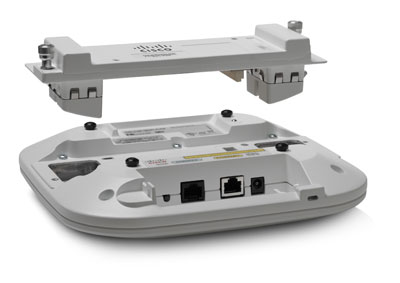
They are not going to stop at the same time: in a year and a half, the second wave module (Wave 2) is promised, with support for MU-MIMO and rates of up to 6.9 Gbps, which means a channel width of 160 MHz and 8 spatial streams. Again, if we talk about real rates between a single client and an access point, then the bottleneck will be customers. 8 spatial streams from one client is a fantasy, but 802.11ac is good because redundant spatial streams do not “disappear”, but are used in MU-MIMO to serve other clients:

Aruba is advancing on the heels of Cisco with its 220th series , with poorly concealed pleasure talking about how their access points tear Cisco access points into small pieces in real performance tests, and for the price too. Motorola released the AP 8232 , a rather interesting access point of modular architecture (for example, you can insert a WIPS module). Ubiquiti, a beloved outside of the United States, has begun shipping the UniFi AP AC . Ruckus Wireless and Aerohive are a bit late in the race, who have not yet started selling 802.11ac equipment.
The general trend is the first wave (3x3 MIMO, 80 MHz channels) today or, in extreme cases, tomorrow, the second wave - next year. By the way, another notable trend is the rejection of controllers in favor of the cloud. The pioneers here were Aerohive and Meraki (the last one bought by Cisco), all the others are gradually pulling up behind them. The cloud trend is not directly related to 802.11ac. Rather, increased data rates, traffic volumes and very fast growth of Wi-Fi infrastructure are pushing the cloud.
The client is not always right yet
What do we have today in the field of client devices? Not too much yet. The first wave is adapters with a channel width of 80 MHz, mainly with support for two spatial streams, for example, Netgear A6200 and D-Link DWA-182 (both on the Broadcom chipset). For such adapters, the theoretical limit of the PHY rate is 866.7 Mbps, and this will certainly be written on the box, but a modestly silent fact that spoils the whole picture is the USB 2.0 bus with a maximum theoretical data transfer rate of 480 Mbps. In practice, under ideal conditions, USB 2.0 adapters do not give a real data transfer rate (i.e., throughput) above 230 Mbps. At the next stage of the evolutionary ladder, models appear on USB 3.0, so far with the same channel width of 80 MHz and two streams, for exampleZyXEL NWD6605 , Edimax EW-7822UAC and Linksys WUSB6300 (all three on the Realtek chipset). Due to adequate bus speed, you can expect throughput at 380-500 Mbps. Well, at the top step are mPCIe adapters integrated into laptops, some even with three streams, which make it possible to achieve a real speed of 550-750 Mbps. However, note that there are very few laptops with 802.11ac so far.
What can be expected from customers in the future? Apparently, low-end clients will be single-threaded, high-end will remain three-threaded. The channel width is likely to reach 160 MHz. Why there will be so few spatial streams, why not 4 or 8? The answer lies mostly in the field of energy consumption. Each additional stream is an additional radio path, which increases energy consumption (in contrast, by the way, from the channel width, which has almost no effect on energy consumption). A smartphone with three streams will very quickly drain the battery. For those who are interested in the details of the power consumption of MIMO devices, I refer to an interesting study .
Are planning
Today, the most common two methods of planning Wi-Fi networks: “access point on a stick” (AP-on-a-stick) and the creation of a virtual model. The first method involves placing a single test access point (usually on a pole, so that the height matches the height of the future permanent access point), measuring the signal, moving to a new position, measuring again, and so on, until there is complete satisfaction with the signal level over the entire area and from the compliance of the plan with requirements for capacity, redundancy, etc. They usually measure and mark the signal with the help of site survey programs, although there are still people who like to draw numbers in a notebook.
The second way is much more progressive - a virtual room model is created in the program, with virtual walls and other obstacles:
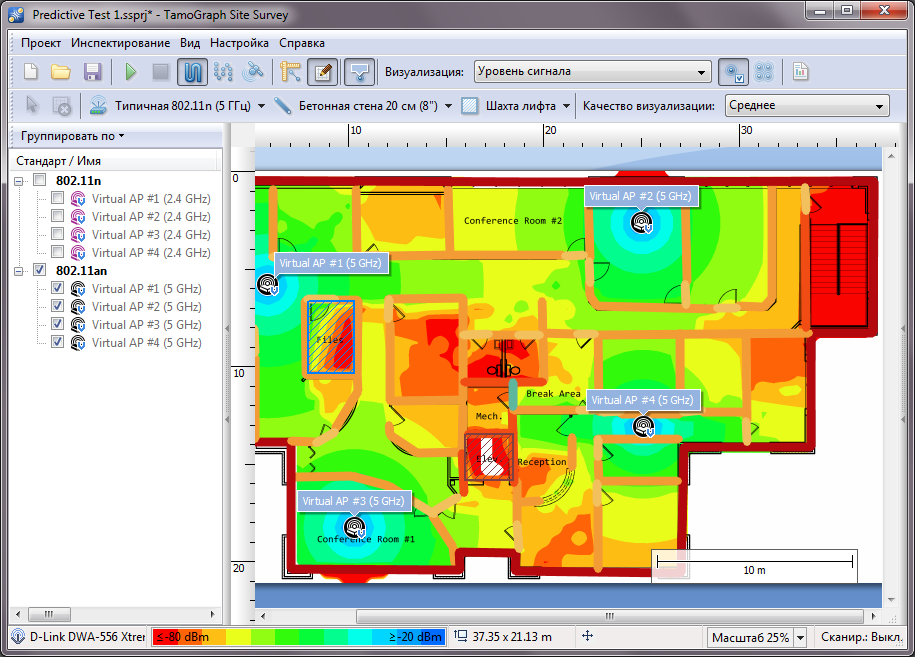
Virtual access points are located and configured on the plan. You can configure 802.11 standard, channel, channel width, antenna type, etc. The process is interactive: bad placement can be easily corrected. How is 802.11ac planning different from previous generation networks? Let's talk about it.
Coating
802.11ac has a smaller coverage area than 2.4 GHz networks for two reasons: (a) the higher the frequency, the higher the free space loss, (b) the drop in signal power for many materials depends on the frequency and it depends ... not in the benefit of high frequencies, alas :-) For example, a solid wood door reduces the signal level by about 6 dB for 2.4 GHz and 10 dB for 5 GHz. Yes there is a door, a well-fed employee, who can reduce the signal by a few dB. Is a smaller coverage area a problem? We don’t think so. Now almost no networks are built, with the main goal of coverage; everyone cares about capacity. BYOD is walking the planet, in offices there are a huge number of client devices, and the fact that the only access point in the office can “finish off” to the farthest corners does not warm anyone: it still cannot pull 20 laptops and 20 smartphones.
Channels
Although the number of non-overlapping channels in the 5 GHz band is much larger than in the 2.4 GHz band (there are, as you know, only three of them), the new wide 802.11ac channels do not give complete freedom. Places are still not enough. The list of allowed channels varies by country , but even in countries with the widest set of channels, 160 MHz channels can be forgotten if we are not talking about the aforementioned hut with one access point.
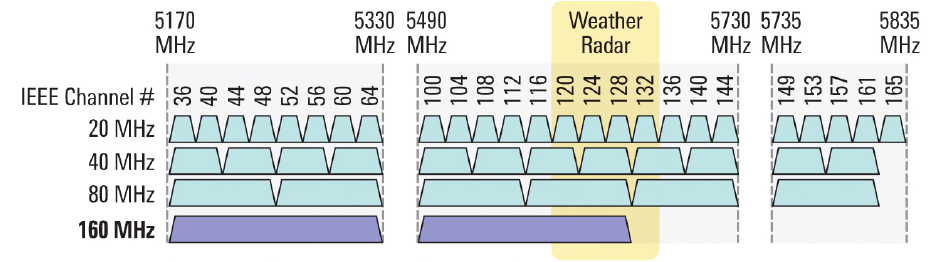
If the placement is not very dense, you can use the 80 and 40 MHz channels, with a dense arrangement, the channels 20 and 40 MHz. Will there be interference? It all depends on the environment and how many channels can be used (by the way, we could not reliably determine the situation in Russia: according to some sources, you can use channels 36-48, according to others - 36-64; if someone knows the exact answer - tell me in the comments). If we assume, for example, that only 36-48 are allowed, then we have only one channel of 80 MHz, or two of 40 or four of 20. It’s not at all thick; the illustration (at the bottom) shows a typical spectrum picture that the analyzer shows if the 802.11ac client actively exchanges data with accurate access on a channel with a width of 80 MHz (and literally one line of shameless self-promotion: we recently started selling USB spectrum analyzers in Russia in complete withTamoGraph Site Survey for planning and inspection of Wi-Fi networks):
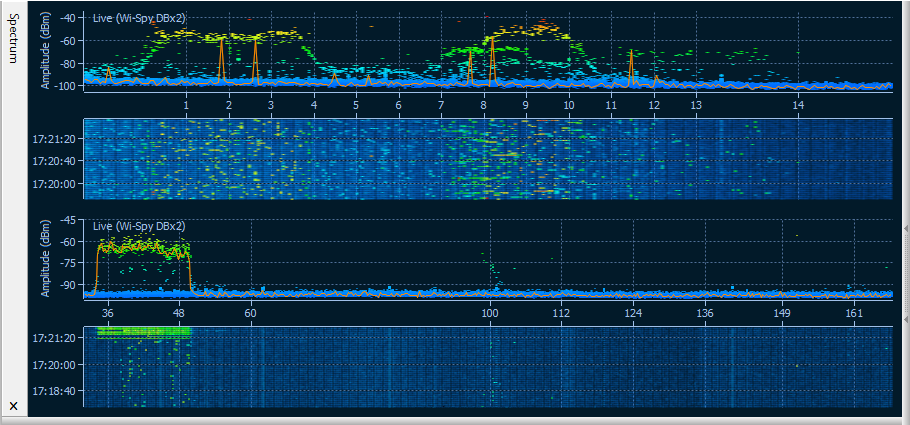
At the waterfall view it is clearly visible that the channel is completely clogged. In such a situation, of course, it is wise to use narrower channels. By the way, since the used 802.11ac access points will probably be dual-band, spectrum analysis in the 2.4 GHz band will not be out of place. A significant proportion of customers, especially mobile ones, are still limited to one 2.4 GHz band, and they also need to take care of high-quality communication. In the 2.4 GHz band, interference is often caused not by Wi-Fi equipment, but by other sources.
And what is the gain in using 802.11ac compared to 802.11n in conditions where there is no possibility to use wide channels, you ask? Firstly, the new 256-QAM modulation will give, for example, 400 Mbps at 40 MHz and two streams where 802.11n gave only 300 Mbps. Secondly, in 802.11n devices cannot dynamically change the channel width depending on external conditions. But in 802.11ac - this is part of the standard, and part of it that really works, which we checked by field tests. The client and the access point can start with the 80 MHz channel under good conditions, and then smoothly switch to 40 or 20 MHz if interference is observed. In addition, the transition to narrower channels occurs when the signal level does not allow supporting the work on a wide channel. The narrower the channel and the less spatial streams, the lower the requirements for signal level: for example, according to the 802.11ac standard, a channel with a width of 80 MHz requires at least -76 dBm for the lowest rate (MCS 0), and a channel with a width of 20 MHz is already -82 dBm. In other words, at the edge of the coverage area, clients will switch to narrower channels.
Profit?
All profit and loss are very well summed up in the article to which we referred above. Whether the high data transfer rate, high network capacity, greater coverage (compared to 802.11n at 5 GHz), dynamic channel width and other 802.11ac advantages outweigh its disadvantages such as the cost of equipment, the limited choice and youth of the technology - the question that we did not try to resolve in this article. We just wanted to outline the path for the brave :-) If you are careful, still wait. Pure you ether!









