 August 21, 2013 at 16:13
ROSA Media Player on Ubuntu. We collect from source
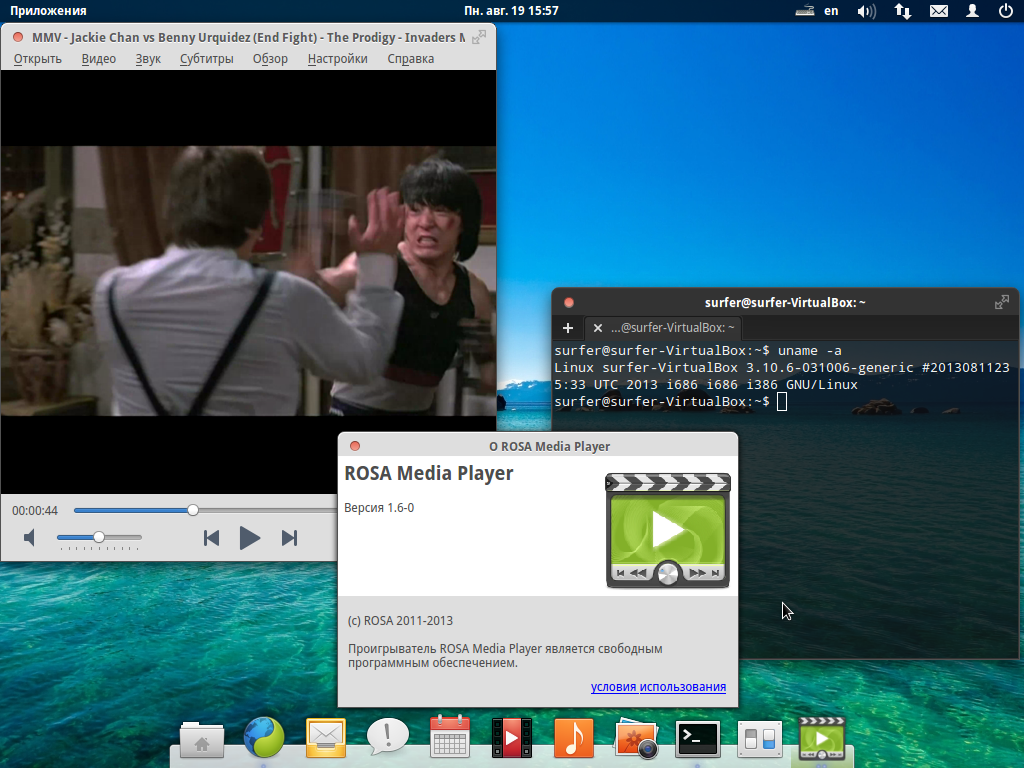
ROSA Media Player is an offshoot of the SMPlayer project and uses MPlayer and FFmpeg to play content. The list of supported formats is identical to the MPlayer features. Among the features include support for capturing video from the screen, saving audio tracks from a video in a separate file, the function of cutting out fragments and cropping videos at the edges, additional filters to normalize the image and combat distortion. The player code is available under the GPLv3 license.
The new version (the one we are going to collect, 1.6.0) is notable for capturing video from the screen with sound (both microphone recording and line-in recording are supported), and YouTube support integration: without leaving ROMP, users can now search, viewing and saving videos posted to YouTube on the local system. It would seem that there is surprising, the same VLC is perfectly able to do the latter. But the craving for new things is inescapable in us, and the ability to create video presentations without additional software is a good bonus.
This player is easy to find in rpm packages, but cannot be found in deb, which seemed strange to me. Yes, in the repositories (ppa: nilarimogard / webupd8) you can find its gray-haired version, already 1.0 RC1, but this does not give us an idea about the actual product. Driven by curiosity, I decided to collect this package and become its maintainer. What came out of this and what not, can be found below.
The following were selected as the manual for the assembly of the deb-package management . The assembly was carried out in OS elementary 0.2, which is based on Linux Ubuntu 12.04 LTS.
1. The source code of the product can be downloaded from the public ROSA repository on ABF: https://abf.rosalinux.ru/uxteam/ROSA_Media_Player .
So wgethttps://abf.rosalinux.ru/uxteam/ROSA_Media_Player/archive/ROSA_Media_Player-master.tar.gz
2. Unpack the tar zxvf package ROSA_Media_Player-master.tar.gz
3. And here comes the shamanism with which I fought for about an hour . The fact is that many packages of Ubuntu distributions are called differently from rpm distributions, which the creators of this player are oriented to, or even are completely absent, such as qtmultimedia. Each of the following packages includes sticking to the error message about the impossibility of compilation, subsequent googling and active use of the apt-file search command. For seasoned Linux users, this all seems obvious, but I hope that my guide will help beginners, curious beginners.
I will not bore you with a long story about all shamanism and briefly tell you what to do. First of all, we need to install packages such as: zlib1g-dev, libqjson-dev, libwildmidi-dev, libqt4-dev, qt4-cmake, qtmobility-dev, libqtmultimediaqt1 .
After that, go to the rosa-media-player / src / folder and make the following changes to the rosa-media-player.pro file :
QT + = network xml mobility
MOBILITY = multimedia
Note: the solution is available at http://kubuntu.ru/ node / 11527 will not help, since the structure of the assembly file has apparently changed.
And only after all these gestures can you give the make command, and it is not given in the / rosa-media-player / src / folder, but in / rosa-media-player. The result of this is a successfully compiled program that can be installed using sudo make install.
But with the creation of the deb package, there are still difficulties. The terminal is encouraged by the following message, and what structure it needs to feed, I, unfortunately, have not figured out yet, but have not given up, the desire to bring little benefit to the ububntu community remains. In optimistic plans to create his own repository and support the existing project, in reality, for the time being, the study of deb-packaging is continuing.
The new version (the one we are going to collect, 1.6.0) is notable for capturing video from the screen with sound (both microphone recording and line-in recording are supported), and YouTube support integration: without leaving ROMP, users can now search, viewing and saving videos posted to YouTube on the local system. It would seem that there is surprising, the same VLC is perfectly able to do the latter. But the craving for new things is inescapable in us, and the ability to create video presentations without additional software is a good bonus.
This player is easy to find in rpm packages, but cannot be found in deb, which seemed strange to me. Yes, in the repositories (ppa: nilarimogard / webupd8) you can find its gray-haired version, already 1.0 RC1, but this does not give us an idea about the actual product. Driven by curiosity, I decided to collect this package and become its maintainer. What came out of this and what not, can be found below.
The following were selected as the manual for the assembly of the deb-package management . The assembly was carried out in OS elementary 0.2, which is based on Linux Ubuntu 12.04 LTS.
1. The source code of the product can be downloaded from the public ROSA repository on ABF: https://abf.rosalinux.ru/uxteam/ROSA_Media_Player .
So wgethttps://abf.rosalinux.ru/uxteam/ROSA_Media_Player/archive/ROSA_Media_Player-master.tar.gz
2. Unpack the tar zxvf package ROSA_Media_Player-master.tar.gz
3. And here comes the shamanism with which I fought for about an hour . The fact is that many packages of Ubuntu distributions are called differently from rpm distributions, which the creators of this player are oriented to, or even are completely absent, such as qtmultimedia. Each of the following packages includes sticking to the error message about the impossibility of compilation, subsequent googling and active use of the apt-file search command. For seasoned Linux users, this all seems obvious, but I hope that my guide will help beginners, curious beginners.
I will not bore you with a long story about all shamanism and briefly tell you what to do. First of all, we need to install packages such as: zlib1g-dev, libqjson-dev, libwildmidi-dev, libqt4-dev, qt4-cmake, qtmobility-dev, libqtmultimediaqt1 .
After that, go to the rosa-media-player / src / folder and make the following changes to the rosa-media-player.pro file :
QT + = network xml mobility
MOBILITY = multimedia
Note: the solution is available at http://kubuntu.ru/ node / 11527 will not help, since the structure of the assembly file has apparently changed.
And only after all these gestures can you give the make command, and it is not given in the / rosa-media-player / src / folder, but in / rosa-media-player. The result of this is a successfully compiled program that can be installed using sudo make install.
But with the creation of the deb package, there are still difficulties. The terminal is encouraged by the following message, and what structure it needs to feed, I, unfortunately, have not figured out yet, but have not given up, the desire to bring little benefit to the ububntu community remains. In optimistic plans to create his own repository and support the existing project, in reality, for the time being, the study of deb-packaging is continuing.
surfer@surfer-VirtualBox:~/Dev/src/ROSA_Media_Player/1.6.0$ dh_make --createorig
For dh_make to find the package name and version, the current directory
needs to be in the format of -. Alternatively use the
-p flag using the format _ to override it.
I cannot understand the directory name or you have an invalid directory name!
Your current directory is /home/surfer/Dev/src/ROSA_Media_Player/1.6.0, perhaps you could try going to
directory where the sources are?
Please note that this change is necessary ONLY during the initial
Debianization with dh_make. When building the package, dpkg-source
will gracefully handle almost any upstream tarball.









