August 1, 2013 at 16:54
GoIP SMS Server for Asterisk (Part 1)
- Tutorial
In this article I will talk about one of the implementation, the use of the SMS distribution server - GoIP, with the Asterisk telephone platform.

Having tried many GSM gateways , I can confidently answer that GoIP gateways are the best, especially in terms of price / quality ratio. As an example, they are excellent, they work at one of the call centers in Belarus, practicing about 100 GSM channels, and receiving about 3,000 calls per day. In addition, the support of service engineers from China was very pleased, very quickly.
A significant advantage of this gateway is its SMS server , which can produce SMS mailings, remove the balance and much more. A localized version of the server and a more detailed version of the article can be found on my website.
Localized versionGoIP SMS server is located on this page , or you can download the original server from the manufacturer’s website. As the Asterisk platform, I used the Elastix distribution . Installing the module is carried out in several steps:
cd / usr / src
tar xvfz goip_install-ru-v1.15.1.tar.gz
cd goip_install
./goip_install.sh
/etc/init.d/httpd restart
When installing, specify the database password.
Go to 192.168.1.35/goip

Password admin login: root root. We get into the admin panel of the SMS server.
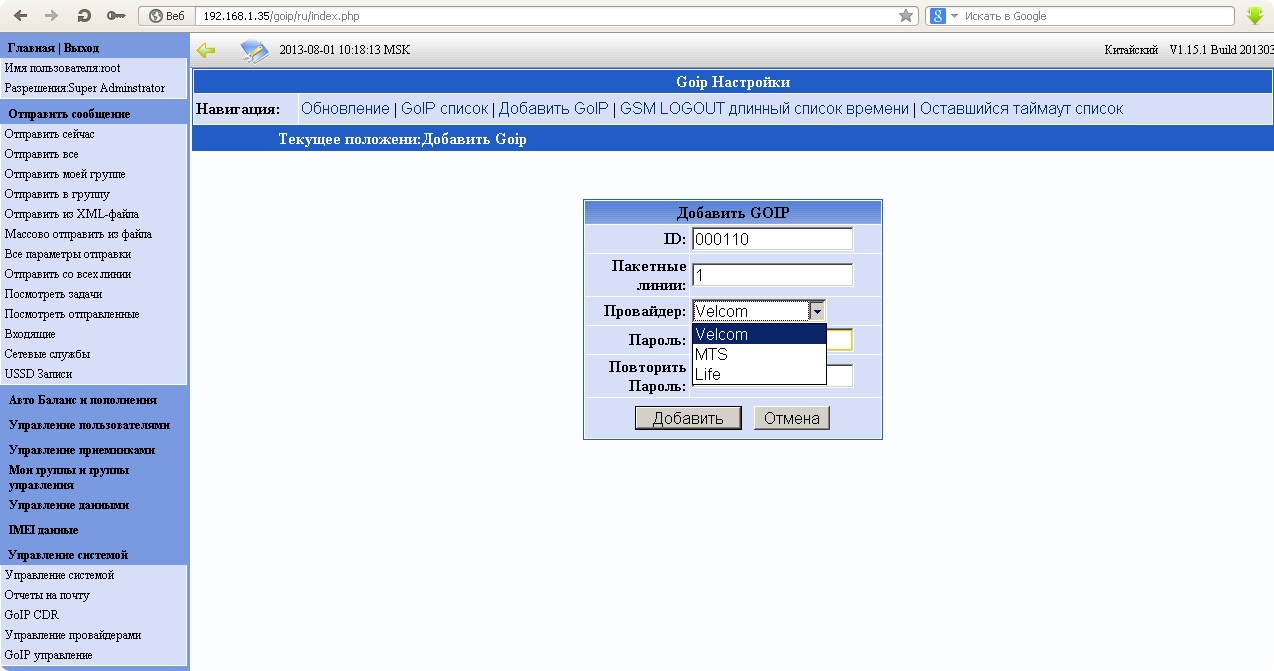
The first thing to do is create trunks on the SMS server and the GoIP gateway.
Go to the add provider tab:

Register SMS Sender on GoIP and SMS server.
Each sim card has its own.
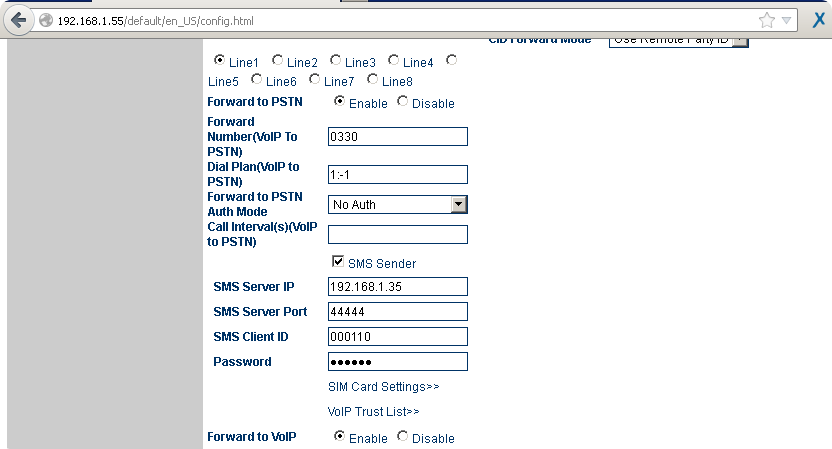
After trunks logged on to the gateways, you can perform cvc distribution using the API or XML file.
In the next part I will talk about the distribution module on Huawei E1550 modems.
Having tried many GSM gateways , I can confidently answer that GoIP gateways are the best, especially in terms of price / quality ratio. As an example, they are excellent, they work at one of the call centers in Belarus, practicing about 100 GSM channels, and receiving about 3,000 calls per day. In addition, the support of service engineers from China was very pleased, very quickly.
A significant advantage of this gateway is its SMS server , which can produce SMS mailings, remove the balance and much more. A localized version of the server and a more detailed version of the article can be found on my website.
Localized versionGoIP SMS server is located on this page , or you can download the original server from the manufacturer’s website. As the Asterisk platform, I used the Elastix distribution . Installing the module is carried out in several steps:
cd / usr / src
tar xvfz goip_install-ru-v1.15.1.tar.gz
cd goip_install
./goip_install.sh
/etc/init.d/httpd restart
When installing, specify the database password.
Go to 192.168.1.35/goip
Password admin login: root root. We get into the admin panel of the SMS server.
The first thing to do is create trunks on the SMS server and the GoIP gateway.
Go to the add provider tab:
Register SMS Sender on GoIP and SMS server.
Each sim card has its own.
After trunks logged on to the gateways, you can perform cvc distribution using the API or XML file.
In the next part I will talk about the distribution module on Huawei E1550 modems.