 July 21, 2013 at 17:01
WigWag startup creates JavaScript smart home programming environment
Today, different manufacturers offer dozens of different (and often incompatible with each other) systems, devices, applications and interfaces to turn a regular house or apartment into a “smart” one - smart door locks and bulbs with WiFi control, sockets, sensors and switches with an account on Twitter Internet refrigerators are air conditioners. The WigWag startup , which has already raised almost four times more money on Kickstarter than it planned, approached the issue of creating a smart home in a more systematic way. They offer not just a set of sensors and actuators, but also a whole infrastructure that is compatible with many existing intelligent electrical appliances, and, more importantly, open to modifications and friendly to both ordinary users and programmers and hackers.
WigWag allows you to create “rules” similar to IFTTT recipes , which can control any devices based on information from sensors or from the Internet. These can be WigWag sensors and actuators, Internet services, Raspberry Pi, Arduino, Belkin WeMo, Philips Hue, and any others that support IP, RS-232, 6loWPAN, Bluetooth and Zigbee protocols. Moreover, you can create rules not only through the graphical interface, but also in JavaScript, using the DeviceJS runtime environment, which WigWag developers position as a way to write applications for smart homes in the same way as applications for the Web are written.
The developers promise to publish all drawings and device specifications, source codes and DeviceJS APIs on Github. The "iron" part of WigWag consists of three components. The first of them is a universal multisensor actuator, which has sensors of temperature, humidity, sound, vibration, movement, light, a mechanical contact sensor, and several communication channels with the outside world, which serve both to receive signals from outside and to control other devices - relays , infrared emitter, digital and analogue inputs / outputs for connecting external sensors, LED and buzzer for signaling. Four AA batteries or a microUSB connector are used for power. The second component is an LED strip with a controller that has its own light and movement level sensors. The third is the base station,
Here is a sample list of what WigWag can do: WigWag
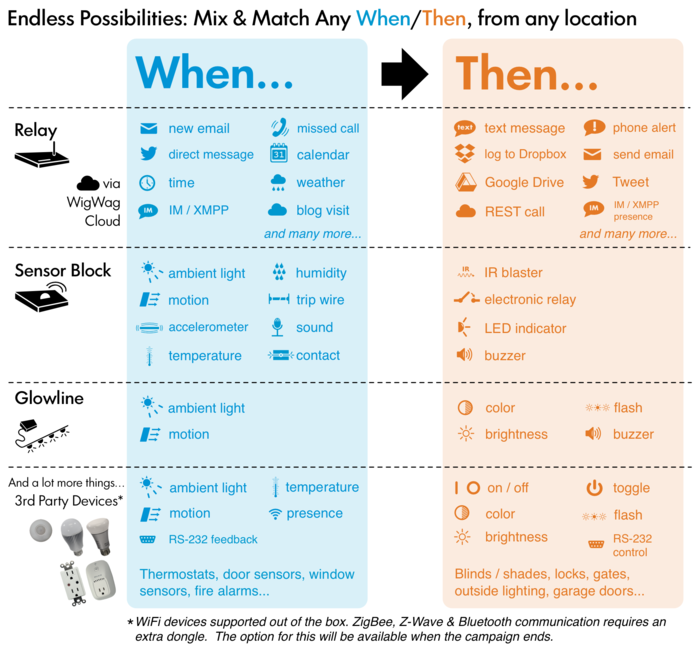
cloud services let you manage devices from anywhere in the world via a web interface. At the same time, at the local level, the system can operate without access to the Internet - the base station will fulfill all the specified rules for devices connected to it without the help of the cloud.
The DeviceJS environment will be built on the basis of Node.js and V8. The DeviceJS API will be built in the image of libraries familiar to most web programmers, such as jQuery or d3.js. This might look like an API call to turn on red light in the kitchen:
But the inclusion of light in the corridor when the motion detector is triggered:
In addition to off-the-shelf components, WigWag offers boards for independent creation of compatible devices based on Arduino and Raspberry Pi.
WigWag allows you to create “rules” similar to IFTTT recipes , which can control any devices based on information from sensors or from the Internet. These can be WigWag sensors and actuators, Internet services, Raspberry Pi, Arduino, Belkin WeMo, Philips Hue, and any others that support IP, RS-232, 6loWPAN, Bluetooth and Zigbee protocols. Moreover, you can create rules not only through the graphical interface, but also in JavaScript, using the DeviceJS runtime environment, which WigWag developers position as a way to write applications for smart homes in the same way as applications for the Web are written.
The developers promise to publish all drawings and device specifications, source codes and DeviceJS APIs on Github. The "iron" part of WigWag consists of three components. The first of them is a universal multisensor actuator, which has sensors of temperature, humidity, sound, vibration, movement, light, a mechanical contact sensor, and several communication channels with the outside world, which serve both to receive signals from outside and to control other devices - relays , infrared emitter, digital and analogue inputs / outputs for connecting external sensors, LED and buzzer for signaling. Four AA batteries or a microUSB connector are used for power. The second component is an LED strip with a controller that has its own light and movement level sensors. The third is the base station,
Here is a sample list of what WigWag can do: WigWag
cloud services let you manage devices from anywhere in the world via a web interface. At the same time, at the local level, the system can operate without access to the Internet - the base station will fulfill all the specified rules for devices connected to it without the help of the cloud.
The DeviceJS environment will be built on the basis of Node.js and V8. The DeviceJS API will be built in the image of libraries familiar to most web programmers, such as jQuery or d3.js. This might look like an API call to turn on red light in the kitchen:
dev$.byLocation("kitchen").setColor("red");
But the inclusion of light in the corridor when the motion detector is triggered:
dev$.byDeviceAlias('hallway-sensor').trigger('motion', function() {
    dev$.byLocation('hallway').setOn();
});
In addition to off-the-shelf components, WigWag offers boards for independent creation of compatible devices based on Arduino and Raspberry Pi.









