 July 22, 2013 at 16:16
Overview of @to Music mobile app for the Android platform
We hasten to share the third review from a series of materials containing practical recommendations for improving the design, architecture and ergonomics of the Android application interface. Surveys prepared in conjunction with UsabilityLab . Read the first two reviews here and here .
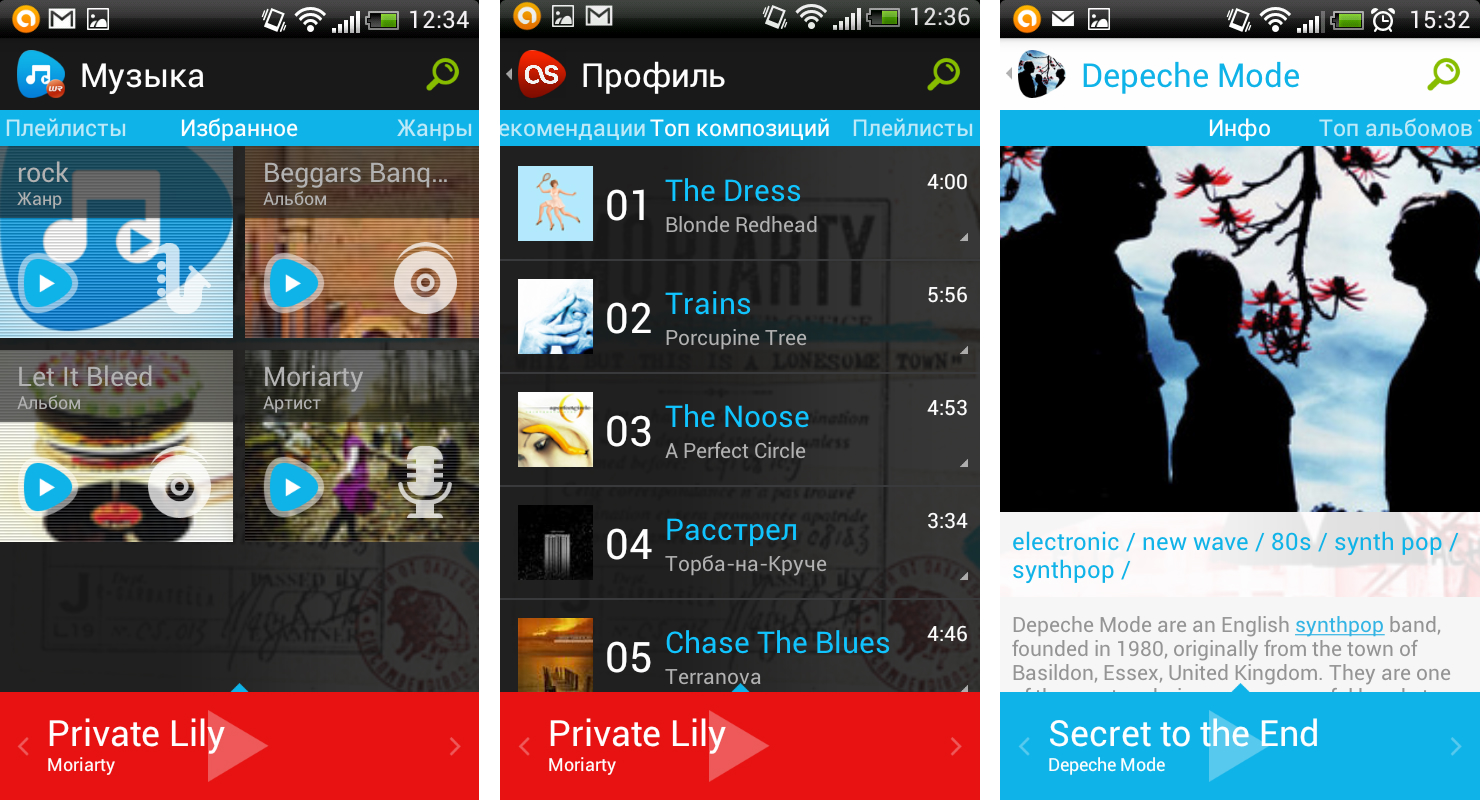
The @to Music app provides access to user profiles on Vk.com and Last.fm, as well as music stored on the user’s Android device. It allows you to not only listen to songs, but also add them to playlists and favorites, search for new ones by name, album, artist, and also save music to the cache on your device.
Reviews about the application are generally positive, and the average rating on Google Play is quite high - 4.4. However, many users point out performance issues. So, for example, Alexander Sitnikov writes:
However, today we will get acquainted with the current functionality of the application, discuss the problems when interacting with it, and try to suggest ways to solve them.
The already identified problem of the speed of the application - when switching between sections, loading and switching tracks - the developers promise to eliminate the next version, which should be released very soon.
Another significant problem that the user may encounter is the lack of a fixed exit screen. According to the guidelines and user experience, any service should have a home screenserving as an entry and exit point. Being on it, you can understand, for example, that the next press of the hardware “Back” button will exit the application. However, in @to Music this rule does not work: when you enter the application, we get to the "Main" section on the screen with your favorites, but we can exit any other section - account profiles, friends, library, groups, locally, etc. At the same time, it continues to appear as active in the list of running applications.

Application navigation can be described as wide as well as deep. On the one hand, already the first level of the menu contains eleven sections and subsections, including settings. On the other hand, almost every section includes two or three levels of several screens each. Already in words it becomes clear that the user may need a lot of time to master the structure of the application.
In fact, the application includes four large blocks. The first is the Home section with three screens: playlists, favorites, genres.
The second one refers to the user account of Vk.com and contains sections “Profile” with screens “recommendations”, “compositions”, “playlists”; "Friends" with similar screens; “Groups” with “composition” and “playlists” screens.
The third block presents information from the Last.fm account. Here are the “Profile” sections similar to the Vk.com account with the screens of “recommendations”, “top tracks”, “playlists”; “Friends” is the same; “Library” - “compositions”, “performers”, “albums”. At the same time, you can go to the page of an individual artist and also on different screens see information about him, top albums and top tracks.
The last block displays the music available on the device and has sections “Locally” with the screens “All” and “Folders”, as well as “Cache” with lists of saved and in the process of saving songs on two different screens.
Such a long description and massive structure, in fact, mean only dividing the functional into two profiles, local music and the most favorite, taken to favorites and playlists. It is difficult to get confused, but you have to spend time studying.
Duplicate sections and the difference in the names of identical sections, as well as the difference in the functionality of the two accounts and the resulting sections that are incomprehensible in terms of functionality, can add problems. And, of course, there is always a risk of leaving the application at the most unexpected moment.
But first things first.
At the first call, the application consistently offers to log in to Vk.com and Last.fm. If the user does not have an account in these services, then he can skip the appropriate steps. After authorization, the application transfers the user to the main screen with the selected one (still empty) and gives tips on adding items to favorites and editing them.
Indicators of progress and status, as well as unambiguous transitions back and forth allow the user to easily enter the application without missing anything.

When entering the application, the user enters the “Favorites” screen of the “Main” section, where he can add his favorite artists, albums, genres, groups, playlists, friends. Only selected songs cannot be added to favorites.
The second screen of the section - “Playlists” - contains custom collections of songs from all profiles. However, adding a playlist to your favorites from here is impossible - to do this, go to the profile in which it was created.
The third screen - “Genres” is not very convenient in terms of search. The names in it are arranged randomly, are not grouped in any way, so it’s immediately difficult to say how complete and detailed it is. Also, it can be difficult for the user to guess which artists are hiding in each of the sections, and whether the same artist can belong to several close sections (for example, Rock and Metal).

The main “Profile” section consists of the “Recommendations”, “Compositions” and “Playlists” screens. In addition, the application allows you to see in separate sections a list of friends (including yourself) and, accordingly, screens with their compositions, recommendations and playlists, as well as a section with groups of which the user is a member. The latter does not seem very suitable for the user's tasks in the system, since he can be subscribed to communities and meetings of various directions that are not related to music in any way. It turns out that a fairly large part of the groups, with the exception of music communities, does not correlate with the main task of the application.
The user may encounter some problems when choosing actions with compositions. So, for example, it is not clear where exactly the composition will disappear when you click on the "Delete from Vk" button or where the so-called "Library" is located, for adding to which there is a separate button. If in the first case it turns out by trial that the composition disappears from the user's audio recordings list, then the problem in the second example remains unresolved - the “Library” section for the Vk.com profile does not exist in the application.

The information in the first two sections is identical to Vk.com - its “Profile” with songs, recommendations, playlists. "Friends" with similar information. The third section - "Library" - is very useful because it contains the top artists and albums of the user, respectively, allowing you to find new albums of your favorite artist, listen to them in their entirety or just watch information about the artists. However, as already mentioned, one of these screens duplicates the compositions already collected in the “Profile”.
A separate problem concerns section names. “Top Songs” refers to both the user’s profile, which presents the most frequently listened to songs, and the list of songs of a particular artist, which contains the most popular songs (by the number of plays by all Last.fm users).

Here you can also find problems when choosing actions with compositions - where to look for what has been added to the library - nothing changes in the same section after adding by the user, and the function is available even if the user is not authorized at Last.fm. In this case, there is no feedback. It is also worth noting here that the existing feedback is represented by messages in English, despite the fact that the entire application is Russian-language.

The main function of the application in the end is listening to music. The user can choose for this any composition from lists, playlists, recommendations, albums. However, there is a chance to encounter a problem when the application does not keep up with its actions and returns to the top of the lists when they are quickly scrolled. The same thing happens when you quickly switch tracks - their names do not change at the speed at which the user changes the tracks, and starts playing them with a long delay.
When playing songs in the expanded player mode on the tablet in a vertical orientation, the album cover is torn off from the main player control panel, respectively, the action selection button with the composition also changes its position, “creeps out” above. On the smartphone, the problem is the opposite - in horizontal orientation, the album cover is a very narrow strip, and the control button is hidden. It turns out that the action button is either inconvenient to use or completely inaccessible.

This also includes the function of caching tracks - it either hides behind the action button, or is located in the upper right corner (when viewing songs of a particular album), without suggesting the choice of specific songs to be stored in the device’s memory. The user is completely unclear what exactly it refers there.
A separate difficulty is the current playlist.
Firstly, on the tablet it does not hide automatically when you switch to another section of the application. That is, the user, opening it, and then, for example, going to the "Main" section, still sees the list of songs in the playlist. This is very confusing - it seems that the application has not responded to the action. At the same time, automatically minimizing the playlist when moving to another section would allow you to immediately see this transition and work with the contents of the called screen.
Secondly, the names are again confusing, because it seems that the playlist is some kind of custom list of songs that he himself compiled. But even the list of tracks within a particular album when listening to it, the system calls it a playlist.

Despite the problems described, @to Music does not accidentally receive high user ratings. The developers have tried in terms of design - the application looks concise and nice. For almost every album there are covers, they are displayed in the player when playing the composition and as the background of the application itself. In addition, the user can choose the application theme - light or dark, to your taste.
It is worth noting that the developers were not too lazy to make a separate version for the tablet. For example, the menu is always present in it - both in horizontal and vertical orientation, allowing you to move between sections instantly.

The @to Music app does a pretty good job of its basic functions - searching and listening to audio recordings. And due to the functionality of the recommendations, taken from the two services presented in it, it also allows you to find new interesting music.
On the other hand, it is this combination of functionals that gives rise to many problems. For example, it seems that part of the sections either duplicates each other, or does not really correspond with the main task of the application. But it greatly complicates its structure. Accordingly, the user is likely to use only part of the functionality presented in the application, namely, all kinds of lists of songs and artists, their playlists and favorites.
But even if we ignore the technical features of combining two accounts, that is what to expect from the new version of @to Music - better speed and stability, and augmented and improved features.
Developers Relations Team, Google Россия
About app
The @to Music app provides access to user profiles on Vk.com and Last.fm, as well as music stored on the user’s Android device. It allows you to not only listen to songs, but also add them to playlists and favorites, search for new ones by name, album, artist, and also save music to the cache on your device.
Reviews about the application are generally positive, and the average rating on Google Play is quite high - 4.4. However, many users point out performance issues. So, for example, Alexander Sitnikov writes:
“A good application, but so far the stability is a little alarming. But the interface itself is very nice. Thanks!"It is worth noting that the very idea of comparing two profiles - Vk.com and Last.fm, with the presentation of essentially two different functionalities (only some sections intersect) without their integration seems incomplete. In the process of working with the application, the user is forced to alternately turn to one profile, then to another, if the compositions collected in them differ. It would be much more interesting to see all your preferences, recommendations in one place, and also to be able to see not only the tracks, but also their artists, albums, genres. In this case, the application would be a very convenient integrator of all the user's musical interests.
However, today we will get acquainted with the current functionality of the application, discuss the problems when interacting with it, and try to suggest ways to solve them.
Briefly about the main thing
The already identified problem of the speed of the application - when switching between sections, loading and switching tracks - the developers promise to eliminate the next version, which should be released very soon.
Another significant problem that the user may encounter is the lack of a fixed exit screen. According to the guidelines and user experience, any service should have a home screenserving as an entry and exit point. Being on it, you can understand, for example, that the next press of the hardware “Back” button will exit the application. However, in @to Music this rule does not work: when you enter the application, we get to the "Main" section on the screen with your favorites, but we can exit any other section - account profiles, friends, library, groups, locally, etc. At the same time, it continues to appear as active in the list of running applications.
Developer Information
Problem | Criticality | Recommendation |
| The application runs slowly when you start songs in the player and switch them. |  | Improve system performance. |
| There is no fixed entry / exit screen. Exit the application by clicking the button "Back" from any section of the main menu. | | Define one main screen that serves as the entry point and preceding the exit from the application . |
Navigation
Application navigation can be described as wide as well as deep. On the one hand, already the first level of the menu contains eleven sections and subsections, including settings. On the other hand, almost every section includes two or three levels of several screens each. Already in words it becomes clear that the user may need a lot of time to master the structure of the application.
In fact, the application includes four large blocks. The first is the Home section with three screens: playlists, favorites, genres.
The second one refers to the user account of Vk.com and contains sections “Profile” with screens “recommendations”, “compositions”, “playlists”; "Friends" with similar screens; “Groups” with “composition” and “playlists” screens.
The third block presents information from the Last.fm account. Here are the “Profile” sections similar to the Vk.com account with the screens of “recommendations”, “top tracks”, “playlists”; “Friends” is the same; “Library” - “compositions”, “performers”, “albums”. At the same time, you can go to the page of an individual artist and also on different screens see information about him, top albums and top tracks.
The last block displays the music available on the device and has sections “Locally” with the screens “All” and “Folders”, as well as “Cache” with lists of saved and in the process of saving songs on two different screens.
Such a long description and massive structure, in fact, mean only dividing the functional into two profiles, local music and the most favorite, taken to favorites and playlists. It is difficult to get confused, but you have to spend time studying.
Duplicate sections and the difference in the names of identical sections, as well as the difference in the functionality of the two accounts and the resulting sections that are incomprehensible in terms of functionality, can add problems. And, of course, there is always a risk of leaving the application at the most unexpected moment.
But first things first.
Application launch
At the first call, the application consistently offers to log in to Vk.com and Last.fm. If the user does not have an account in these services, then he can skip the appropriate steps. After authorization, the application transfers the user to the main screen with the selected one (still empty) and gives tips on adding items to favorites and editing them.
Indicators of progress and status, as well as unambiguous transitions back and forth allow the user to easily enter the application without missing anything.
When entering the application, the user enters the “Favorites” screen of the “Main” section, where he can add his favorite artists, albums, genres, groups, playlists, friends. Only selected songs cannot be added to favorites.
The second screen of the section - “Playlists” - contains custom collections of songs from all profiles. However, adding a playlist to your favorites from here is impossible - to do this, go to the profile in which it was created.
The third screen - “Genres” is not very convenient in terms of search. The names in it are arranged randomly, are not grouped in any way, so it’s immediately difficult to say how complete and detailed it is. Also, it can be difficult for the user to guess which artists are hiding in each of the sections, and whether the same artist can belong to several close sections (for example, Rock and Metal).
Developer Information
Problem | Criticality | Recommendation |
| There is no way to add playlists to favorites from the section on the main screen. |  | Provide the ability to add items to favorites from any section. |
| There is no way to add individual songs to favorites. |  | Provide the ability to add items of any type to favorites. |
Profile Vk.com
The main “Profile” section consists of the “Recommendations”, “Compositions” and “Playlists” screens. In addition, the application allows you to see in separate sections a list of friends (including yourself) and, accordingly, screens with their compositions, recommendations and playlists, as well as a section with groups of which the user is a member. The latter does not seem very suitable for the user's tasks in the system, since he can be subscribed to communities and meetings of various directions that are not related to music in any way. It turns out that a fairly large part of the groups, with the exception of music communities, does not correlate with the main task of the application.
The user may encounter some problems when choosing actions with compositions. So, for example, it is not clear where exactly the composition will disappear when you click on the "Delete from Vk" button or where the so-called "Library" is located, for adding to which there is a separate button. If in the first case it turns out by trial that the composition disappears from the user's audio recordings list, then the problem in the second example remains unresolved - the “Library” section for the Vk.com profile does not exist in the application.
Developer Information
Problem | Criticality | Recommendation |
| The “Groups” section has little relevance to the main functionality of the application. | | If possible, replace this section with a similar “Library” displaying frequently listened artists and albums. |
| Some of the options for the compositions are not obvious names "Remove from Vk", "Add to the library Vk." | | Rename options to uniquely identify the actions performed with their help. |
Last.fm Profile
The information in the first two sections is identical to Vk.com - its “Profile” with songs, recommendations, playlists. "Friends" with similar information. The third section - "Library" - is very useful because it contains the top artists and albums of the user, respectively, allowing you to find new albums of your favorite artist, listen to them in their entirety or just watch information about the artists. However, as already mentioned, one of these screens duplicates the compositions already collected in the “Profile”.
A separate problem concerns section names. “Top Songs” refers to both the user’s profile, which presents the most frequently listened to songs, and the list of songs of a particular artist, which contains the most popular songs (by the number of plays by all Last.fm users).
Here you can also find problems when choosing actions with compositions - where to look for what has been added to the library - nothing changes in the same section after adding by the user, and the function is available even if the user is not authorized at Last.fm. In this case, there is no feedback. It is also worth noting here that the existing feedback is represented by messages in English, despite the fact that the entire application is Russian-language.
Developer Information
Problem | Criticality | Recommendation |
| There is no feedback on user actions with compositions. | | Show informational messages about what happened in the system after user actions with compositions, for example, that they were completed successfully or an error occurred. |
| The available feedback from the application is presented in English. | | Translate informational messages into Russian. |
| The title “Top Songs” is carried by two sections that are different in meaning - in the user profile and artist profile. | | Rename one of the sections in “Compositions” - it will look more logical in the user's profile, and will also correspond to the same name in the Vk.com profile. |
Select and listen to songs
The main function of the application in the end is listening to music. The user can choose for this any composition from lists, playlists, recommendations, albums. However, there is a chance to encounter a problem when the application does not keep up with its actions and returns to the top of the lists when they are quickly scrolled. The same thing happens when you quickly switch tracks - their names do not change at the speed at which the user changes the tracks, and starts playing them with a long delay.
When playing songs in the expanded player mode on the tablet in a vertical orientation, the album cover is torn off from the main player control panel, respectively, the action selection button with the composition also changes its position, “creeps out” above. On the smartphone, the problem is the opposite - in horizontal orientation, the album cover is a very narrow strip, and the control button is hidden. It turns out that the action button is either inconvenient to use or completely inaccessible.
This also includes the function of caching tracks - it either hides behind the action button, or is located in the upper right corner (when viewing songs of a particular album), without suggesting the choice of specific songs to be stored in the device’s memory. The user is completely unclear what exactly it refers there.
A separate difficulty is the current playlist.
Firstly, on the tablet it does not hide automatically when you switch to another section of the application. That is, the user, opening it, and then, for example, going to the "Main" section, still sees the list of songs in the playlist. This is very confusing - it seems that the application has not responded to the action. At the same time, automatically minimizing the playlist when moving to another section would allow you to immediately see this transition and work with the contents of the called screen.
Secondly, the names are again confusing, because it seems that the playlist is some kind of custom list of songs that he himself compiled. But even the list of tracks within a particular album when listening to it, the system calls it a playlist.
Developer Information
Problem | Criticality | Recommendation |
| Элементы управления изменяют своё положение на разных экранах и при разной ориентации устройства. | | Зафиксировать положение каждого из управляющих элементов системы для обеих ориентаций, определив положение функции кэширования, и закрепив панель с кнопкой выбора действия вместе с нижней границей обложки альбома относительно плеера. |
| Текущий плейлист не скрывается при переходе в другой раздел приложения (на планшете). | | При переходе в один из разделов приложения автоматически скрывать текущий плейлист и показывать содержание выбранного раздела. |
| Название «Плейлист» не соответствует информации, представленной в нём. | | Оставить данное название только для разделов, где собраны пользовательские списки треков. «Текущий плейлист» переименовать в «Список воспроизведения». |
О хорошем
Despite the problems described, @to Music does not accidentally receive high user ratings. The developers have tried in terms of design - the application looks concise and nice. For almost every album there are covers, they are displayed in the player when playing the composition and as the background of the application itself. In addition, the user can choose the application theme - light or dark, to your taste.
It is worth noting that the developers were not too lazy to make a separate version for the tablet. For example, the menu is always present in it - both in horizontal and vertical orientation, allowing you to move between sections instantly.
Total
The @to Music app does a pretty good job of its basic functions - searching and listening to audio recordings. And due to the functionality of the recommendations, taken from the two services presented in it, it also allows you to find new interesting music.
On the other hand, it is this combination of functionals that gives rise to many problems. For example, it seems that part of the sections either duplicates each other, or does not really correspond with the main task of the application. But it greatly complicates its structure. Accordingly, the user is likely to use only part of the functionality presented in the application, namely, all kinds of lists of songs and artists, their playlists and favorites.
But even if we ignore the technical features of combining two accounts, that is what to expect from the new version of @to Music - better speed and stability, and augmented and improved features.
Resume for developers: what to do first
Recommendation | Criticality |
| Improve system performance. | |
| Define one main screen that serves as the entry point and preceding the exit from the application . | |
| If possible, replace the "Groups" section with a similar one to the "Library" with the display of frequently listened artists and albums. | |
| Translate informational messages into Russian. | |
| Fix the position of each of the control elements of the system for both orientations. | |
| When you go to one of the sections of the application, automatically hide the current playlist and show the contents of the selected section. | |
| Переименовать один из разделов в «Композиции» — логичнее это будет выглядеть в профиле пользователя, а также будет соответствовать аналогичному названию в профиле Vk.com. | |
| Показывать информационные сообщения о том, что произошло в системе после действий пользователя с композициями, например, что они совершены успешно или возникла ошибка. | |
| Обеспечить возможность добавления в избранное элементов из любого раздела. | |
| Увеличить скорость реагирования системы на действия пользователя. | |
| Оставить данное название только для разделов, где собраны пользовательские списки треков. «Текущий плейлист» переименовать в «Список воспроизведения». | |
| Переименовать названия действий с композициями так, чтобы однозначно обозначить операции, выполняемые с их помощью. | |
| Обеспечить возможность добавления в избранное элементов любого типа. | |









