CLI harvester for Plesk

This article will focus on the Plesk hosting control panel and CLI-interfaces, however, the information can be useful in general terms of creating convenient CLI-applications.
It turns out that while administering the Plesk hosting control panel, despite the web interface, I still spend quite a lot of time in the console. In the end, if I want to see the rights to the file inside the vasya.com domain, then go to the file manager. If you take a battle server under a good load, then some things you even want to watch from the console, instead of the web interface.
On the one hand, when administering Unix / Linux systems on a regular basis, you get used to using autocomlite, aliases, and start writing bash scripts for small routine tasks. On the other hand, if you look at Plesk, then it has a rather rich CLI interface, which is not found in every control panel. But the strange thing is that using it, to put it mildly, is not very convenient, and for many typical administrative tasks it is generally useless.
The desire to somehow influence the situation and make some improvements in the CLI has ripened for a long time. Spending half the time in the console, you type and type the next command. If you look closely at these commands, you can notice that these same commands are found in the history file by other Plesk administrators as well. And the teams are very, very verbose:
# mysql -uadmin -p`cat /etc/psa/.psa.shadow` psa
# /usr/local/psa/bin/domain ...
# /usr/local/psa/bin/sw-engine-pleskrun /usr/local...
# tail -f /var/log/sw-cp-server/error_log
...
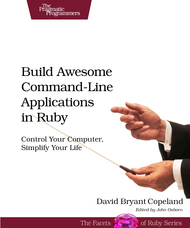 The previous points mentioned were the motivation to try to change something. Besides, the decision was influenced at the beginning of the year by the book which I came across about creating command line applications in Ruby (it was already somehow promoted on Habré). By the way, I liked the book with the fact that there was a minimum of water there, and basically there were examples of how to make good console applications. I can’t say that I learned a lot of new things, but the book systematized knowledge, sorting things out and serving as an additional incentive to apply this knowledge.
 The last motivating factor was that I wanted to make a tool that would be useful in my daily work.
So there was a console utility with a very obvious name - "
plesk", which was designed to simplify the execution of a number of frequent operations in the CLI. The utility comes with the standard Plesk 11.5 package. But let's return to the theory. If you look at the Unix / Linux utilities, they can be divided into two classes: simple commands and command suites. when the number of options exceeds a reasonable limit, and it is possible to break the instruments into separate areas, at this moment, and there comes a need to develop command suite Example of a simple command -. it
ls(there are many options, but the team - one), and examples of command suites - this gitor svn(there are many subcommands). In the context of Plesk, one of the problems was as follows: the directory
/usr/local/psa/bin/contains more than a hundred different utilities./usr/local/psa/bin/every time I really do not want to. To do " cd /usr/local/psa/bin/" - too. Cramming /usr/local/psa/bin/PATH is an even less attractive idea, because PATH will be chaotic and it will be impossible to understand whether it is a standard utility or a utility from Plesk. Throwing away the old CLI interface and writing a completely new one over the coming weekend is utopian both in terms of time and in terms of supporting backward compatibility. The logical answer to this problem is to make the command suite wrapper over the standard interface. /usr/local/psa/bin/domainWe will call the utility as " plesk bin domain". In order not to remember the names of the plesk utility subcommands and available utilities from bin, we add bash completion. To make it even more convenient, add bash completion for the commands / options of the utilities themselves from bin.Previously, in order to create a client from the console, I did something like this. I made a help call and looked at the options. Very often I remember the approximate names and understand what I want, but not the exact spelling of a specific option:
# /usr/local/psa/bin/client -h
Usage: client command  ..
    Available commands:
    --create or -c         Creates a new customer account..
After that, I typed the command I needed (returning along the way to the help information, since not all the options can be immediately remembered):
# /usr/local/psa/bin/client --create ...
Now instead of this, click Tab more often;)
# plesk bin cl
client       client_pref  cloning
# plesk bin client --create
--create     --create-gapps-account
Nothing, as they say, supernatural, but I am now able to type a team to create a client without looking at the help.
The next aspect is shortcuts for frequently typed but long teams.
Instead of typing a rather long command to get into the console MySQL client:
# mysql -uadmin -p`cat /etc/psa/.psa.shadow` psa
Now just type:
# plesk db
Sometimes it becomes necessary to find out the version of Plesk on a machine. The architecture of the machine. The name of the distribution. Yes, and the micro-version, if installed, will not hurt to find out. To do this, you will have to type a lot of commands:
# cat /etc/issue
CentOS release 5.9 (Final)..
# cat /usr/local/psa/version
11.5.22 CentOS 5 115130325.19
# cat /usr/local/psa/.revision
319415
# uname -a
Linux hp-demo...
# cat /root/.autoinstaller/microupdates.xml
...
Now just type one small command and get all the information at once:
# plesk version
Product version: 11.5.30 Update #6
    Update date: 2013/07/19 07:42
     Build date: 2013/07/11 12:00
   Build target: Debian 6.0
       Revision: 323071
   Architecture: 32-bit
Wrapper version: 1.0
But simple shortcuts are few, so move on. Let's say we want to see the contents of a table. Just dial:
# plesk db show misc
+-------------------------------------+----------------------------------------------------------------+
| param                               | val                                                            |
+-------------------------------------+----------------------------------------------------------------+
| FullHostName                        | unknown                                                        |
| actionlog_rot_num_periods           | 30                                                             |
...
If the output exceeds the screen size, then paging will be used. Those who used it
svn logand git logwill understand what kind of difference it is. This behavior can be achieved, for example, using the command "| less --quit-if-one-screen --no-init". The panel has various configuration files. You can also simplify their opening for editing:
# plesk conf panel.ini
And we are already in Vim and can make changes. This is achieved using the usual proc_open.
Few people know that a team
tailcan monitor multiple files at once. Using this feature, a command was created to simultaneously monitor all the log files to which the panel writes:# plesk log --all
Log files: /usr/local/psa/var/log/maillog /var/log/sw-cp-server/..
==> /usr/local/psa/var/log/maillog <==
Jul 22 17:25:43 ay postfix/anvil[25376]: statistics: max connection count 1 for (smtp:1.164.98.84) at Jul 22 17:22:21
..
==> /var/log/sw-cp-server/error_log <==
==> /usr/local/psa/admin/logs/httpsd_access_log <==
...
A fresh look at old problems gives interesting results. In 370 lines of wrapper code, quite a lot of ideas fit in an effort to simplify certain points.
Another important one is the documentation.
If you call the utility without parameters, then a brief help should be issued. However, the help should definitely not be "
Usage: command [options]" (some of the standard Plesk utilities suffer from this). Still, a little detail will not hurt, namely, a listing of options, a list of subcommands, if any. For command suites, there must be a help subcommand and the ability to execute command help subcommand. In fact, this is some replacement for the manual with the ability to filter information. And of course, true Unix utility must have a man page. Yes, you can now dial, "man plesk":) In general, thanks to man's, the user can learn the intricacies of the utility and get additional information, such as usage examples, combinations of options, etc. If you set out to create your own command suite, then don't forget about usage, help . subcommand and the man page Although writing help -. one of the least favorite classes programmers back to the utility "
plesk." any person has the opportunity to participate in its development Plesk develops a very small team of developers on the other hand, administrators using Plesk'om -.. to not . How many orders of magnitude larger as the utility is designed primarily to make life easier for administrators in the CLI, it is open source, and repository-mirror is on GitHub - github.If you have any great idea and you can implement it, then there is a chance that this functionality will be in upstream. To minimize dependencies, the utility was written in PHP - the language used to operate the web interface of the panel (although I am an ardent supporter of Ruby and JS :)). PHP, on the other hand, is quite popular, so choosing this language can only contribute to the development of the utility. PS For lovers of visual perception - a presentation on SlideShare .