June 28, 2013 at 18:26
Android modem interaction
In a previous article, I talked about how the layer of the radio interface is arranged in the Android OS. Today I will talk about how you can interact directly with the modem.
It often happens that a tablet with a 3G modem does not provide the ability to call, send an SMS message and even find out the account balance. In this article, we will fight this, as well as see how to use all the functionality provided by the modem.
As you already know, the manufacturer’s RIL translates Android OS requests into a modem understandable form. As a rule, many standardized Hayes AT commands are used to interact with the modem, however, some modem manufacturers supplement the standard set of AT commands with their own extensions. Today we will work at the level between the manufacturer's RIL and the modem.
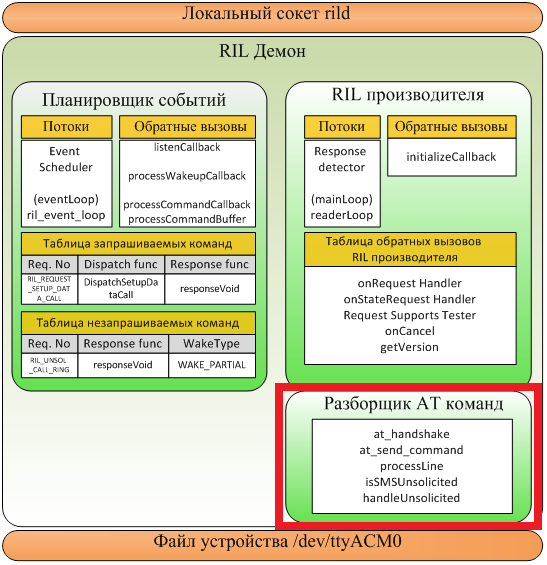
I note that for experiments, your device should be rooted, and you should have minimal programming experience on NDK.
To begin with, we need to establish the name of the modem device file in the system. Typically, this is / dev / ttyACM0 or / dev / smd0 (/ dev / ttyUSB0 is also found). To find out, you need to run the command to view the radio log in the terminal: logcat -b radio . The very first line of the radio log should look like: " Opening tty device / dev / ttyACM0 ". If there is no such line, then we are less fortunate to have to sort through all the devices located in the / dev / directory. To do this, it is necessary to send a test command " AT " to each file from this directory , and if it is a modem device file, see the answer in the " OK " radio log . Commands can be sent, for example, using the terminal: echo "AT"> / dev / file_name .
Now, let's establish what commands are sent to the modem. To do this, we carry out an “attack” of the MITM type.

For this:
The program code is available here .

After examining our log, you can see which AT commands and parameters correspond to the actions. After starting the rild daemon first, the modem initializes, receives the necessary information from the base station, etc.
If you sent an SMS message, the following sequence of AT commands corresponded to this:
AT + CMGS = 18
>
0001000b815686070855f4345005c8329bfd06 ^ Z The
message looks like this because it is encoded in PDU format. By playing this AT command sequence programmatically, you can verify that the message is being sent successfully. At the same time, of course, it does not appear in the list of sent messages in the Android OS application.
Using the AT command AT + CUSD = 1, * 100 #, 15you can make USSD request
A using the ATD + 79161234567 command; make an outgoing phone call.
Using this approach, it is possible, for example, to filter SMS messages, calls, etc.
Materials used:
1. fabiensanglard.net/cellphoneModem/index2.php
2. Source RIL of the manufacturer
It often happens that a tablet with a 3G modem does not provide the ability to call, send an SMS message and even find out the account balance. In this article, we will fight this, as well as see how to use all the functionality provided by the modem.
As you already know, the manufacturer’s RIL translates Android OS requests into a modem understandable form. As a rule, many standardized Hayes AT commands are used to interact with the modem, however, some modem manufacturers supplement the standard set of AT commands with their own extensions. Today we will work at the level between the manufacturer's RIL and the modem.
I note that for experiments, your device should be rooted, and you should have minimal programming experience on NDK.
Let's get started
To begin with, we need to establish the name of the modem device file in the system. Typically, this is / dev / ttyACM0 or / dev / smd0 (/ dev / ttyUSB0 is also found). To find out, you need to run the command to view the radio log in the terminal: logcat -b radio . The very first line of the radio log should look like: " Opening tty device / dev / ttyACM0 ". If there is no such line, then we are less fortunate to have to sort through all the devices located in the / dev / directory. To do this, it is necessary to send a test command " AT " to each file from this directory , and if it is a modem device file, see the answer in the " OK " radio log . Commands can be sent, for example, using the terminal: echo "AT"> / dev / file_name .
Now, let's establish what commands are sent to the modem. To do this, we carry out an “attack” of the MITM type.
For this:
- Rename the real modem file to / dev / ttyACM0_real .
- Create the file / dev / ttyACM0 as a symbolic link to the pseudo-terminal / dev / ptmx .
- We will log everything that goes through / dev / ttyACM0 and redirect it to / dev / ttyACM0_real
- Restart the rild: " kill pid_rild " daemon , it will start automatically.
The program code is available here .
After examining our log, you can see which AT commands and parameters correspond to the actions. After starting the rild daemon first, the modem initializes, receives the necessary information from the base station, etc.
If you sent an SMS message, the following sequence of AT commands corresponded to this:
AT + CMGS = 18
>
0001000b815686070855f4345005c8329bfd06 ^ Z The
message looks like this because it is encoded in PDU format. By playing this AT command sequence programmatically, you can verify that the message is being sent successfully. At the same time, of course, it does not appear in the list of sent messages in the Android OS application.
Using the AT command AT + CUSD = 1, * 100 #, 15you can make USSD request
A using the ATD + 79161234567 command; make an outgoing phone call.
Using this approach, it is possible, for example, to filter SMS messages, calls, etc.
Materials used:
1. fabiensanglard.net/cellphoneModem/index2.php
2. Source RIL of the manufacturer