 June 27, 2013 at 15:13
C ++ support in ReSharper
As you probably know, we have been working on the 8th version of ReSharper for a long time - during the development process we improved navigation, expanded support for XAML, added our own mechanism for viewing dependencies between projects, and added a lot of new and interesting functionality.
But now I want to talk about something beyond the scope of our plans for 8-ke: for several months now, part of our team has been working on something completely new, which our users have been asking for years - support in the ReSharper C ++ programming language .
This initiative is part of our plan to make C ++ one of the languages that would be fully supported in our products - both in ReSharper and in a separate cross-platform development environment.which we announced earlier this year.
C ++ is a very powerful language that has not gone anywhere over the years, despite the emergence and growth of its “successor languages” C # or Java: today a lot of code is written in this language, and it will be used for a very long time . We at JetBrains believe our toolkit can help C ++ developers develop faster and more efficiently.
Parsing a language like C ++ is not easy, especially when you consider all that preprocessing and template processing, which is especially time-consuming in large projects. Our main goal is precisely the correctness of processing all possible nuances, and a lot of effort was spent just to “understand” C ++, regardless of the specific features that are used in the language. At the moment, we do not have much visible functionality, but a lot of fundamental work has been done. Today, those internal builds that are being prepared with us include the following functionality:
To give you an idea of what you can expect from the current C ++ support in ReSharper, I suggest looking at this screencast:
At the moment, we do not have public assemblies with which to experiment, and the current EAP does not include C ++ support . It will take us a few more months to get something worth showing to the general public. But if you do not want to wait, here is what you can do:
Well, how interesting? Maybe you have been waiting for this news for a long time? Then subscribe to private assemblies and, working with them, help us make C ++ support part of ReSharper as quickly as possible. Well, feel free to tell us exactly what you would like to see in terms of C ++ support in the comments to this post. Thanks!
But now I want to talk about something beyond the scope of our plans for 8-ke: for several months now, part of our team has been working on something completely new, which our users have been asking for years - support in the ReSharper C ++ programming language .
This initiative is part of our plan to make C ++ one of the languages that would be fully supported in our products - both in ReSharper and in a separate cross-platform development environment.which we announced earlier this year.
C ++ is a very powerful language that has not gone anywhere over the years, despite the emergence and growth of its “successor languages” C # or Java: today a lot of code is written in this language, and it will be used for a very long time . We at JetBrains believe our toolkit can help C ++ developers develop faster and more efficiently.
Feature set
Parsing a language like C ++ is not easy, especially when you consider all that preprocessing and template processing, which is especially time-consuming in large projects. Our main goal is precisely the correctness of processing all possible nuances, and a lot of effort was spent just to “understand” C ++, regardless of the specific features that are used in the language. At the moment, we do not have much visible functionality, but a lot of fundamental work has been done. Today, those internal builds that are being prepared with us include the following functionality:
- Syntax highlighting support
- A complete set of navigation support mechanisms including mechanisms such as Go to Type , Go to Symbol , Go to File Member and of course the new Go to Everything specific for ReSharper 8.
- Support for contextual navigation , including navigation to the declaration ( Go to Declaration ), inherited symbols ( Derived Symbols ), basic symbols ( Base Symbols ) - in other words, support for all the basic features that can be expected when you open the Navigate To menu :

- We also have a Find Usages element search mechanism with previews, search filters, various grouping options, and all that usually appears in the Find Usages window .
- Side markers (gutter marks) in the new indicator of possible actions in ReSharper 8 help to track the relationships between non-trace elements and make transitions between them:
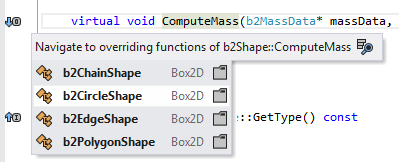
- Refactoring for the introduction of a new variable ( Introduce Variable ):

- Contextual actions for substituting macros , both single and nested (i.e., fully executed):

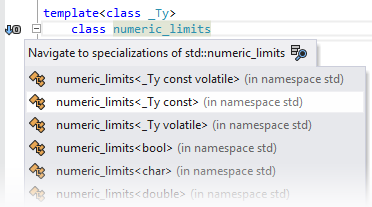
- Understanding the templates gives ReSharper the ability to correctly calculate and enable the transition to specific specializations of a particular template:
To give you an idea of what you can expect from the current C ++ support in ReSharper, I suggest looking at this screencast:
How to try it all?
At the moment, we do not have public assemblies with which to experiment, and the current EAP does not include C ++ support . It will take us a few more months to get something worth showing to the general public. But if you do not want to wait, here is what you can do:
- Go to the C ++ support page on our website.
- Fill out the form with the description of those C ++ extensions, libraries and language versions that you use. We apologize for such a large "questionnaire", but believe me - this information is very important for us to understand what is worth working on in the first place.
- Send us a subscription request for private ReSharper assemblies with built-in C ++ support . As soon as we have a private assembly that can function with your environment settings, we will send you an e-mail with a download link.
What is next?
- First of all, I want to emphasize once again that C ++ support will not be included in ReSharper 8 because it is still “raw” for a full-fledged production release.
- In the next few months, our team will work on C ++ support to introduce public EAP this fall . As we add support for new versions of the language, platform-specific extensions, as well as support for new versions of Visual Studio, we will send private builds to those who subscribe to them.
- At the moment, we are almost ready to support C / C ++ 03 for small and medium-sized projects that either do not use third-party libraries at all, or use small ones. The current development plan for the next few months looks something like this:
- Support for small and medium-sized projects that use larger libraries, such as Boost
- C ++ 11 Support
- Guaranteed adequate work with large projects
- Support for Visual Studio-specific extensions, as well as support for MFC / ATL / WTL
- Support for small and medium-sized projects that use larger libraries, such as Boost
- As soon as we have everything ready for public release, we will open the Early Access Program (EAP) and, after public testing, add C ++ support to the main ReSharper build so that C ++ support becomes part of ReSharper Full Edition .
Well, how interesting? Maybe you have been waiting for this news for a long time? Then subscribe to private assemblies and, working with them, help us make C ++ support part of ReSharper as quickly as possible. Well, feel free to tell us exactly what you would like to see in terms of C ++ support in the comments to this post. Thanks!









