June 21, 2013 at 13:11
Review monoblock Samsung 300A2A-T01
The emerging tendency to reduce the size of computer devices and integrate some of their components into others is more and more evident every year. Thus, gradually niches were formed in this market: classic computers, all-in-ones, nettops, laptops, ultrabooks, tablets, smartphones, etc. Now the user can easily choose the right device based on a certain range of tasks. Monoblocks are traditionally given much less attention than individual computer components or mobile devices. The Samsung 300A2A-T01 monoblock fell into my hands , and I want to share my impressions of meeting with the habrosociety.

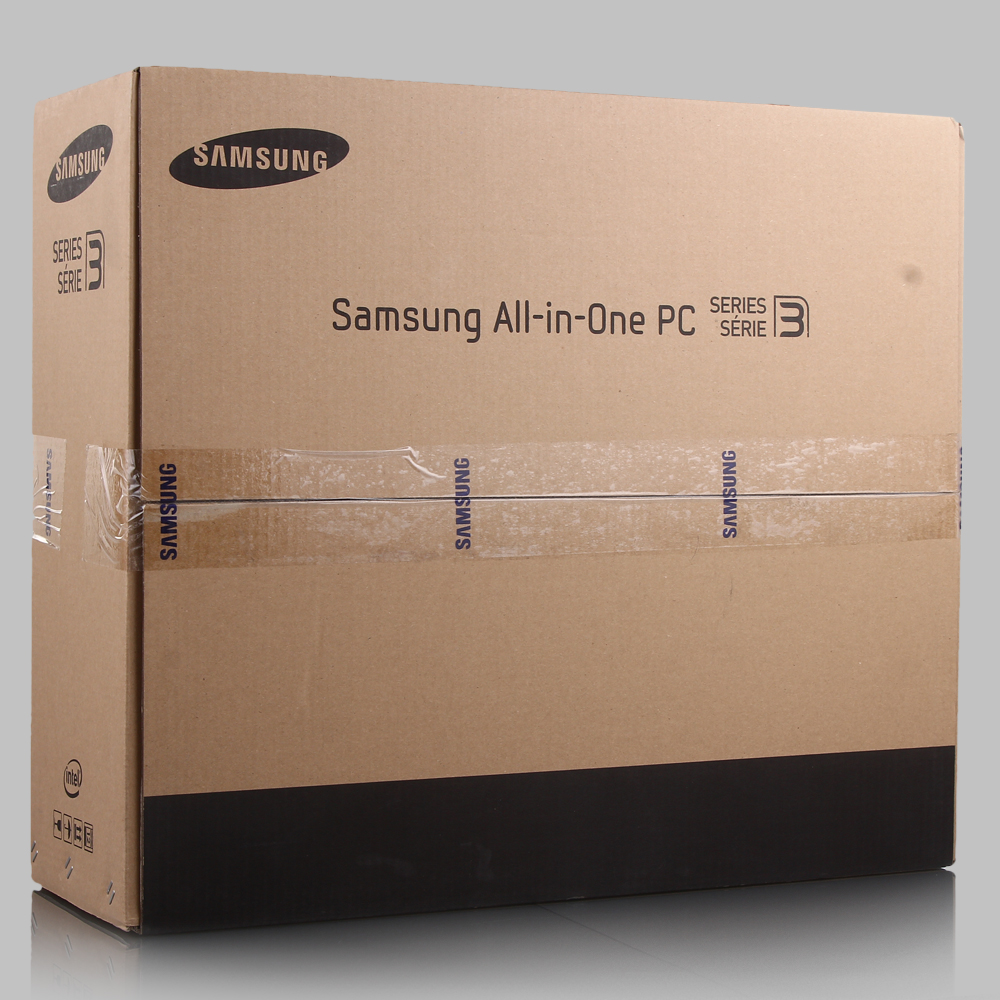
The monoblock is packed in a cardboard box, which has a traditional color scheme for Samsung. The overall dimensions of the box are 62 x 53 x 22 cm. But the mass of the device in the package slightly exceeds the mark of 10 kilograms. The box has a plastic handle for easy transportation. All contents are fixed very reliably with foam inserts covering the components, like a shell from a nut.
Until now, I had to deal with monoblocks, all of which were inside the monitor case. At the same time, the whole structure was located on the table on tiny legs and strove to crash from almost the slightest touch. On the contrary, the Samsung 300A2A-T01 candy bar has a partial arrangement of its iron filling in a massive leg. The foot has four rubber pads that provide reliable grip on the table surface. The stability of the candy bar is just fine, it will survive the attack of pets without any problems. But the attack of small children is still hardly restrained. But this is a disaster for almost all home electronic equipment, when your child throws an apple or googlophone or heaps the end of the Full HD monitor =)))
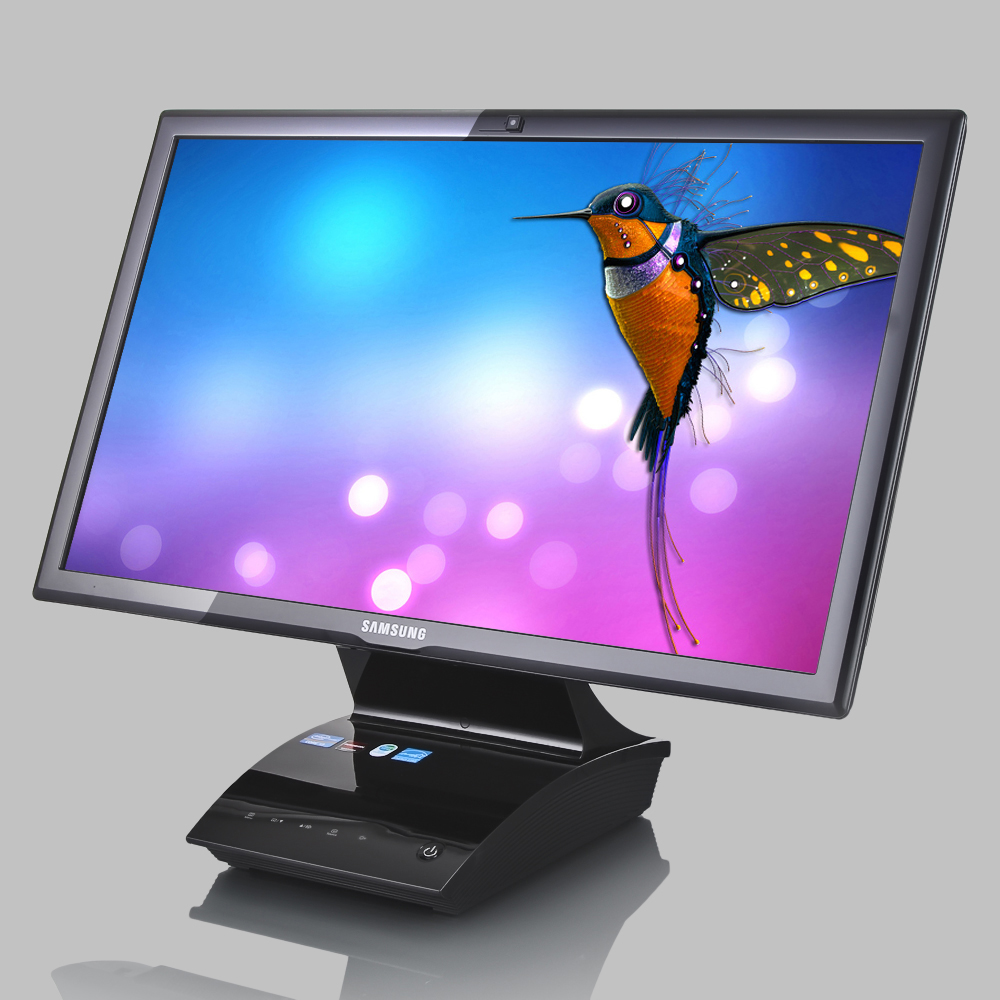
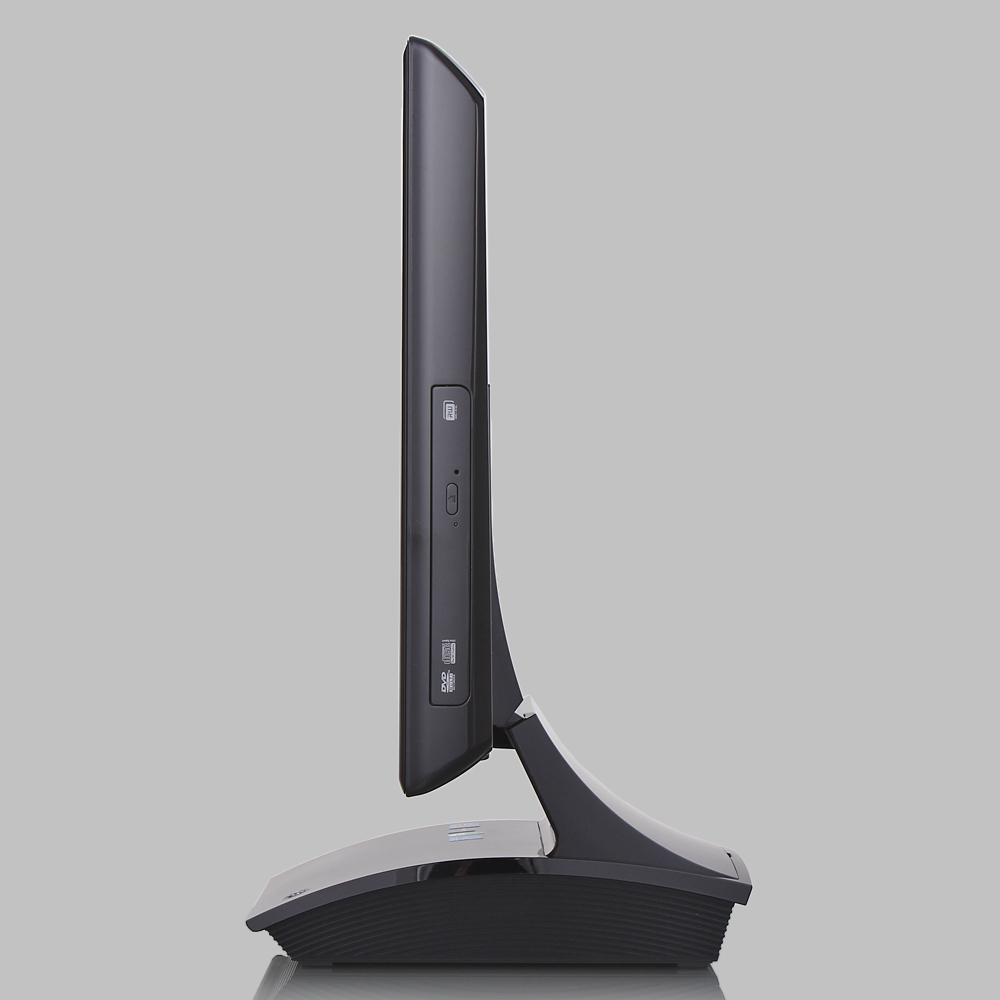
The overall dimensions of the monoblock itself are 517 x 238.1 x 404.8 mm, and the mass is 6.4 kg.
The manufacturer describes the candy bar as: “The maximum of simplicity and convenience,” and one cannot disagree with this. The candy bar looks very nice, all the controls and ports are quite convenient and access to them is not difficult. True, only the case is made of glossy plastic, which over time will somewhat spoil the original appearance, due to fingerprints and scratches.
Samsung 300A2A-T01 has a 21.5-inch Full HD screen with LED-backlit, with a resolution of 1920 x 1080 and an aspect ratio of 16: 9. The screen surface is matte, which personally can not but rejoice me.
On the back there are ventilation grilles, a sticker indicating the model and some ports.
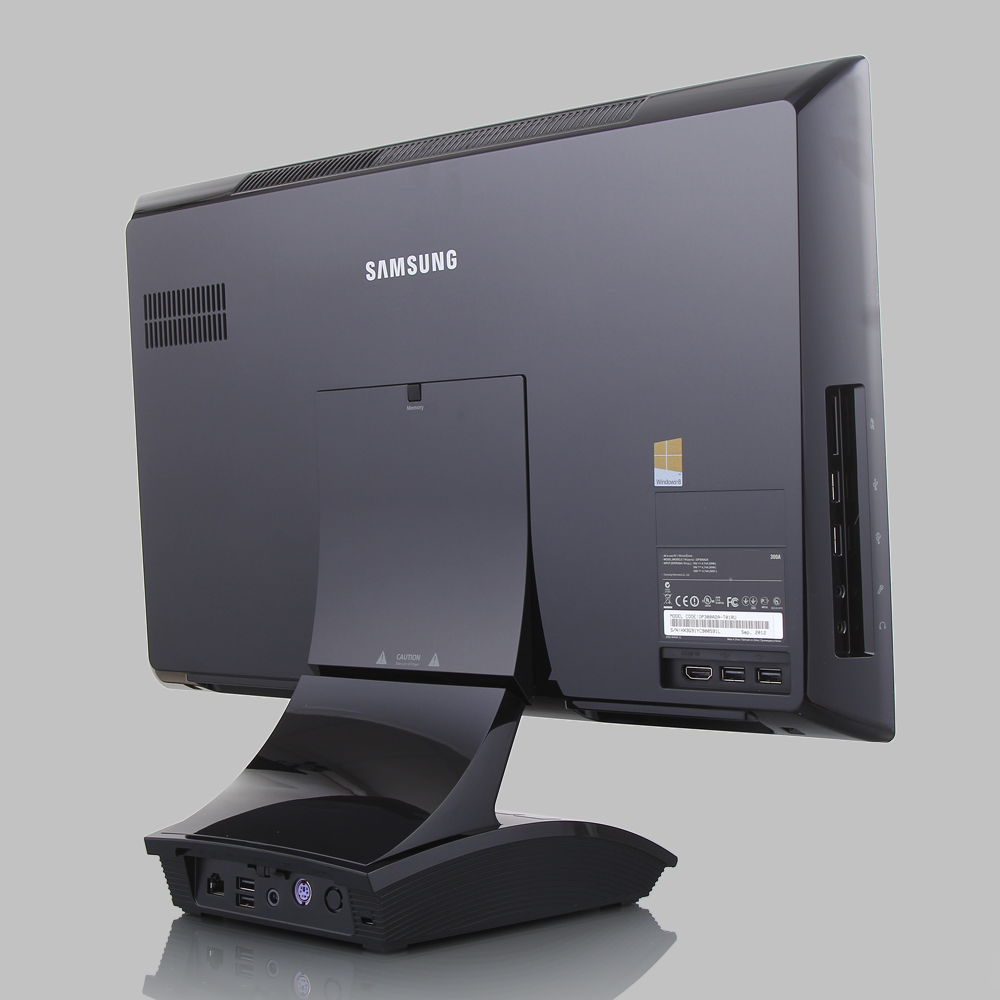
Directly on the rear wall are two USB 2.0 ports and one HDMI port. Existence of the HDMI port allows to use a monoblock as the additional monitor, for example for your laptop. On the back wall there is a licensed sticker of Windows 8. The most optimal place for it is there, and not on an external power supply, as is the case with ultrabooks.
The left end contains another part of the peripheral ports:
• built-in 3-in-1 card reader with support for SD, SDHC, SDXC;
• two USB 2.0 ports;
• two mini-jack connectors 3.5 mm, for connecting a microphone and head microphones.
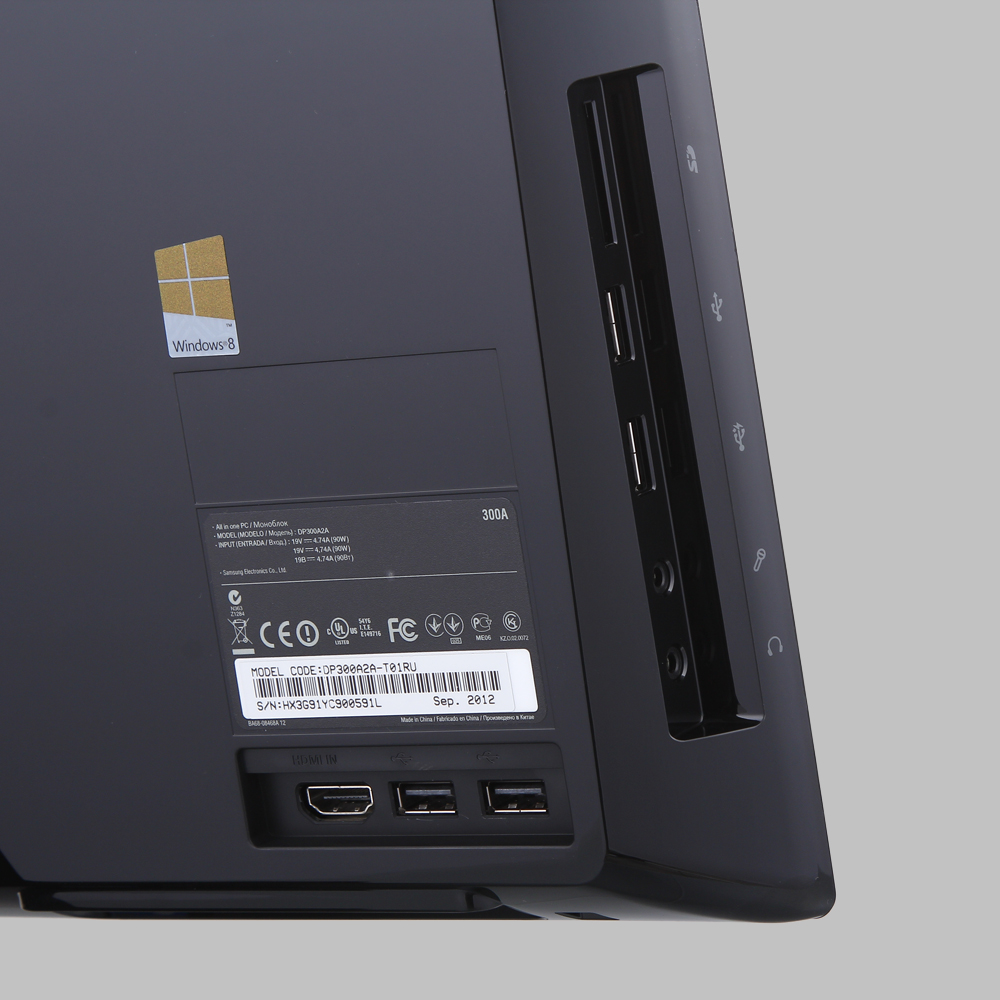
The right side of the monoblock has only a built-in DVD-SM drive.
The front of the stand contains a power button and touch buttons to control the monitor settings. The button layout is very standard, as is the process of changing settings. There are also informational stickers that the processor belongs to the Intel Core i3 line, and the AMD Radeon graphics card. I will return to a more detailed consideration of the iron component a little later, but now we went further.

The reverse side of the stand contains another portion of the peripheral ports:
• RJ-45 network interface, with support for a gigabit network;
• two USB 2.0 ports;
• connector for connecting an external power supply;
• PS / 2 connector for connecting a keyboard;

Among the optional accessories for the Samsung 300A2A-T01 all-in-one, the kit includes:
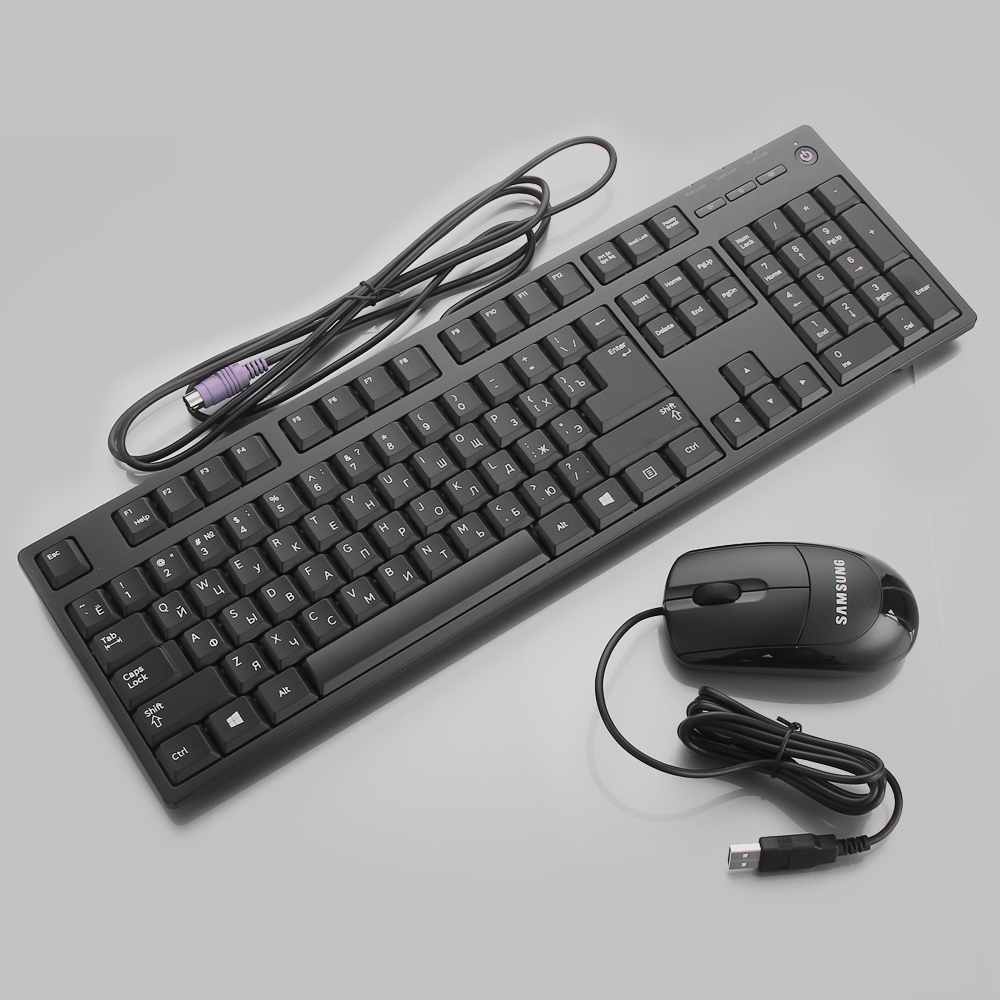
• wired keyboard with PS / 2 connector;
• wired mouse with USB connector;
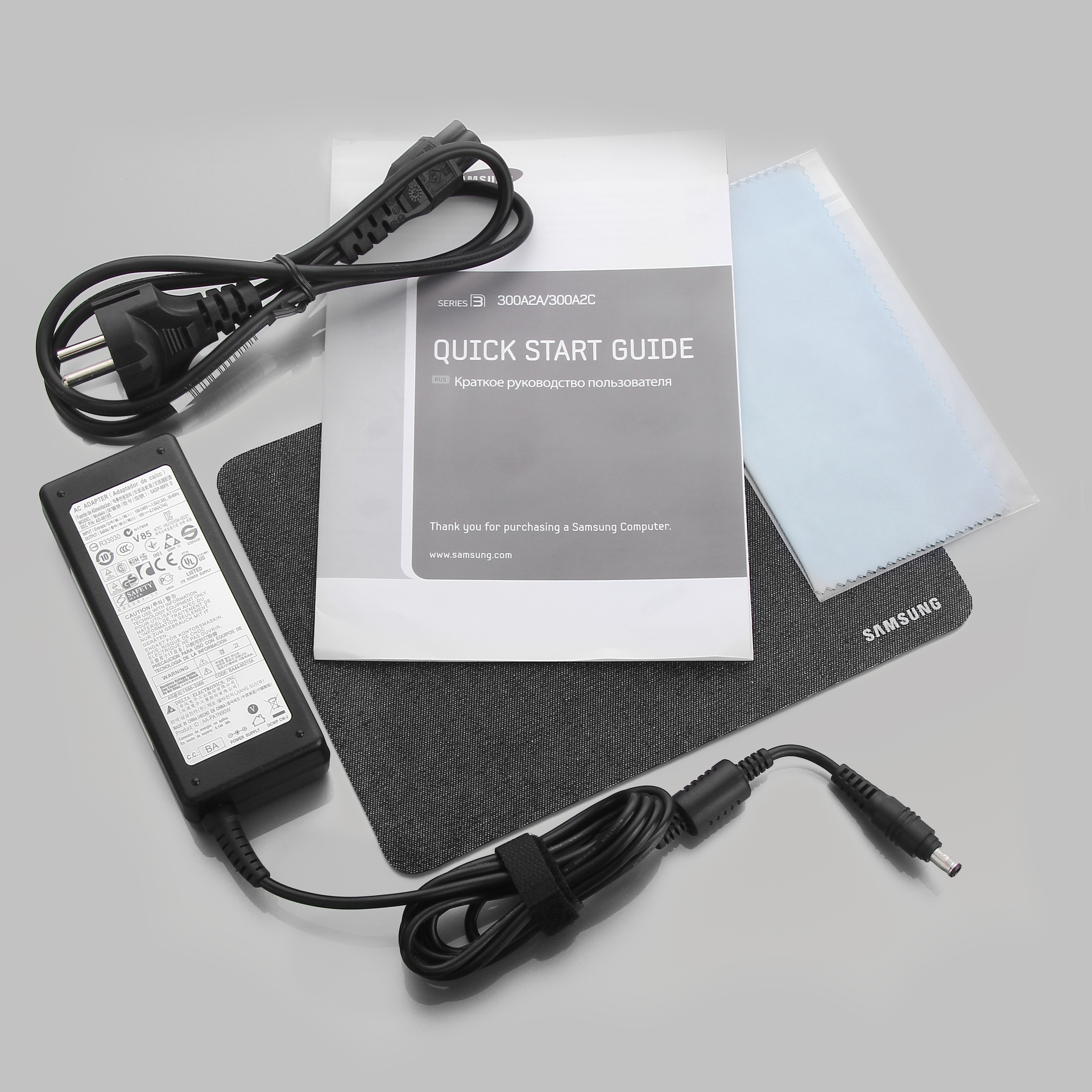
• external power supply with a power of 90 W;
• branded mouse pad;
• cleaning cloth;
• user's manual.
Samsung 300A2A-T01 is based on the Intel Core i3-3220T processor.
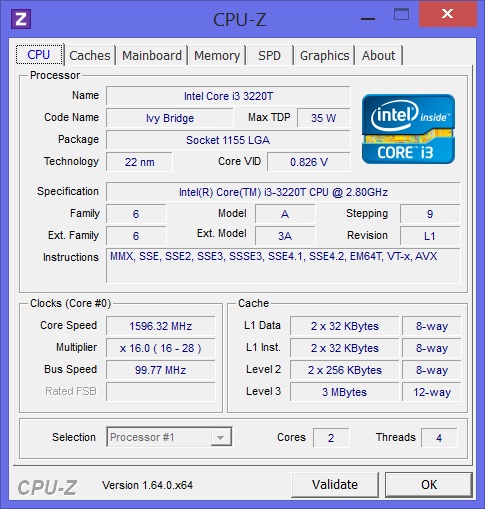
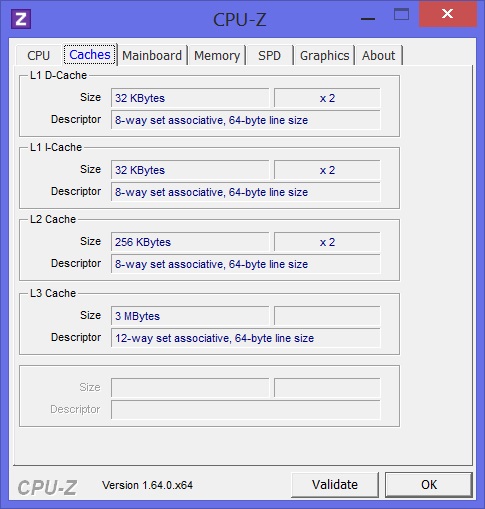
This processor belongs to the Ivy Bridge family and has two computing cores. With support for Hyper Threading technology, the processor is capable of simultaneously processing up to four data streams. The processor cores operate at a frequency of 2.8 GHz, and the maximum level of heat dissipation is 35 watts.

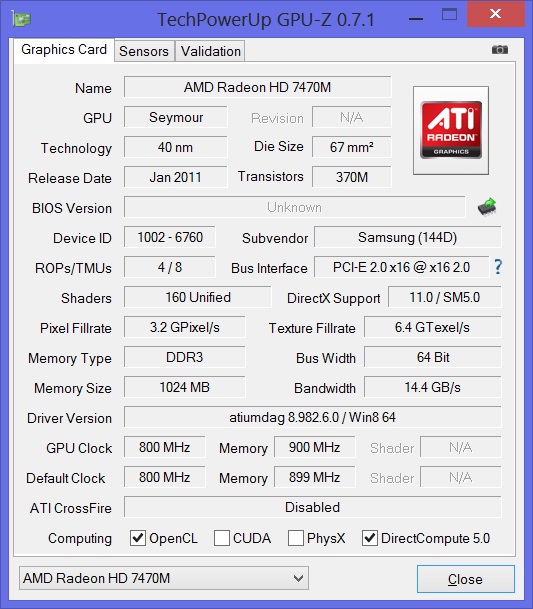
Despite the fact that the Intel Core i3-3220T has an integrated HD2500 video core, the manufacturer added a discrete AMD Radeon HD 7470M graphics card. This is done, in my opinion, absolutely right, because the performance of the HD2500 lags far behind. The Radeon HD 7470M graphics accelerator has one gigabyte of GDDR3 type video memory, which should easily be enough for everyday tasks using one Full HD monitor.
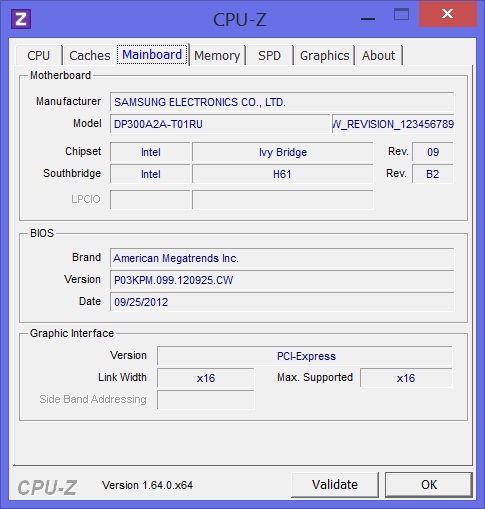
The motherboard is based on the Intel H61 chipset. This chipset was developed for collaboration with Intel processors of the Sandy Bridge family. However, there is nothing strange in the fact that it works with Ivy Bridge processors. The chipset belongs to the category of budget and is designed for computers to solve everyday problems. For me, its key drawbacks are the lack of support for USB 3.0 and SATA 6 Gb / s ports. True, motherboard manufacturers can separately solve this problem through additional controllers.
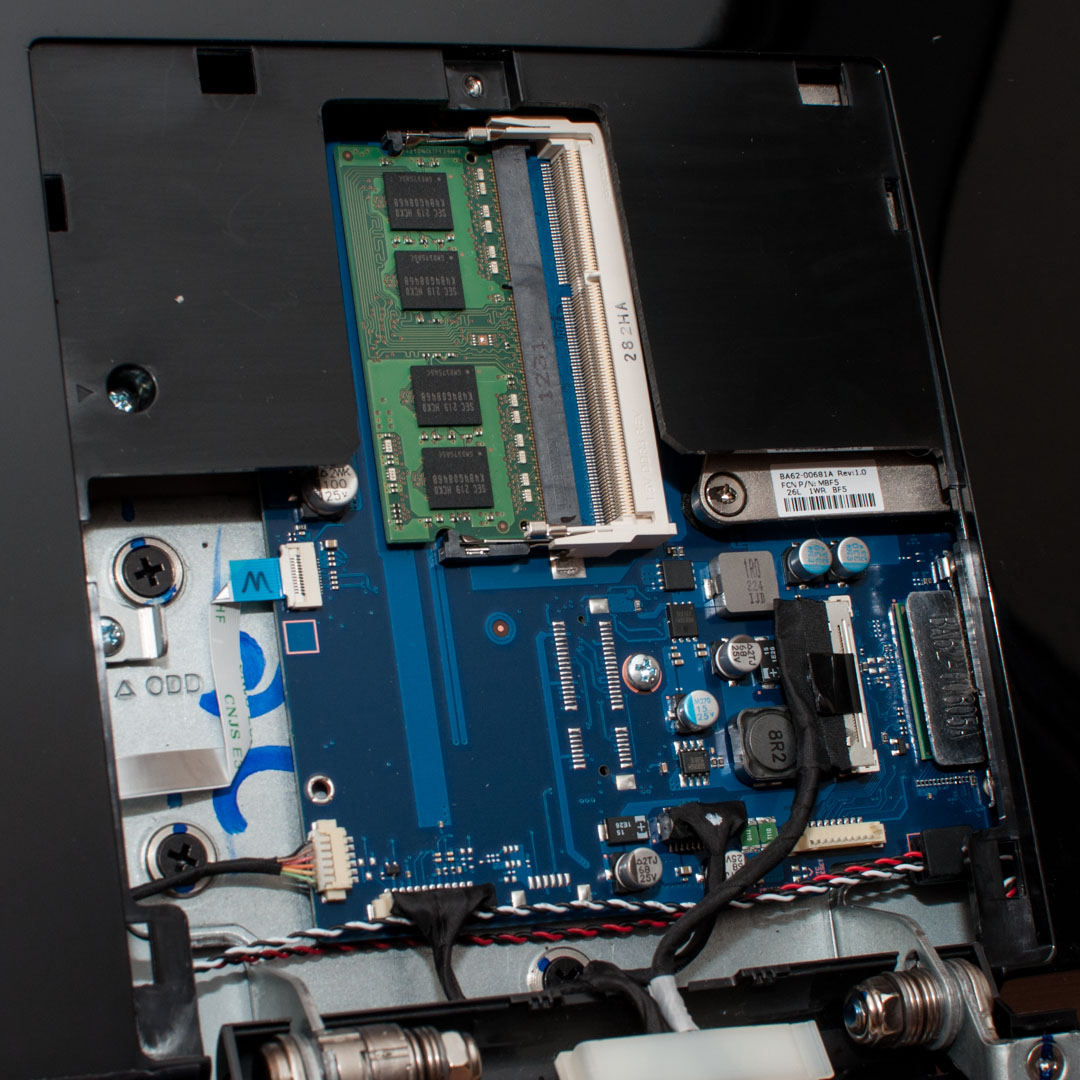
The amount of RAM is 4 GB. It is implemented by one SODIMM module with a frequency of 1600 MHz.
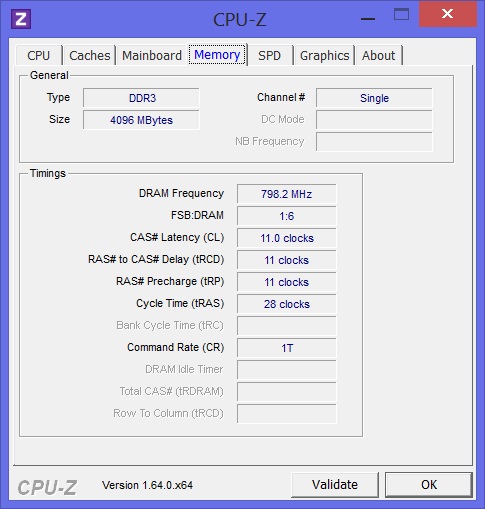

The H61 chipset supports up to 8 GB of memory, and each channel can have no more than one module. Thus, to activate the dual-channel operating mode of the RAM, you will have to additionally buy and install another SODIMM module.
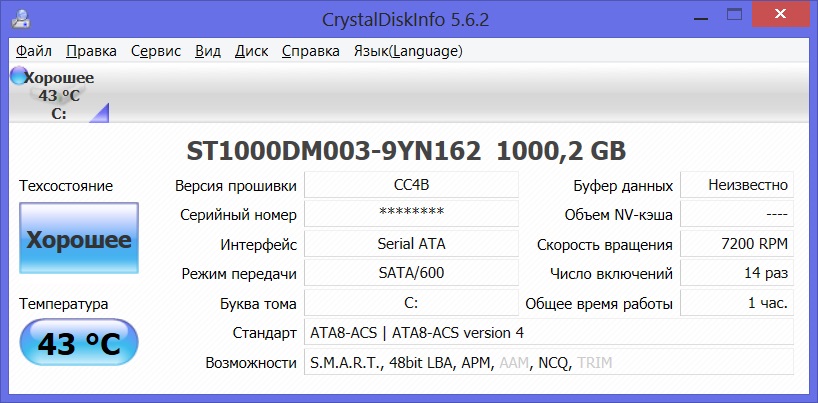
The installed ST1000DM003-9YN162 hard drive is a Seagate product. The disk capacity is 1000 GB. Despite the lack of support for SATA 6 Gb / s ports, the H61 chipset has a hard drive with this interface. It seems Samsung engineers have added support through a third-party controller.
Qualcomm Atheros AR 9285 and Realtek PCIe GBE controllers are responsible for supporting network connections. Thanks to them, it is possible to use wireless connections 802.11 bgn and gigabit wired.

Performance testing was carried out using the following tests:
• 3DMark Vantage;
• 3DMark 11;
• AIDA64;
• Cinebench 11.5;
• CrystalDiskMark 3.0.1;
• Media Player Classic;
• PCMark 7.
Test results:
Comparison of test results I made with a representative of a competitive niche - nettop ASUS EeeBox PC EB1053. The EeeBox PC EB1053 is based on a combination of the Intel Atom D2550 processor and the NVIDIA GeForce 610M graphics accelerator and also uses DDR3 type RAM.
CrystalDiskMark 3.0.1
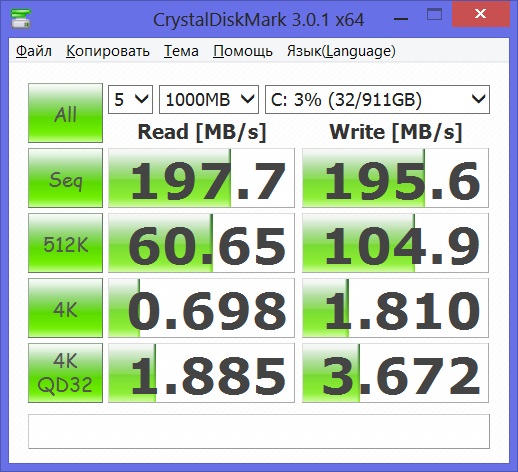
The read and write speeds measured during the test confirm the use of the SATA 6 Gb / s interface. 197.7 MB / s for reading and 195.6 MB / s for writing by the standards of several years ago are simply impressive. Let me remind you that earlier to achieve such speeds it was necessary to assemble a RAID-0 array.
AIDA 64 Cache & Memory Benchmark

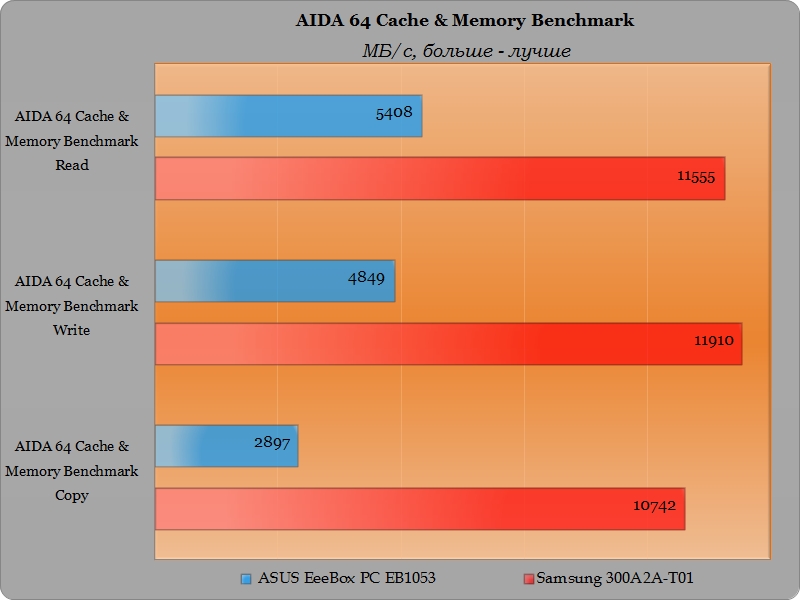
This test reveals the clear superiority of the Intel Core i3-3220T processor memory controller. A more than twofold advantage in read and write operations in memory and almost four times superiority in copy operations in memory. The difference in the cache speeds of L1 and L2 is simply huge. In addition, the Core i3-3220T has 3 MB L3 cache.
Cinebench 11.5
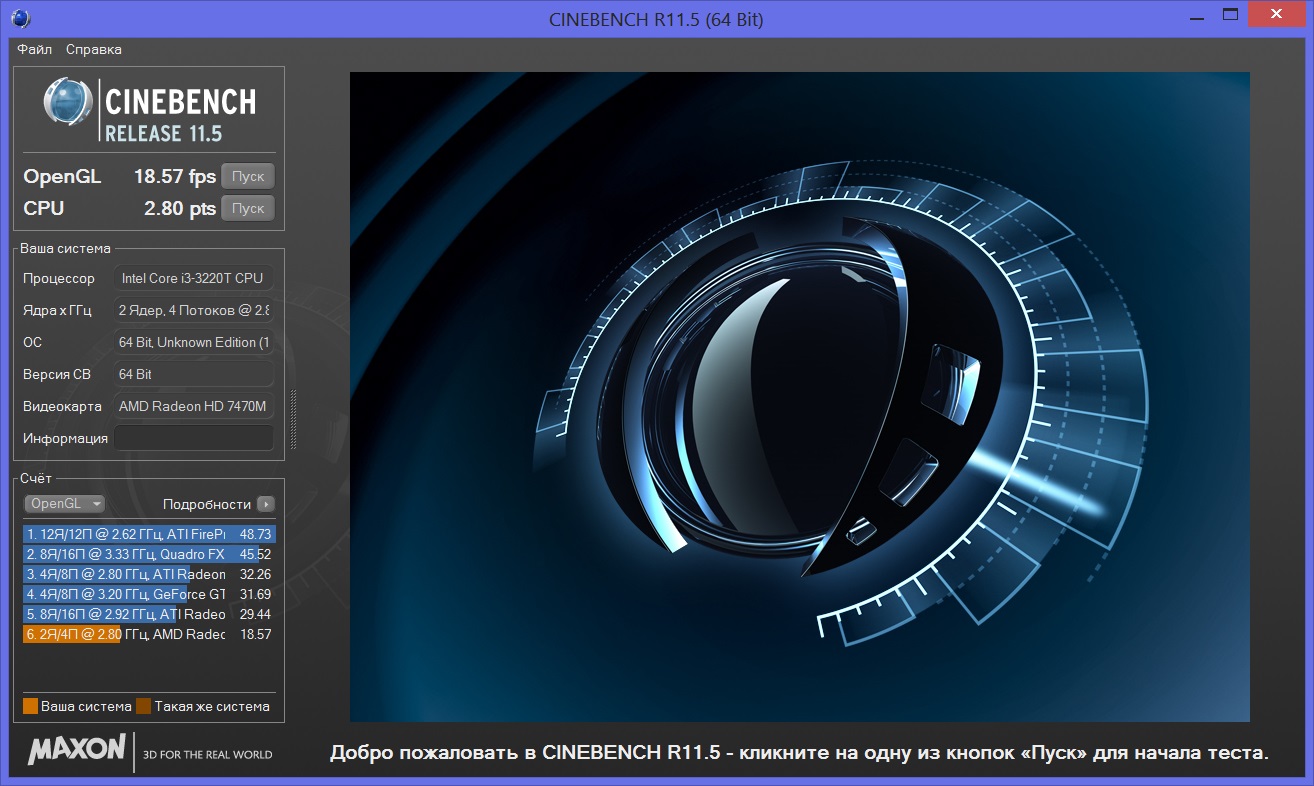
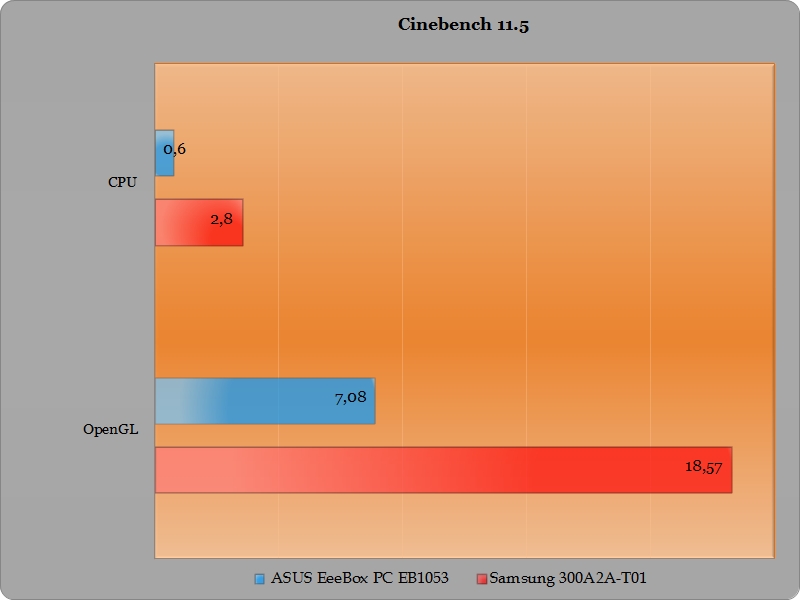
The performance of AMD Radeon HD 7470M graphics is 2.6 times higher than the NVIDIA GeForce 610M. The performance of the Intel Core i3-3220T processor is 4.6 times higher than the Intel Atom D2550. The superiority of the Intel Core i3-3220T + AMD Radeon HD 7470M bundle over the Intel Atom D2550 + NVIDIA GeForce 610M does not raise any questions.
3DMark Vantage

3DMark 11
PCMark 7
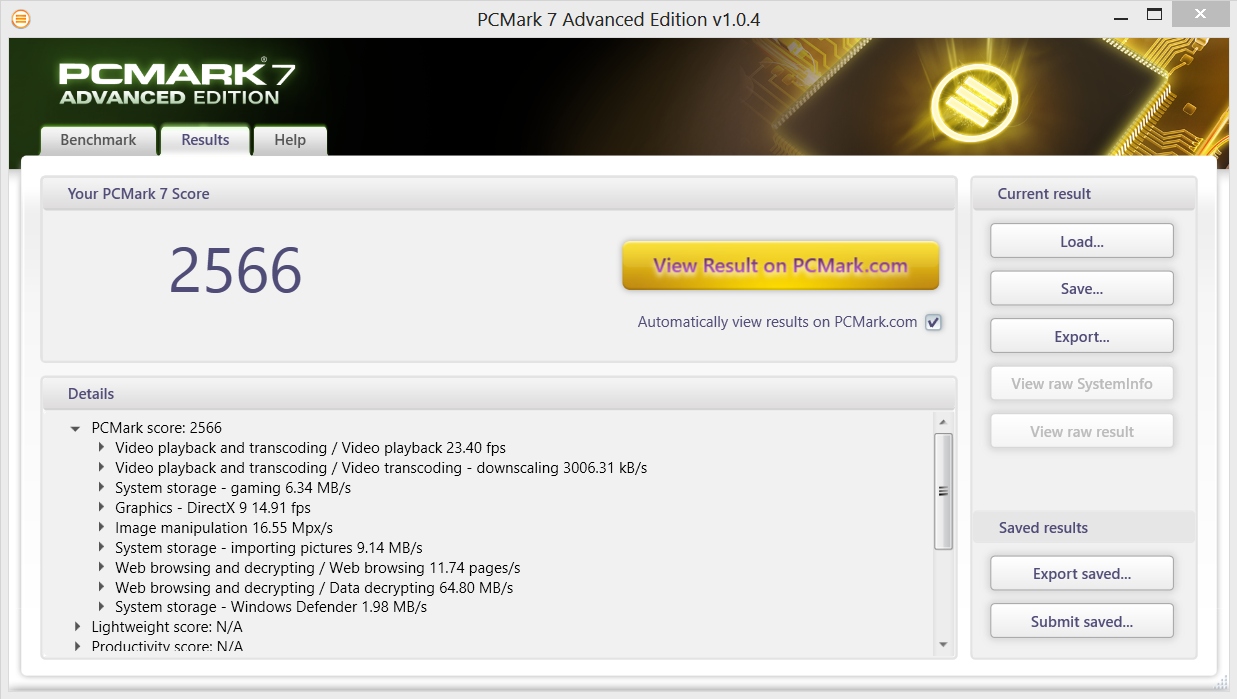

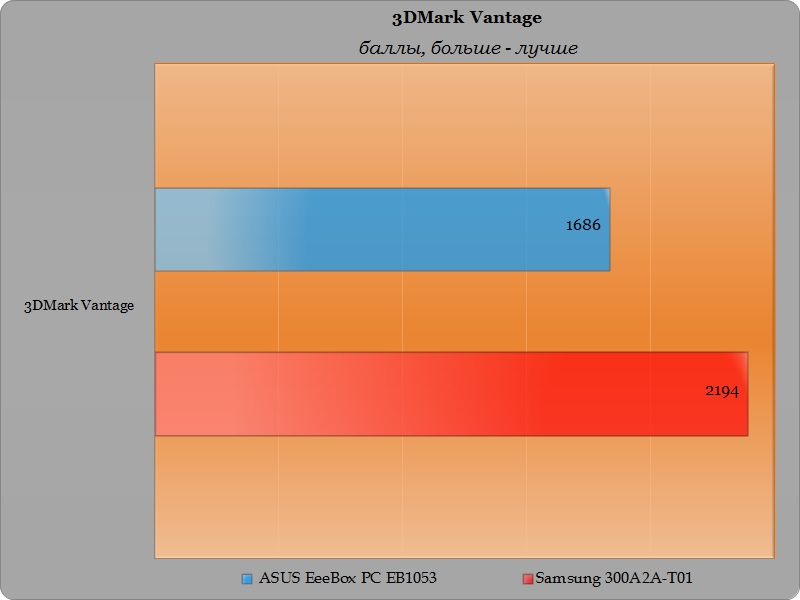
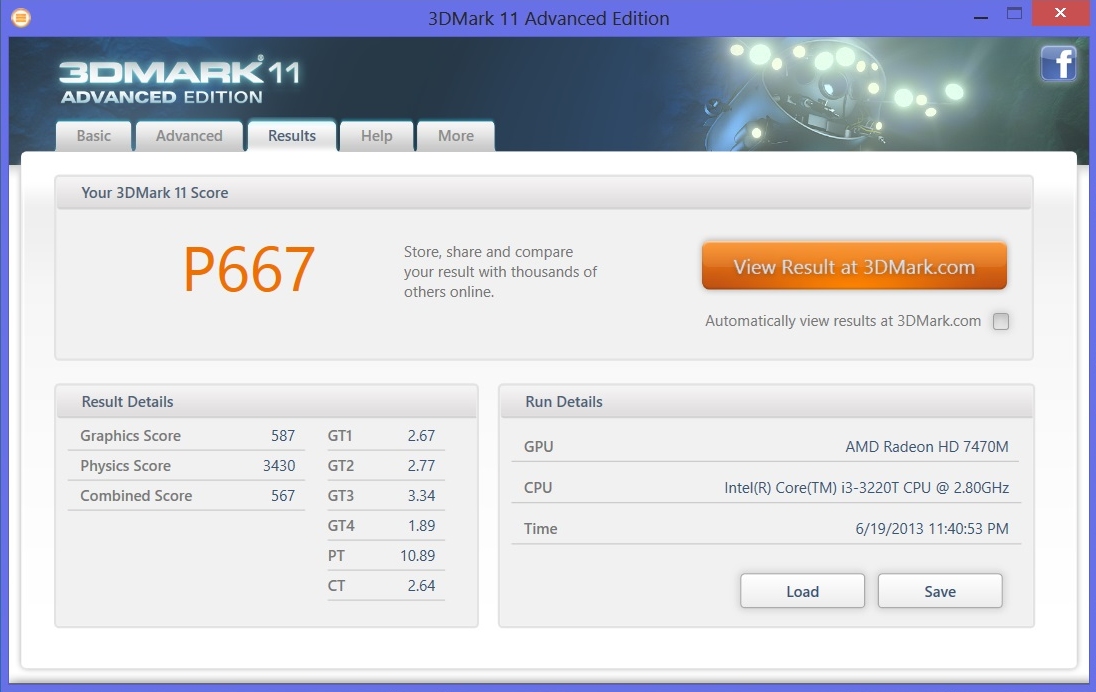
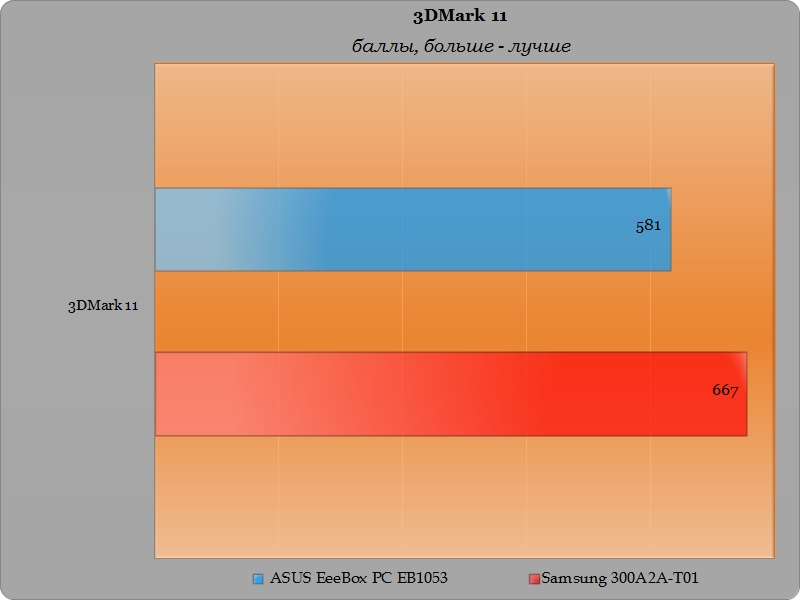
Monoblock Samsung 300A2A-T01 leaves no chance for the nettop EeeBox PC EB1053 to somehow compete on equal footing in all three tests. Of course, I did not expect a miracle from him, but the gap in the PCMark 7 test even seemed to me very significant.
Media player classic
To assess the ability to play video in high resolution, we used a 3DMark 11 demo video in 1080p resolution. Two options for Media Player Classic settings were tested: with and without DXVA filters enabled.
When playing a 3DMark 11 movie with DXVA filters disabled, the processor load reached 18-20%. After turning on the DXVA filters in the player’s settings, the processor load is at the level of 8-10%.
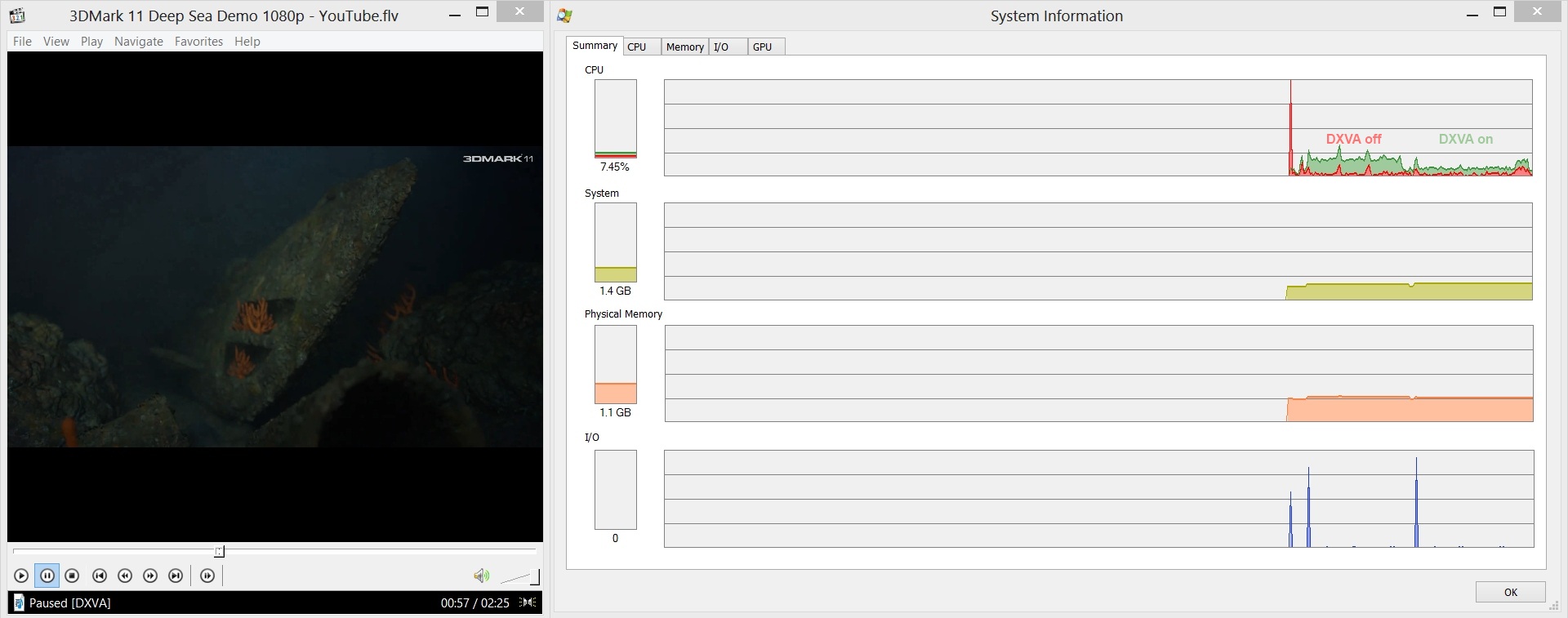
Compared to nettops on Intel Atom D2550, Atom D2700 or AMD E-350 processors, the system is able to cope with Full HD video playback regardless of the player settings. When playing videos on nettops with DXVA filters turned off, the processor load reaches 100%, and the video plays in jerks.
The all-in-one Samsung 300A2A-T01 is ideal for users to use for everyday tasks. A bunch of powerful enough Intel Core i3-3220T processor and AMD Radeon HD 7470M graphics cards interact perfectly and provide an acceptable level of performance for a home computer. This candy bar is also suitable for users who want to upgrade old computers or are looking for a replacement for nettops on Intel Atom or AMD E-series processors.
The manufacturer gives a guarantee for a monoblock of 12 months. Of course, if he has any shortcomings, then they will definitely come out within this period. However, I would like to still have at least a three-year warranty.
Another additional plus could be support for USB 3.0 ports. Unfortunately, an engineering solution was not made to close this issue. And it is no longer possible for a number of users to imagine their life without the fastest copying data to the same flash drive or external hard drive.
The monoblock is packed in a cardboard box, which has a traditional color scheme for Samsung. The overall dimensions of the box are 62 x 53 x 22 cm. But the mass of the device in the package slightly exceeds the mark of 10 kilograms. The box has a plastic handle for easy transportation. All contents are fixed very reliably with foam inserts covering the components, like a shell from a nut.
Until now, I had to deal with monoblocks, all of which were inside the monitor case. At the same time, the whole structure was located on the table on tiny legs and strove to crash from almost the slightest touch. On the contrary, the Samsung 300A2A-T01 candy bar has a partial arrangement of its iron filling in a massive leg. The foot has four rubber pads that provide reliable grip on the table surface. The stability of the candy bar is just fine, it will survive the attack of pets without any problems. But the attack of small children is still hardly restrained. But this is a disaster for almost all home electronic equipment, when your child throws an apple or googlophone or heaps the end of the Full HD monitor =)))
The overall dimensions of the monoblock itself are 517 x 238.1 x 404.8 mm, and the mass is 6.4 kg.
The manufacturer describes the candy bar as: “The maximum of simplicity and convenience,” and one cannot disagree with this. The candy bar looks very nice, all the controls and ports are quite convenient and access to them is not difficult. True, only the case is made of glossy plastic, which over time will somewhat spoil the original appearance, due to fingerprints and scratches.
Samsung 300A2A-T01 has a 21.5-inch Full HD screen with LED-backlit, with a resolution of 1920 x 1080 and an aspect ratio of 16: 9. The screen surface is matte, which personally can not but rejoice me.
On the back there are ventilation grilles, a sticker indicating the model and some ports.
Directly on the rear wall are two USB 2.0 ports and one HDMI port. Existence of the HDMI port allows to use a monoblock as the additional monitor, for example for your laptop. On the back wall there is a licensed sticker of Windows 8. The most optimal place for it is there, and not on an external power supply, as is the case with ultrabooks.
The left end contains another part of the peripheral ports:
• built-in 3-in-1 card reader with support for SD, SDHC, SDXC;
• two USB 2.0 ports;
• two mini-jack connectors 3.5 mm, for connecting a microphone and head microphones.
The right side of the monoblock has only a built-in DVD-SM drive.
The front of the stand contains a power button and touch buttons to control the monitor settings. The button layout is very standard, as is the process of changing settings. There are also informational stickers that the processor belongs to the Intel Core i3 line, and the AMD Radeon graphics card. I will return to a more detailed consideration of the iron component a little later, but now we went further.
The reverse side of the stand contains another portion of the peripheral ports:
• RJ-45 network interface, with support for a gigabit network;
• two USB 2.0 ports;
• connector for connecting an external power supply;
• PS / 2 connector for connecting a keyboard;
Among the optional accessories for the Samsung 300A2A-T01 all-in-one, the kit includes:
• wired keyboard with PS / 2 connector;
• wired mouse with USB connector;
• external power supply with a power of 90 W;
• branded mouse pad;
• cleaning cloth;
• user's manual.
Samsung 300A2A-T01 is based on the Intel Core i3-3220T processor.
This processor belongs to the Ivy Bridge family and has two computing cores. With support for Hyper Threading technology, the processor is capable of simultaneously processing up to four data streams. The processor cores operate at a frequency of 2.8 GHz, and the maximum level of heat dissipation is 35 watts.
Despite the fact that the Intel Core i3-3220T has an integrated HD2500 video core, the manufacturer added a discrete AMD Radeon HD 7470M graphics card. This is done, in my opinion, absolutely right, because the performance of the HD2500 lags far behind. The Radeon HD 7470M graphics accelerator has one gigabyte of GDDR3 type video memory, which should easily be enough for everyday tasks using one Full HD monitor.
The motherboard is based on the Intel H61 chipset. This chipset was developed for collaboration with Intel processors of the Sandy Bridge family. However, there is nothing strange in the fact that it works with Ivy Bridge processors. The chipset belongs to the category of budget and is designed for computers to solve everyday problems. For me, its key drawbacks are the lack of support for USB 3.0 and SATA 6 Gb / s ports. True, motherboard manufacturers can separately solve this problem through additional controllers.
The amount of RAM is 4 GB. It is implemented by one SODIMM module with a frequency of 1600 MHz.
The H61 chipset supports up to 8 GB of memory, and each channel can have no more than one module. Thus, to activate the dual-channel operating mode of the RAM, you will have to additionally buy and install another SODIMM module.
The installed ST1000DM003-9YN162 hard drive is a Seagate product. The disk capacity is 1000 GB. Despite the lack of support for SATA 6 Gb / s ports, the H61 chipset has a hard drive with this interface. It seems Samsung engineers have added support through a third-party controller.
Qualcomm Atheros AR 9285 and Realtek PCIe GBE controllers are responsible for supporting network connections. Thanks to them, it is possible to use wireless connections 802.11 bgn and gigabit wired.
Performance testing was carried out using the following tests:
• 3DMark Vantage;
• 3DMark 11;
• AIDA64;
• Cinebench 11.5;
• CrystalDiskMark 3.0.1;
• Media Player Classic;
• PCMark 7.
Test results:
Comparison of test results I made with a representative of a competitive niche - nettop ASUS EeeBox PC EB1053. The EeeBox PC EB1053 is based on a combination of the Intel Atom D2550 processor and the NVIDIA GeForce 610M graphics accelerator and also uses DDR3 type RAM.
CrystalDiskMark 3.0.1
The read and write speeds measured during the test confirm the use of the SATA 6 Gb / s interface. 197.7 MB / s for reading and 195.6 MB / s for writing by the standards of several years ago are simply impressive. Let me remind you that earlier to achieve such speeds it was necessary to assemble a RAID-0 array.
AIDA 64 Cache & Memory Benchmark
This test reveals the clear superiority of the Intel Core i3-3220T processor memory controller. A more than twofold advantage in read and write operations in memory and almost four times superiority in copy operations in memory. The difference in the cache speeds of L1 and L2 is simply huge. In addition, the Core i3-3220T has 3 MB L3 cache.
Cinebench 11.5
The performance of AMD Radeon HD 7470M graphics is 2.6 times higher than the NVIDIA GeForce 610M. The performance of the Intel Core i3-3220T processor is 4.6 times higher than the Intel Atom D2550. The superiority of the Intel Core i3-3220T + AMD Radeon HD 7470M bundle over the Intel Atom D2550 + NVIDIA GeForce 610M does not raise any questions.
3DMark Vantage
3DMark 11
PCMark 7
Monoblock Samsung 300A2A-T01 leaves no chance for the nettop EeeBox PC EB1053 to somehow compete on equal footing in all three tests. Of course, I did not expect a miracle from him, but the gap in the PCMark 7 test even seemed to me very significant.
Media player classic
To assess the ability to play video in high resolution, we used a 3DMark 11 demo video in 1080p resolution. Two options for Media Player Classic settings were tested: with and without DXVA filters enabled.
When playing a 3DMark 11 movie with DXVA filters disabled, the processor load reached 18-20%. After turning on the DXVA filters in the player’s settings, the processor load is at the level of 8-10%.
Compared to nettops on Intel Atom D2550, Atom D2700 or AMD E-350 processors, the system is able to cope with Full HD video playback regardless of the player settings. When playing videos on nettops with DXVA filters turned off, the processor load reaches 100%, and the video plays in jerks.
The all-in-one Samsung 300A2A-T01 is ideal for users to use for everyday tasks. A bunch of powerful enough Intel Core i3-3220T processor and AMD Radeon HD 7470M graphics cards interact perfectly and provide an acceptable level of performance for a home computer. This candy bar is also suitable for users who want to upgrade old computers or are looking for a replacement for nettops on Intel Atom or AMD E-series processors.
The manufacturer gives a guarantee for a monoblock of 12 months. Of course, if he has any shortcomings, then they will definitely come out within this period. However, I would like to still have at least a three-year warranty.
Another additional plus could be support for USB 3.0 ports. Unfortunately, an engineering solution was not made to close this issue. And it is no longer possible for a number of users to imagine their life without the fastest copying data to the same flash drive or external hard drive.