June 14, 2013 at 14:02
Node.js vs Java + Rhino + Jetty + FreeMarker

Although Node.js has acquired a lot of modules since its inception , it is still significantly inferior in capabilities to a powerful set of Java libraries . So why not take advantage of the potential of Java to develop web applications in JavaScript? Let's see how you can build a convenient JavaScript MVC framework in Java.
Mozilla rhino
First of all, let's start with rhinos. To compile / interpret JavaScript, we will use the Mozilla Rhino engine , which provides excellent integration of ECMAScript code in Java applications. Starting with J2SE 6, Rhino is included in the JRE as part of the Java Scripting API, however, the version in the JRE is significantly outdated and, in addition, with some unpleasant implementation features from Sun, so it’s better to use a fresh build .
First of all
helloworld.js:print('Hey you!');
Assuming the Rhino libraries are unpacked in
./lib, we run the example as follows:java -Djava.ext.dirs=./lib org.mozilla.javascript.tools.shell.Main helloworld.js
By the way, the kit includes a debugger with a good UI, it starts like this:
java -Djava.ext.dirs=./lib org.mozilla.javascript.tools.debugger.Main helloworld.js
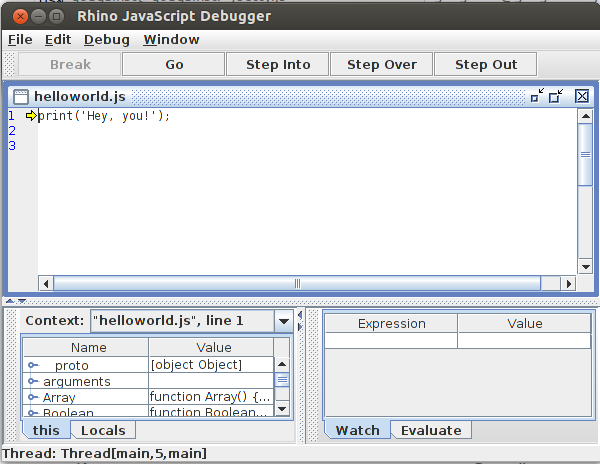
Rhino, in addition to the standard ECMAScript objects, includes a number of functions in the global context that facilitate the communication of JavaScript with Java. Yes, if you still do not understand, from JavaScript code you can transparently work with Java code. There is a global object for working with packages
Packages. For example, you can create an instance like this java.io.File:var file = new Packages.java.io.File('filename');
However, there are also global objects
java, com, org, eduand net, so the code can be reduced to the following:var file = new java.io.File('filename');
You can use the following pattern for import:
var File = java.io.File;
//...
var file = new File('filename');
But still more convenient like this:
importClass(java.io.File);
//...
var file = new File('filename');
Or so:
importPackage(java.io);
//...
var file = new File('filename');
Rhino allows you to implement Java interfaces in a way convenient for the JS programmer:
var runnable = new java.lang.Runnable({run: function() { print("I'm running!"); }});
new java.lang.Thread(runnable).start();
By the way, note that it is
java.langnot imported into the global context in order to avoid conflicts with the built-in ECMAScript types. And the latest versions of Rhino include a full implementation of CommonJS , which can be included in Rhino Shell using a switch
-require. If we have a module
./modules/math.js:exports.sum = function(a, b) {
return a + b;
}
Then you can use it like this:
var math = require('math');
print(math.sum(2, 4));
This code runs like this:
java -Djava.ext.dirs=./lib org.mozilla.javascript.tools.shell.Main -require -modules ./modules test.js
Jetty
We use Jetty as the basis for the HTTP server . Jetty is a servlet container, and at the same time flexible in configuring a web server with support for SPDY, WebSocket, OSGi, JMX, JNDI and JAAS. You can download the distribution here .
The simplest code to run Jetty is:
importPackage(org.eclipse.jetty.server);
var server = new Server(8888); // Порт 8888
server.start();
server.join(); // Передадим управление Jetty
Jars from the Jetty distribution should also be placed in
./lib, in the future we will run everything like this:java -Djava.ext.dirs=./lib org.mozilla.javascript.tools.shell.Main -require -modules ./modules server.js
Yes, that’s all.
This server issues
HTTP 404with any request. Turn it into a simple file server.importPackage(org.eclipse.jetty.server);
importPackage(org.eclipse.jetty.server.handler);
var resourceHandler = new ResourceHandler();
resourceHandler.setDirectoriesListed(true); // Разрешим просмотр списка файлов в папках
resourceHandler.setResourceBase('web'); // Установим базовой директорию ./web
resourceHandler.setWelcomeFiles(['index.html']); // В качестве главной страницы будет использоваться index.html
var server = new Server(8888);
server.setHandler(resourceHandler);
server.start();
server.join();
Now try to create a servlet.
importPackage(org.eclipse.jetty.server);
importPackage(org.eclipse.jetty.server.handler);
importPackage(org.eclipse.jetty.servlet);
importPackage(javax.servlet.http);
var contextHandler = new ServletContextHandler(ServletContextHandler.SESSIONS);
contextHandler.setContextPath('/');
contextHandler.addServlet(
  new ServletHolder(new HttpServlet({ // Обратим еще раз внимание на то, как изящно реализуются интерфейсы
    doGet: function(request, response) {
      response.setContentType('text/plain');
      response.getWriter().println('Yes, it works!');
    }
  })),
  '/test'
);
var server = new Server(8888);
server.setHandler(contextHandler);
server.start();
server.join();
Our servlet is available at
localhost:8888/test. As another example, we’ll format it as a servlet module that generates a picture with text on the fly.importPackage(java.awt.image);
importClass(java.awt.Color);
importClass(javax.imageio.ImageIO); // Входит в состав J2SE 6
var width = 400, height = 400;
exports.doGet = function(request, response) {
var image = new BufferedImage(width, height, BufferedImage.TYPE_INT_RGB);
var graphics = image.createGraphics();
var color = new Color(Math.random(), Math.random(), Math.random());
graphics.setColor(color);
graphics.fillRect(0, 0, width, height);
graphics.setColor(color.brighter());
graphics.drawString('On the fly!', 10, 20);
response.setContentType('image/png');
var outputStream = response.getOutputStream();
ImageIO.write(image, 'png', outputStream);
outputStream.close();
};
Put it in the folder
./modulesas imageServlet.jswe include it in the server code:contextHandler.addServlet(
new ServletHolder(new HttpServlet(require('imageServlet'))),
'/image.png'
);
What is there with the DBMS? Let's see how to get a list of databases from MySQL.
importPackage(java.sql);
exports.doGet = function(request, response) {
try {
var connection = DriverManager.getConnection('jdbc:mysql://localhost/?', 'root', '');
try {
var resultSet = connection
.createStatement()
.executeQuery('show databases;');
response.setContentType('text/html;charset=UTF-8');
var writer = response.getWriter();
writer.println('Databases
');
while (resultSet.next()) {
writer.println(resultSet.getString('Database') + '
');
}
} catch(e) {} finally {
resultSet.close();
}
} catch(e) {} finally {
if(connection)
connection.close();
}
};
For this code, you will need the MySQL Connector / J for JDBC.
Now there remains the last component, the template engine.
Freemarker
FreeMarker is definitely the best template engine for Java, and not just for HTML and HTTP. About its rich features, you can write a separate article, so immediately turn to the specifics.
Put in
./templates/template.ftlsuch a template:${title} ${title}
<#if message??>
${message?html}
<#else>
The suffix
?htmlreplaces the same special characters in escape variables with escape sequences. This template will use the following servlet:importPackage(Packages.freemarker.template);
importPackage(Packages.freemarker.ext.rhino);
var configuration = new Configuration();
configuration.setObjectWrapper(new RhinoWrapper()); // Поистине приятный сюрприз.
var template = configuration.getTemplate('templates/template.ftl');
exports.doGet = function(request, response) {
response.setContentType('text/html;charset=UTF-8');
template.process(
{'title': 'Compose a message'},
response.getWriter()
);
};
exports.doPost = function(request, response) {
response.setContentType('text/html;charset=UTF-8');
template.process(
{
'title': 'Message',
'message': request.getParameter('message')
},
response.getWriter()
);
};
Comparison with Node.js I nobly blame the reader. The full sample code is available on GitHub .