 December 12, 2012 at 11:36
Experience optimizing the VPS environment for $ 10 for a personal WordPress network
This short article is devoted to a description of my actions to bring VPS for $ 10 / month to an acceptable state for the work of a personal network of sites on WordPress in single and network mode (WordPress Network Mode).
So, my dear high-tech experts and casual readers, this story began at the end of April 2012, when my beloved city monopolist provider flatly refused me further placement of my tri-nuclear atlon in its rack.
So that's what I mean ... oh yes! It was, therefore, a two-unit server (it’s hard to call it a server) completely free of charge in the rack at the provider, in which there were already 3 racks and 2 of them were empty. Why is it free? Because I helped this very provider to develop corporate sites. In addition, there are simply no other people with similar knowledge in our small town - the far periphery, the smart ones quickly leave for Moscow and other foreign countries.
In general, my projects were spinning on AthlonX3 / 4Gb RAM and I didn’t bother with optimization and setup issues - I made websites on my favorite wordpress and didn’t even think that someday the freebie would end.
After the next publication of an amateur report-lack of compromise on the local mayor, the director of the provider (from the same party as the mayor) approached me and recommended taking information from the server within 24 hours. Compromics lay on him. It's good that he came up and said.
There was no more day. And my projections already sat well in SERP, and I didn’t want to lose my position ... The bottom line - in 12 hours the first cheap VPS for $ 10 in Germany was found (just not in my country), the software was delivered from any repositories, the data was transfused, the DNSs were rewritten, and with grief in half, everything was less or less working, though it barely barely moved.
By the way, the restriction of $ 10 was taken for a reason - this is the amount I had at that time on webmoney, it was accumulated in Yandex.Direct. Actually, this budget rose by only $ 2 - for an additional IP. Now this VPS costs me $ 12.
VPS parameters: CentOS 5, XEN, 2.8Ghz, 256 Mb RAM, 15 GB SATA, traffic - unlimited. In a hurry, nginx, apache + mod_php + eaccelerator, mysql, memcache was installed. Imagine - time is ticking, you need to transfer about 12 gig from one country to another, and also put it in, set it up, and it is desirable that the search engines do not understand anything :)
I originally set apache front-end. It was something :) ab2 from the old server showed no more than 1.4 requests per second. Nginx I then saw for the first time. Put, read (a bit, there was no time) somehow saved up configs - it got started. And even faster. After installing eaccelerator, the result of ab2 at 6 rps seemed just fine to me and I left this whole thing.
No mysqltuner.pl, no choice / optimization of apache mpm, even nginx ate so much memory that 80% of the clogged swap seemed normal to me. But apparently it was due to stress :) In my opinion, the sites did not slow down, well, a little thought. But knowing my audience, I perfectly understood that my visitors would not go anywhere.
The sites grew and expanded - slowly, but when they went to TOP-5 Google and Yandex for requests regarding my resort city, sites in the summer became often unavailable (RAM / SWAP - 100%). Since there really was no time to do optimization in the summer, I postponed the task to the end of the year.
From the end of April to December 7, in this “barely rides” mode, my sites got these statistics:
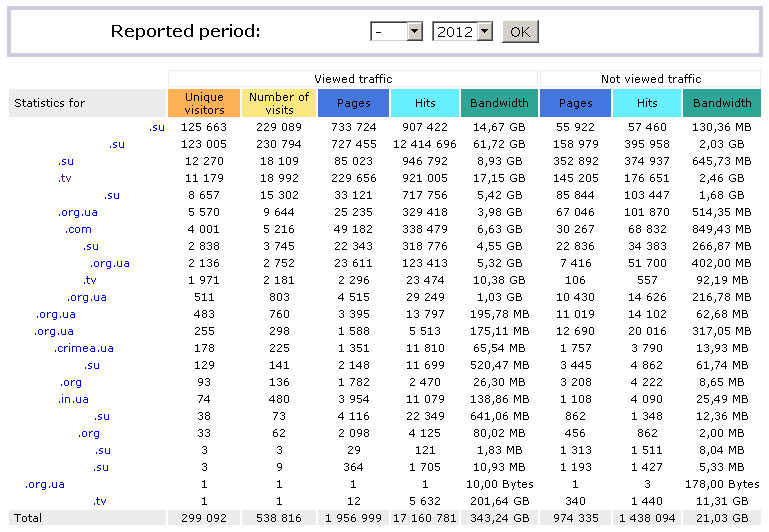
.SU is the WordPress Network - a network of sites dedicated to my city. The rest are "single" WordPress's. PS When everything is divided into subdomains - it’s more convenient to maintain. By the way, I just read today about making statics on a subdomain, I will try, but later.
(I ask you in the comments not to describe in detail how bad Wordpress is, its code, and what resource consumption it has. I myself came across this like a head against a wall. Perhaps this is the essence of the next article.)
By the way, it’s important to mention the fact that this period, I began to have customers in the city who needed to make a site. I didn’t really bother - stamped on WP. And at one point, with the raising of the next site, this whole pile of WP began to work very badly.
yum update brought a lot of updates. But they didn’t help much, and they couldn’t help. I knew that I had to switch to php-fpm and start caching. For my case, caching is most relevant, since the vast majority of my sites are almost static - expire suits a couple of weeks. And those sites that are not static (and this is primarily the heavy WordPress Network) can be carefully tweaked so that the cache is updated strictly where it is needed and at the time it is needed.
In general, php-fpm did not want to be installed without tambourines. Through the heels of another repository I found a compiled package, with all the options I needed. In general, it was possible from sorts - but did not want to. Installed, quickly set up ... httpd stop && php-fpm start - LLC! 9 rps! I'm going to the record! A joke of course.
php-frm costs, but eaccelerator had to be demolished - not compatible, you need a new one. Google-training - it turns out this accelerator has long been outdated. yum install php-pecl-apc. It was delivered, again not without tambourines - I adjusted it, started up. The page generation began to work somehow very strange. The first opening is long - then for some time the sites begin to fly. Then stupid. Then fly again. A long google tutorial led me to describe using APC on Facebook. It turned out to be useful, a lot has become clear.
Configured php-fpm. Climbing the site - then suddenly 502, F5, F5, 504. What a canoe! php-fpm stops responding after some time. Again I read - there is little memory, I put more. Better, but still after some time again 502. I read, I read, memleaks, deadlocks, a complete set.
I pull off APC, I put XCache. Generally did not start. Okay. It is necessary to think and read. I put back the APC. Configure again. With another config, it has stopped flying out so far. And the speed has increased significantly - the generation time of especially simple pages has decreased several times (2.7s -> 0.8s). Yes, guys, 2.7s - this is a pumped WordPress simple page. And if I hang up the plug-ins - as I have on .TV - so there is generally only optimization 19-25s without optimization.
And then suddenly I realized! First you need to configure all the district software, which is run in by many people and perfectly copes with its duties. I stopped picking php-fpm + apc - and started to configure from the very “front” edge - from the network stack of the operating system. There are a lot of recommendations on the network, everything is described in detail - I will not repeat it. Configured, checked, nginx began to move much faster, and mysql was a bit faster.
Next, nginx - reduced the number of workers to 1 and connections to 8196. I enabled sendfile and aio, checked the directio value. Twisted output_buffers according to the manual. And so! I got a little more than 60 rps on statics. I thought that the first victory is and needs to be continued. Similarly walked through php-fpm (without touching apc yet). Ending, limits. Then mysql. Mysqltuner.pl helped me with this and of course the manual. After increasing the caches and decreasing the number of connections, the whole VPS operation was significantly accelerated, the load average fell, a third of the memory was freed.
However, php-fpm continued to fall periodically. I read a lot of links in Google. APC is good - but he is so good. We will return to it a little later.
As an interim solution, I decided to try to put a caching plugin on all WordPress - W3-Total-Cache. For the future, I wanted to use nginx fastcgi cache with the cache purge module (I tried it - I didn’t like it, I will write why below). W3TC was chosen as a “fast-set-up-to-sleep", and in my case it was the optimal solution. If the back-end falls, the front-end will feed people with static (but not everything is so smooth).
We prepare W3TC as follows - Page cache: Disk Enchanced, Database cache - APC, Object cache - APC. Expire to taste. On the wordpress code, I found a semi-working config for distributing page cache from W3TC directly from the front-end (via nginx without running php-fpm), finalized it. Restart and only here I begin to understand what it means when sites are fast. Statics flies out from under nginx'a well very quickly. On pure statics, I got in ab2 up to 800 (!!!) rps
Of course, when I sat down to write this text - I already know that ab2 is bad, and siege is good. But at that moment I did not know this. But still! Compare the initial show 1.4 and the intermediate 800! But this did not end there, but just begun! But only the next morning.
I woke up in the morning from the next Yandex SMS, that the sites had been in touch quite a while. php-fpm did not respond to front-end requests. As a result of long picking, restarts and reconfigurations, it turned out that cleaning the user cache in apc causes some kind of dead lock, resulting in php-fpm stop processing requests. And here I came to what was on the VPS, but was not used properly. Memcached and the corresponding extension for php is memcache. The database cache and Object cache in W3TC was urgently reconfigured to Memcached. Of course, I read that memcached on the localhost does not give a performance increase compared to the disk cache, however, in my case, the increase was very noticeable. Without tests, visually. Apparently this is due to significant IO on the VPS.
php-fpm ALMOST stopped boggling, but it is almost. I did not like it - I can’t constantly sit and check whether it works or not. Yes, and how so - it seems like a production solution (tiny, but still), and the back-end falls. Poorly. I downloaded the last APC, compiled with different options. Spinlocks showed the greatest performance, but they are also the most volatile (experimental all the same). In general, this did not affect the deadlocks when cleaning the user cache (db, object in the context of wp + w3tс); it hangs and hangs. As a result, user cache lies on memcached, and behaves smartly.
What I just did not try. He stopped on the basis of APC with mmap memory and pthread mutex Locks locking. I wrote a small script for the crown, which once a minute checks the liveliness of php-fpm. And set fastcgi timeout to nginx in 2 minutes. Until suddenly stupid - php-fpm fell - the little user will wait (taking into account my audience). I haven’t found another solution yet - if anyone came across or knows - suggest.
A separate song is the nginx fastcgi cache. After its initialization, the nginx cache manager ate 60MB of the total 256 memory, showed performance lower than just nginx + w3tc (pagecache disk enhanced) and was safely disabled.
For now, I settled on the following software: nginx 1.3.8, php 5.3.19 (+ php-fpm), apc 3.1.19, memcached 1.4.15, mysql 5.0.95 serve several single WordPress and one WordPress Network with the activated W3 plugin Total Cache
PHP sessions are located in memcached, user cache (db, object) -> memcached, apc.XXXXXX in / dev / shm /, apc works exclusively as an optimizer and php cache cache.
ab2 on fully cached sites yields about 800 rps on block-cached sites around 200 rps (rounded down).
I was really tired of the constantly falling PHP-FPM. But today, all night I had an amazingsex parsing of the configuration keys before compiling PHP 5.4.9. While I figured out how to build it, and its modules from source - I thought the roof would move. Barely collected, launched. Sites work. User cache in APC does not cause a deadlock. At the time of the publication update - PHP-FPM Uptime 9 hours and 15 minutes without any complaints. However, I still could not figure out how to compile PHP in a minimal working build for WordPress. Now all the modules are compiled into PHP itself and I don’t know how to turn them off correctly. Dear community, tell me please, how can this be done? What real modules are needed for the optimal work of WordPress with the maximum minimization of PHP binaries?
Thanks to aktuba’s guidance , I noticed the importance of server responses to If-Modified-Since or If-None-Match headers. For some reason, neither nginx nor W3TC gave me 304 Not Modified in appropriate cases. As a result, I added the following directives to the nginx configuration for one WP-site: if_modified_since before; etag on; This has a very positive effect on reducing the number of requests to the server. I’ll look at the statistics of requests and turn it on on all sites.
In addition, the worker_aio_requests 128 directive was added to the events context of the nginx configuration; to increase aio performance.
On synthetics ab, the following results were obtained:
Gentlemen, experts, as I understand it, it’s often nice to criticize, but I’m not an expert, and I’m not sharing so much my best practices with beginners, but showing how you can find a way that is convenient for everyone. Although of course - criticize! And practical recommendations of the community will be especially useful - I want to try, test on this VPS, and supplement the article if there is an increase.
Have a good mood
Intro
So, my dear high-tech experts and casual readers, this story began at the end of April 2012, when my beloved city monopolist provider flatly refused me further placement of my tri-nuclear atlon in its rack.
I live in a small resort town (3 thousand local and 50 thousand came here in the summer) and most of my personal projects are dedicated to my native and beloved city. A pair of urban webcams, weather, guides, etc. In addition, I still struggle a bit for justice and rights: I organized a small project on the TV domain - we shoot reports about the lawlessness of officials, etc. ...
So that's what I mean ... oh yes! It was, therefore, a two-unit server (it’s hard to call it a server) completely free of charge in the rack at the provider, in which there were already 3 racks and 2 of them were empty. Why is it free? Because I helped this very provider to develop corporate sites. In addition, there are simply no other people with similar knowledge in our small town - the far periphery, the smart ones quickly leave for Moscow and other foreign countries.
In general, my projects were spinning on AthlonX3 / 4Gb RAM and I didn’t bother with optimization and setup issues - I made websites on my favorite wordpress and didn’t even think that someday the freebie would end.
After the next publication of an amateur report-lack of compromise on the local mayor, the director of the provider (from the same party as the mayor) approached me and recommended taking information from the server within 24 hours. Compromics lay on him. It's good that he came up and said.
There was no more day. And my projections already sat well in SERP, and I didn’t want to lose my position ... The bottom line - in 12 hours the first cheap VPS for $ 10 in Germany was found (just not in my country), the software was delivered from any repositories, the data was transfused, the DNSs were rewritten, and with grief in half, everything was less or less working, though it barely barely moved.
By the way, the restriction of $ 10 was taken for a reason - this is the amount I had at that time on webmoney, it was accumulated in Yandex.Direct. Actually, this budget rose by only $ 2 - for an additional IP. Now this VPS costs me $ 12.
If only search engines saw
VPS parameters: CentOS 5, XEN, 2.8Ghz, 256 Mb RAM, 15 GB SATA, traffic - unlimited. In a hurry, nginx, apache + mod_php + eaccelerator, mysql, memcache was installed. Imagine - time is ticking, you need to transfer about 12 gig from one country to another, and also put it in, set it up, and it is desirable that the search engines do not understand anything :)
I’m kind of not a programmer - so-so, aredneckllamo encoder, and not an administrator - I know yum install, yum erase, make && make install ... But I more or less have an indispensable google-learning skill.
I originally set apache front-end. It was something :) ab2 from the old server showed no more than 1.4 requests per second. Nginx I then saw for the first time. Put, read (a bit, there was no time) somehow saved up configs - it got started. And even faster. After installing eaccelerator, the result of ab2 at 6 rps seemed just fine to me and I left this whole thing.
No mysqltuner.pl, no choice / optimization of apache mpm, even nginx ate so much memory that 80% of the clogged swap seemed normal to me. But apparently it was due to stress :) In my opinion, the sites did not slow down, well, a little thought. But knowing my audience, I perfectly understood that my visitors would not go anywhere.
Something somehow really slow
The sites grew and expanded - slowly, but when they went to TOP-5 Google and Yandex for requests regarding my resort city, sites in the summer became often unavailable (RAM / SWAP - 100%). Since there really was no time to do optimization in the summer, I postponed the task to the end of the year.
From the end of April to December 7, in this “barely rides” mode, my sites got these statistics:
.SU is the WordPress Network - a network of sites dedicated to my city. The rest are "single" WordPress's. PS When everything is divided into subdomains - it’s more convenient to maintain. By the way, I just read today about making statics on a subdomain, I will try, but later.
(I ask you in the comments not to describe in detail how bad Wordpress is, its code, and what resource consumption it has. I myself came across this like a head against a wall. Perhaps this is the essence of the next article.)
By the way, it’s important to mention the fact that this period, I began to have customers in the city who needed to make a site. I didn’t really bother - stamped on WP. And at one point, with the raising of the next site, this whole pile of WP began to work very badly.
I read, put, configure, tyunya, kata, I take off
yum update brought a lot of updates. But they didn’t help much, and they couldn’t help. I knew that I had to switch to php-fpm and start caching. For my case, caching is most relevant, since the vast majority of my sites are almost static - expire suits a couple of weeks. And those sites that are not static (and this is primarily the heavy WordPress Network) can be carefully tweaked so that the cache is updated strictly where it is needed and at the time it is needed.
In general, php-fpm did not want to be installed without tambourines. Through the heels of another repository I found a compiled package, with all the options I needed. In general, it was possible from sorts - but did not want to. Installed, quickly set up ... httpd stop && php-fpm start - LLC! 9 rps! I'm going to the record! A joke of course.
php-frm costs, but eaccelerator had to be demolished - not compatible, you need a new one. Google-training - it turns out this accelerator has long been outdated. yum install php-pecl-apc. It was delivered, again not without tambourines - I adjusted it, started up. The page generation began to work somehow very strange. The first opening is long - then for some time the sites begin to fly. Then stupid. Then fly again. A long google tutorial led me to describe using APC on Facebook. It turned out to be useful, a lot has become clear.
Configured php-fpm. Climbing the site - then suddenly 502, F5, F5, 504. What a canoe! php-fpm stops responding after some time. Again I read - there is little memory, I put more. Better, but still after some time again 502. I read, I read, memleaks, deadlocks, a complete set.
I pull off APC, I put XCache. Generally did not start. Okay. It is necessary to think and read. I put back the APC. Configure again. With another config, it has stopped flying out so far. And the speed has increased significantly - the generation time of especially simple pages has decreased several times (2.7s -> 0.8s). Yes, guys, 2.7s - this is a pumped WordPress simple page. And if I hang up the plug-ins - as I have on .TV - so there is generally only optimization 19-25s without optimization.
And then suddenly I realized! First you need to configure all the district software, which is run in by many people and perfectly copes with its duties. I stopped picking php-fpm + apc - and started to configure from the very “front” edge - from the network stack of the operating system. There are a lot of recommendations on the network, everything is described in detail - I will not repeat it. Configured, checked, nginx began to move much faster, and mysql was a bit faster.
Next, nginx - reduced the number of workers to 1 and connections to 8196. I enabled sendfile and aio, checked the directio value. Twisted output_buffers according to the manual. And so! I got a little more than 60 rps on statics. I thought that the first victory is and needs to be continued. Similarly walked through php-fpm (without touching apc yet). Ending, limits. Then mysql. Mysqltuner.pl helped me with this and of course the manual. After increasing the caches and decreasing the number of connections, the whole VPS operation was significantly accelerated, the load average fell, a third of the memory was freed.
However, php-fpm continued to fall periodically. I read a lot of links in Google. APC is good - but he is so good. We will return to it a little later.
I want to sleep, and the sites are ephemeral
As an interim solution, I decided to try to put a caching plugin on all WordPress - W3-Total-Cache. For the future, I wanted to use nginx fastcgi cache with the cache purge module (I tried it - I didn’t like it, I will write why below). W3TC was chosen as a “fast-set-up-to-sleep", and in my case it was the optimal solution. If the back-end falls, the front-end will feed people with static (but not everything is so smooth).
We prepare W3TC as follows - Page cache: Disk Enchanced, Database cache - APC, Object cache - APC. Expire to taste. On the wordpress code, I found a semi-working config for distributing page cache from W3TC directly from the front-end (via nginx without running php-fpm), finalized it. Restart and only here I begin to understand what it means when sites are fast. Statics flies out from under nginx'a well very quickly. On pure statics, I got in ab2 up to 800 (!!!) rps
Of course, when I sat down to write this text - I already know that ab2 is bad, and siege is good. But at that moment I did not know this. But still! Compare the initial show 1.4 and the intermediate 800! But this did not end there, but just begun! But only the next morning.
The morning is wiser than the evening
I woke up in the morning from the next Yandex SMS, that the sites had been in touch quite a while. php-fpm did not respond to front-end requests. As a result of long picking, restarts and reconfigurations, it turned out that cleaning the user cache in apc causes some kind of dead lock, resulting in php-fpm stop processing requests. And here I came to what was on the VPS, but was not used properly. Memcached and the corresponding extension for php is memcache. The database cache and Object cache in W3TC was urgently reconfigured to Memcached. Of course, I read that memcached on the localhost does not give a performance increase compared to the disk cache, however, in my case, the increase was very noticeable. Without tests, visually. Apparently this is due to significant IO on the VPS.
php-fpm ALMOST stopped boggling, but it is almost. I did not like it - I can’t constantly sit and check whether it works or not. Yes, and how so - it seems like a production solution (tiny, but still), and the back-end falls. Poorly. I downloaded the last APC, compiled with different options. Spinlocks showed the greatest performance, but they are also the most volatile (experimental all the same). In general, this did not affect the deadlocks when cleaning the user cache (db, object in the context of wp + w3tс); it hangs and hangs. As a result, user cache lies on memcached, and behaves smartly.
What I just did not try. He stopped on the basis of APC with mmap memory and pthread mutex Locks locking. I wrote a small script for the crown, which once a minute checks the liveliness of php-fpm. And set fastcgi timeout to nginx in 2 minutes. Until suddenly stupid - php-fpm fell - the little user will wait (taking into account my audience). I haven’t found another solution yet - if anyone came across or knows - suggest.
A separate song is the nginx fastcgi cache. After its initialization, the nginx cache manager ate 60MB of the total 256 memory, showed performance lower than just nginx + w3tc (pagecache disk enhanced) and was safely disabled.
Results of optimization procedures
For now, I settled on the following software: nginx 1.3.8, php 5.3.19 (+ php-fpm), apc 3.1.19, memcached 1.4.15, mysql 5.0.95 serve several single WordPress and one WordPress Network with the activated W3 plugin Total Cache
PHP sessions are located in memcached, user cache (db, object) -> memcached, apc.XXXXXX in / dev / shm /, apc works exclusively as an optimizer and php cache cache.
ab2 on fully cached sites yields about 800 rps on block-cached sites around 200 rps (rounded down).
Update on today, 12/12/2012
I was really tired of the constantly falling PHP-FPM. But today, all night I had an amazing
php output -m
? Php -m #
[the PHP the Modules]
both apc,
bcmath
-in calendar
Core
ctype
curl
date
dom
ereg
exif
fileinfo
filter
the ftp
gd
the gettext
hash
the iconv
intl
the json
of libxml
of mbstring
the mcrypt
memcache
mhash
the mysql
the mysqli
mysqlnd
the openssl
pcre
posix
Reflection
the session
SimpleXML
sockets
the SPL
standard
SYSVMSG
sysvsem
sysvshm
tokenizer
the xml
zip
zlib
[the PHP the Modules]
both apc,
bcmath
-in calendar
Core
ctype
curl
date
dom
ereg
exif
fileinfo
filter
the ftp
gd
the gettext
hash
the iconv
intl
the json
of libxml
of mbstring
the mcrypt
memcache
mhash
the mysql
the mysqli
mysqlnd
the openssl
pcre
posix
Reflection
the session
SimpleXML
sockets
the SPL
standard
SYSVMSG
sysvsem
sysvshm
tokenizer
the xml
zip
zlib
The evening supplement of the same day:
Thanks to aktuba’s guidance , I noticed the importance of server responses to If-Modified-Since or If-None-Match headers. For some reason, neither nginx nor W3TC gave me 304 Not Modified in appropriate cases. As a result, I added the following directives to the nginx configuration for one WP-site: if_modified_since before; etag on; This has a very positive effect on reducing the number of requests to the server. I’ll look at the statistics of requests and turn it on on all sites.
In addition, the worker_aio_requests 128 directive was added to the events context of the nginx configuration; to increase aio performance.
On synthetics ab, the following results were obtained:
ab -n 10000 -c 1000 http: //*.org/
As you can see, the return of statics has significantly accelerated. This is excellent, even more than. Although, in this case, I still sin on the fact that it could be unloaded by the IO in the node in these 4 seconds, but this is unlikely. A cycle of similar tests confirmed this picture.
This is ApacheBench, Version 2.3 <$Revision: 655654 $>
Copyright 1996 Adam Twiss, Zeus Technology Ltd, http://www.zeustech.net/
Licensed to The Apache Software Foundation, http://www.apache.org/
Benchmarking *.org (be patient)
Completed 1000 requests
Completed 2000 requests
Completed 3000 requests
Completed 4000 requests
Completed 5000 requests
Completed 6000 requests
Completed 7000 requests
Completed 8000 requests
Completed 9000 requests
Completed 10000 requests
Finished 10000 requests
Server Software:        nginx
Server Hostname:        *.org
Server Port:            80
Document Path:          /
Document Length:        22307 bytes
Concurrency Level:      1000
Time taken for tests:   4.812 seconds
Complete requests:      10000
Failed requests:        0
Write errors:           0
Total transferred:      229199440 bytes
HTML transferred:       226639120 bytes
Requests per second:    2078.22 [#/sec] (mean)
Time per request:       481.181 [ms] (mean)
Time per request:       0.481 [ms] (mean, across all concurrent requests)
Transfer rate:          46516.29 [Kbytes/sec] received
Connection Times (ms)
              min  mean[+/-sd] median   max
Connect:        6  150  69.8    147     309
Processing:   105  288  70.8    276     600
Waiting:        5  144  50.0    145     511
Total:        215  439  93.6    448     783
Percentage of the requests served within a certain time (ms)
  50%    448
  66%    467
  75%    477
  80%    498
  90%    541
  95%    629
  98%    634
  99%    774
 100%    783 (longest request)
As you can see, the return of statics has significantly accelerated. This is excellent, even more than. Although, in this case, I still sin on the fact that it could be unloaded by the IO in the node in these 4 seconds, but this is unlikely. A cycle of similar tests confirmed this picture.
Attach:
crontab bash script to check php-fpm 'adequacy' with default www pool
Two kilos is used because it sometimes hangs so that it is demolished only the second time.
Attention! php-fpm and nginx must be configured for location / fpmstatus to work correctly
#!/bin/sh
POOL=`curl --retry 3 --retry-delay 1 --connect-timeout 2 --max-time 2 --silent http://127.0.0.1/fpmstatus | grep pool | awk '{ print $2 }'`
if [ "$POOL" != "www" ]
then
    echo -------------------------------------------------------------------------- >>/var/log/php-fpm/restarts.log
    echo `date` PHP-FPM $host:$port is DOWN >>/var/log/php-fpm/restarts.log
    echo `date` first try sigterm PHP-FPM... >>/var/log/php-fpm/restarts.log
    killall -9 php-fpm >>/dev/null
    sleep 5
    echo `date` second try sigterm PHP-FPM... >>/var/log/php-fpm/restarts.log
    killall -9 php-fpm >>/dev/null
    sleep 5
    echo `date` restarting PHP-FPM NOW >>/var/log/php-fpm/restarts.log
    /etc/init.d/php-fpm restart >>/dev/null
    echo -------------------------------------------------------------------------- >>/var/log/php-fpm/restarts.log
else
    sleep 1
fi
exit
Two kilos is used because it sometimes hangs so that it is demolished only the second time.
Attention! php-fpm and nginx must be configured for location / fpmstatus to work correctly
apc.ini
extension = apc.so
apc.enabled=1
apc.shm_size=128M
apc.num_files_hint=0
apc.user_entries_hint=0
apc.ttl=0
apc.use_request_time=1
apc.user_ttl=0
apc.gc_ttl=3600
apc.cache_by_default=1
apc.filters
apc.mmap_file_mask=/apc.shm.XXXXXX
apc.file_update_protection=10
apc.enable_cli=0
apc.max_file_size=1M
apc.stat=1
apc.stat_ctime=0
apc.canonicalize=1
apc.write_lock=0
apc.rfc1867=0
apc.rfc1867_prefix =upload_
apc.rfc1867_name=APC_UPLOAD_PROGRESS
apc.rfc1867_freq=0
apc.rfc1867_ttl=3600
apc.include_once_override=0
apc.lazy_classes=0
apc.lazy_functions=0
apc.coredump_unmap=0
apc.file_md5=0
apc.localcache=1
apc.localcache.size=1024
excerpts from nginx.conf (which are very deep in google ...)
worker_processes  1;
timer_resolution  100ms;
worker_rlimit_nofile 4096;
worker_priority  -5;
events {
    worker_connections  8196;
    use epoll;
}
sendfile on;
aio on;
directio 5m;
output_buffers 8 128k;
tcp_nopush      on;
tcp_nodelay     on;
server_tokens   off;
reset_timedout_connection  on;
open_file_cache max=8192 inactive=60s;
open_file_cache_valid 60m;
open_file_cache_min_uses 2;
open_file_cache_errors on;
wp-net.conf (for Wordpress Network to work with w3tc page disk cache, conf connects to nginx)
map $host $sid {
                wp-net.su             -999;
                forum.wp-net.su       2;
                about.wp-net.su      4;
                info.wp-net.su        5;
                test.wp-net.su      6;
}
server {
listen IP.IP.IP.IP:80;
        server_name wp-net.su *.wp-net.su;
        access_log /var/log/nginx/nginx_($host)_access.log;
        error_log /var/log/nginx/nginx_(ALL.wp-net.su)_error.log error;
        root /var/www/vhosts/wp-net.su;
        index index.php;
location = /favicon.ico { log_not_found off; access_log off; }
location = /robots.txt { allow all; log_not_found off; access_log off; }
location ~ /\. { deny all; }
location ~* /(?:uploads|files)/.*\.php$ { deny all; }
if ($request_uri ~* "\/files\/(.*)"){ set $rtfile $1; }
location ^~ /files {
                try_files /wp-content/blogs.dir/$sid/$uri /wp-includes/ms-files.php?file=$rtfile;
                expires 7d;
}
location ^~ /blogs.dir {
                internal;
                alias /var/www/vhosts/wp-net.su/wp-content/blogs.dir;
                access_log off;
                log_not_found off;
                expires 7d;
}
location ~* ^.+\.(js|css)$ { expires 2d; }
location ~* ^.+\.(ogg|ogv|svg|svgz|eot|otf|woff|mp4|ttf|rss|atom|jpg|jpeg|gif|png|ico|zip|tgz|gz|rar|bz2|doc|xls|exe|ppt|tar|mid|midi|wav|bmp|rtf)$ {
                expires 7d;
}
set $cache_uri $request_uri;
if ($request_method = POST) { set $cache_uri 'null cache'; }
if ($query_string != "") { set $cache_uri 'null cache'; }
if ($request_uri ~* "(/wp-admin/|/xmlrpc.php|/wp-(app|cron|login|register|mail).php|wp-.*.php|/feed/|index.php|wp-comments-popup.php|wp-links-opml.php|wp-locations.php|sitemap(_index)?.xml|[a-z0-9_-]+-sitemap([0-9]+)?.xml)") { set $cache_uri 'null cache'; }
if ($http_cookie ~* "comment_author|wordpress_[a-f0-9]+|wp-postpass|wordpress_logged_in") { set $cache_uri 'null cache'; }
location / {
                try_files /wp-content/w3tc-$host/pgcache/$cache_uri/_index.html $uri $uri/ /index.php?$args;
}
location ~ \.php$ {
                try_files $uri =404;
                fastcgi_split_path_info ^(.+\.php)(/.+)$;
                include /etc/nginx/fastcgi.conf;
                fastcgi_connect_timeout 1800s;
                fastcgi_read_timeout 1800s;
                fastcgi_send_timeout 1800s;
                fastcgi_index index.php;
                fastcgi_param SCRIPT_FILENAME $document_root$fastcgi_script_name;
                fastcgi_intercept_errors off;
                fastcgi_pass phpfpm;
        }
}
important from /etc/my.cnf
[mysqld_safe]
key_buffer=8M
max_allowed_packet=1M
max_heap_table_size=24M
table_cache=1024
sort_buffer_size=512K
read_buffer_size=512K
read_rnd_buffer_size=2M
net_buffer_length=20K
thread_stack=640K
thread_cache=4
tmp_table_size=8M
query_cache_limit=8M
query_cache_size=16M
skip-locking
skip-networking
skip-bdb
skip-innodb
skip-thread-priority
old-passwords=0
thread_concurrency=1
max_connections=16
Gentlemen, experts, as I understand it, it’s often nice to criticize, but I’m not an expert, and I’m not sharing so much my best practices with beginners, but showing how you can find a way that is convenient for everyone. Although of course - criticize! And practical recommendations of the community will be especially useful - I want to try, test on this VPS, and supplement the article if there is an increase.
Have a good mood









