ScadaPy: add the IEC 60870-5-104 protocol
Adding the iec-104 protocol to scadapy provides additional opportunities for expanding the system, both in home automation and for local use in small enterprises.
This protocol is quite difficult to master, but at the moment you can find enough documentation on the Internet for review.
What gives us the use of this protocol?
A significant factor is that the protocol is asynchronous, unlike modbus, and data is transmitted only when the current state of the variable changes, which in turn reduces the load on the communication channels. It is also possible to get a timestamp of a state change of a variable on an object; on modbus, separate registers are used for this.
You can read in detail here .
At the moment, we were unable to find a suitable library for development written in Python, so we used the ready-made library in C from this site .
Then we compiled two utilities, iec104client and iec104server.
When using IEC 60870-5-104 client, the iec104client utility establishes communication with a slave device, after which data is received from the object, and a command (20) is initially formed - general interrogated by station interrogation and processing the received data, and then there is a sporadic reception on change of value of variables.
In case of loss of communication with the device, the iec104client utility independently attempts to restore the connection. When a session is resumed, a group survey command (20) is sent first, and then a sporadic reception.
Supported ASDU:
Discrete values:
To understand the source text is not difficult, special attention should be paid to the function
All processing of the received data occurs in it.
You can just leave
and then keep track of which data was taken.
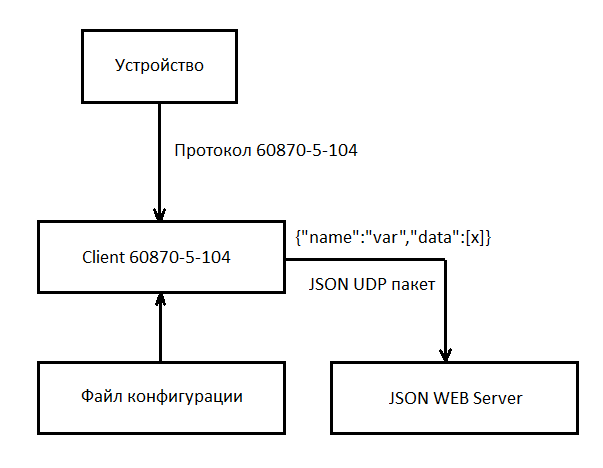
The diagram above shows the principle of the program.
After receiving the value of the state of a discrete or analog signal, the json udp packet is transmitted to the monitoring server or another provided server (we use the json web server).
The package format has not changed: {“name”: "myvar", "data": [220.001]}
At the moment, the time stamp is not transmitted in the package due to the lack of need, but I still think that it will need to be added.
The configuration file for the iec104client is as follows:
A small example of a configuration file for retrieving values from a lower-level server, a relay relay protection device, Sirius 3-LV-03 via Modbus RTU. In this case, we are only interested in currents and voltages, and the rest of the information goes to the SDAD SCADA system.
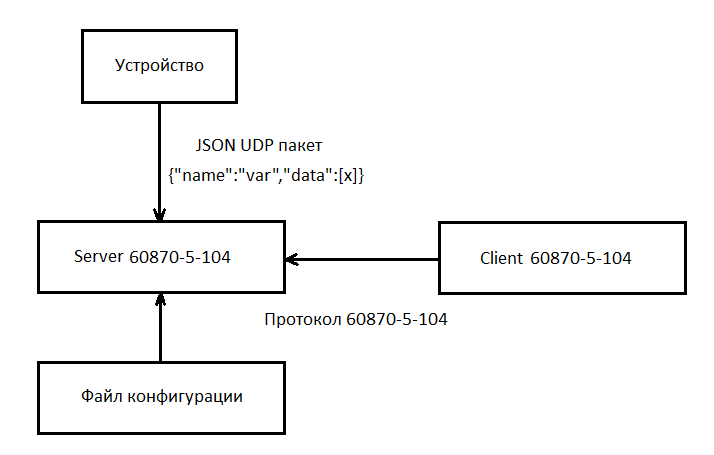
When using the IEC 60870-5-104 server, the iec104server utility works as a udp server, maintains communication with the client and, when the state of a variable changes, transmits data to the communication channel.
The parameter settings file, iec104server, is as follows:
Windows:
The package msys2-i686-20180531 was used to build the utilities .
You need to install this package, for example on the C: drive, you get something like C: \ msys32. Go to this directory and run the file msys2_shell.cmd.
A console window will appear in which you can now enter linux commands.
You must install the necessary libraries for compilation:
Now you need to download the source code for compilation.
Go here to download the archive, copy the folder lib60870-C to c: \ msys32.
In the msys console window, compile the lib60870 library:
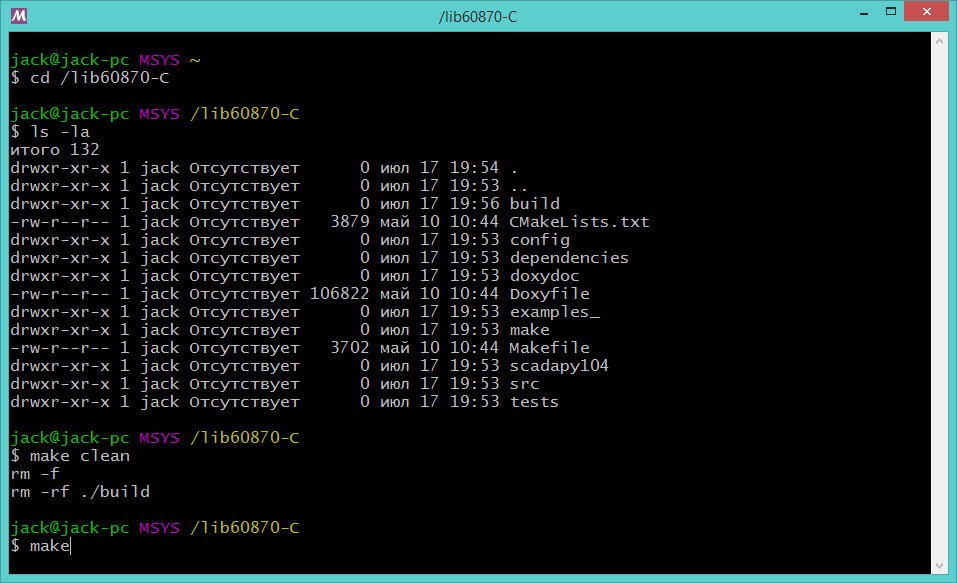
Now do
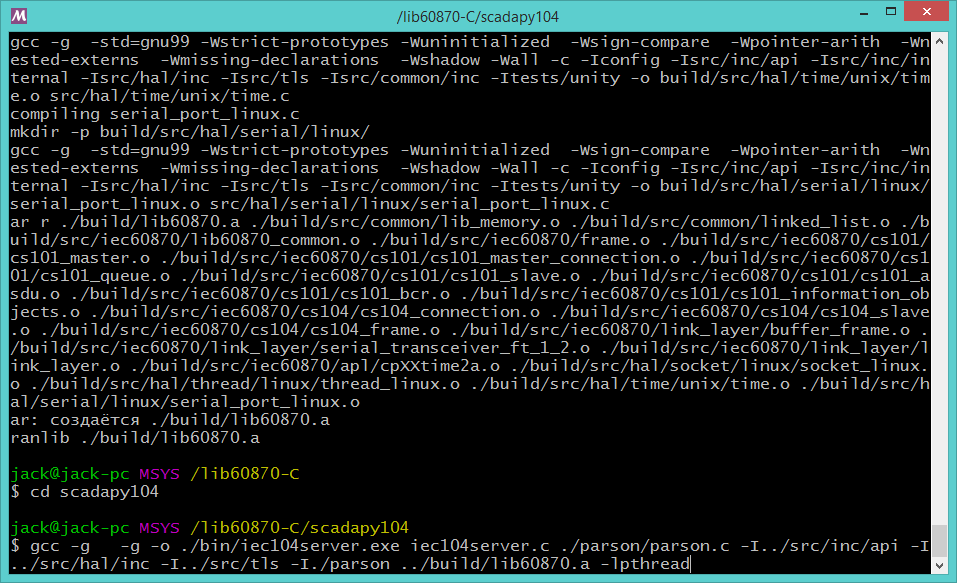
Run the server build:
Run the client build:
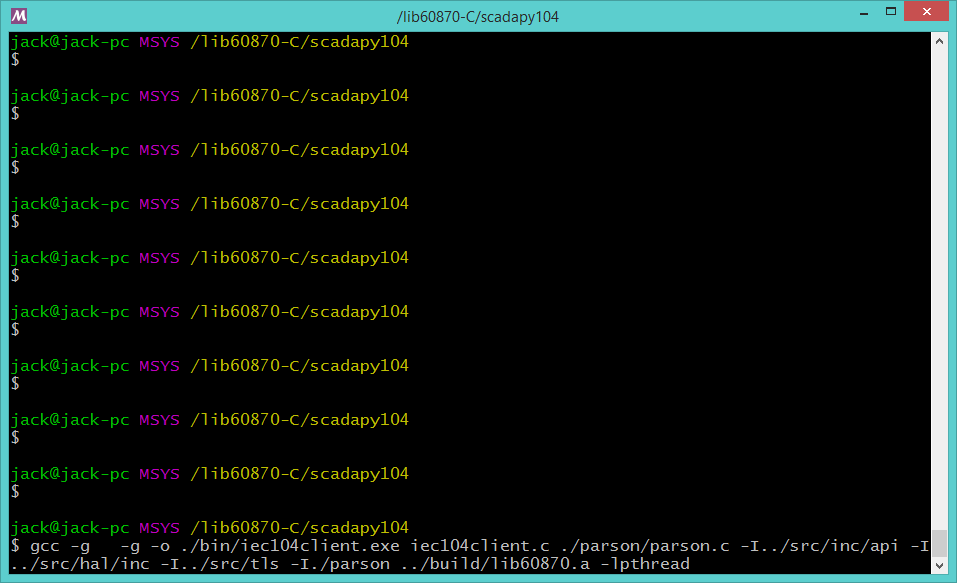
The folder
To run these files, on Windows 7.8 you need dll files.
On other versions, windows was not checked.
Now if you run any of these utilities, a help prompt will appear.
Linux: You
need to install the gcc and make packages if not installed (using Ubuntu):
$ sudo apt install build-essential
Next, everything is compiled in the same way.
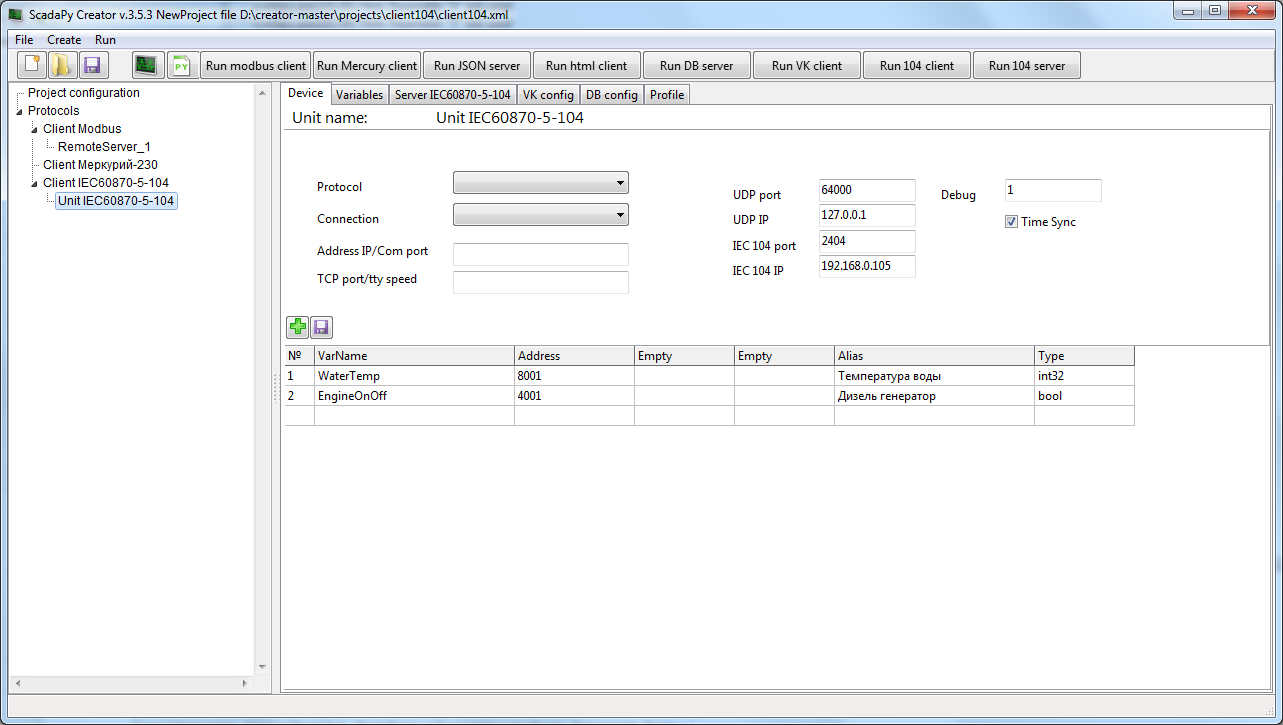
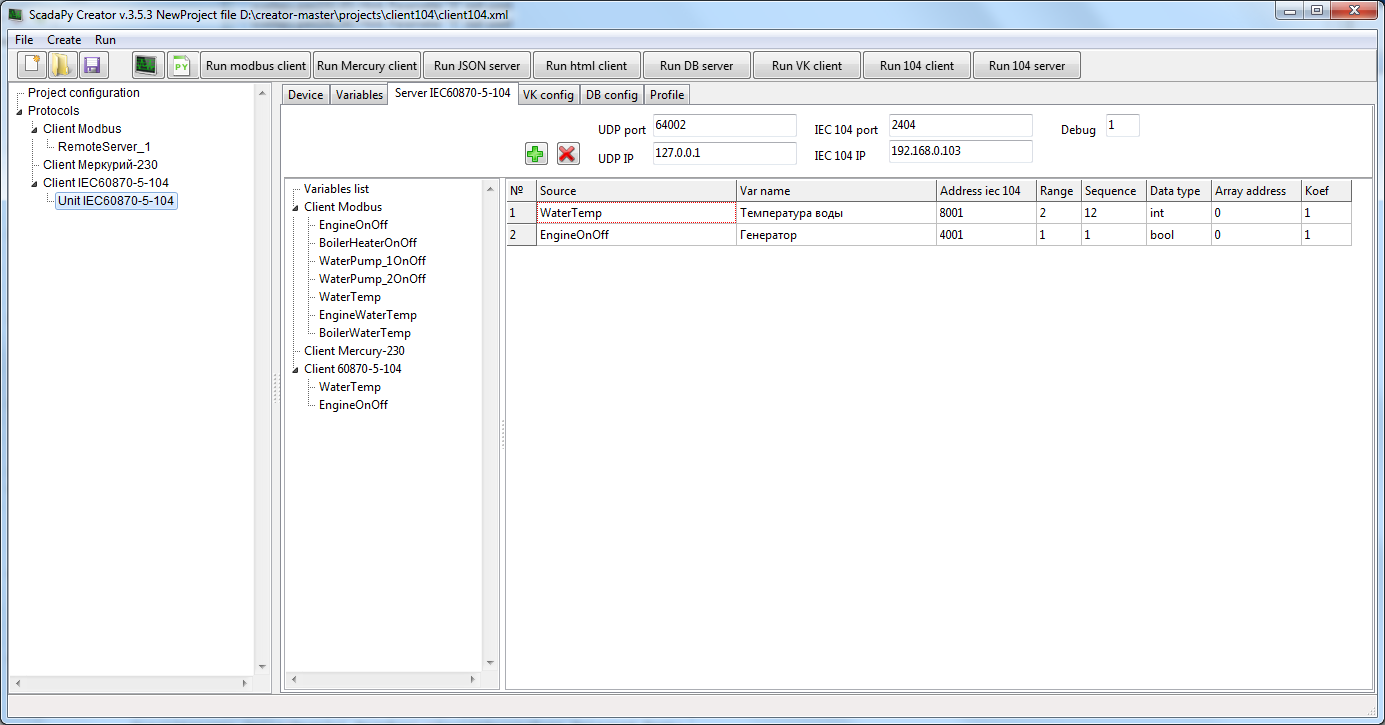
Configuration files can be created and tested for functionality in the “ScadaPy creator”.
For client:
For server:
All libraries and projects are here.
This protocol is quite difficult to master, but at the moment you can find enough documentation on the Internet for review.
What gives us the use of this protocol?
A significant factor is that the protocol is asynchronous, unlike modbus, and data is transmitted only when the current state of the variable changes, which in turn reduces the load on the communication channels. It is also possible to get a timestamp of a state change of a variable on an object; on modbus, separate registers are used for this.
You can read in detail here .
At the moment, we were unable to find a suitable library for development written in Python, so we used the ready-made library in C from this site .
Then we compiled two utilities, iec104client and iec104server.
Customer
When using IEC 60870-5-104 client, the iec104client utility establishes communication with a slave device, after which data is received from the object, and a command (20) is initially formed - general interrogated by station interrogation and processing the received data, and then there is a sporadic reception on change of value of variables.
In case of loss of communication with the device, the iec104client utility independently attempts to restore the connection. When a session is resumed, a group survey command (20) is sent first, and then a sporadic reception.
Supported ASDU:
Discrete values:
- <36> M_SP_TB_1 - singleton information with time stamp CP56Time2a
- <1> M_SP_NA_1 - Singleton Information
- <13> M_ME_NC - the value of the measured value, a short floating-point format without a timestamp.
- <36> M_ME_TF_1 - the value of the measured value, the short floating-point format with the timestamp CP56Time2a.
- <11> M_ME_NB_1 - measured value value, scaled value
To understand the source text is not difficult, special attention should be paid to the function
staticboolasduReceivedHandler(void* parameter, int address, CS101_ASDU asdu).
All processing of the received data occurs in it.
You can just leave
printf("REC type: %s(%i) elements: %i\n",
            TypeID_toString(CS101_ASDU_getTypeID(asdu)),
            CS101_ASDU_getTypeID(asdu),
            CS101_ASDU_getNumberOfElements(asdu));
and then keep track of which data was taken.
The diagram above shows the principle of the program.
After receiving the value of the state of a discrete or analog signal, the json udp packet is transmitted to the monitoring server or another provided server (we use the json web server).
The package format has not changed: {“name”: "myvar", "data": [220.001]}
At the moment, the time stamp is not transmitted in the package due to the lack of need, but I still think that it will need to be added.
The configuration file for the iec104client is as follows:
Client configuration file
[

{ "Client":

 { "UdpPort" :"64000", -- порт UDP сервера

 "UdpIp" :"127.0.0.1", -- IP адрес UDP сервера

 "Iec104Port":"2404", -- порт сервера 104 протокола ( не меняется)

 "Iec104Ip" :"192.168.0.105", -- IP адрес сервера 104 протокола

 "Debug" :"1", -- режим вывода отладочной информации (1 или 3)

 "TimeSync" :"1" -- флаг синхронизации времени сервера (1 или 0)

 }

}

,

{ "MeasureValue": -- аналоговая переменная

 {

 "VarName" : "WaterTemp", -- имя переменной

 "IecAddress": "8001", -- адрес на сервере

 "Alias" : "Температура воды", -- псевдоним

 "VarType" : "int32" -- тип переменной

//int – знаковый int 2 байта

//int32 – 4 байта без знака (передается как float)

//float – число с плавающей точкой

//

 }

}

,

{ "SinglePoint": -- дискретная переменная

 {

 "VarName" : "EngineOnOff", -- имя переменной

 "IecAddress": "4001", -- адрес на сервере

 "Alias" : "Дизель генератор", -- псевдоним

 "VarType" : "bool" -- тип переменной

 }

}

]
A small example of a configuration file for retrieving values from a lower-level server, a relay relay protection device, Sirius 3-LV-03 via Modbus RTU. In this case, we are only interested in currents and voltages, and the rest of the information goes to the SDAD SCADA system.
110 kV substation
[

{ "Client":

 { "UdpPort" :"64000",

 "UdpIp" :"0.0.0.0",

 "Iec104Port":"2404",

 "Iec104Ip" :"ххх.ххх.ххх.ххх",

 "Debug" :"1",

 "TimeSync" :"0"

 }

}

,

{ "SinglePoint":

 {

 "VarName" : "alarm",

 "IecAddress": "681",

 "Alias" : "alarm",

 "VarType" : "bool"

 }

}

,

{ "MeasureValue":

 {

 "VarName" : "Ia",

 "IecAddress": "372",

 "Alias" : "-- Ia --",

 "VarType" : "float"

 }

}

,

{ "MeasureValue":

 {

 "VarName" : "Ib",

 "IecAddress": "373",

 "Alias" : "-- Ib --",

 "VarType" : "float"

 }

}

,

{ "MeasureValue":

 {

 "VarName" : "Ic",

 "IecAddress": "374",

 "Alias" : "-- Ic --",

 "VarType" : "float"

 }

}


,

{ "MeasureValue":

 {

 "VarName" : "Uab",

 "IecAddress": "369",

 "Alias" : "-- Uab --",

 "VarType" : "float"

 }

}


,

{ "MeasureValue":

 {

 "VarName" : "Ubc",

 "IecAddress": "370",

 "Alias" : "-- Ubc --",

 "VarType" : "float"

 }

}

,

{ "MeasureValue":

 {

 "VarName" : "Uca",

 "IecAddress": "371",

 "Alias" : "-- Uca --",

 "VarType" : "float"

 }

}


]
Server
When using the IEC 60870-5-104 server, the iec104server utility works as a udp server, maintains communication with the client and, when the state of a variable changes, transmits data to the communication channel.
The parameter settings file, iec104server, is as follows:
Server Tuning
[

{ "Server":

 { "UdpPort" :"64002",

 "UdpIp" :"127.0.0.1",

 "Iec104Port":"2404",

 "Iec104Ip" :"192.168.0.103",

 "Debug" :"1"

 }

}

,

{ "MeasureValue":

 {

 "VarName" : "WaterTemp",

 "IecAddress" : "8001",

 "OffSet" : "0", --адрес в массиве(0–первый элемент) [100,200,300,400]

 "ByteCount" : "2", --количество элементов массива (1,2)

 "ByteSequence": "12",--последовательность элементов (1,12,21)

 "Koef" : "1", -- коэффициент

 "VarType" : "int" – тип переменной

 }

}

,

{ "SinglePoint":

 {

 "VarName" : "EngineOnOff",

 "IecAddress" : "4001",

 "OffSet" : "0",

 "ByteCount" : "1", -- не используется

 "ByteSequence": "1", -- не используется

 "VarType" : "bool"

 }

}

]
Compiling
Windows:
The package msys2-i686-20180531 was used to build the utilities .
You need to install this package, for example on the C: drive, you get something like C: \ msys32. Go to this directory and run the file msys2_shell.cmd.
A console window will appear in which you can now enter linux commands.
You must install the necessary libraries for compilation:
pacman –S make
pacman –S gcc
Now you need to download the source code for compilation.
Go here to download the archive, copy the folder lib60870-C to c: \ msys32.
In the msys console window, compile the lib60870 library:
cd /lib60870-C
make clean
make
Now do
cd scadapy104Run the server build:
gcc -g -g -o ./bin/iec104server.exe iec104server.c ./parson/parson.c -I../src/inc/api -I../src/hal/inc -I../src/tls -I./parson ../build/lib60870.a –lpthreadRun the client build:
gcc -g -g -o ./bin/iec104client.exe iec104client.c ./parson/parson.c -I../src/inc/api -I../src/hal/inc -I../src/tls -I./parson ../build/lib60870.a -lpthreadThe folder
C:\msys32\lib60870-C\scadapy104\binwill contain two files, iec104client.exe and iec104server.exe. To run these files, on Windows 7.8 you need dll files.
On other versions, windows was not checked.
Now if you run any of these utilities, a help prompt will appear.
Linux: You
need to install the gcc and make packages if not installed (using Ubuntu):
$ sudo apt install build-essential
Next, everything is compiled in the same way.
Configuration files can be created and tested for functionality in the “ScadaPy creator”.
For client:
For server:
All libraries and projects are here.