November 22, 2012 at 15:02
Sharpen Astesrisk to work with Cisco BLF
BLF (Busy Lamp Field) - in general, this is a set of indicators on the IP phone that show the status of the line: free or busy.
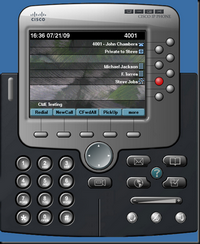
In this article, we will teach Asterisk to work correctly with Cisco phones to display BLF statuses.
Enter the command in the Asterisk console:
The State column shows, in fact, the state of the line, Watchers - the number of listeners to this line. When the line status changes, Asterisk sends a message to the phone and the phone turns on the indication. The performance of BLF on Asterisk can first be checked on a softphone, for example, on DrayTek SoftPhone. After adding contacts, you can see the line busy indication. By default, Asterisk sends messages that the Cisco phone cannot read, and, accordingly, the BLF does not work on them.
Download the patch: issues.asterisk.org/jira/secure/attachment/32739/cisco-blf-asterisk.1.8.0.patch
When this patch is installed, asterisk will not compile.
There is a small typo in the patch, it needs to be fixed.
On line 23, switch (state) fix to switch (data-> state) ;
in line 40 state fix to data-> state ;
in line 60 state fix to data ;
in line 66 state fix to data .
Next, copy the Asterisk sources to a folder, for example / usr / src / asterisk.
We put the patch in the channels folder and immediately rename it, for example, in patch.
We execute the command:
At the request “File to patch” we enter the path where sip.h is located (usually in include / sip / sip.h).
If Asterisk is installed, then you need to remove it. To do this, stop Asterisk:
Remove Asterisk:
Before installing asterisk, you must install all the modules for compiling the sources, in particular gcc, gcc-c ++, kernel-devel, ncurses-devel, openssl-devel, m2crypto, libssl-devel.
Next we do:
We launch:
This ended with Asterisk.
Let's consider the main lines for working with BLF
featureID 21 means that for this Directory Number you must use BLF.
In the /etc/asterisk/sip_general_additional.conf file, add or change, if any, the lines:
The following devices were used to organize BLF:
Phones: Cisco 7961, 7962, FreePBX 2.0.2, Asterisk 1.8.11.
In this article, we will teach Asterisk to work correctly with Cisco phones to display BLF statuses.
Theory
Enter the command in the Asterisk console:
asterisk*CLI> core show hints
    -= Registered Asterisk Dial Plan Hints =-
                   1196@ext-local           : SIP/1196              State:Ringing         Watchers  3
                   1188@ext-local           : SIP/1188              State:InUse           Watchers  3
                   5030@ext-local           : SIP/5030              State:Idle            Watchers  1
The State column shows, in fact, the state of the line, Watchers - the number of listeners to this line. When the line status changes, Asterisk sends a message to the phone and the phone turns on the indication. The performance of BLF on Asterisk can first be checked on a softphone, for example, on DrayTek SoftPhone. After adding contacts, you can see the line busy indication. By default, Asterisk sends messages that the Cisco phone cannot read, and, accordingly, the BLF does not work on them.
Patch Asterisk source codes
Download the patch: issues.asterisk.org/jira/secure/attachment/32739/cisco-blf-asterisk.1.8.0.patch
When this patch is installed, asterisk will not compile.
There is a small typo in the patch, it needs to be fixed.
On line 23, switch (state) fix to switch (data-> state) ;
in line 40 state fix to data-> state ;
in line 60 state fix to data ;
in line 66 state fix to data .
Next, copy the Asterisk sources to a folder, for example / usr / src / asterisk.
We put the patch in the channels folder and immediately rename it, for example, in patch.
We execute the command:
patch chan_sip.c patch
At the request “File to patch” we enter the path where sip.h is located (usually in include / sip / sip.h).
If Asterisk is installed, then you need to remove it. To do this, stop Asterisk:
service asterisk stop
Remove Asterisk:
yum remove asterisk
Before installing asterisk, you must install all the modules for compiling the sources, in particular gcc, gcc-c ++, kernel-devel, ncurses-devel, openssl-devel, m2crypto, libssl-devel.
Next we do:
./configure
make menuselect  -- выбираем необходимые модули
make
make  install
We launch:
asterisk start
This ended with Asterisk.
Configuring phone config files
config.file
true SIP cisco cisco Y-M-D Central Asia Standard Time PBX-IP Address Unicast 2000 5060 5061 PBX-IP Address Disable 2000 2000 2000 5060 5060 5060 false 120 true true x-cisco-serviceuri-cfwdall x-cisco-serviceuri-pickup x-cisco-serviceuri-opickup x-cisco-serviceuri-gpickup x-cisco-serviceuri-meetme x-cisco-serviceuri-abbrdial false 2 true true 2 2 0 true false 6 10 180 3600 5 120 120 5 500 4000 70 true None 1 false true false false none 101 3 avt 3 false false 2 true 15000 10 false false 16384 32766 9 USECALLMANAGER 5060 2 3 false 3 4 5 true false false true LineName 5037 LineName 5037 5037 password 21 Description Directory Number 5060 184 0 dialplan.xml true 1 false false 1 0 1 0 0 0 0 1 1,7 09:00 12:00 01:00 1 2 10.1.96.31 0 100 50 0 0 5 1 10.1.96.31 0 0 0 0 0 0 1 1 1200501729-ee9247c4-1a10-481c-8fdc-612737c5aadd 1 0 96 0 96 2 0 0 3804 PBX-ip-address false 1 Let's consider the main lines for working with BLF
21 Description Directory Number featureID 21 means that for this Directory Number you must use BLF.
In the /etc/asterisk/sip_general_additional.conf file, add or change, if any, the lines:
allowsubscribe=yes
notifyhold=yes
callcounter=yes
notifyringing=yes
limitonpeers=yes
buggymwi=yes
Used devices
The following devices were used to organize BLF:
Phones: Cisco 7961, 7962, FreePBX 2.0.2, Asterisk 1.8.11.