 November 9, 2012 at 12:48
Caution when buying a MacBook. High-tech offline fraud method
Good day to all dear friends. For a long time I did not write on a habr and it is a pity that my new publication concerns scammers. And not just scammers, about whom I read somewhere, but about scammers who personally deceived me.

The purpose of this article is to unveil a rather tricky and non-trivial type of fraud that I came across literally last week. The case is now in the investigative department, so I will immediately disappoint detective detectives: I will not disclose the details of the investigation and the details of the case now. Only after the case is closed.
The second goal is to find those deceived as I am, in order to receive compensation and sew another / two / three statements to the case.
As you guessed, the criminals were found (looking ahead, I will say that this happened naturally without the help of the police). About what to be afraid of when buying a new or used MacBook, as well as how criminals were found and caught, read under the cat.
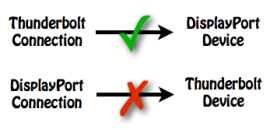
I'll start with the lyrics. A year ago, I bought an Apple Thunderbolt Display and found that my MacBook Pro wasn’t working with it because it has a Mini Display Port. Although the connector is absolutely identical, the DP-> TB bundle does not work, but on the contrary, TB-> DP works fine. In general, at this moment not only I was so deceived, there was a rather serious confusion with this compatibility, and even the Sydney Apple Store consultants claimed that a new Apple Display could be connected to the DisplayPort connector. But this is an absolute lie, compatibility only in the opposite direction. I was annoyed by this fact and exchanged laptops with my wife (she had a Macbook Air 13 2011).
Then I was simply amazed at the performance and convenience of working on Air: the screen resolution was like on 15 firmware, Xcode worked quickly, there was no memory shortage even on 4 GB of RAM, and even worked fine in Windows 7 running in parallels. Then I threw back the idea of buying a new MacBook and decided to wait for something new, I was hoping for a 15-inch air.
A year passed and Apple released the Macbook Pro 15 Retina, and I realized what to take.
Naturally, at the beginning of sales, I did not buy it, since it was during this period of time that there were no trips to countries where it could be bought, and there was no desire to overpay the starting wraps.
It was still compounded by the fact that I needed a lot of RAM (all the same, 4GB on Air subsequently became lacking). Therefore, I did not want the standard 975 or 976 model, because the memory became soldered and it was already impossible to upgrade it (by normal human means without soldering).

It so happened that with 16 GB we only sold the most top-end model, sometimes intermediate models with such an amount of RAM slipped, but they quickly sold out.
Therefore, I was not in a hurry especially, planning to buy this device during a winter trip to Europe.
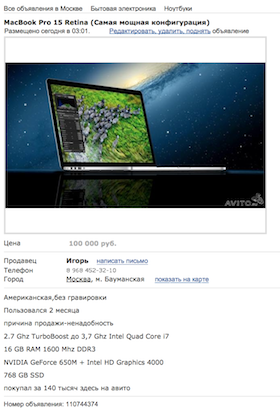
But then I came across one ad on Avito.ru when I was looking for iPhone 5 (clickable): I am very positive about used equipment, as this is a good way to save money (albeit a risky one). In any case, you can check the expiration date of the warranty online and if something goes wrong with it, you can take it to a service center under warranty. And the Retina Macbook is not a completely unique device (not many applications have been adapted yet), so it is likely that someone bought, tried and did not like it. Well, a big plus - the American layout and the lack of engraving. I really liked it and I called the seller.
Met in a large shopping center, the guys came together. Immediately, their behavior seemed strange to me, but honestly, one can say that half of the inhabitants of the capital have very strange behavior.
I opened the laptop; it turned out to be in good condition. I launched the “About this Mac” application, launched the “system_profiler” command in the console. These are the tools that I was sure of and trusted them. Everything told me that this is the top custom configuration: 2.7 / 16/768.
Nothing remarkable, everything went fine.
At home, I began to restore the system from my time machine, and at the initial stage of the installation, the MacBook told me that I had a 256 Gig disk at my disposal. Here I thought hard. I ran the Apple Hardware test (at the start of the system you need to hold down the “D” key) and found this:
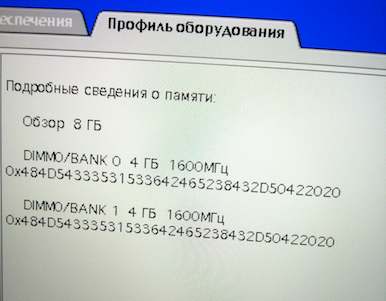
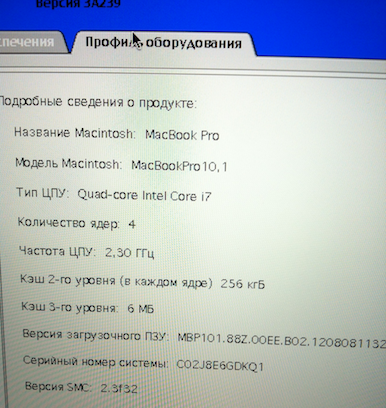
As you can see, it turned out to be just the youngest model.
I was very interested in how it happened. After half an hour, I completely figured out how to make this kind of transformation. And before that, I was completely sure of the above utilities (“About this Mac” and “system_profiler”), for which I paid.
What we have: I bought a top 15-inch MacBook, the price of a new one in retail is 120-130 thousand rubles. I received the youngest model, the retail price for a new copy is 60 thousand rubles. In total, I estimate my damage at 50 thousand rubles: the market price for a used model of this model is about 50 tr, I bought it for 100 tr
Otherwise, the laptop turned out to be in very good condition, it was activated on September 27 and is under official warranty.
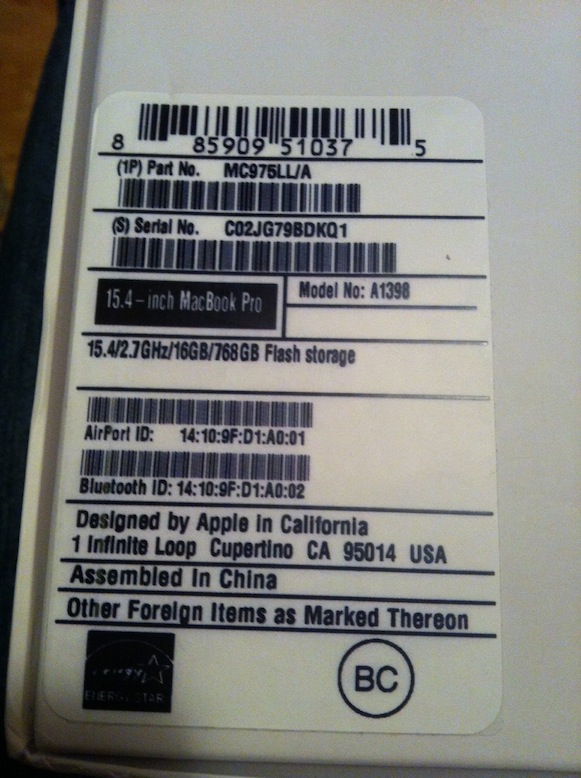
And now pictures of what the hype looks like:

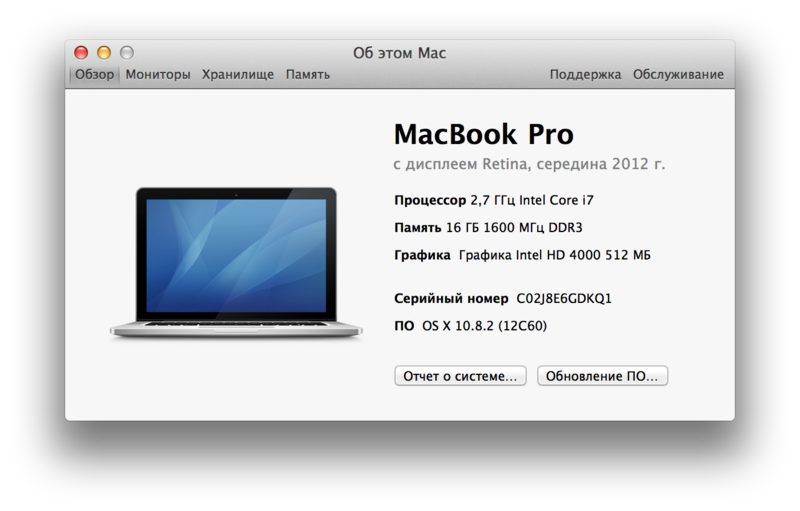

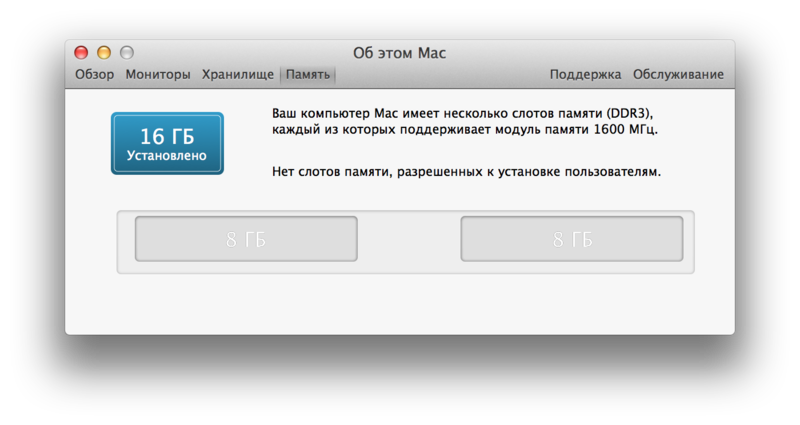
The stickers on the box were also faked, it is very difficult to distinguish from the original. The serial is the same:
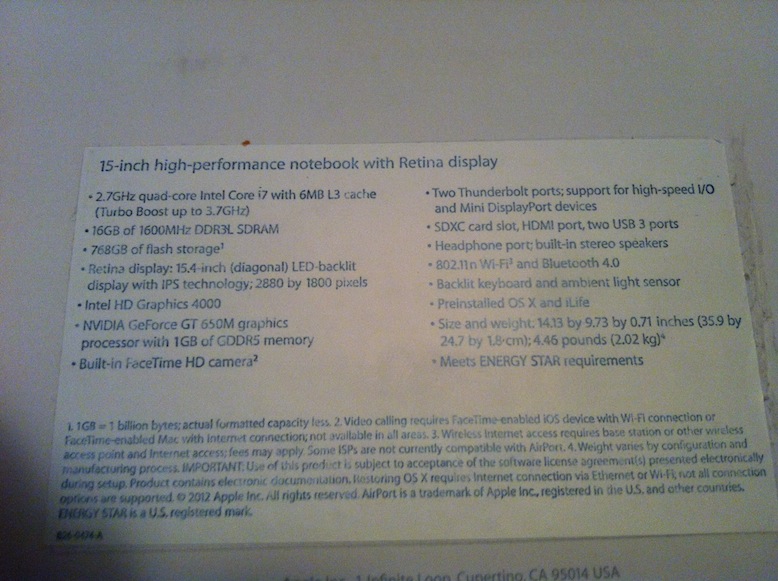
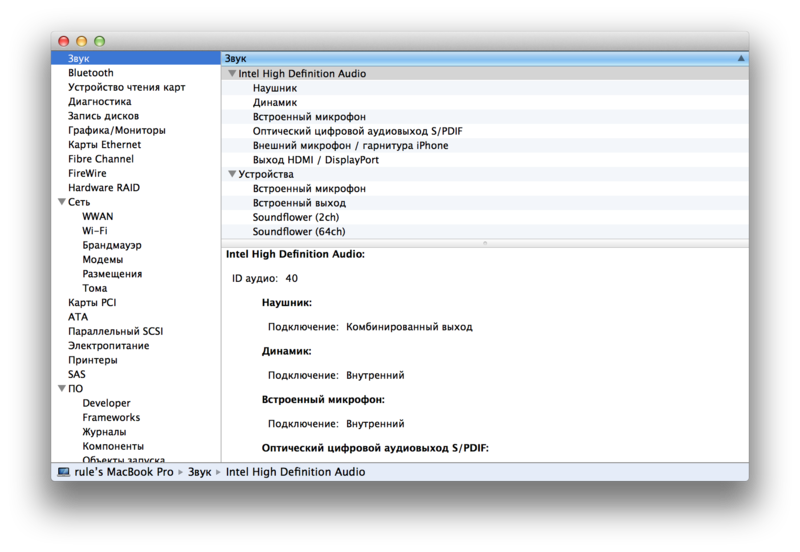
But in this screenshot you can see that in the detailed information there is no information about the processor, memory and disks. I did not pay attention to this - this is my mistake number 1.
My second fatal mistake was that I did not look carefully at the beginning of the output of the "system_profiler" command. This utility already gives quite a lot of text on the output, but I did not pay attention to two important lines that were lost among the total amount of information:
Well, the third fatal error is that I did not run the Apple Hardware Test.
Of course, I realize that I'm more to blame for being deceived. But I would calmly put up with it if the guys did not put it on stream. I did not like their behavior and I decided to act.
Two main rules that will protect you from such frauds:
1. Always run the Apple Hardware Test. This is very easy to do: when loading the laptop, as soon as the white screen appears, press the letter “D”. And run the system on a light test and look at the system profile. If you have half an hour of time, you can run the system on a full test. But be sure to connect the device to power, as an error with an indistinct description will come out:
2. Check the laptop by serial number in the Apple database , so you will understand that it is not restored and when it was activated.
All who have suffered from such fraud, I beg you to contact me (write in personal mail on the hub). Since the criminals are already caught, you will receive compensation (if your description of the criminal coincides with reality and his testimony). One of the conditions “to go good” on my part was that he compensate for the losses to all the victims. And if someone who he didn’t remember intentionally or accidentally appears, then I will bring this matter to court.
Therefore, if you or your friends suffered from such a fraud, then please write to me at Habrapost or Google mail .
If you bought a top-end MacBook from your hands, even in film, check it just in case. Cases are known that factory packaging is falsified. You could be deceived, you just have not noticed it yet.
Unfortunately, I can’t tell you how “our police work great” and how I managed to catch these guys. But I will describe it later, as soon as we close the case. It was exciting and interesting.
Be vigilant and do not be fooled, this is not good and will not bring you happiness in any case.
The purpose of this article is to unveil a rather tricky and non-trivial type of fraud that I came across literally last week. The case is now in the investigative department, so I will immediately disappoint detective detectives: I will not disclose the details of the investigation and the details of the case now. Only after the case is closed.
The second goal is to find those deceived as I am, in order to receive compensation and sew another / two / three statements to the case.
As you guessed, the criminals were found (looking ahead, I will say that this happened naturally without the help of the police). About what to be afraid of when buying a new or used MacBook, as well as how criminals were found and caught, read under the cat.
Background
I'll start with the lyrics. A year ago, I bought an Apple Thunderbolt Display and found that my MacBook Pro wasn’t working with it because it has a Mini Display Port. Although the connector is absolutely identical, the DP-> TB bundle does not work, but on the contrary, TB-> DP works fine. In general, at this moment not only I was so deceived, there was a rather serious confusion with this compatibility, and even the Sydney Apple Store consultants claimed that a new Apple Display could be connected to the DisplayPort connector. But this is an absolute lie, compatibility only in the opposite direction. I was annoyed by this fact and exchanged laptops with my wife (she had a Macbook Air 13 2011).
Then I was simply amazed at the performance and convenience of working on Air: the screen resolution was like on 15 firmware, Xcode worked quickly, there was no memory shortage even on 4 GB of RAM, and even worked fine in Windows 7 running in parallels. Then I threw back the idea of buying a new MacBook and decided to wait for something new, I was hoping for a 15-inch air.
A year passed and Apple released the Macbook Pro 15 Retina, and I realized what to take.
Tie
Naturally, at the beginning of sales, I did not buy it, since it was during this period of time that there were no trips to countries where it could be bought, and there was no desire to overpay the starting wraps.
It was still compounded by the fact that I needed a lot of RAM (all the same, 4GB on Air subsequently became lacking). Therefore, I did not want the standard 975 or 976 model, because the memory became soldered and it was already impossible to upgrade it (by normal human means without soldering).
It so happened that with 16 GB we only sold the most top-end model, sometimes intermediate models with such an amount of RAM slipped, but they quickly sold out.
Therefore, I was not in a hurry especially, planning to buy this device during a winter trip to Europe.
Start
But then I came across one ad on Avito.ru when I was looking for iPhone 5 (clickable): I am very positive about used equipment, as this is a good way to save money (albeit a risky one). In any case, you can check the expiration date of the warranty online and if something goes wrong with it, you can take it to a service center under warranty. And the Retina Macbook is not a completely unique device (not many applications have been adapted yet), so it is likely that someone bought, tried and did not like it. Well, a big plus - the American layout and the lack of engraving. I really liked it and I called the seller.

Purchase
Met in a large shopping center, the guys came together. Immediately, their behavior seemed strange to me, but honestly, one can say that half of the inhabitants of the capital have very strange behavior.
I opened the laptop; it turned out to be in good condition. I launched the “About this Mac” application, launched the “system_profiler” command in the console. These are the tools that I was sure of and trusted them. Everything told me that this is the top custom configuration: 2.7 / 16/768.
Nothing remarkable, everything went fine.
How I discovered the catch
At home, I began to restore the system from my time machine, and at the initial stage of the installation, the MacBook told me that I had a 256 Gig disk at my disposal. Here I thought hard. I ran the Apple Hardware test (at the start of the system you need to hold down the “D” key) and found this:
As you can see, it turned out to be just the youngest model.
The essence of deception
I was very interested in how it happened. After half an hour, I completely figured out how to make this kind of transformation. And before that, I was completely sure of the above utilities (“About this Mac” and “system_profiler”), for which I paid.
What we have: I bought a top 15-inch MacBook, the price of a new one in retail is 120-130 thousand rubles. I received the youngest model, the retail price for a new copy is 60 thousand rubles. In total, I estimate my damage at 50 thousand rubles: the market price for a used model of this model is about 50 tr, I bought it for 100 tr
Otherwise, the laptop turned out to be in very good condition, it was activated on September 27 and is under official warranty.
And now pictures of what the hype looks like:
The stickers on the box were also faked, it is very difficult to distinguish from the original. The serial is the same:
But in this screenshot you can see that in the detailed information there is no information about the processor, memory and disks. I did not pay attention to this - this is my mistake number 1.
My second fatal mistake was that I did not look carefully at the beginning of the output of the "system_profiler" command. This utility already gives quite a lot of text on the output, but I did not pay attention to two important lines that were lost among the total amount of information:
system_profiler
2012-11-09 12:02:58.557 system_profiler[289:707] Error loading /System/Library/SystemProfiler/SPMemoryReporter.spreporter: Error Domain=NSCocoaErrorDomain Code=4 "The bundle “SPMemoryReporter” couldn’t be loaded because its executable couldn’t be located." UserInfo=0x7f943b2165e0 {NSLocalizedFailureReason=The bundle’s executable couldn’t be located., NSLocalizedRecoverySuggestion=Try reinstalling the bundle., NSBundlePath=/System/Library/SystemProfiler/SPMemoryReporter.spreporter, NSLocalizedDescription=The bundle “SPMemoryReporter” couldn’t be loaded because its executable couldn’t be located.}
2012-11-09 12:02:58.579 system_profiler[289:707] Error loading /System/Library/SystemProfiler/SPPlatformReporter.spreporter: Error Domain=NSCocoaErrorDomain Code=4 "The bundle “SPPlatformReporter” couldn’t be loaded because its executable couldn’t be located." UserInfo=0x7f943b011c20 {NSLocalizedFailureReason=The bundle’s executable couldn’t be located., NSLocalizedRecoverySuggestion=Try reinstalling the bundle., NSBundlePath=/System/Library/SystemProfiler/SPPlatformReporter.spreporter, NSLocalizedDescription=The bundle “SPPlatformReporter” couldn’t be loaded because its executable couldn’t be located.}
Well, the third fatal error is that I did not run the Apple Hardware Test.
Of course, I realize that I'm more to blame for being deceived. But I would calmly put up with it if the guys did not put it on stream. I did not like their behavior and I decided to act.
Be carefull
Two main rules that will protect you from such frauds:
1. Always run the Apple Hardware Test. This is very easy to do: when loading the laptop, as soon as the white screen appears, press the letter “D”. And run the system on a light test and look at the system profile. If you have half an hour of time, you can run the system on a full test. But be sure to connect the device to power, as an error with an indistinct description will come out:
4SNS/1/40000001:ID0R-0.000.
2. Check the laptop by serial number in the Apple database , so you will understand that it is not restored and when it was activated.
Instead of a conclusion
All who have suffered from such fraud, I beg you to contact me (write in personal mail on the hub). Since the criminals are already caught, you will receive compensation (if your description of the criminal coincides with reality and his testimony). One of the conditions “to go good” on my part was that he compensate for the losses to all the victims. And if someone who he didn’t remember intentionally or accidentally appears, then I will bring this matter to court.
Therefore, if you or your friends suffered from such a fraud, then please write to me at Habrapost or Google mail .
If you bought a top-end MacBook from your hands, even in film, check it just in case. Cases are known that factory packaging is falsified. You could be deceived, you just have not noticed it yet.
To be continued...
Unfortunately, I can’t tell you how “our police work great” and how I managed to catch these guys. But I will describe it later, as soon as we close the case. It was exciting and interesting.
Be vigilant and do not be fooled, this is not good and will not bring you happiness in any case.









