
 August 14, 2012 at 15:50
PHP Information Widgets in Ubuntu
Hello.
I want to share with you the idea of writing a semblance of information widgets in PHP.
The bottom line is that using PHP means it’s easy to rob or simply get information from the Internet (+ personal preferences for this language), after which this information can be displayed using the notify-send utility in a beautiful and concise way to the right corner of the monitor.
I will say right away that I do not claim innovation. Perhaps this method may seem rather silly to many, but it’s easier for me, for example, to look into the corner of the monitor than to clog the desktop with all sorts of screens, Konka and others.
As an example, let's create a weather widget based on data from openweathermap.com.
We will need a web server with PHP, it doesn’t matter on a localhost or not.
Create a directory on the server where widgets will be located, I have this / public_html / scripts /.
Create a file with the name, for example, weather.php. Created? Excellent. Now let's get the data from openweathermap.com. They have their own API for these purposes, which can be found on the same site , so we will not dwell on this.
First, we need to get the identifier of the city we need. To do this, find this city on the site and see detailed information about it. In the address bar we will see the identifier.
For my city, the link looks like this: openweathermap.org/city/ 705812 , the identifier itself is 705812.
Well, now we know the city id and can get the data using the
weather.php API Listing:
Everything is simple here. We get the contents of our data page to a file, write its contents to a variable, and output it via notify-send using the icon that was pulled from the server.
I put the shell script in the home directory named weather.sh
Listing weather.sh:
PS. If anyone has a way to make this option easier, I will be glad to hear.
When you call the shell script, we get something similar to this:
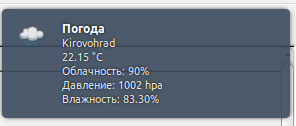
And then you can output it every minute / hour / day, etc. by crown, or assign a hotkey to it through Compiz or something else. There is already a matter of personal preference.
I hope this material seems useful to someone.
Thanks for attention.
I want to share with you the idea of writing a semblance of information widgets in PHP.
The bottom line is that using PHP means it’s easy to rob or simply get information from the Internet (+ personal preferences for this language), after which this information can be displayed using the notify-send utility in a beautiful and concise way to the right corner of the monitor.
I will say right away that I do not claim innovation. Perhaps this method may seem rather silly to many, but it’s easier for me, for example, to look into the corner of the monitor than to clog the desktop with all sorts of screens, Konka and others.
As an example, let's create a weather widget based on data from openweathermap.com.
We will need a web server with PHP, it doesn’t matter on a localhost or not.
Create a directory on the server where widgets will be located, I have this / public_html / scripts /.
Let's get down to the first part - PHP:
Create a file with the name, for example, weather.php. Created? Excellent. Now let's get the data from openweathermap.com. They have their own API for these purposes, which can be found on the same site , so we will not dwell on this.
First, we need to get the identifier of the city we need. To do this, find this city on the site and see detailed information about it. In the address bar we will see the identifier.
For my city, the link looks like this: openweathermap.org/city/ 705812 , the identifier itself is 705812.
Well, now we know the city id and can get the data using the
weather.php API Listing:
The second part is a Shell script.
Everything is simple here. We get the contents of our data page to a file, write its contents to a variable, and output it via notify-send using the icon that was pulled from the server.
I put the shell script in the home directory named weather.sh
Listing weather.sh:
#!/bin/bash
rm weather.php
wget http://localhost/scripts/weather.php
WEATHER=`cat ~/weather.php`
notify-send "Погода" "$WEATHER" -i ~/webserv/public_html/scripts/weather.png
PS. If anyone has a way to make this option easier, I will be glad to hear.
Conclusion
When you call the shell script, we get something similar to this:
And then you can output it every minute / hour / day, etc. by crown, or assign a hotkey to it through Compiz or something else. There is already a matter of personal preference.
I hope this material seems useful to someone.
Thanks for attention.