Prototype, block diagram, layout - what to choose?
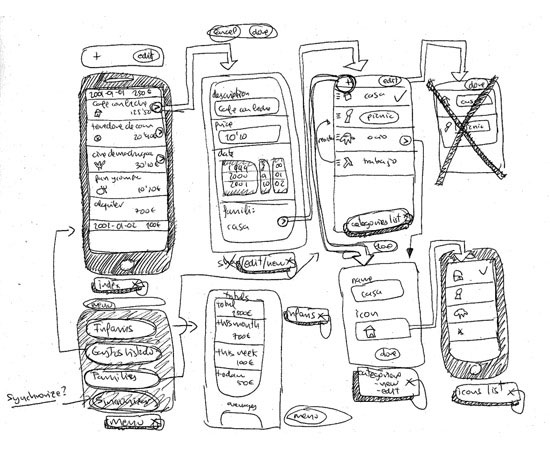
This is a translation of the original article, “Wireframing, Prototyping, Mockuping - What's the Difference?” .
so
A couple of years ago, I realized that many of my colleagues (not designers) have different names for the results of my work. They suggested that block layout (wireframe) , prototype (prototype) and layout (mockup) are the same thing - a kind of grayish, square, sketch explaining brilliant ideas.
The problem with this generalization is that they do not always know what to expect from the work of UX designers (User Experience designers) , and therefore they are often confused. “Why the hell is this element inactive?”, “Well, I didn’t know what was supposed to happen after clicking on this link ...” - such comments annoy many UX design projects ...
Mixing concepts block diagram and prototype is equivalent what to consider the architectural design and sketch of the facade of the building one and the same.
You can, of course, try living inside a beautiful picture. You know - with its beauty it will eclipse any other building. But you cannot count on a comfortable stay in it without an architectural project that explains how to build it.
The sketch of the facade and the architectural plan are various types of communication in architecture:
- the architectural project gives an idea of how the building should be built;
- A sketch of the facade of the building only demonstrates how the building will look to future residents.
The same comparison can be applied to block diagrams, prototypes and layouts. They look and work differently, they serve different purposes.
The sketch of the facade of the building and the architectural design really have a lot in common - they both represent the final product - the actual house. The same with prototypes, block diagrams and layouts - all these documents are one form of presentation of the final product.
Believe it or not, the difference between a prototype, a block diagram and a layout was always one of the first things that I tried to teach members of my UX design team.
And this is really important.
Let's discuss each approach to understand what and when to use.
Block diagram (wireframe)
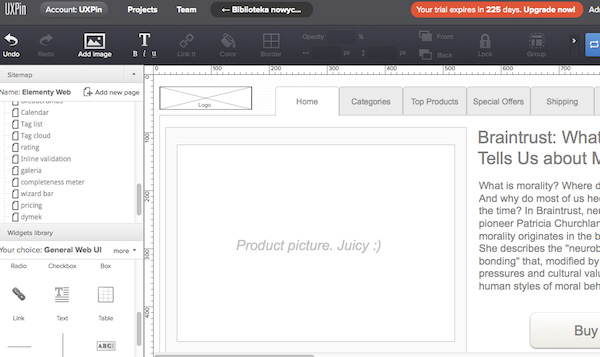
1. What is a block diagram?
The block diagram is a low-detailed representation of product design.
It should clearly show:
- the main content groups (what?)
- the information structure (where?)
- the description and basic visualizations of the user and system interaction (how?) The
block diagram is not just meaningless sets of gray blocks (although at first glance it may seem exactly). They must be considered as the basis of design and not to forget that the scheme should reflect all the important parts of the final product.
“Presentation” is one of the most important terms here, which will help you find the right balance of indicators of speed and quality of rendering. You cannot go into details, but on the other hand, you must create a clear view of the final project, which will not miss a single important detail. You give direction to the project as a whole and to the people who work with you (developers, designers, copywriters, project managers - they all need high-quality schemes). In fact, you are creating a map of the city. Each street shown on the map is greatly simplified. You can feel the greatness of the city if you look at the map, but you cannot feel its beauty.
The block diagram should be created quickly, and most of the time should be spent communicating with team members and thinking through the details. The very creation of the layout should be very fast.
Visualization should be neat, but very simple. Black-gray-white gamma is typical (in some cases, you can add blue to indicate links).
If something takes too much time (for example, selecting an icon for the image upload button), you need to present it in a simplified form. Try replacing it with a schematic image in the form of a rectangle with two crossed lines inside and add the appropriate description.
We are inclined to believe that the block diagram does not give a complete picture of the desired result.
Remember - a well-created scheme is the basis of a clean design and determines the direction of work for the entire team.
2. When a block diagram is used.
Block diagrams are usually used as project documentation. Since it is static and displays the interaction of the user with the interface at a certain point in time, the diagram should be accompanied by a description (from short notes explaining the interaction to a complex of technical documentation).
However, schemes can be used in a less formal way. Due to their simplicity, they can serve to improve the interaction of team members. If developers ask how to make this or that mechanism, the answer for them may be a quickly created block diagram.
Block diagrams are almost never used for usability testing, although they can help gather feedback in the early stages. They are not suitable for studies in which methodological purity is important. And in order to try to get a quick understanding of the task - completely.
Blockcharts in the context of the entire development process can be surprisingly efficient. And, although in recent years they have received some negative reviews, block diagrams are still an integral part of many projects.
The prototype (prototype)

1. What is a prototype?
A prototype (often confused with a block diagram) is a medium or highly detailed representation of the final product that mimics user interaction.
The prototype is used to:
- reflect the main ways of interacting with users;
- testing the interaction of the developed system with the user as a finished product.
A prototype is an imitation of the final interaction between the user and the program. It may not look the same as the final product, but should be sufficiently detailed.
Particular attention should be paid to the similarity of the prototype with the final product. The interface is usually closely related to the software part, so prototyping often reduces costs and speeds up development cycles.
2. When to use the prototype?
The full potential of prototypes is revealed during usability testing. Detailed modeling of the interaction of the system with the user makes it possible to verify the convenience of the interface even before the development begins.
Typically, a prototype is not a “fair” display of the finished product. On the other hand, the prototype is the most attractive form of project documentation, allowing in an accessible form to convey the task.
Remember that prototyping is a very expensive and time-consuming activity. I would advise you to create prototypes that could be used in development (yes, this means that you have to write part of HTML, CSS code). This is especially effective in relatively simple projects.
If everything is done correctly, then in combination with usability testing, prototyping can give good results.
Layout (mockup)

1. What is a layout?
The layout is a medium or highly detailed static design design. Very often, the layout is the final design of the parts or the whole project.
A well-made layout:
- transmits the structure of information, visualizes the content and demonstrates the basic functionality in the form of statistical images;
- allows people to understand how the final product will look.
Layouts are often confused with block diagrams, due to the name of some companies ( gomockingbird.com , mockupbuilder.com ).
2. When to use the layout.
Creating layouts is especially useful if you want to coordinate the project with customers in the early stages. Thanks to greater detail, the layouts will not cause misunderstanding and negativity, as could be the case with the structural schemes. And their creation takes much less time than to create a prototype. Layouts give good feedback, they can also be used in the preparation of technical documentation.
What is the result?
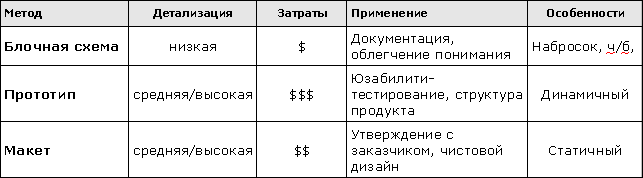
Where to begin?
Before choosing one of the design approaches, you need to:
- identify the problems that you are trying to solve;
- get acquainted with the target audience;
- look at the achievements of competitors in this area;
- establish general product requirements
. This is a minimum. Now think about which of the results will be most suitable for you. Consider your product and team. What will be better for all of you? Formalized documentation, or informal drafts with collaboration, discussions? Do you have time and money for thorough usability testing, or are you going to make a couple of freehand sketches in a local cafe?
What skills do you have? Can you write the code?
Having looked at yourself and the whole team as a whole, you can easily determine the method necessary for you.
You can, of course, take advantage of them all and ... in most cases, you will succeed! Do not be afraid to take this step. Each of the methods has its advantages, and if everything is done correctly, you will get a great design.









