 July 2, 2012 at 13:43
Manage Agile Projects with YouTrack 4.0
Hello, Habr!
 At the end of last week, the long-awaited “major” release of the innovative YouTrack 4.0 bug tracker with the ability to control Agile processes was released. We want to tell you a little more about this functionality.
YouTrack is popular with developers due to its advanced use of keyboard shortcuts, efficient search queries and command syntax, as well as fully customizable Ishu workflows and attributes.
YouTrack 4.0 adds a completely new, independent module for managing Agile processes, which can easily be adapted to the particular implementation of the Scrum methodology or Kanban process in your team. If you are just mastering Agile-processes, this module will be a great help in familiarizing yourself with them, and will also allow you to combine the most convenient for you elements of each process.
YouTrack 4.0 implements the key functionality for managing Agile processes:
1) Agrum Board
Scrum
Kanban
2) Backlog management
Create a backlog for the product (product backlog) or release (release backlog) to conveniently plan and prioritize your tasks throughout the project, release or iteration. Prioritize user stories or tasks in the backlog with a simple drag and drop. Use shortcuts to organize and change your backlog on the fly.
3) Support for several projects on the board
You can conduct several projects on the board at once in one iteration. All that is needed is a common set of version values for these projects.
4) Your personal board
Use the advanced search queries to filter tasks (cards) on the board just like you always did it in YouTrack. For example, filter out those that are not assigned to anyone (#unassigned) or those that have been assigned to you (for: me).
YouTrack also remains loyal to supporting extended keyboard shortcuts. Use shortcuts to move tasks (cards) on the board, add, edit and delete “swimming lanes” and tasks, etc.
In addition, the following has been added to YouTrack 4.0:
By setting up e-mail and jabber notifications “for yourself”, you can control what exactly you should tell your users in the notification when a new one is created, when it has been updated, commented or reassigned. Add your own headline, change the language, redo the text of the message, and much more with the help of Freemarker templates .
Now you can create subtasks for any task (issue). Just add the parent or sublink to the desired task, or in the Tree-View mode, determine its place in the general hierarchy of tasks / subtasks by simply dragging and dropping to the desired level.

Simply drag and drop tasks into the Issues List if you want to change their order, including the order of search results or saved queries. Save your search results to share with your team members.
Work with YouTrack in your personal context. Select any saved search, tag or project in the contextual drop-down list and work in it until you want to switch to another context. If you need to filter tasks at once in all projects in YouTrack, just select Everything as a context. Use the sidebar to pin and pin projects, tags, and saved searches to keep this list compact.
Import users and projects from AgileZen into YouTrack with user stories and their tasks. By default, the story is imported as a feature (feature), and its tasks (tasks) - as subtasks to it.
There is no need to add the user to the list of followers of isha to send him a single notification. Now you can notify the user simply by mentioning his username in the comment to ish.
Sometimes, too many notifications annoy users or team members. Now you can apply commands without sending any notifications.
Of course, this is not a complete list of improvements that we have implemented to make your work with YouTrack easier, faster and more efficient. You can find all release details on the What's new page .
You can try YouTrack for free. Download a free package for 10 users or register YouTrack InCloud located in the JetBrains cloud (a free plan for 9 users is offered).
We thank you for your attention!
Design with pleasure!
At the end of last week, the long-awaited “major” release of the innovative YouTrack 4.0 bug tracker with the ability to control Agile processes was released. We want to tell you a little more about this functionality. YouTrack is popular with developers due to its advanced use of keyboard shortcuts, efficient search queries and command syntax, as well as fully customizable Ishu workflows and attributes.
YouTrack 4.0 adds a completely new, independent module for managing Agile processes, which can easily be adapted to the particular implementation of the Scrum methodology or Kanban process in your team. If you are just mastering Agile-processes, this module will be a great help in familiarizing yourself with them, and will also allow you to combine the most convenient for you elements of each process.
YouTrack 4.0 implements the key functionality for managing Agile processes:
1) Agrum Board
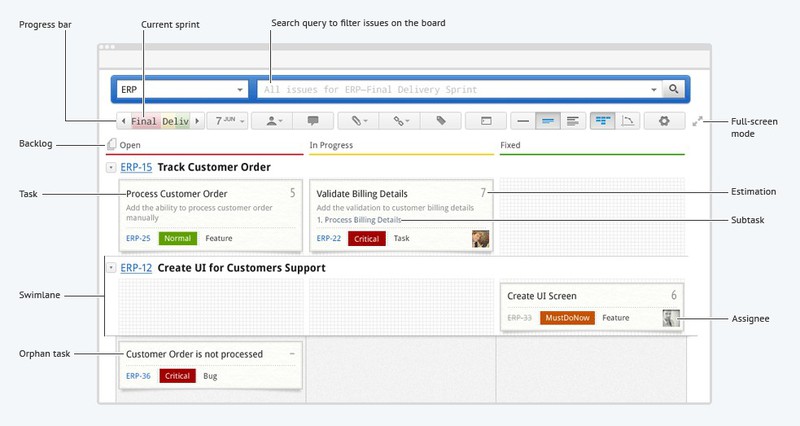
Scrum
- Use the board to visualize your daily activity. Group your tasks related to the implementation of each user story (user story), through the creation of swimlanes - "swimming lanes". Evaluate and move tasks on the board, thus reflecting the progress of the team during the sprint.
- Create sprints (iterations in scrum) and determine the duration of each of them. Plan your sprint by dragging user stories from the backlog onto the board.
- Use the burndown chart to visualize team progress during the sprint.
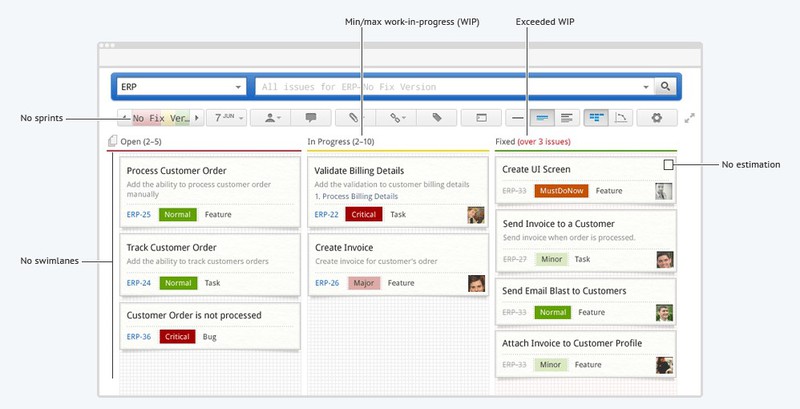
Kanban
- Create different columns on the Kanban board to represent the different stages of your development process. Move your tasks along the board as you work on them.
- Set the minimum and maximum number of “work-in-progress” for each column to control the number of tasks at any stage of development.
- Use the Cumulative Flow graph to identify potential bottlenecks.
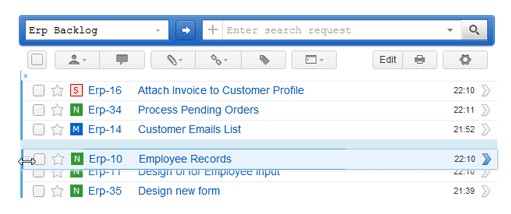
2) Backlog management
Create a backlog for the product (product backlog) or release (release backlog) to conveniently plan and prioritize your tasks throughout the project, release or iteration. Prioritize user stories or tasks in the backlog with a simple drag and drop. Use shortcuts to organize and change your backlog on the fly.
3) Support for several projects on the board
You can conduct several projects on the board at once in one iteration. All that is needed is a common set of version values for these projects.
4) Your personal board
Use the advanced search queries to filter tasks (cards) on the board just like you always did it in YouTrack. For example, filter out those that are not assigned to anyone (#unassigned) or those that have been assigned to you (for: me).
YouTrack also remains loyal to supporting extended keyboard shortcuts. Use shortcuts to move tasks (cards) on the board, add, edit and delete “swimming lanes” and tasks, etc.
In addition, the following has been added to YouTrack 4.0:
- Customizable notification templates
By setting up e-mail and jabber notifications “for yourself”, you can control what exactly you should tell your users in the notification when a new one is created, when it has been updated, commented or reassigned. Add your own headline, change the language, redo the text of the message, and much more with the help of Freemarker templates .
- Arbitrary ordering of tasks, support for subtasks
Now you can create subtasks for any task (issue). Just add the parent or sublink to the desired task, or in the Tree-View mode, determine its place in the general hierarchy of tasks / subtasks by simply dragging and dropping to the desired level.
Simply drag and drop tasks into the Issues List if you want to change their order, including the order of search results or saved queries. Save your search results to share with your team members.
- Global and personal context
Work with YouTrack in your personal context. Select any saved search, tag or project in the contextual drop-down list and work in it until you want to switch to another context. If you need to filter tasks at once in all projects in YouTrack, just select Everything as a context. Use the sidebar to pin and pin projects, tags, and saved searches to keep this list compact.
- Import from AgileZen
Import users and projects from AgileZen into YouTrack with user stories and their tasks. By default, the story is imported as a feature (feature), and its tasks (tasks) - as subtasks to it.
- Notification of users through comments
There is no need to add the user to the list of followers of isha to send him a single notification. Now you can notify the user simply by mentioning his username in the comment to ish.
- Quiet teams
Sometimes, too many notifications annoy users or team members. Now you can apply commands without sending any notifications.
Of course, this is not a complete list of improvements that we have implemented to make your work with YouTrack easier, faster and more efficient. You can find all release details on the What's new page .
You can try YouTrack for free. Download a free package for 10 users or register YouTrack InCloud located in the JetBrains cloud (a free plan for 9 users is offered).
We thank you for your attention!
Design with pleasure!









