 June 15, 2012 at 02:26
Working with USB devices in a C program on MacOS X
Greetings to dear readers.
In this short article, I would like to consider the issue of interacting with equipment (in this case, USB devices) in the MacOS X operating system.
IOKit will be considered a very interesting and useful framework, a way to receive notifications about adding / removing equipment, as well as receiving complete information about devices. Of course, this material does not claim any uniqueness, because everyone can deal with these issues on their own, having studied the Apple documentation, as well as having smoked a variety of sources at opensource.apple.com
My article is an attempt to fill in the gap in Russian-language material of this kind and describe some rake that newcomers may encounter.
Everyone who is interested - welcome to cat.
IOKit.
There is a wonderful thing in the MacOS X kernel - the IOKit framework. This is an object-oriented C ++ framework designed specifically to support the hardware driver infrastructure. True, C ++ is somewhat truncated there, for example, there are no exceptions, RTTI, templates. The rest of the kernel is written primarily in C.
IOKit itself can be divided into two parts: the kernel framework itself, on which the drivers are written, and the user-specific IOKit.framework, designed for easy access to kernel modules (and therefore hardware) from user applications.
The object-oriented nature of IOKit allows you to conveniently display the real physical model of equipment: a USB device is connected, via a USB port it is connected to the hub, the hub is connected to the corresponding controller in the computer, this controller is connected to the rest of the motherboard chipset via the PCI bus. Each IOKit driver in this model is either an end node (for example, a USB modem) or a connecting module (for example, a USB port controller), in Apple's terminology, the latter is called nub.
The Xcode package includes the graphical utility IORegExplorer, which allows you to view the entire structure of IOKit modules, read a variety of parameters and technical information.
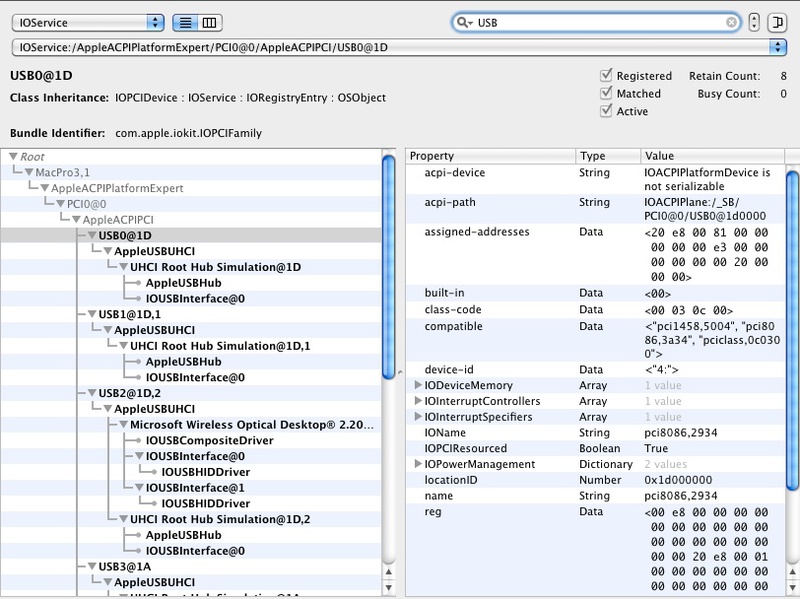
There is also a console analogue of the utility - ioreg.
This article will only deal with user-specific IOKit.framework. If any of the readers are interested in the kernel framework, you can read the article habrahabr.ru/post/36875 , as well as the wonderful book OS X and iOS Kernel Programming.
Receiving USB notifications
As mentioned above, we will work with USB, so we need only one header file
To begin with, we subscribe to receive notifications about adding / removing USB devices. A special object like IONotificationPortRef will help us with this.
Create and initialize an instance of IONotificationPortRef
We created a kind of virtual port for listening to events from IOKit (it has not yet been determined which ones). kIOMasterPortDefault is a constant that defines a certain default port for receiving messages from IOKit, always use this value.
Now we will determine which messages we want to receive. To do this, create the so-called dictionary using the appropriate container of the MacOS X base framework.
The key method here is IOServiceMatching, which creates a dictionary of USB class devices, I think this is obvious (there are other constants, for example, for FireWire and the like, which allow receiving notifications). Next, we "take" the ownership of this object using CFRetain. This is necessary so that there would be no problems with the possible double release of the object in the IOKit framework methods. Actually, we don’t need to free this object ourselves, in other cases, never forget to call CFRelease for objects allocated in the heap (not received by any Get * method). Also, always check, freshly created / freshly received * Ref objects of the base framework, for NULL, as these are, in fact, ordinary pointers and you need to work with them accordingly.
Next, “hang” this dictionary on a previously created port, as matching notification. This is done by the IOServiceAddMatchingNotification method.
Consider it carefully
The first parameter to notifyPort is the actual port we created earlier.
The second notificationType parameter is the type of notifications for this dictionary, such as kIOTerminatedNotification , kIOMatchedNotification , kIOFirstMatchNotification . I think that from the names of these constants it is quite clear what they mean.
The third parameter matching is the dictionary itself. The type of the object, as you can see, is CFDictionaryRef. This is not a problem because CFMutableDictionaryRef is easily cast to CFDictionaryRef.
Fourth callback method- The most interesting. This is a pointer to a callback method that is called when the corresponding event arrives. About him a little lower.
The fifth parameter refCon is the context of the callback method, here you can transfer your data to this function.
The last notification parameter is an iterator designed to iterate over the device collection, this argument is initialized in IOServiceAddMatchingNotification and is also passed to the callback method, indicating the very first device in the collection.
If successful, IOServiceAddMatchingNotification returns zero, otherwise a positive number, an error code.
The callback function is defined as follows:
As you can see, the function accepts the very last two arguments from IOServiceAddMatchingNotification.
We need to declare two such functions - to add and remove devices
And now, finally, configure the notifications.
No additional method initialization is required and be sure to check the result code after each call to IOServiceAddMatchingNotification.
Now we need to configure the stream with a loop in which our listener will spin. MacOS X provides a corresponding object for these purposes - CFRunLoop. For normal operation of this object, you must specify the so-called source and start in the context of the current or some other stream, and after the work is done, stop it.
Let's do it like this:
In this case, we add the notification source using the special IONotificationPortGetRunLoopSource method, use our notification port, in addition, we specify the identifier of the required stream - in this case, the current stream CFRunLoopGetCurrent ()
Further, this stream can start and start receiving notifications. But there is one caveat that everything works - callback methods need to be called once manually, as if "testing" the collection. If this is not done, notifications will not come.
The start of the thread is performed by the CFRunLoopRun () method; Everything, at this point, code execution will not go any further. This cycle can only be stopped using CFRunLoopStop, by argument, this method is passed the identifier of the thread where CFRunLoopRun was launched, actually the value that returned above CFRunLoopGetCurrent. In a multi-threaded environment, I recommend that you keep this value in order to be able to stop RunLoop from the context of another thread, simply by specifying the correct, saved identifier.
After stopping the flow, you need to tidy up a bit:
Getting information about USB devices
So, we learned how to receive notifications about adding / removing USB devices, now let's see how you can get all the information about devices directly in callback methods.
In a good way, both methods should be reduced to calling one method iterate_usb_devices
Here we go through the device collection using the passed iterator and IOIteratorNext, after using the object, you need to free it in IOObjectRelease.
Each received usbDevice object is the source of all the necessary information. The simplest example:
If successful, a readable device name, such as “Novatel wireless modem,” will be displayed. io_name_t is essentially a regular char array.
Another example, getting the full path to the device, in the IOKit hierarchy:
These are the simplest cases, because the usbDevice object is associated with a whole dictionary of various parameters in the form of a key-value pair. Using the corresponding keys, you can get the corresponding parameter values, for example, get the device’s VendorID.
This method looks for the corresponding parameter by a string key, in this case “idVendor” (CFSTR is a MacOS X framework method that quickly converts a C-string to an internal object of type CFStringRef)
IORegistryEntrySearchCFProperty returns NULL if the search was unsuccessful, or a pointer to an object of the type you are looking for, in this case, CFNumberRef. To "fetch" a normal numerical value from CFNumberRef, you must use the following:
Getting the “ProductID” is done in exactly the same way, only the “idProduct” line should be used as a key.
Of course, the list of parameters and the corresponding keys can vary greatly from device to device. The reader may have a corresponding question - how to find out which parameters and by which keys to look for in this device and how to display all the values at once?
This is done quite simply:
If this method is successfully completed, we will have at our disposal a dictionary filled with all the keys / values of the device.
The easiest way, now, to print this dictionary on the screen is the CFShow framework. A couple of words about it, CFShow is a universal method for emulating any CoreFoundation Framework objects in MacOS X - CFMutableDictionaryRef, CFStringRef, CFNumberRef, etc. The output is done in stderr.
So, we display the contents of the dictionary on the screen:
Now we have a list of all keys and all parameters for this device and we can use this knowledge to get specific values in the form of specific objects (either through IORegistryEntrySearchCFProperty, or directly from the dictionary, using the methods for working with dictionaries)
Working application.
Now I would like to give an example of a small application containing everything that is described above. Among other things, I decided to add signal processing to this example in order to be able to correctly complete the application using Ctrl-C.
Note: In real projects, never perform such actions in the signal handler, why, you can read, for example, in this message
Compilation of the application is performed by a command,
or the
result of both commands will be identical.
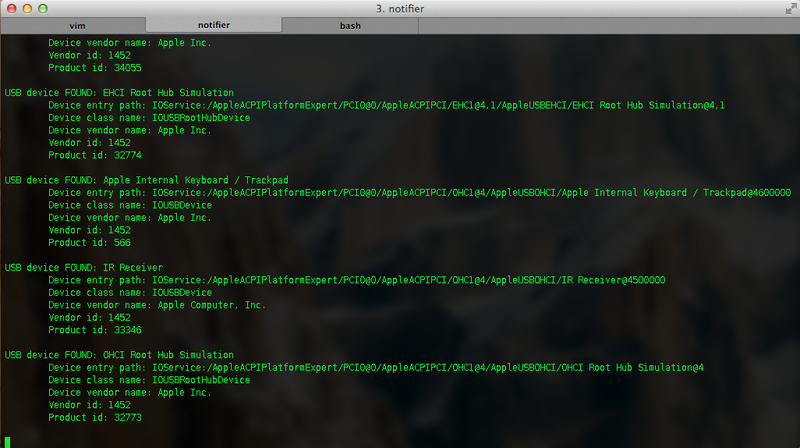
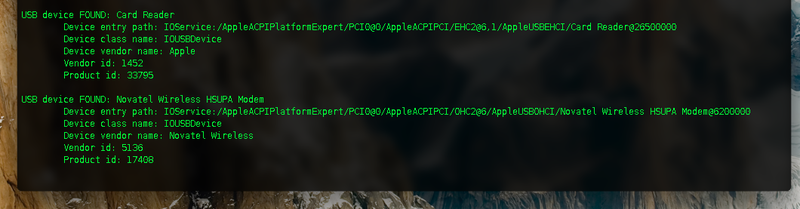
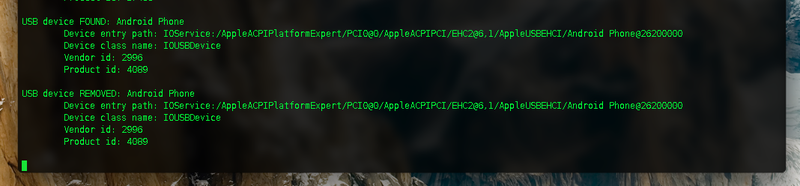
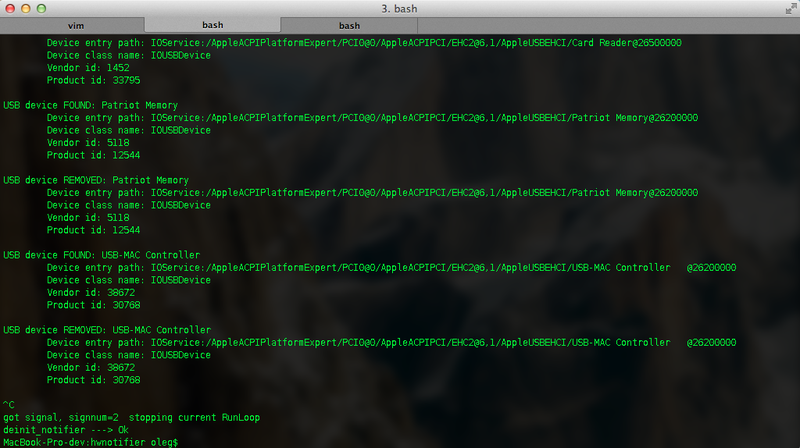
Below you can see screenshots of a running application with information about connected and disconnected devices

References:
goo.gl/LRyIr
goo.gl/O1Oyk
goo.gl/NQUtL
goo.gl/daEiS
goo.gl/7jkUs
goo.gl/yeJre
www.amazon .com / OS-X-iOS-Kernel-Programming / dp / 1430235365
habrahabr.ru/post/36875
Thank you for your attention.
In this short article, I would like to consider the issue of interacting with equipment (in this case, USB devices) in the MacOS X operating system.
IOKit will be considered a very interesting and useful framework, a way to receive notifications about adding / removing equipment, as well as receiving complete information about devices. Of course, this material does not claim any uniqueness, because everyone can deal with these issues on their own, having studied the Apple documentation, as well as having smoked a variety of sources at opensource.apple.com
My article is an attempt to fill in the gap in Russian-language material of this kind and describe some rake that newcomers may encounter.
Everyone who is interested - welcome to cat.
IOKit.
There is a wonderful thing in the MacOS X kernel - the IOKit framework. This is an object-oriented C ++ framework designed specifically to support the hardware driver infrastructure. True, C ++ is somewhat truncated there, for example, there are no exceptions, RTTI, templates. The rest of the kernel is written primarily in C.
IOKit itself can be divided into two parts: the kernel framework itself, on which the drivers are written, and the user-specific IOKit.framework, designed for easy access to kernel modules (and therefore hardware) from user applications.
The object-oriented nature of IOKit allows you to conveniently display the real physical model of equipment: a USB device is connected, via a USB port it is connected to the hub, the hub is connected to the corresponding controller in the computer, this controller is connected to the rest of the motherboard chipset via the PCI bus. Each IOKit driver in this model is either an end node (for example, a USB modem) or a connecting module (for example, a USB port controller), in Apple's terminology, the latter is called nub.
The Xcode package includes the graphical utility IORegExplorer, which allows you to view the entire structure of IOKit modules, read a variety of parameters and technical information.
There is also a console analogue of the utility - ioreg.
This article will only deal with user-specific IOKit.framework. If any of the readers are interested in the kernel framework, you can read the article habrahabr.ru/post/36875 , as well as the wonderful book OS X and iOS Kernel Programming.
Receiving USB notifications
As mentioned above, we will work with USB, so we need only one header file
#include To begin with, we subscribe to receive notifications about adding / removing USB devices. A special object like IONotificationPortRef will help us with this.
Create and initialize an instance of IONotificationPortRef
IONotificationPortRef notificationPort = IONotificationPortCreate(kIOMasterPortDefault);
We created a kind of virtual port for listening to events from IOKit (it has not yet been determined which ones). kIOMasterPortDefault is a constant that defines a certain default port for receiving messages from IOKit, always use this value.
Now we will determine which messages we want to receive. To do this, create the so-called dictionary using the appropriate container of the MacOS X base framework.
CFMutableDictionaryRef matchDict = (CFMutableDictionaryRef) CFRetain(IOServiceMatching(kIOUSBDeviceClassName));
The key method here is IOServiceMatching, which creates a dictionary of USB class devices, I think this is obvious (there are other constants, for example, for FireWire and the like, which allow receiving notifications). Next, we "take" the ownership of this object using CFRetain. This is necessary so that there would be no problems with the possible double release of the object in the IOKit framework methods. Actually, we don’t need to free this object ourselves, in other cases, never forget to call CFRelease for objects allocated in the heap (not received by any Get * method). Also, always check, freshly created / freshly received * Ref objects of the base framework, for NULL, as these are, in fact, ordinary pointers and you need to work with them accordingly.
Next, “hang” this dictionary on a previously created port, as matching notification. This is done by the IOServiceAddMatchingNotification method.
Consider it carefully
kern_return_t IOServiceAddMatchingNotification(
    IONotificationPortRef notifyPort,
    const io_name_t notificationType,
    CFDictionaryRef matching,
    IOServiceMatchingCallback callback,
    void *refCon,
    io_iterator_t *notification );
The first parameter to notifyPort is the actual port we created earlier.
The second notificationType parameter is the type of notifications for this dictionary, such as kIOTerminatedNotification , kIOMatchedNotification , kIOFirstMatchNotification . I think that from the names of these constants it is quite clear what they mean.
The third parameter matching is the dictionary itself. The type of the object, as you can see, is CFDictionaryRef. This is not a problem because CFMutableDictionaryRef is easily cast to CFDictionaryRef.
Fourth callback method- The most interesting. This is a pointer to a callback method that is called when the corresponding event arrives. About him a little lower.
The fifth parameter refCon is the context of the callback method, here you can transfer your data to this function.
The last notification parameter is an iterator designed to iterate over the device collection, this argument is initialized in IOServiceAddMatchingNotification and is also passed to the callback method, indicating the very first device in the collection.
If successful, IOServiceAddMatchingNotification returns zero, otherwise a positive number, an error code.
The callback function is defined as follows:
typedef void (*IOServiceMatchingCallback)(void *refcon, io_iterator_t iterator);As you can see, the function accepts the very last two arguments from IOServiceAddMatchingNotification.
We need to declare two such functions - to add and remove devices
void usb_device_added(void* refcon, io_iterator_t iterator)
{
}
void usb_device_removed(void* refcon, io_iterator_t iterator)
{
}
And now, finally, configure the notifications.
kern_return_t result;
io_iterator_t deviceAddedIter;
io_iterator_t deviceRemovedIter;
result = IOServiceAddMatchingNotification(notificationPort, kIOMatchedNotification, matchDict, usb_device_added, NULL, &deviceAddedIter);
...
result = IOServiceAddMatchingNotification(notificationPort, kIOTerminatedNotification, matchDict, usb_device_removed, NULL, &deviceRemovedIter);
No additional method initialization is required and be sure to check the result code after each call to IOServiceAddMatchingNotification.
Now we need to configure the stream with a loop in which our listener will spin. MacOS X provides a corresponding object for these purposes - CFRunLoop. For normal operation of this object, you must specify the so-called source and start in the context of the current or some other stream, and after the work is done, stop it.
Let's do it like this:
CFRunLoopAddSource(CFRunLoopGetCurrent(), IONotificationPortGetRunLoopSource(notificationPort), kCFRunLoopDefaultMode);
In this case, we add the notification source using the special IONotificationPortGetRunLoopSource method, use our notification port, in addition, we specify the identifier of the required stream - in this case, the current stream CFRunLoopGetCurrent ()
Further, this stream can start and start receiving notifications. But there is one caveat that everything works - callback methods need to be called once manually, as if "testing" the collection. If this is not done, notifications will not come.
The start of the thread is performed by the CFRunLoopRun () method; Everything, at this point, code execution will not go any further. This cycle can only be stopped using CFRunLoopStop, by argument, this method is passed the identifier of the thread where CFRunLoopRun was launched, actually the value that returned above CFRunLoopGetCurrent. In a multi-threaded environment, I recommend that you keep this value in order to be able to stop RunLoop from the context of another thread, simply by specifying the correct, saved identifier.
After stopping the flow, you need to tidy up a bit:
CFRunLoopRemoveSource(CFRunLoopGetCurrent(), IONotificationPortGetRunLoopSource(notificationPort), kCFRunLoopDefaultMode);
IONotificationPortDestroy(notificationPort);
Getting information about USB devices
So, we learned how to receive notifications about adding / removing USB devices, now let's see how you can get all the information about devices directly in callback methods.
In a good way, both methods should be reduced to calling one method iterate_usb_devices
void iterate_usb_devices(io_iterator_t iterator)
{
	io_service_t usbDevice;
	while ((usbDevice = IOIteratorNext(iterator))) {
		....
		IOObjectRelease(usbDevice);
	}
}
Here we go through the device collection using the passed iterator and IOIteratorNext, after using the object, you need to free it in IOObjectRelease.
Each received usbDevice object is the source of all the necessary information. The simplest example:
io_name_t devicename;
if (IORegistryEntryGetName(usbDevice, devicename) != KERN_SUCCESS) == KERN_SUCCESS) {
	printf("Device name: %s\n", devicename);
}
If successful, a readable device name, such as “Novatel wireless modem,” will be displayed. io_name_t is essentially a regular char array.
Another example, getting the full path to the device, in the IOKit hierarchy:
io_name_t entrypath;
if (IORegistryEntryGetPath(usbDevice, kIOServicePlane, entrypath) == KERN_SUCCESS) {
	printf("\tDevice entry path: %s\n", entrypath);
}
These are the simplest cases, because the usbDevice object is associated with a whole dictionary of various parameters in the form of a key-value pair. Using the corresponding keys, you can get the corresponding parameter values, for example, get the device’s VendorID.
CFNumberRef vendorId = (CFNumberRef) IORegistryEntrySearchCFProperty(usbDevice
								, kIOServicePlane
								, CFSTR("idVendor")
								, NULL
								, kIORegistryIterateRecursively | kIORegistryIterateParents);
This method looks for the corresponding parameter by a string key, in this case “idVendor” (CFSTR is a MacOS X framework method that quickly converts a C-string to an internal object of type CFStringRef)
IORegistryEntrySearchCFProperty returns NULL if the search was unsuccessful, or a pointer to an object of the type you are looking for, in this case, CFNumberRef. To "fetch" a normal numerical value from CFNumberRef, you must use the following:
int result;
if (CFNumberGetValue(vendorId, kCFNumberSInt32Type, &result)) {
	printf("VendorID: %i\n", result);
}
Getting the “ProductID” is done in exactly the same way, only the “idProduct” line should be used as a key.
Of course, the list of parameters and the corresponding keys can vary greatly from device to device. The reader may have a corresponding question - how to find out which parameters and by which keys to look for in this device and how to display all the values at once?
This is done quite simply:
CFMutableDictionaryRef properties;
IORegistryEntryCreateCFProperties(usbDevice, &properties, kCFAllocatorDefault, 0);
If this method is successfully completed, we will have at our disposal a dictionary filled with all the keys / values of the device.
The easiest way, now, to print this dictionary on the screen is the CFShow framework. A couple of words about it, CFShow is a universal method for emulating any CoreFoundation Framework objects in MacOS X - CFMutableDictionaryRef, CFStringRef, CFNumberRef, etc. The output is done in stderr.
So, we display the contents of the dictionary on the screen:
CFShow(properties);
Now we have a list of all keys and all parameters for this device and we can use this knowledge to get specific values in the form of specific objects (either through IORegistryEntrySearchCFProperty, or directly from the dictionary, using the methods for working with dictionaries)
Working application.
Now I would like to give an example of a small application containing everything that is described above. Among other things, I decided to add signal processing to this example in order to be able to correctly complete the application using Ctrl-C.
Note: In real projects, never perform such actions in the signal handler, why, you can read, for example, in this message
#include
#include
#include
#include
static IONotificationPortRef notificationPort;
void usb_device_added(void* refcon, io_iterator_t iterator);
void usb_device_removed(void* refcon, io_iterator_t iterator);
void init_notifier()
{
	notificationPort = IONotificationPortCreate(kIOMasterPortDefault);
	CFRunLoopAddSource(CFRunLoopGetCurrent(), IONotificationPortGetRunLoopSource(notificationPort), kCFRunLoopDefaultMode);
	printf("init_notifier ---> Ok\n");
}
void configure_and_start_notifier()
{
	printf("Starting notifier...\n\n");
	CFMutableDictionaryRef matchDict = (CFMutableDictionaryRef) CFRetain(IOServiceMatching(kIOUSBDeviceClassName));
	if (!matchDict) {
		fprintf(stderr, "Failed to create matching dictionary for kIOUSBDeviceClassName\n");
		return;
	}
	kern_return_t addResult;
	io_iterator_t deviceAddedIter;
	addResult = IOServiceAddMatchingNotification(notificationPort, kIOMatchedNotification, matchDict, usb_device_added, NULL, &deviceAddedIter);
	if (addResult != KERN_SUCCESS) {
		fprintf(stderr, "IOServiceAddMatchingNotification failed for kIOMatchedNotification\n");
		return;
	}
	usb_device_added(NULL, deviceAddedIter);
	io_iterator_t deviceRemovedIter;
	addResult = IOServiceAddMatchingNotification(notificationPort, kIOTerminatedNotification, matchDict, usb_device_removed, NULL, &deviceRemovedIter);
	if (addResult != KERN_SUCCESS) {
		fprintf(stderr, "IOServiceAddMatchingNotification failed for kIOTerminatedNotification\n");
		return;
	}
	usb_device_removed(NULL, deviceRemovedIter);
	CFRunLoopRun();
}
void deinit_notifier()
{
	CFRunLoopRemoveSource(CFRunLoopGetCurrent(), IONotificationPortGetRunLoopSource(notificationPort), kCFRunLoopDefaultMode);
	IONotificationPortDestroy(notificationPort);
	printf("deinit_notifier ---> Ok\n");
}
void signal_handler(int signum)
{
	printf("\ngot signal, signnum=%i  stopping current RunLoop\n", signum);
	CFRunLoopStop(CFRunLoopGetCurrent());
}
void init_signal_handler()
{
	signal(SIGINT,  signal_handler);
	signal(SIGQUIT, signal_handler);
	signal(SIGTERM, signal_handler);
}
int main()
{
	init_signal_handler();
	init_notifier();
	configure_and_start_notifier();
	deinit_notifier();
	return 0;
}
void print_cfstringref(const char* prefix, CFStringRef cfVal)
{
	char* cVal = malloc(CFStringGetLength(cfVal) * sizeof(char));
	if (!cVal) {
		return;
	}
	if (CFStringGetCString(cfVal, cVal, CFStringGetLength(cfVal) + 1, kCFStringEncodingASCII)) {
		printf("%s %s\n", prefix, cVal);
	}
	free(cVal);
}
void print_cfnumberref(const char* prefix, CFNumberRef cfVal)
{
	int result;
	if (CFNumberGetValue(cfVal, kCFNumberSInt32Type, &result)) {
		printf("%s %i\n", prefix, result);
	}
}
void get_usb_device_info(io_service_t device, int newdev)
{
	io_name_t devicename;
	io_name_t entrypath;
	io_name_t classname;
	if (IORegistryEntryGetName(device, devicename) != KERN_SUCCESS) {
		fprintf(stderr, "%s unknown device (unable to get device name)\n", newdev ? "Added " : " Removed");
		return;
	}
	printf("USB device %s: %s\n", newdev ? "FOUND" : "REMOVED", devicename);
	if (IORegistryEntryGetPath(device, kIOServicePlane, entrypath) == KERN_SUCCESS) {
		printf("\tDevice entry path: %s\n", entrypath);
	}
	if (IOObjectGetClass(device, classname) == KERN_SUCCESS) {
		printf("\tDevice class name: %s\n", classname);
	}
	CFStringRef vendorname = (CFStringRef) IORegistryEntrySearchCFProperty(device
							, kIOServicePlane
							, CFSTR("USB Vendor Name")
							, NULL
							, kIORegistryIterateRecursively | kIORegistryIterateParents);
	if (vendorname) {
		print_cfstringref("\tDevice vendor name:", vendorname);
	}
	CFNumberRef vendorId = (CFNumberRef) IORegistryEntrySearchCFProperty(device
							, kIOServicePlane
							, CFSTR("idVendor")
							, NULL
							, kIORegistryIterateRecursively | kIORegistryIterateParents);
	if (vendorId) {
		print_cfnumberref("\tVendor id:", vendorId);
	}
	CFNumberRef productId = (CFNumberRef) IORegistryEntrySearchCFProperty(device
							, kIOServicePlane
							, CFSTR("idProduct")
							, NULL
							, kIORegistryIterateRecursively | kIORegistryIterateParents);
	if (productId) {
		print_cfnumberref("\tProduct id:", productId);
	}
	printf("\n");
}
void iterate_usb_devices(io_iterator_t iterator, int newdev)
{
	io_service_t usbDevice;
	while ((usbDevice = IOIteratorNext(iterator))) {
		get_usb_device_info(usbDevice, newdev);
		IOObjectRelease(usbDevice);
	}
}
void usb_device_added(void* refcon, io_iterator_t iterator)
{
	iterate_usb_devices(iterator, 1);
}
void usb_device_removed(void* refcon, io_iterator_t iterator)
{
	iterate_usb_devices(iterator, 0);
}
Compilation of the application is performed by a command,
gcc usbnotify.c -framework IOKit -framework Foundation -o notifieror the
clang usbnotify.c -framework IOKit -framework Foundation -o notifierresult of both commands will be identical.
Below you can see screenshots of a running application with information about connected and disconnected devices
References:
goo.gl/LRyIr
goo.gl/O1Oyk
goo.gl/NQUtL
goo.gl/daEiS
goo.gl/7jkUs
goo.gl/yeJre
www.amazon .com / OS-X-iOS-Kernel-Programming / dp / 1430235365
habrahabr.ru/post/36875
Thank you for your attention.









