May 14, 2012 at 13:29
JetBrains decompiler: dotPeek 1.0 release
 Good afternoon, Khabrovites! The free decompiler and assembly manager from JetBrains went public - a few days ago the official release of dotPeek 1.0 became available on our website .
 dotPeek , which we wrote about on Habré about a year ago, when the first public builds of the product appeared, is a tool that combines high-quality decompilation with advanced navigation and search in the manner of ReSharper, our notorious extension for Visual Studio. Today we bring to your attention an authorized translation of news on the release of this product.
The main features of dotPeek 1.0 are:
- Decompiling .NET Framework 1.0-4.5 assemblies into equivalent C # code . Supported libraries (.dll), executable files (.exe), as well as Windows 8 metadata files (.winmd). In addition, dotPeek can search for assemblies in the directories that you specify for it, and it opens various kinds of archives: both .zip and related formats .vsix and .nupkg.
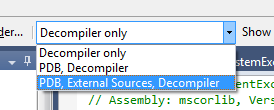
- The ability to connect to servers of symbols and code, which allows you to download and display the source code when it can be detected . In the end, decompilation is good, but the source is better, isn't it? If you allow the program to search for PDB files or a code server, dotPeek will be able to get the source code corresponding to the versions of the assemblies being viewed, and show it in its original form. By default, dotPeek can access Microsoft Reference Source Code Center and SymbolSource.org servers .
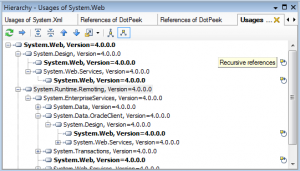
- A quick overview of the structure and hierarchy of the code . This is achieved, in particular, due to the File Structure functions borrowed from ReSharper to review the structure of an open file and Type Hierarchy to analyze type inheritance. In addition, there is a References Hierarchy function that helps you learn the relationships between assemblies.
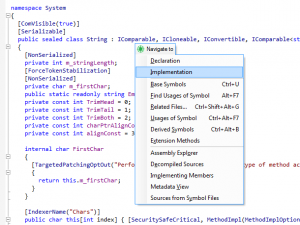
- Numerous search and navigation features taken from ReSharper . Among them are Go to Type (quick transition to a specific type), Go to Symbol (quick transition to any character in loaded assemblies), Go to File Member (review, filtering and transition to class members), as well as the whole set of context-sensitive navigation , including the transition from a symbol to its decorations, implementations, basic symbols and heirs.
- Call search - here, again, it could not do without the search and highlighting function of calls that came from ReSharper.
- Familiar keyboard shortcuts for most commands: There are two keyboard schemes, Visual Studio and IntelliJ IDEA, which help users of ReSharper and other JetBrains tools feel in a familiar environment.
You can learn more about dotPeek 1.0 features from the functionality overview on the product website . In addition, we highly recommend that you watch a video shot by our evangelist James Kovaks and published on the jetbrains.tv video portal.
If you are interested in trying our decompiler in combat, you can download it here . Hope you enjoy!