 May 14, 2012 at 11:46
Simple universal javascript switch
 When developing sites, it is often necessary to switch their state, usually pseudo-links are used for this: hide or show the tooltip, input field, another part of the page.
 You can write JavaScript code and styles for it each time, but over time, this leads to the growth of the code, which we encountered at some point.
However, the problem can be solved much more elegantly. The solution considered below is simple and does not require the subsequent participation of a JavaScript programmer, since the typesetter will be able to independently make the necessary changes to the styles.
Principle of operation
The solution was proposed by our developer Pavel Dovbush aka dpp : in the HTML code, the jst ( JavaScript toggle ) class is registered on the switching element , and jsw ( JavaScript wrapper ) on the parent element within which the changes occur .
The proposed script tracks clicks on elements with the jst class and switches a specific class on the wrapping element with the jsw class . By default, this is the jse class ( JavaScript enable ), but a different name may be specified for it in the rel attribute . Other classes on the element are not affected.
The following is a code that is intentionally simplified to demonstrate the idea, but it is easy to supplement or transfer it to the framework used to support Internet Explorer version 8 and lower.
// Отслеживание щелчков.
document.addEventListener('click', clickEvent, false);
function clickEvent(e) {
   /* Если это щелчок по .jst, выполняется
      функция переключателя toggle(). */
   if (e.target && /(^|\s)jst(\s|$)/.test(e.target.className)) {
       toggle(e.target);
       // Отмена действия по умолчанию (например, перехода по ссылке).
       e.preventDefault();
   }
}
function toggle(el) {
   var cls = el.rel || 'jse',
       // Регулярное выражение для поиска и замены класса.
       rcls = new RegExp('(^|\\s)' + cls + '(?=\\s|$)');
   // Поиск оборачивающего элемента.
   do {
       el = el.parentNode;
       if (!el) return; // Если не найден - делать нечего.
   } while(!/(^|\s)jsw(\s|$)/.test(el.className));
   // Переключение класса.
   if (rcls.test(el.className)) {
       el.className = el.className.replace(rcls, '');
   } else {
       el.className += ' ' + cls;
   }
}
The click event handler "hangs" immediately on the document node using the " event bubbling ". This technique allows you to track clicks anywhere in the document, does not require its full download ( document already exists when scripts are run) and starts working immediately after JavaScript is executed containing this code. At the same time, the page initialization speed increases due to getting rid of a series of slow DOM requests for “hanging” event handlers, which would be inevitable with the traditional approach.
The rel attribute in the above code is specified directly through the dot, however, this option only works with links. To retrieve the attribute of any element, use the methodgetAttribute () . From the point of view of semantics, it would be more correct to use the data- * attributes from HTML5, the consideration of which is beyond the scope of this article.
For standard switching options, it is reasonable to define standard styles. In Badoo, classes like jsh, jsb, jseh, jseb are used for this :
.js .jsb,
.js .jse .jseb { display: block }
.js .jsi,
.js .jse .jsei { display: inline }
.jsb, .jsi,
.js .jsh,
.js .jse .jseh { display: none }
The js class is added by the script immediately upon execution, providing a separation of the style depending on whether JavaScript is enabled or disabled:
document.documentElement.className += ' js'
The jsi and jsb classes enable when running JavaScript the display of inline and block elements, respectively, jsh - on the contrary, hides it. The jsei , jseb, and jseh classes work the same as the js counterparts in the presence of the jse class .
Using these classes, you can flexibly control the behavior of the page, while ensuring “graceful degradation” (English graceful degradation ) in the case of JavaScript turned off in the browser.
Examples of using
On the Badoo website, it is not necessary to indicate the real name and surname in the block of basic information about yourself. For this reason, the designer decided to hide these fields under the pseudo-link:
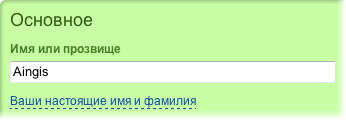
After clicking on the text, the fields appear, and the pseudo-link itself disappears (the width of the form in the image is reduced).

This can be achieved, for example, using the following HTML code:
Ваши настоящие имя и фамилияThe change class on the pseudo-link sets the appearance, jsi shows it when JavaScript is enabled, and jseh hides it after switching. Using the jsh class, fields are hidden when JavaScript is enabled, and jseb makes them visible after switching.
This ensures the operation of the hiding pseudo-link. Nevertheless, when the scripts are turned off in the browser, optional fields will be displayed, so the whole form will remain available.
As you can see from the example, the switch is not necessary to use only for round-trip operation. It can also be used in the case of unilateral actions, such as showing optional fields.
Other examples of use on the site:
- By clicking on the appropriate text, you can familiarize yourself with the terms of the paid service.

Sample HTML:
The jsh class hides the text in small print, and jseb provides a display by clicking on the switch - the "Terms of Use" pseudo-link.Стоимость услуги – 100 кредитов. Они будут сняты с вашего счета. Условия пользования
Нажимая на "Поднять наверх!", с вашего аккаунта Badoo будет списано 100 кредитов…
- If you click on the caption for the photo, a description edit box will appear. The Cancel pseudo-link returns to its original state.

Extended use
However, a simple switch is not always enough, sometimes it is necessary to switch between three or more states, or change something in the form to be filled out depending on the user's choice from the proposed options (using radio buttons).
The function is easy to modify for this use. To do this, the jss class is defined , by clicking on the element with which, on the parent element with the jsw class, the class will be overwritten with the value from the rel or value attribute . This option should already be used carefully, since any other class on the element, except jsw , will be overwritten.
function clickEvent(e) {
    if (!e.target) return;
    // Если это щелчок по .jst, выполняется
    // функция переключателя toggle().
    if (/(^|\s)jst(\s|$)/.test(e.target.className)) {
        toggle(e.target);
        // Отмена действия по умолчанию (перехода по ссылке).
        e.preventDefault();
        e.stopPropagation();
    }
    // Если щелчок по .jss, в функцию toggle()
    // передаётся соответствующий параметр.
    if (/(^|\s)jss(\s|$)/.test(e.target.className)) {
        toggle(e.target, true);
        // В случае чекбоксов и радиокнопок
        // нужно дать кнопкам переключиться.
        if (e.target.tagName != 'INPUT') {
            e.preventDefault();
            e.stopPropagation();
        }
    }
}
function toggle(el, set) {
    var cls = el.rel || (el.nodeName == 'INPUT' ?
                        'jse_' + el.value : 'jse');
    // Поиск оборачивающего элемента.
    do {
        el = el.parentNode;
        if (!el) return; // Если не найден - делать нечего.
    } while(!/(^|\s)jsw(\s|$)/.test(el.className));
    if (set) {
        // Установка класса (.jss).
        el.className = 'jsw ' + cls;
    } else {
        // Регулярное выражение для поиска и замены класса.
        var rcls = new RegExp('(^|\\s)' + cls + '(?=\\s|$)');
        // Переключение класса (.jst).
        if (rcls.test(el.className)) {
            el.className = el.className.replace(rcls, '');
        } else {
            el.className += ' ' + cls;
        }
    }
}
Usage example
Badoo users can give each other presents, and there are several overlapping sets to help you choose one. For example, a cherry is present in all sets, and a soccer ball is only in a friendly and complete one.
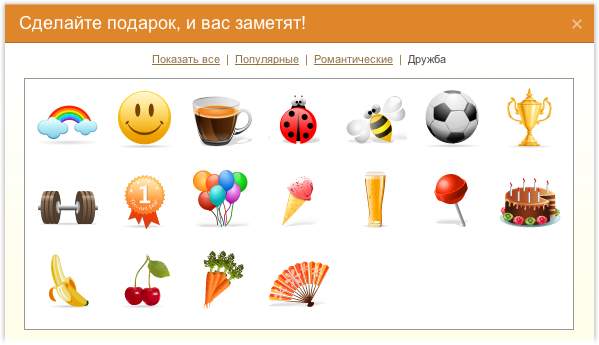
Somewhat simplified, the HTML looks like this:
Показать всеПопулярныеРомантическиеДружба

Each gift is represented by an element.
with a picture of the gift inside, and additional classes of the element determine their belonging to a particular group.
With our function, only the following styles are needed to control the switching of these sets:
An example of using the function with radio buttons can serve as a form of booking tickets (unfortunately, we did not find an equally clear example). Depending on the booking of one-way or round-trip tickets, the return date field is displayed or missing.

Sample HTML code:
With the specified code, hiding the return date field can be provided with only one line in CSS:
Instead of reinventing the wheel every time, you can generalize the class of problems that arise and find a universal solution that satisfies them in 80% of cases.
The function considered in this article allows you to solve many typical tasks of switching some elements on a page using the forces of only a layout designer, without overloading the JavaScript code and not distracting the resources of JavaScript programmers. The volume of CSS code also decreases as a result.
Nevertheless, there are cases when the use of this function is impossible: for example, automatic focus on the displayed field (although the autofocus attribute in new browsers solves this problem) or dynamically loading parts of the page using AJAX requests.
Also, with a large number of switchable items, for example, with a huge number of various tabs, the CSS code may be unreasonably bloated - so much so that it makes sense to consider other solutions.
The advantages of this function are simplicity and versatility. It can work in all browsers that run JavaScript, has all the features for "elegant degradation" in the case of idle scripts and does not require any extra elements and "hacks", unlike the method using hiddenand CSS3 selectors : checked .
Update: At the request of workers, several examples are laid out here .
Leo Solntsev Aingis , web developer of Badoo
With our function, only the following styles are needed to control the switching of these sets:
.gift_items .giftframe {
    display:none;
}
.all .gift_items .giftframe,
.popular .gift_items .popular,
.romantic .gift_items .romantic,
.friendship .gift_items .friendship { display:inline-block; }
An example of using the function with radio buttons can serve as a form of booking tickets (unfortunately, we did not find an equally clear example). Depending on the booking of one-way or round-trip tickets, the return date field is displayed or missing.
Sample HTML code:
With the specified code, hiding the return date field can be provided with only one line in CSS:
.jse_oneway .back_date { display:none }
Conclusion
Instead of reinventing the wheel every time, you can generalize the class of problems that arise and find a universal solution that satisfies them in 80% of cases.
The function considered in this article allows you to solve many typical tasks of switching some elements on a page using the forces of only a layout designer, without overloading the JavaScript code and not distracting the resources of JavaScript programmers. The volume of CSS code also decreases as a result.
Nevertheless, there are cases when the use of this function is impossible: for example, automatic focus on the displayed field (although the autofocus attribute in new browsers solves this problem) or dynamically loading parts of the page using AJAX requests.
Also, with a large number of switchable items, for example, with a huge number of various tabs, the CSS code may be unreasonably bloated - so much so that it makes sense to consider other solutions.
The advantages of this function are simplicity and versatility. It can work in all browsers that run JavaScript, has all the features for "elegant degradation" in the case of idle scripts and does not require any extra elements and "hacks", unlike the method using hiddenand CSS3 selectors : checked .
Update: At the request of workers, several examples are laid out here .
Leo Solntsev Aingis , web developer of Badoo









