April 24, 2012 at 12:09
 Home Digital Library: MyHomeLib + FBD
I think that almost every lover of electronic reading has come across a situation where the volume of books downloaded from the network increases so much that finding the right book in the folder with them becomes more difficult than downloading it again. In this case, many try to systematize the collection, some leave everything as it is and continue to download everything in the hope of someday putting everything in order, while others simply stop downloading books in the hope that, if necessary, everything you need can be found on the Internet.
As a result, the former sooner or later abandon the thankless job of maintaining a collection of books in order, the latter have a huge pile of books that are almost impossible to work with, and still others risk at one point finding their favorite book site closed or commercialized.
In any case, the question of organizing a home library and finding the right book in it is quite relevant.
When it comes to files in fb2 format, the issue of cataloging is solved very simply - install the free program MyHomeLib , create an empty collection, start importing and ... voila! In a few minutes we have our entire collection sorted by authors, series and genres. It looks something like this:

In terms of working with fb2 files, the program features are very extensive. MyHomeLib originally created to work with archives on-line library librusec and from the spin-offs from it Flibusty .
I will list only the main ones with some explanations:
The program interface consists of several bookmark sheets. The first three bookmarks allow you to work with lists of books sorted by authors, series and genres. The tab “Search” allows you to quickly find the right book. In earlier versions of MHL, there was a simplified search for a word or a fragment of a word. Current releases use exclusively quasi-SQL queries.
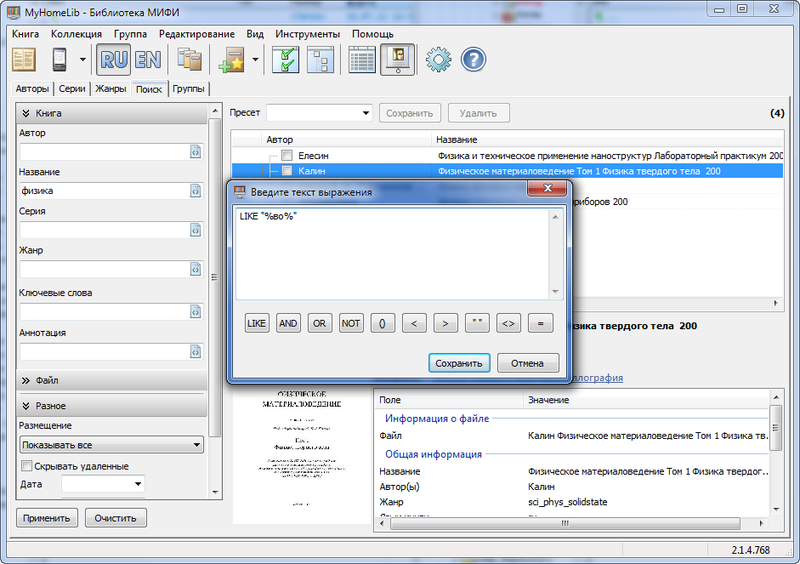
Suppose you need to find a book about which you only remember that the word "vacation" was in its title. Click on the ellipsis button next to the Title field. The query editor opens. Now you need to click on the inscription "LIKE" (similarity search). LIKE "%%"
appears in the query input field
.
Between the "%" characters we enter the search word, preferably without ending. Close the window. Formed query:
LIKE "% vacation%"
Click the “Apply” button and after a second or two you can iterate over the list of results. And if you suddenly remembered that at the beginning of the title of the book you were looking for was something summer, we reopen the query designer and add this condition. It should
look something like: LIKE "% vacation%" AND LIKE "summer%"
The formulated search conditions can be saved for later use as presets.
MyHomeLib allows you to split books into groups. Two of them are provided by default, these are Favorites and Reading, but no one bothers the user to create their own groups. To view lists of selected books there is a bookmark, which is called “Groups”. If you select an online collection of Librusek, there will also be a download manager bookmark.
The main working bookmark will, of course, be the “Authors”. By default, the list of authors is divided by the letters of the alphabet, but, if necessary, you can call up the complete list.
The works of the current author are displayed in the form of a convenient tree structure with a series breakdown, but you can switch to flat mode (table).
Almost all actions with books are carried out through the context menu. In addition to grouping, MyHomeLib allows you to select books for bulk copying, transferring, or deleting, evaluate them using a five-point system, and mark already read books.
The “Book Information” context menu command allows you to not only view the FB2 annotation, but also add reviews. For liberated books, you can even download user reviews from the main site.
All these notes, ratings, reviews, as "add-ons" over the main database, can be exported to an XML file so that, for example, after updating the database, return user data back.
MHL database files are not compact. However, it is possible to export them to an XML file or in inpx format, which gives a gain in volume tenfold. The resulting file can be easily uploaded to the Web or sent by e-mail. Deploying inpx back to the production database does not take much time.
For reading txt, html, doc and FB2 books, MyHomeLib comes with an advanced reader AlReader. But if you are used to another “watchman”, for example, CoolReader, it can be connected via settings without any problems.
To extract individual FB-shki from Librusek archives, you need to use the "Send to device" function. The book will be saved to the previously specified folder. Moreover, it can be packed into a zip archive and renamed according to the settings in the "Folders / Devices" section of the "Program Settings" function. For example: Author - Title (Series). There you can set the option so that the program each time asks where to put the file. It is possible to use transliteration of the entire file / folder name as well as individual parts (convenient for older Sony readers).
Unfortunately, all of the above regarding the ease of cataloging does not apply to all book formats. Books in the FB2 format contain all the information necessary for cataloging and are easy to process using cataloging programs. It is enough to press a couple of buttons and from tens of thousands of books all the necessary information will be extracted, including covers and annotations, the files will be renamed and arranged in folders in accordance with the specified template.
The FBD format proposed by the authors of the Fb2Librarian program is called upon to solve the problem with processing other e-book formats .
In fact, FBD is a regular empty file in FB2 format with a filled in descriptor that has the same name as the book itself.
Thus, we have the book itself in any of the common formats (PDF, DjVu, CHM, TXT, DOC, etc.) and a satellite file in the FBD format, containing all the necessary information about the book, including the cover and annotation, packed in one archive .
The drawback (or rather, a theoretically solvable problem), in my opinion, is only one - the standard FB2 genres are not suitable for non-fiction.
At the moment, the library is supported by FBD librusec and catalogers MyHomeLib and Fb2Librarian. As far as I know, Support in MyRuLib is in the plans.
Currently working on the editor of FBD Maker . The editor's interface was built on the similarity of the interfaces of mp3-tag editors, taking into account the specifics of the tasks. It is more suitable for mass conversion of books - for example, binder magazines (in this case it is convenient to use masks and templates) or archives of the Genesis library (you can get information directly from it).
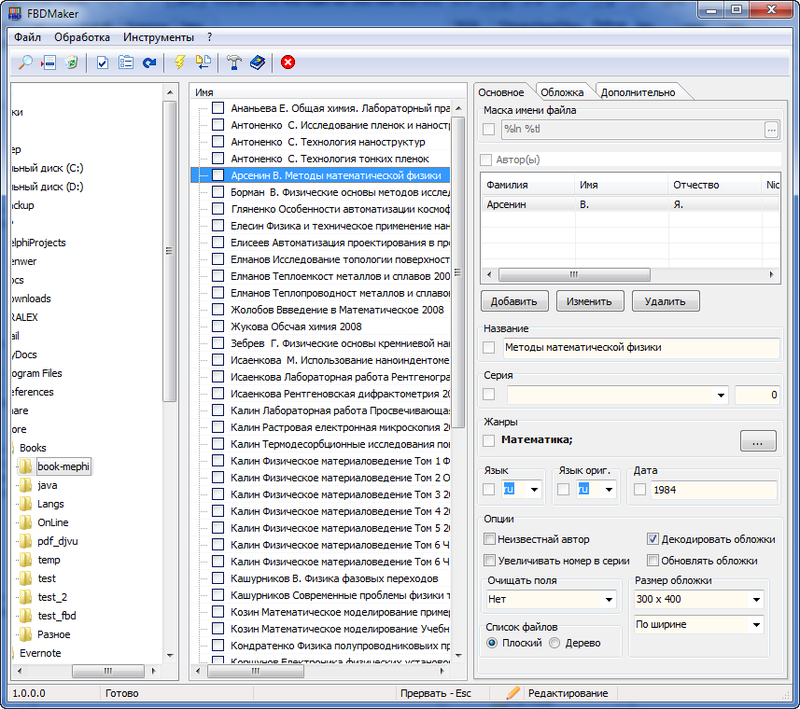
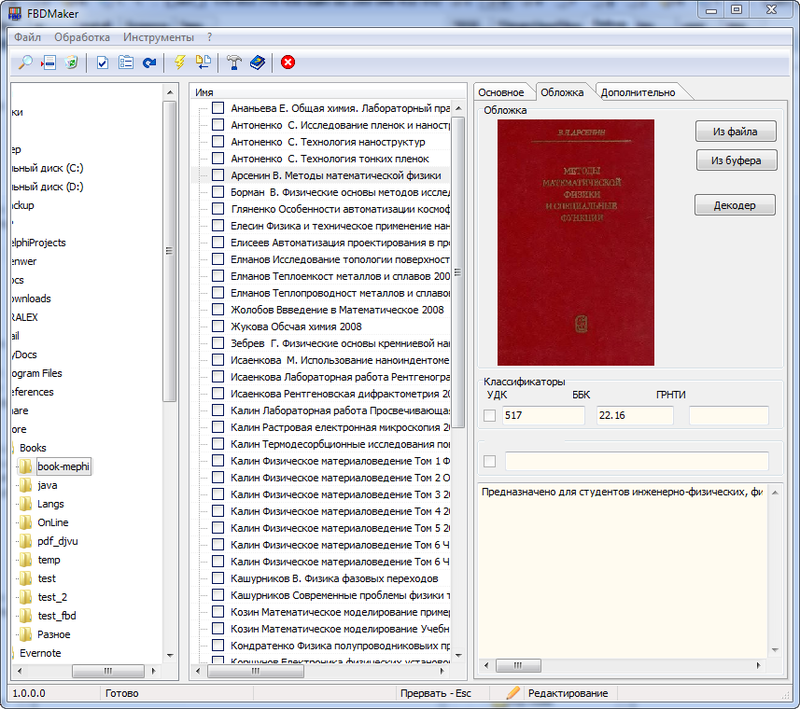
What does he know at the moment:
Individual books can be converted directly to MyHomeLib at the time of adding to the collection.
Both projects (MyHomeLib and FBD Maker) are written in Delphi. SQLite is used as the database engine. In addition, there is a small utility for editing the list of genres.
Homepage
Sources are open and available on Assembla:
MyHomeLib
FBD Maker
Everyone is invited to participate in the discussion, testing and development.
As a result, the former sooner or later abandon the thankless job of maintaining a collection of books in order, the latter have a huge pile of books that are almost impossible to work with, and still others risk at one point finding their favorite book site closed or commercialized.
In any case, the question of organizing a home library and finding the right book in it is quite relevant.
When it comes to files in fb2 format, the issue of cataloging is solved very simply - install the free program MyHomeLib , create an empty collection, start importing and ... voila! In a few minutes we have our entire collection sorted by authors, series and genres. It looks something like this:
In terms of working with fb2 files, the program features are very extensive. MyHomeLib originally created to work with archives on-line library librusec and from the spin-offs from it Flibusty .
I will list only the main ones with some explanations:
Key features
- unlimited number of collections - for example, you can simultaneously work with librusek archives, with the Flibust library on-line and your own file collections in fb2 and fbd formats.
- convenient viewing of book collections in the form of a tree view with grouping by author / series
- the ability to work with book lists in tabular mode with sorting by any column
- display cover and annotations when viewing a book list
- reading email books in fb2, html, doc, txt formats without installing additional programs (using AlReader 2)
- automatic import of fb2 from folders and zip archives
- non-fb2 collections, the ability to work with any type of file (in this mode, books must be entered into the database manually or using a list in inpx format)
- Full support for the FBD format (import, conversion, editing)
- quick search by author, book title
- full search by author, title, series, genre, etc.
- sharing user collections with inpx files
- custom folder and file name templates when exporting books from collections
- export of fb2 books in fb2.zip, txt, lrf format (using the fb2lrf converter)
- quick connection of e-pub and pdf converters
- import / export of user collections in xml and inpx format
- connection of user scripts for book processing (creation of collections, conversion)
- Editable individual lists of genres of any level of nesting
- ratings and reviews of books, reading marks
- work with groups of books (Favorites, Read, etc.)
- the possibility of "two clicks" to connect other collections (Traum Library, etc.)
Work with Lib.rus.ec archives:
- support for fb2 and usr archives of the Lib.rus.ec library
- automatic updating of book lists for Lib.rus.ec archives
- downloading reviews from the site Lib.rus.ec
Work with libraries on the Lib.rus.ec engine (Flibust, etc.) in on-line mode
- download manager
- loading books in the background
- automatic updating of on-line collections
- downloading reviews from the site
The program interface consists of several bookmark sheets. The first three bookmarks allow you to work with lists of books sorted by authors, series and genres. The tab “Search” allows you to quickly find the right book. In earlier versions of MHL, there was a simplified search for a word or a fragment of a word. Current releases use exclusively quasi-SQL queries.
Suppose you need to find a book about which you only remember that the word "vacation" was in its title. Click on the ellipsis button next to the Title field. The query editor opens. Now you need to click on the inscription "LIKE" (similarity search). LIKE "%%"
appears in the query input field
.
Between the "%" characters we enter the search word, preferably without ending. Close the window. Formed query:
LIKE "% vacation%"
Click the “Apply” button and after a second or two you can iterate over the list of results. And if you suddenly remembered that at the beginning of the title of the book you were looking for was something summer, we reopen the query designer and add this condition. It should
look something like: LIKE "% vacation%" AND LIKE "summer%"
The formulated search conditions can be saved for later use as presets.
MyHomeLib allows you to split books into groups. Two of them are provided by default, these are Favorites and Reading, but no one bothers the user to create their own groups. To view lists of selected books there is a bookmark, which is called “Groups”. If you select an online collection of Librusek, there will also be a download manager bookmark.
The main working bookmark will, of course, be the “Authors”. By default, the list of authors is divided by the letters of the alphabet, but, if necessary, you can call up the complete list.
The works of the current author are displayed in the form of a convenient tree structure with a series breakdown, but you can switch to flat mode (table).
Almost all actions with books are carried out through the context menu. In addition to grouping, MyHomeLib allows you to select books for bulk copying, transferring, or deleting, evaluate them using a five-point system, and mark already read books.
The “Book Information” context menu command allows you to not only view the FB2 annotation, but also add reviews. For liberated books, you can even download user reviews from the main site.
All these notes, ratings, reviews, as "add-ons" over the main database, can be exported to an XML file so that, for example, after updating the database, return user data back.
MHL database files are not compact. However, it is possible to export them to an XML file or in inpx format, which gives a gain in volume tenfold. The resulting file can be easily uploaded to the Web or sent by e-mail. Deploying inpx back to the production database does not take much time.
For reading txt, html, doc and FB2 books, MyHomeLib comes with an advanced reader AlReader. But if you are used to another “watchman”, for example, CoolReader, it can be connected via settings without any problems.
To extract individual FB-shki from Librusek archives, you need to use the "Send to device" function. The book will be saved to the previously specified folder. Moreover, it can be packed into a zip archive and renamed according to the settings in the "Folders / Devices" section of the "Program Settings" function. For example: Author - Title (Series). There you can set the option so that the program each time asks where to put the file. It is possible to use transliteration of the entire file / folder name as well as individual parts (convenient for older Sony readers).
FBD format
Unfortunately, all of the above regarding the ease of cataloging does not apply to all book formats. Books in the FB2 format contain all the information necessary for cataloging and are easy to process using cataloging programs. It is enough to press a couple of buttons and from tens of thousands of books all the necessary information will be extracted, including covers and annotations, the files will be renamed and arranged in folders in accordance with the specified template.
The FBD format proposed by the authors of the Fb2Librarian program is called upon to solve the problem with processing other e-book formats .
In fact, FBD is a regular empty file in FB2 format with a filled in descriptor that has the same name as the book itself.
Thus, we have the book itself in any of the common formats (PDF, DjVu, CHM, TXT, DOC, etc.) and a satellite file in the FBD format, containing all the necessary information about the book, including the cover and annotation, packed in one archive .
The advantages of this approach to the storage of information about the book:
- All information is stored and transmitted along with the book.
- The format allows you to store all the possible information about the book
- Books can be processed automatically by catalogers and online libraries.
- A description file can be created in any FB2 book editor.
The drawback (or rather, a theoretically solvable problem), in my opinion, is only one - the standard FB2 genres are not suitable for non-fiction.
Format support
At the moment, the library is supported by FBD librusec and catalogers MyHomeLib and Fb2Librarian. As far as I know, Support in MyRuLib is in the plans.
Currently working on the editor of FBD Maker . The editor's interface was built on the similarity of the interfaces of mp3-tag editors, taking into account the specifics of the tasks. It is more suitable for mass conversion of books - for example, binder magazines (in this case it is convenient to use masks and templates) or archives of the Genesis library (you can get information directly from it).
What does he know at the moment:
- fill in masked fields with data from the file name
- automatically download information from the Genesis library database using the md5 hash
- automatically convert all marked files
- automatically insert cover art from jpg file
- edit single file
- overwrite individual fields in file groups
- automatic conversion and renaming of files from genesis
- import covers from DjVu
Individual books can be converted directly to MyHomeLib at the time of adding to the collection.
Both projects (MyHomeLib and FBD Maker) are written in Delphi. SQLite is used as the database engine. In addition, there is a small utility for editing the list of genres.
Homepage
Sources are open and available on Assembla:
MyHomeLib
FBD Maker
Everyone is invited to participate in the discussion, testing and development.