 February 24, 2012 at 12:02
Snapshots for virtual machines in the cloud
Summary : A post talks about what snapshots are in the cloud, how to use them, and how they work.
One of the most noticeable new features in the cloud that appeared this year is snapshots. Everything we do is divided into three categories - what is useful to us (billing, service utilities, etc.), what is useful to customers, but not visually noticeable (for example, storage systems, changing versions of a hypervisor that have already been launched servers), and what is useful to customers and visually noticeable - and here are snapshots just from this third category).
I want to warn that the article will be very complicated. First I will tell you about simple things - how to work with it and what is the use of it, and then I will tell how it works inside. And if we, I hope, have managed with convenience and clarity at the "user" level, then here is a description of the device ... So to speak, take courage or skip.
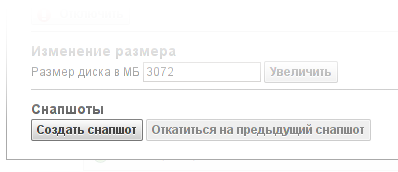
Snapshot can be performed at any time, on or off the machine. At the moment snapshots are executed, the disk activity of the machine slightly stops (we are talking about something on the order of a second), after which it continues “as if nothing had happened”. There are two methods to make a snapshot: in the properties of the disk on the page with virtual machines (there is also a button "roll back to the previous snapshot") and in the list of snapshots on the page with disks. There is a list of all snapshots of the disk. Note that for a virtual machine, we usually do not give the opportunity to create a snapshot during installation. Especiallydiveattentive clients may find that the “create snapshot” button on the disk page is still active (and works). There will be nothing interesting (except for semi-established Linux) in such a snapshot, but we decided not to take away from people the opportunity to shoot themselves in the leg to do what they want with their machines.
So, the created snapshot contains a copy of the disk at the time of creation. In size, it is often much smaller than a disk. If someone is interested in how the size of the snapshot is calculated, see the second part. Snapshots form a chain (if snapshots are done in a row) or a tree (how it turns out - see the section on rollback to snapshot). If you remove the snapshot, then it begins to "dissolve" - to merge with the neighboring ones (while the total volume of snapshots decreases). The process is quite fast (a few minutes - and no snapshot).
The most “tasty” function of snapshots, personally, I consider the ability to connect a snapshot as a disk. It is connected in read only mode (read-only), and allows you to look at the "previous" state of the disk. No one bothers to make 10 snapshots on the disk and connect all 10 to the same machine - in this case, the disks will be a chronology of the “main” disk.
Moreover, the snapshot can be connected to any number of machines at the same time. (I immediately answer the question - is it possible to boot from a snapshot - formally, yes, in fact, the file system is very nervous from read only on root - we are working on this issue).
The second most important function is the rollback of the disk to snapshot, that is, restoration of the state of the disk. In this case, the changes are lost, so it’s better to make a new one before rolling back to the old snapshot. In this case, the disk can be "switched" between snapshots (rolled back / forth). The process of rolling back to snapshot has some minor inconveniences - statistics on disk operations become unavailable and machine consumption in the past is incorrectly displayed. The total consumption by account is calculated correctly, but since a new VBD (block device) is formed, the data for VM is displayed for the new VBD. (We know about this not very obvious feature of our billing and plan to change it to a more convenient one in the foreseeable future).
For ease of use, in the last few days before the announcement, we added the “final touch” - if the disc is rolled back from the snapshot, then the reverted_at field appears (that is, “restored from the snapshot”). A trifle, but useful. This field will pursue the disk until its death (and after, hehe, we do not delete object data).
An important point: every time a snapshot is made or rolled back, “COW” syndrome (copy-on-write) is observed - the first record will be slower than the next. So on very busy servers with a lot of recording, snapshots should be treated carefully.
If you make a few snapshots on the disk, then roll the disk back to the snapshot in the "middle", then make a few snapshots, then roll it back to another snapshot, then roll it back again, then it formssnapshot tree . We store relationships in our database - what snapshot whose is. Unfortunately, visualization is still in progress (programmers strongly protest, having received the task of "draw a tree on JS", and let them be ashamed when reading this post).
Limits Unfortunately, all this luxury is not unlimited. Our limitations: the length of the snapshot chain is not more than 20 disks, the maximum number of snapshots in a tree (including branches) is not more than 60 pcs. According to our estimates, this is more than enough for normal operation.
On the “drives” page, each drive has a “snapshots” tab, which lists all snapshots of the drive. Snapshots can be called and give them a multi-line description (but all are lazy, yes, I also love when these fields are filled, but filling them is usually very lazy). In any case, a snapshot can be uniquely identified by an absolutely useless number ( Eng. Universally useless ID, uuid) and (partially) by the date of creation.

A little bit about the “total” field. Due to some features of the system, the information about snapshots is updated unevenly - the list of snapshots is updated immediately after the creation of snapshots, but the “total” field may be delayed for a while - up to two minutes. Unlike other resources that we calculate in real time, disks and snapshots are taken into account at a (approximately) two-minute interval. The “total” field is calculated at the moment of calculating the volume of consumption, so that the “total” immediately after creating the snapshot will be incorrect (but it will definitely come back to normal by the next write-off tick).
(please remove minor children and persons with increased susceptibility from the screens, now it will be hardcore).
Our snapshots (like disks) are based on the VHD-format, which was invented by microsoft, put into public use and used by citrix. It supports very effective snapshots (they are much more effective than LVM snapshots, which increase the number of records in proportion to the number of snapshots). When a chain of snapshots is built up, there is implicitly implied a “zero” snapshot, with respect to which changes of all the others are recorded (without this “zero” snapshot it becomes unclear what kind of “changes” are stored in the first snapshot). Zero snapshot, of course, is not paid (since physically it does not take up disk space).
When writing to a “holey” block, this block is copied from the “old” snapshot to the current disk (the part that was recorded is replaced, the rest is taken in the previous copy). After recording in the current disc, it becomes one hole less and reading of this place later goes from the “current” disc. Disk operations for snapshot disks cost as much as regular disk operations (personally, I’m not sure how operations on snapshots are harder than usual for our storage systems, so I decided not to touch this area).
What happens when creating a snapshot? (Technical part).

The current drive is declared the so-called 'base copy', that is, read only a copy of the state of the machine. Since the disk could have predecessors in the snapshot chain, base copy refers to other base copy (note base copy always refers only to base copy). In addition, another “snapshot” is made - this is a read / write copy of the current state (that is, the differences between the snapshot and base copy). In general, you can write snapshots, but we forbid this, because in this case we get thin provision, and we cannot allow it for reasons of guaranteed reservation of reserved space (see the section below). But even the “unrecorded” snapshot contains 8MB of meta data. Thus, each snapshot consists of two halves: metadata (8MB) and the contents of base copy. The disk is referenced by one type of link to the base copy of the previous snapshot, and the second type of link to the "snapshot." When a disk rollback occurs, the snapshot is cloned (not copied - hence the nuances with COW), referring to the same base copy referenced by the snapshot that was cloned.
If someone makes a snapshot two or three times in a row (without changing the data), you get one base copy and three snapshots with meta data.
When the snapshot is deleted (from the middle), the following happens: the snapshot (metadata) itself is deleted immediately, but the base copy begins to disband - the data is transferred either to the "previous" state, or to the "future", or generally discarded (if there is an alternative state both in the past and in the future). This process is the “melting” of the snapshot, which does not occur instantly. I must say that the data is not actually copied, but only “re-marked” within the framework of LVM (LE are thrown between different LVs), or deleted (if the previous copy has a different version of the block).
One of the questions that we are asked on storage related to thin provision. What is thin provision? This is when a certain amount of space is declared to the consumer, and the actual occupied space is less - and increases as the actual recording. This fits perfectly with our model with snapshots, COW from “empty space”, and it is implemented perfectly in XCP. In fact, thin provision is a “record in a snapshot”, that is, a record in an “empty place”, which from this begins to take its place in reality.
However, thin provision is dangerous. The reverse side of thin provision is overselling (aka oversubscription). Roughly speaking, we have 100TB of space. We allowed creating 200 drives of 1TB on such a storage. The actual disk size at the beginning is 30-50 gigabytes, so there is plenty of free space. But, all of a sudden, customers start writing to discs. Disks have already been allocated to them. It takes a little time, and ... yes, the average disk full creeps up to 500GB. And then ... Then someone wants to write another gigabyte, but gets an error. Because the place is over.
We do not have power over clients' disks, and if we provided them with resources, these resources are theirs, and it’s not our business to say “now it’s possible, but now not”. If there can be a compromise with respect to other resources (3% of the processors were not given to someone, they were migrated to another host to provide a performance margin), that is, a slight “under-delivery” is simply not noticeable, then this will not work for disk space . They didn’t allow at least one sector to be recorded - an error is recorded throughout the block device.
So, with common sense, we decided not to do that.
Due to the fact that snapshots are made in R / O, and only decrease after creation, we can refuse to create a new snapshot (anything happens - the place may suddenly end), but we certainly will not refuse to work already created disks and snapshots.
One of the most noticeable new features in the cloud that appeared this year is snapshots. Everything we do is divided into three categories - what is useful to us (billing, service utilities, etc.), what is useful to customers, but not visually noticeable (for example, storage systems, changing versions of a hypervisor that have already been launched servers), and what is useful to customers and visually noticeable - and here are snapshots just from this third category).
I want to warn that the article will be very complicated. First I will tell you about simple things - how to work with it and what is the use of it, and then I will tell how it works inside. And if we, I hope, have managed with convenience and clarity at the "user" level, then here is a description of the device ... So to speak, take courage or skip.
How to use snapshots?
The most typical application of snapshots is to create backup copies in case of an error in the configuration of the machine. I want to warn you right away, this is important: snapshots are stored in the same place as the disks. This means that if a meteorite falls on us or another natural disaster of federal significance comes, snapshots will be lost simultaneously with the disks, that is, for full backups, you should use another, geographically remote, storage location. We absolutely do not plan to lose client drives or allow natural disasters to the server, but I still have to warn.Snapshot can be performed at any time, on or off the machine. At the moment snapshots are executed, the disk activity of the machine slightly stops (we are talking about something on the order of a second), after which it continues “as if nothing had happened”. There are two methods to make a snapshot: in the properties of the disk on the page with virtual machines (there is also a button "roll back to the previous snapshot") and in the list of snapshots on the page with disks. There is a list of all snapshots of the disk. Note that for a virtual machine, we usually do not give the opportunity to create a snapshot during installation. Especially
So, the created snapshot contains a copy of the disk at the time of creation. In size, it is often much smaller than a disk. If someone is interested in how the size of the snapshot is calculated, see the second part. Snapshots form a chain (if snapshots are done in a row) or a tree (how it turns out - see the section on rollback to snapshot). If you remove the snapshot, then it begins to "dissolve" - to merge with the neighboring ones (while the total volume of snapshots decreases). The process is quite fast (a few minutes - and no snapshot).
The most “tasty” function of snapshots, personally, I consider the ability to connect a snapshot as a disk. It is connected in read only mode (read-only), and allows you to look at the "previous" state of the disk. No one bothers to make 10 snapshots on the disk and connect all 10 to the same machine - in this case, the disks will be a chronology of the “main” disk.
Moreover, the snapshot can be connected to any number of machines at the same time. (I immediately answer the question - is it possible to boot from a snapshot - formally, yes, in fact, the file system is very nervous from read only on root - we are working on this issue).
The second most important function is the rollback of the disk to snapshot, that is, restoration of the state of the disk. In this case, the changes are lost, so it’s better to make a new one before rolling back to the old snapshot. In this case, the disk can be "switched" between snapshots (rolled back / forth). The process of rolling back to snapshot has some minor inconveniences - statistics on disk operations become unavailable and machine consumption in the past is incorrectly displayed. The total consumption by account is calculated correctly, but since a new VBD (block device) is formed, the data for VM is displayed for the new VBD. (We know about this not very obvious feature of our billing and plan to change it to a more convenient one in the foreseeable future).
For ease of use, in the last few days before the announcement, we added the “final touch” - if the disc is rolled back from the snapshot, then the reverted_at field appears (that is, “restored from the snapshot”). A trifle, but useful. This field will pursue the disk until its death (and after, hehe, we do not delete object data).
An important point: every time a snapshot is made or rolled back, “COW” syndrome (copy-on-write) is observed - the first record will be slower than the next. So on very busy servers with a lot of recording, snapshots should be treated carefully.
If you make a few snapshots on the disk, then roll the disk back to the snapshot in the "middle", then make a few snapshots, then roll it back to another snapshot, then roll it back again, then it formssnapshot tree . We store relationships in our database - what snapshot whose is. Unfortunately, visualization is still in progress (programmers strongly protest, having received the task of "draw a tree on JS", and let them be ashamed when reading this post).
Limits Unfortunately, all this luxury is not unlimited. Our limitations: the length of the snapshot chain is not more than 20 disks, the maximum number of snapshots in a tree (including branches) is not more than 60 pcs. According to our estimates, this is more than enough for normal operation.
On the “drives” page, each drive has a “snapshots” tab, which lists all snapshots of the drive. Snapshots can be called and give them a multi-line description (but all are lazy, yes, I also love when these fields are filled, but filling them is usually very lazy). In any case, a snapshot can be uniquely identified by an absolutely useless number ( Eng. Universally useless ID, uuid) and (partially) by the date of creation.
A little bit about the “total” field. Due to some features of the system, the information about snapshots is updated unevenly - the list of snapshots is updated immediately after the creation of snapshots, but the “total” field may be delayed for a while - up to two minutes. Unlike other resources that we calculate in real time, disks and snapshots are taken into account at a (approximately) two-minute interval. The “total” field is calculated at the moment of calculating the volume of consumption, so that the “total” immediately after creating the snapshot will be incorrect (but it will definitely come back to normal by the next write-off tick).
How does it work?
(please remove minor children and persons with increased susceptibility from the screens, now it will be hardcore).
Our snapshots (like disks) are based on the VHD-format, which was invented by microsoft, put into public use and used by citrix. It supports very effective snapshots (they are much more effective than LVM snapshots, which increase the number of records in proportion to the number of snapshots). When a chain of snapshots is built up, there is implicitly implied a “zero” snapshot, with respect to which changes of all the others are recorded (without this “zero” snapshot it becomes unclear what kind of “changes” are stored in the first snapshot). Zero snapshot, of course, is not paid (since physically it does not take up disk space).
When writing to a “holey” block, this block is copied from the “old” snapshot to the current disk (the part that was recorded is replaced, the rest is taken in the previous copy). After recording in the current disc, it becomes one hole less and reading of this place later goes from the “current” disc. Disk operations for snapshot disks cost as much as regular disk operations (personally, I’m not sure how operations on snapshots are harder than usual for our storage systems, so I decided not to touch this area).
What happens when creating a snapshot? (Technical part).
The current drive is declared the so-called 'base copy', that is, read only a copy of the state of the machine. Since the disk could have predecessors in the snapshot chain, base copy refers to other base copy (note base copy always refers only to base copy). In addition, another “snapshot” is made - this is a read / write copy of the current state (that is, the differences between the snapshot and base copy). In general, you can write snapshots, but we forbid this, because in this case we get thin provision, and we cannot allow it for reasons of guaranteed reservation of reserved space (see the section below). But even the “unrecorded” snapshot contains 8MB of meta data. Thus, each snapshot consists of two halves: metadata (8MB) and the contents of base copy. The disk is referenced by one type of link to the base copy of the previous snapshot, and the second type of link to the "snapshot." When a disk rollback occurs, the snapshot is cloned (not copied - hence the nuances with COW), referring to the same base copy referenced by the snapshot that was cloned.
If someone makes a snapshot two or three times in a row (without changing the data), you get one base copy and three snapshots with meta data.
When the snapshot is deleted (from the middle), the following happens: the snapshot (metadata) itself is deleted immediately, but the base copy begins to disband - the data is transferred either to the "previous" state, or to the "future", or generally discarded (if there is an alternative state both in the past and in the future). This process is the “melting” of the snapshot, which does not occur instantly. I must say that the data is not actually copied, but only “re-marked” within the framework of LVM (LE are thrown between different LVs), or deleted (if the previous copy has a different version of the block).
A bit about thin provision
One of the questions that we are asked on storage related to thin provision. What is thin provision? This is when a certain amount of space is declared to the consumer, and the actual occupied space is less - and increases as the actual recording. This fits perfectly with our model with snapshots, COW from “empty space”, and it is implemented perfectly in XCP. In fact, thin provision is a “record in a snapshot”, that is, a record in an “empty place”, which from this begins to take its place in reality.
However, thin provision is dangerous. The reverse side of thin provision is overselling (aka oversubscription). Roughly speaking, we have 100TB of space. We allowed creating 200 drives of 1TB on such a storage. The actual disk size at the beginning is 30-50 gigabytes, so there is plenty of free space. But, all of a sudden, customers start writing to discs. Disks have already been allocated to them. It takes a little time, and ... yes, the average disk full creeps up to 500GB. And then ... Then someone wants to write another gigabyte, but gets an error. Because the place is over.
We do not have power over clients' disks, and if we provided them with resources, these resources are theirs, and it’s not our business to say “now it’s possible, but now not”. If there can be a compromise with respect to other resources (3% of the processors were not given to someone, they were migrated to another host to provide a performance margin), that is, a slight “under-delivery” is simply not noticeable, then this will not work for disk space . They didn’t allow at least one sector to be recorded - an error is recorded throughout the block device.
So, with common sense, we decided not to do that.
Due to the fact that snapshots are made in R / O, and only decrease after creation, we can refuse to create a new snapshot (anything happens - the place may suddenly end), but we certainly will not refuse to work already created disks and snapshots.









