Containd integration with Kubernetes, replacing Docker, is ready for production
- Transfer
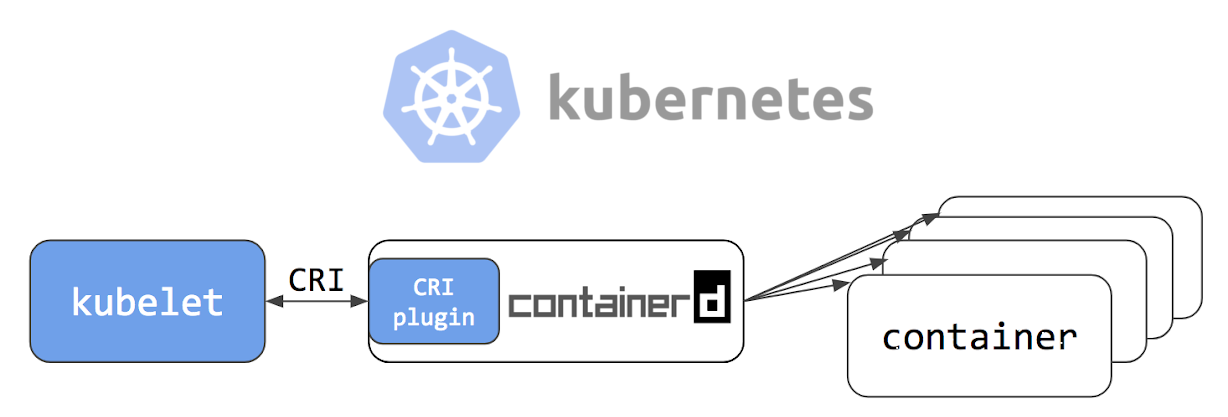
Note trans. : We have already written about containerd and other executable environments for Kubernetes. A new publication is a translation of a recent announcement of an important milestone in the development of containerd, published in the official blog of the Kubernetes project. The text is written by employees of Google and IBM, who (of course, together with Docker Inc.) make a significant contribution to the improvement of containerd.
Earlier in the blog - in the Note Containerd Brings More Container Runtime Options for Kubernetes - we presented the alpha version of containerd integration with Kubernetes. The next 6 months of development led to the fact that integration has become publicly available! This means that you can now use containerd 1.1as an executable environment for containers in Kubernetes clusters in production.
Containerd 1.1 works with Kubernetes version 1.10 and higher, supports all the features of Kubernetes. In the Kubernetes test infrastructure, the test coverage of integration with containerd on the Google Cloud Platform is the same as the integration with Docker (see test dashboard ).
“We are very pleased to see that containerd quickly reached this significant milestone. In Alibaba Cloud, we began to actively use containerd from its early days and, thanks to its emphasis on simplicity and reliability, made containerd the container engine by default in its Serverless Kubernetes product, which places high demands on performance and stability. Containerd will undoubtedly be the main engine of the container era and will lead to the development of innovation. ” - Xinwei, staff engineer from Alibaba Cloud
Architectural improvements
The containerd integration architecture with Kubernetes was changed twice. Each of its evolutionary steps stabilized and improved the efficiency of the stack.
Containerd 1.0 - CRI-Containerd (ceased to exist)

In containerd 1.0, the interaction between Kubelet and containerd required the demon cri-containerd (we wrote about it at the end of this article - approx. Transl. ) . This daemon services requests for Container Runtime Interface (CRI) of Kubelet and containerd used for the respective containers and the control containers images. This approach eliminated one additional link in the stack, when compared to the Docker CRI implementation ( dockershim ) - see the illustration above .
However, cri-containerd and containerd 1.0 were two separate daemons interacting on GRPC. An additional daemon in this bundle made it difficult for users to understand the device, and when deploying, and also generated unnecessary overhead for interaction.
Containerd 1.1 - CRI Plugin (current version)
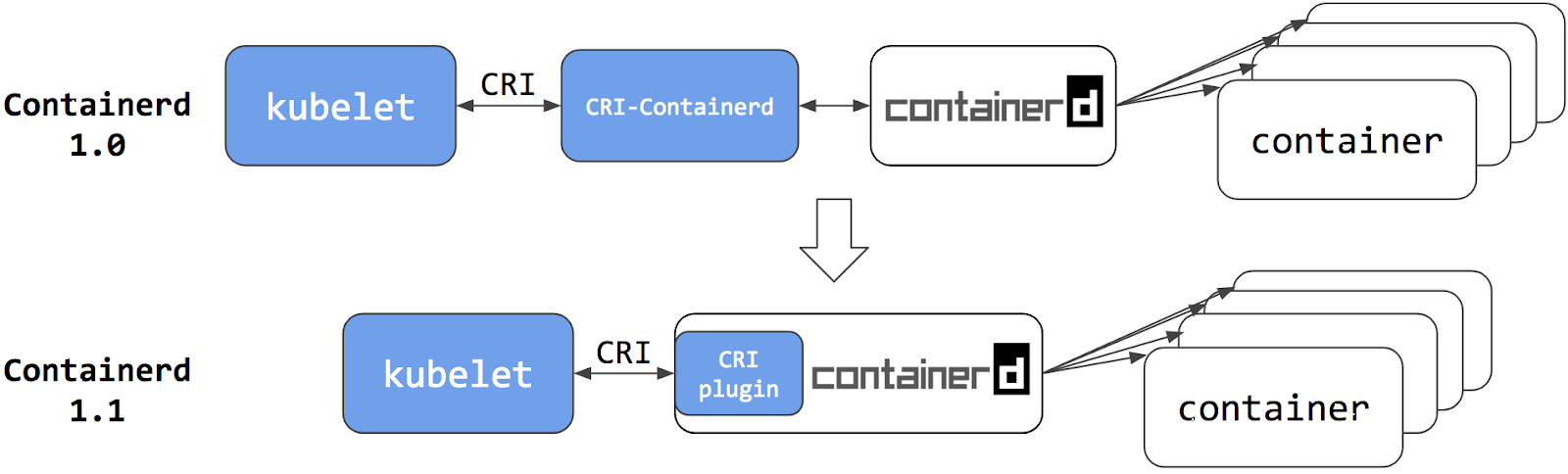
In containerd 1.1, the cri-containerd daemon has been converted to the containerd CRI plugin. This plugin is built into containerd 1.1 and is enabled by default. Unlike cri-containerd, the plugin interacts with containerd by directly calling the necessary functions. The new architecture has made integration more stable and productive, removing another link (GRPC) from the stack. Now containerd 1.1 can be used directly in Kubernetes, and the cri-containerd daemon is no longer required.
Performance
One of the main challenges for the release of containerd 1.1 was performance improvement. Optimizations were carried out in the field of time for launching the flow and use of resources by the daemon.
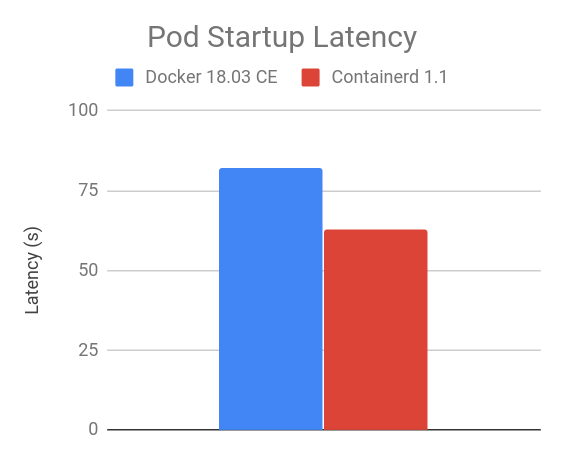
The following results are a comparison of containerd 1.1 and Docker 18.03 CE. The integration of containerd 1.1 uses the built-in CRI plugin, and the integration for Docker 18.03 CE works with dockershim. The results were generated using the benchmark of the performance of the Kubernetes nodes, which is part of the e2e tests for K8s nodes . Used on most of the comparison of the data publicly available in node performance the dashboard .
Delay at start
The results of the 105 pod batch startup benchmark show that containerd 1.1 integration has a lower delay when starting the pod than Docker 18.03 CE with dockershim (the smaller the better).
CPU and memory
In idle state, containerd 1.1 integration with 105 pods consumes less CPU and memory than Docker 18.03 CE integration with dockershim. Results may vary depending on the number of pods launched on the node - the number of 105 pods is selected because the default is now the maximum value for custom sweeps on the node.
As can be seen from the graphs below, containerd 1.1 Kubelet integration consumes 30.89% less CPU and 11.30% less RSS (resident set size) memory, and also 12.78% less RSS memory is consumed by the executable environment for containers .

Addition from the translator
It is worth noting that continues its development and another alternative solution - CRI-O . In particular, at the Open Source Summit Japan 2018 being held these days , an NTT employee presented a report with a detailed comparison of the available executable media for containers. And this is how one of his slides, comparing their performance, looks like:

crictl
The console interface (CLI) of the executable environment for containers is a useful tool for identifying problems in the system and application. When using Docker as a container environment in Kubernetes, system administrators sometimes go to the Kubernetes node to execute Docker commands, gather information about the system and / or application. For example, they can use
docker psand docker inspectto verify the status of the process, docker imagesto obtain a list of images on the node docker infofor configuration executable medium for containers, etc. For containerd and all other CRI compliant environments, such as dockershim, we recommend using crictlas a CLI alternative to Docker console commands for analyzing problems on subframes, containers and container images hosted on Kubernetes nodes.
crictl is a utility offering similar capabilities to the Docker CLI and works equally for all executable environments for CRI compatible containers. It can be found in the kubernetes-incubator / cri-tools repository ; The current version is cri-tools v1.11.0 (the version is corrected for the current 3-day old release instead of v1.0.0-beta.1 mentioned in the original article - approx. translation ) . Although the crictl utilityand created to be similar to the Docker CLI, offering a simple transition for users, it is not a complete copy of it. Several important differences are discussed below.
Application limitations: crictl is a tool for troubleshooting
crictl is not a substitute for commands
dockeror kubectl- its use is limited to the area of identification, analysis of problems. The Docker console interface offers a rich set of commands, which makes it a very useful development tool. However, this is not the best option for troubleshooting on Kubernetes nodes. Some Docker commands (for example, docker networkand docker build) are useless for Kubernetes, and some (for example docker rename) can break everything. The goal of crictl is to provide enough commands to identify problems on nodes that are safe to use in the production environment.Kubernetes Orientation
crictl offers a more comprehensive view of containers in the world of Kubernetes. Console Docker interface does not use the basic concepts Kubernetes, such as under (pod) and namespace ( the namespace ), which prevents visible the containers and pods (about the importance of this issue - we recently talked to - however, already in the context of monitoring report - ca. . Trans. ) . One such example is the
docker psobscure, long Docker container names and the list of pause containers along with the application containers: 
However, pause containers- This is part of the implementation of the hearth, where one such container is used for each hearth; they should not be displayed when displaying containers included in the hearth.
crictl , on the other hand, was created for Kubernetes. The utility provides different sets of commands for podov and containers. For example,
crictl podsdisplays information about the sub, and crictl ps- only information about the containers of the application. All data is formatted into a table view: 

Another example is
crictl podsan argument --namespacethat allows you to filter pods by namespaces defined in Kubernetes: 
For more information on how to use crictl with containerd, see here:
What about the Docker Engine?
We often hear the following question: “Does the switch to containerd mean that I can no longer use the Docker Engine?”, And the short answer to it is “NO”.
Docker Engine collected on the basis of containerd. The next release of Docker Community Edition (Docker CE) will use containerd version 1.1. Accordingly, it will have a built-in and enabled CRI plugin by default. This means that users will have the opportunity to continue working with the Docker Engine for other typical scenarios, as well as the ability to configure Kubernetes to use the underlying containerd that ships with the Docker Engine and is simultaneously used by Docker Engine itself on the same node. Take a look at the architectural diagram below, showing how the same containerd is used by the Docker Engine and Kubelet :
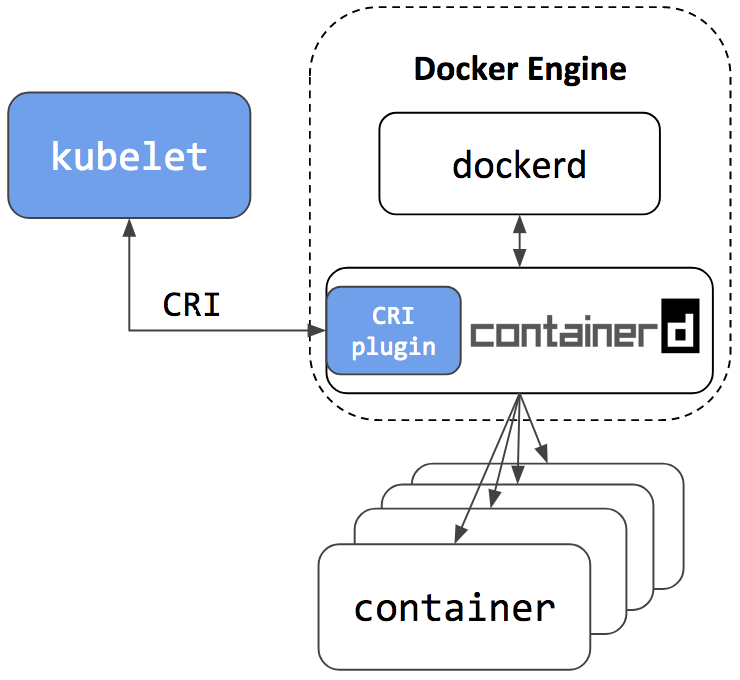
Since containerd is used by both Kubelet and Docker Engine, users who choose to integrate with containerd will not only get all the new features for Kubernetes, improvements in performance and stability, but also the option of using the Docker Engine, as before, for other needs.
The namespace mechanism in containerd ensures that Kubelet and Docker Engine will not have access to containers and images not created by them. This means that they will not interfere with each other, as well as:
- Users entering the command
docker pswill not see containers created in Kubernetes. For this usecrictl ps. Conversely, users will not seecrictl pscontainers created in the Docker CLI in Kubernetes or on command . Commandscrictl createandcrictl runare intended only for troubleshooting. Manual launch of bogs or containers usingcrictlon production nodes is not recommended. - Users entering the command
docker imageswill not see the images from Kubernetes. To do this, use the commandcrictl images. Conversely, Kubernetes will not see the images created by the teamsdocker pull,docker loadanddocker build. To do this, use the commandcrictl pull, and alsoctr cri load, if you need to download the image.
Summary
- Containerd 1.1 has native CRI support. It can be directly used by Kubernetes.
- Containerd 1.1 is ready for production.
- Containd 1.1 has good performance in terms of start-up time and utilization of system resources.
- crictl is a console (CLI) utility for communicating with containerd 1.1 and other executable container environments that comply with CRIs to identify problems on a node.
- Containerd 1.1 will be included in the next stable release of Docker CE. Users will be allowed to continue working with Docker in non-Kubernetes cases, and configure Kubernetes to use the underlying containerd that is included with Docker.
We want to thank everyone from Google, IBM, Docker, ZTE, ZJU and the individual developers who have contributed and made it all possible!
For a detailed list of changes in the release of containerd 1.1, see the Release Notes .
How to try
Instructions for setting up a Kubernetes cluster to use containerd as the default executable environment:
- for a cluster on a GCE being lifted with the help
kube-up.sh, here ; - to install a cluster from many nodes using Ansible and kubeadm - here ;
- to create a cluster from scratch on Google Cloud - see Kubernetes the Hard Way ;
- for manual installation from a tarball archive - here ;
- for installation using LinuxKit on a local virtual machine - here .
How to contribute
CRI plugin containerd - Open Source-project on GitHub, which is part of containerd: https://github.com/containerd/cri . All proposed changes are welcome in the form of ideas, tickets, corrections. This developer getting started guide is a good starting point for making changes.
PS from translator
Read also in our blog:
- " CRI-O - Docker alternative to launch containers in Kubernetes ";
- “ What and why is Docker doing in Moby to integrate with Kubernetes?” ";
- “ Four releases 1.0 from CNCF and major announcements about Kubernetes from KubeCon 2017 ”;
- “ Why do you need containerd and why it was separated from Docker ”;
- “ What is the essence of the Moby project and why the main Docker repository suddenly became moby / moby? "