December 5, 2011 at 11:31
Choosing a Distributed File System for Linux. A few words about Ceph and the rest
There are several dozen file systems, all of which provide user interfaces for storing data. Each of the systems is good in its own way. However, in our age of high loads and petabytes of data for processing, it turned out to be quite difficult to find what you need, you just need to think about distributed data, distributed loads, multiple mounting of rw and other cluster charms.
Objective: to organize a distributed file storage
- without self-assembled kernels, modules, patches,
- with the possibility of multiple mounting in rw mode,
- POSIX compatibility,
- fault tolerance,
- compatibility with existing technologies,
- reasonable overhead on I / O operations compared to local file systems;
- ease of configuration, maintenance and administration.
In our work, we use Proxmox and OpenVZ container virtualization . It’s convenient, it flies, this solution has more advantages than similar products. At least for our projects and in our realities.
Storage itself is everywhere mounted on FC.
We had successful experience using this file system, we decided to try it first. Proxmox has recently switched to the Redhat kernel, it has ocfs2 support turned off. There is a module in the kernel, but openvz and proxmox are not recommended on the forumsto use it. We tried and rebuilt the kernel. Module version 1.5.0, a cluster of 4 iron machines based on debian squeeze, proxmox 2.0beta3, kernel 2.6.32-6-pve. For tests, stress was used. The problems remained the same for several years. Everything started up, setting up this bundle takes half an hour from the force. However, under load, the cluster can spontaneously collapse, which leads to a total kernel panic on all servers at once. During the test day, the machines rebooted a total of five times. This is treated, but it is quite difficult to bring such a system to a healthy state. I also had to rebuild the kernel and enable ocfs2. Minus.
Although the core is redhat's, the module is enabled by default, we weren’t able to get started here either. It's all about proxmox, which from the second version came up with their own cluster with chess and poetesses for storing their configs. There cman, corosync and other packages from gfs2-tools, only all rebuilt specifically for pve. The snap-in for gfs2, therefore, is simply not put out of packages, as it offers to demolish all proxmox first, which we could not do. In three hours of addiction, I managed to win, but again kernel panic ended. An attempt to adapt the packages for proxmox to solve our problems was unsuccessful, after two hours it was decided to abandon this idea.
We stopped while on it.
POSIX compatible, high speed, excellent scalability, several bold and interesting approaches to implementation.
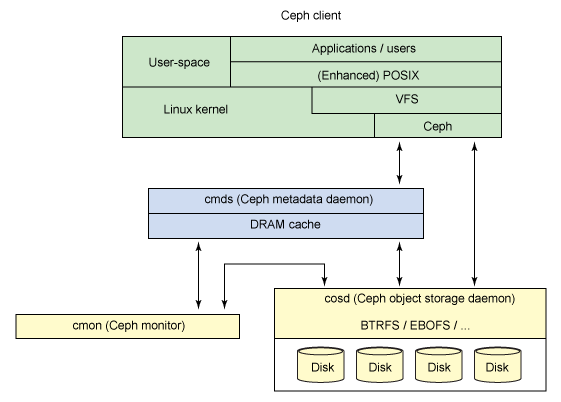
The file system consists of the following components:

1. Clients. Data users.
2. Metadata servers. Distributed metadata is cached and synchronized. Using metadata, the client at any time knows where the data he needs is located. Metadata servers also distribute new data.
3. A cluster for storing objects. Here, both data and metadata are stored as objects.
4. Cluster monitors. Monitor the health of the entire system as a whole.
Actual file I / O occurs between the client and the object storage cluster. Thus, the management of high-level POSIX functions (opening, closing, and renaming) is performed using metadata servers, and the usual POSIX functions (reading and writing) are managed directly through the object storage cluster.
There may be several components, depending on the tasks facing the administrator.
The file system can be connected either directly, using the kernel module, or through FUSE. From a user perspective, the Ceph file system is transparent. They simply have access to a huge data storage system and are not aware of the metadata servers, monitors and individual devices that make up the massive storage pool used for this. Users simply see a mount point at which standard file I / O operations can be performed. From the point of view of the administrator, it is possible to transparently expand the cluster by adding as many components as needed, monitors, storage, metadata servers.
Developers proudly call the Ceph ecosystem.
GPFS, Luster and other file systems, as well as add-ons, we did not consider this time, they are either very difficult to configure, or they do not develop, or they do not fit the task.
The configuration is standard, everything is taken from the Ceph wiki. In general, the file system left a good impression. An array of 2TB was assembled, in half from SAS and SATA disks (export of block devices by FC), partitions in ext3.
Ceph storage is mounted inside 12 virtual machines on 4 hardware nodes, read-write from all mount points is performed. The fourth day of stress tests pass normally, I / O is issued on average 75 mb / s. on peak recording.
We have not yet considered the other Ceph functions (and there are still quite a lot of them), there are also problems with FUSE. But although the developers warn that the system is experimental, that it should not be used in production, we believe that if you really want to, then you can -_-
I ask all interested, as well as all sympathizers, in PM. The topic is very interesting, we are looking for like-minded people to discuss the problems that have arisen and find ways to solve them.
Links:
- http://ru.wikipedia.org/wiki/Ceph
- project site
- a brief overview used to write this article
Objective: to organize a distributed file storage
- without self-assembled kernels, modules, patches,
- with the possibility of multiple mounting in rw mode,
- POSIX compatibility,
- fault tolerance,
- compatibility with existing technologies,
- reasonable overhead on I / O operations compared to local file systems;
- ease of configuration, maintenance and administration.
In our work, we use Proxmox and OpenVZ container virtualization . It’s convenient, it flies, this solution has more advantages than similar products. At least for our projects and in our realities.
Storage itself is everywhere mounted on FC.
OCFS2
We had successful experience using this file system, we decided to try it first. Proxmox has recently switched to the Redhat kernel, it has ocfs2 support turned off. There is a module in the kernel, but openvz and proxmox are not recommended on the forumsto use it. We tried and rebuilt the kernel. Module version 1.5.0, a cluster of 4 iron machines based on debian squeeze, proxmox 2.0beta3, kernel 2.6.32-6-pve. For tests, stress was used. The problems remained the same for several years. Everything started up, setting up this bundle takes half an hour from the force. However, under load, the cluster can spontaneously collapse, which leads to a total kernel panic on all servers at once. During the test day, the machines rebooted a total of five times. This is treated, but it is quite difficult to bring such a system to a healthy state. I also had to rebuild the kernel and enable ocfs2. Minus.
Gfs2
Although the core is redhat's, the module is enabled by default, we weren’t able to get started here either. It's all about proxmox, which from the second version came up with their own cluster with chess and poetesses for storing their configs. There cman, corosync and other packages from gfs2-tools, only all rebuilt specifically for pve. The snap-in for gfs2, therefore, is simply not put out of packages, as it offers to demolish all proxmox first, which we could not do. In three hours of addiction, I managed to win, but again kernel panic ended. An attempt to adapt the packages for proxmox to solve our problems was unsuccessful, after two hours it was decided to abandon this idea.
Ceph
We stopped while on it.
POSIX compatible, high speed, excellent scalability, several bold and interesting approaches to implementation.
The file system consists of the following components:
1. Clients. Data users.
2. Metadata servers. Distributed metadata is cached and synchronized. Using metadata, the client at any time knows where the data he needs is located. Metadata servers also distribute new data.
3. A cluster for storing objects. Here, both data and metadata are stored as objects.
4. Cluster monitors. Monitor the health of the entire system as a whole.
Actual file I / O occurs between the client and the object storage cluster. Thus, the management of high-level POSIX functions (opening, closing, and renaming) is performed using metadata servers, and the usual POSIX functions (reading and writing) are managed directly through the object storage cluster.
There may be several components, depending on the tasks facing the administrator.
The file system can be connected either directly, using the kernel module, or through FUSE. From a user perspective, the Ceph file system is transparent. They simply have access to a huge data storage system and are not aware of the metadata servers, monitors and individual devices that make up the massive storage pool used for this. Users simply see a mount point at which standard file I / O operations can be performed. From the point of view of the administrator, it is possible to transparently expand the cluster by adding as many components as needed, monitors, storage, metadata servers.
Developers proudly call the Ceph ecosystem.
GPFS, Luster and other file systems, as well as add-ons, we did not consider this time, they are either very difficult to configure, or they do not develop, or they do not fit the task.
Configuration and testing
The configuration is standard, everything is taken from the Ceph wiki. In general, the file system left a good impression. An array of 2TB was assembled, in half from SAS and SATA disks (export of block devices by FC), partitions in ext3.
Ceph storage is mounted inside 12 virtual machines on 4 hardware nodes, read-write from all mount points is performed. The fourth day of stress tests pass normally, I / O is issued on average 75 mb / s. on peak recording.
We have not yet considered the other Ceph functions (and there are still quite a lot of them), there are also problems with FUSE. But although the developers warn that the system is experimental, that it should not be used in production, we believe that if you really want to, then you can -_-
I ask all interested, as well as all sympathizers, in PM. The topic is very interesting, we are looking for like-minded people to discuss the problems that have arisen and find ways to solve them.
Links:
- http://ru.wikipedia.org/wiki/Ceph
- project site
- a brief overview used to write this article