February 28, 2012 at 13:13
Creating a proxy dll to run DirectDraw games in a window
 In continuation of the topic of expanding the functionality of ready-made programs, I would like to talk about another way to change the logic of an already compiled program, which does not require making changes to the executable file itself. This can come in handy when distributing your modification in the United States, where direct interference with the executable file is strongly condemned. It will be about creating a tiny proxy dll (only ≈4 kilobytes) to replace the library used by the application using the example ddraw.dll.
Let's get started
All work will be carried out in Visual Studio 2010. First, we examine the target library for exported functions. To do this, use the dumpbin utility (in the VS2010 \ VC \ bin directory):
vcvars32
dumpbin /EXPORTS c:\windows\system32\ddraw.dll ordinal hint RVA name
1 0 00002E69 AcquireDDThreadLock
2 1 000327FA CompleteCreateSysmemSurface
3 2 00032FAE D3DParseUnknownCommand
4 3 00033EEF DDGetAttachedSurfaceLcl
5 4 000325D7 DDInternalLock
6 5 0003258C DDInternalUnlock
7 6 000363FC DSoundHelp
8 7 0000859D DirectDrawCreate
9 8 00037851 DirectDrawCreateClipper
10 9 0000EBC6 DirectDrawCreateEx
11 A 000338C9 DirectDrawEnumerateA
12 B 00033368 DirectDrawEnumerateExA
13 C 00032CB2 DirectDrawEnumerateExW
14 D 0003333B DirectDrawEnumerateW
15 E 000387C1 DllCanUnloadNow
16 F 00038607 DllGetClassObject
17 10 00032675 GetDDSurfaceLocal
18 11 0003A5F9 GetOLEThunkData
19 12 0000E927 GetSurfaceFromDC
20 13 00027CC4 RegisterSpecialCase
21 14 00002EA8 ReleaseDDThreadLock
22 15 000421A6 SetAppCompatDataBased on this, we can already create our own proxy dll. Since we do not need anything other than WinAPI, therefore, in a fresh win32 library project, the first thing to do is turn off RTL by turning on the parameter
/NODEFAULTLIBand specifying the entry point DllMain. This will greatly win in volume. Next, in the DEF file, we specify the exported functions in the following form:
LIBRARY "ddraw"
EXPORTS
AcquireDDThreadLock           = FakeAcquireDDThreadLock            @1
CheckFullscreen               = FakeCheckFullscreen                @2
CompleteCreateSysmemSurface   = FakeCompleteCreateSysmemSurface    @3
D3DParseUnknownCommand        = FakeD3DParseUnknownCommand         @4
...
Since we need to ensure that our “fake” functions simply transfer control to their originals, in C ++ the declaration of each of them will look like this:
__declspec(naked) void FakeAcquireDDThreadLock()
{
    _asm { jmp [ddraw.AcquireDDThreadLock] }
}
__declspec(naked)we force the compiler not to generate standard prolog and epilogue code that push data onto the stack. As a result, the data on the stack is already stored in a suitable form, and we can simply transfer control of the original function with one command jmpwithout repeatedly transferring parameters to the stack. The address for the transition is taken from the ddraw structure, which looks like this:
struct ddraw_dll
{
	HMODULE dll;
	FARPROC	AcquireDDThreadLock;
	FARPROC	CheckFullscreen;
	FARPROC	CompleteCreateSysmemSurface;
	FARPROC	D3DParseUnknownCommand;
	// ... аналогично объявляются другие функции ...
} ddraw;
BOOL APIENTRY DllMain(HMODULE hModule, DWORD ul_reason_for_call, LPVOID lpReserved)
{
    char path[MAX_PATH];
    switch (ul_reason_for_call)
    {
        case DLL_PROCESS_ATTACH:
            CopyMemory(path+GetSystemDirectory(path,MAX_PATH-10), "\\ddraw.dll",11);
            ddraw.dll = LoadLibrary(path);
            if (ddraw.dll == false)
            {
                MessageBox(0, "Cannot load original ddraw.dll library", APP_NAME, MB_ICONERROR);
                ExitProcess(0);
            }
            ddraw.AcquireDDThreadLock         = GetProcAddress(ddraw.dll, "AcquireDDThreadLock");
            ddraw.CheckFullscreen             = GetProcAddress(ddraw.dll, "CheckFullscreen");
            ddraw.CompleteCreateSysmemSurface = GetProcAddress(ddraw.dll, "CompleteCreateSysmemSurface");
            ddraw.D3DParseUnknownCommand      = GetProcAddress(ddraw.dll, "D3DParseUnknownCommand");
            // ... аналогичные вызовы для других экспортируемых функций ...
        break;
        case DLL_PROCESS_DETACH:
            FreeLibrary(ddraw.dll);
        break;
    }
    return TRUE;
}
As a result, we got a compact dll that simply passes all the calls through itself, completely without interfering with the process. A similar result could be achieved using an automatic solution , but the code would not be so beautiful.
Windowed mode for DirectDraw games
After we got a clean proxy dll, which successfully works with the target application, we can proceed with the necessary modifications. At the time of loading our library, we can patch the necessary sections of code already in memory, set hooks for calls from other libraries, and also change the logic of the functions that we proxy in our dll. In our case, it would be most logical to change the function
DirectDrawCreateso that it returns an IDirectDraw structure with spoofed addresses of methods whose behavior we would like to change to achieve the final goal.However, this is too much work for the demonstration work, and therefore we simply use the services of the wndmode.dll library from the previous article, which already implements all the necessary, just load it into the address space of the process.
Let's do it right in
DllMain, adding in case DLL_PROCESS_ATTACHone line:LoadLibrary("wndmode.dll");
Wndmode.dll library
This library is responsible for intercepting all DirectDraw calls, changing parameters so that the program runs in a window, and only after that transfers control to the original DirectDraw functions.
Wndmode.dll itself is a highly modified version of the d3dhook.dll library, where it is implemented:
- Complete independence from the D3D Windower program
- Settings are loaded from the [WINDOWMODE] section of the wndmode.ini file
- Default settings replaced for Genie compatibility
- Added Border parameter that turns on / off the frame around the window
- If the game resolution is equal to the system resolution, the frame is automatically removed
The following settings may be contained in wndmode.ini:
[WINDOWMODE]
UseWindowMode=1
UseGDI=0
UseDirect3D=0
UseDirectInput=0
UseDirectDraw=1
UseDDrawColorEmulate=1
UseDDrawFlipBlt=0
UseDDrawColorConvert=1
UseDDrawPrimaryBlt=1
UseDDrawAutoBlt=0
UseDDrawEmulate=0
UseDDrawPrimaryLost=0
UseCursorMsg=0
UseCursorSet=0
UseCursorGet=0
UseSpeedHack=0
SpeedHackMultiple=10
UseBackgroundResize=0
UseForegroundControl=0
UseFGCGetActiveWindow=0
UseFGCGetForegroundWindow=0
UseFGCFixedWindowPosition=0
EnableExtraKey=0
ShowFps=0
UseCursorClip=0
UseBackgroundPriority=0
DDrawBltWait=-1
Border=1
Most options are the same as D3D Windower . The Height and Width parameters were removed, which fixed the window size, and instead the Border parameter was added (to display the window frame or not) and automatic hiding of the frame was implemented if the resolution of the game matches the system resolution. The appropriate settings for each game will be different, they will have to be selected manually.
Download
Source code: at bitbucket.org
Binaries: wndmode.zip (340 kb)
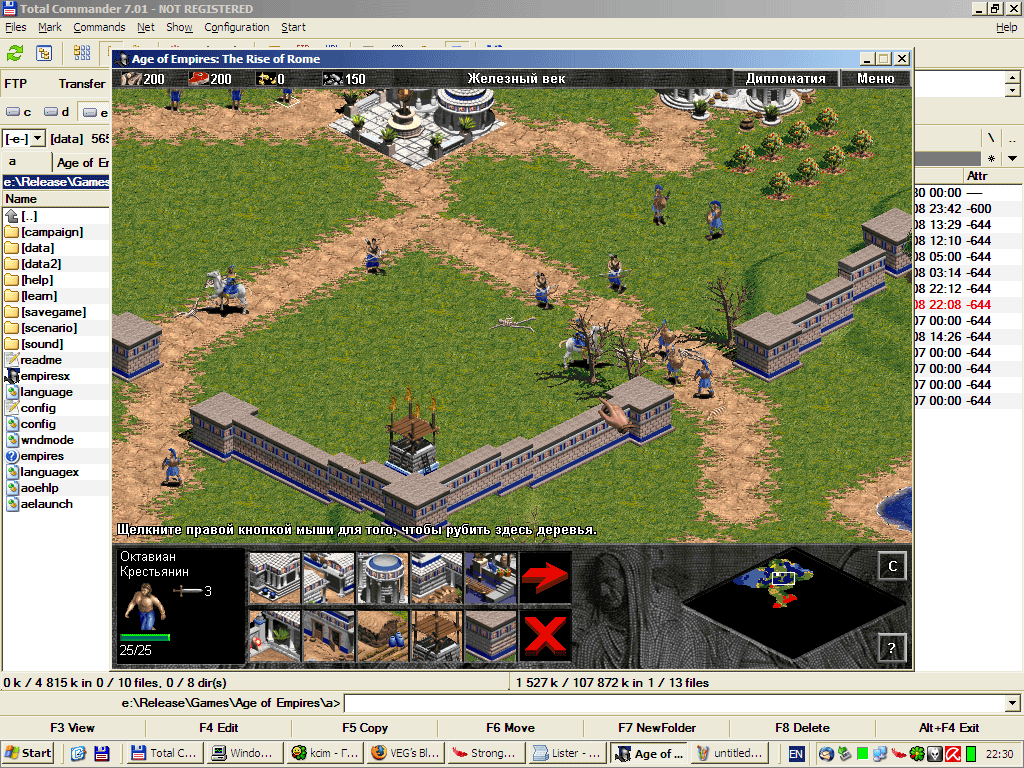
Demo: Age of Empires: The Rise of Rome
Copy our ddraw.dll, wndmode.dll and wndmode.ini to the directory with the game, start the game. Drumroll…