Handling large amounts of incoming mail based on KANA Response
I’ll try to talk about the problem of processing a large number of incoming e-mail and responses to it. Obviously, companies with a large number of customers (telecoms, banks, tour operators and many others) can receive millions of mail messages per year. Most of them are impersonal, that is, directed to the general mailboxes of the company, such as for example: [email protected], [email protected], [email protected]. The number of agents in the "post center" can be from several tens to several thousand. Processing so many messages using public folders in Ekschendzh is possible, but quite inefficient.
Next I’ll try to tell you how the KANA Response product from KANA helps to solve this problem ., which is one of the leaders in this market in America / England and gradually in Western Europe.
KANA Response is more than other KANA solutions, a product out of the box. The main task of the server side is to pick up incoming mail through pop3 accounts, and using a system of rules to categorize and distribute messages into queues that have different priorities, SLAs and agents that can respond to messages from this queue. Also, with the help of categorization (both with the help of rules and with the help of a self-learning module), messages are delivered to the agent with the response template already attached. The client part is a java application that can be downloaded as an applet, as a Java WebStart application, or installed on a workstation as a local application.
The working application of the agent looks something like this:
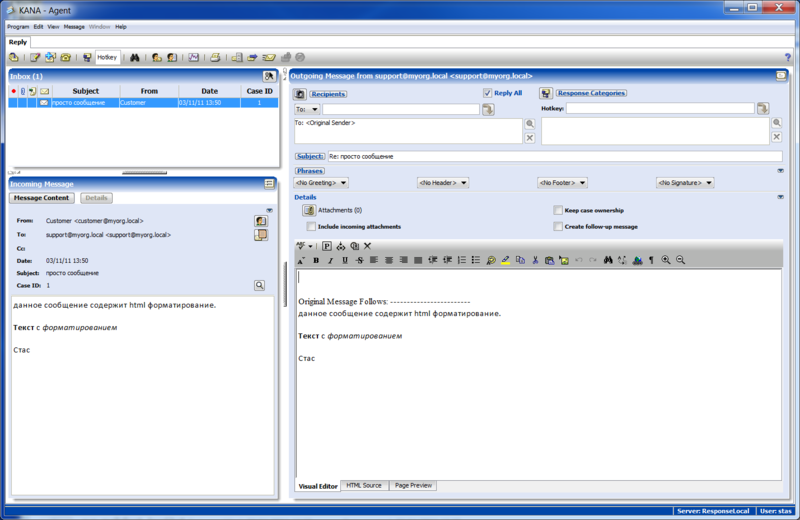
On the left is the agent’s current mailbox, where letters from the queues to which he is subscribed are sent, taking into account the priority of the queue and the message age. Below it is the selected incoming message. You can immediately see all messages from this client or all messages related to the current message thread. You can switch to a detailed view, which shows the attached documents, service information, the complete source code of the message, message history.
On the right is the response form, where you can select the message category (the category can add a response template to the message), greeting phrases, signatures. And of course, the answer editor. The editor can work in both HTML and plain text format.
There is also a statistics window for monitoring the current state:
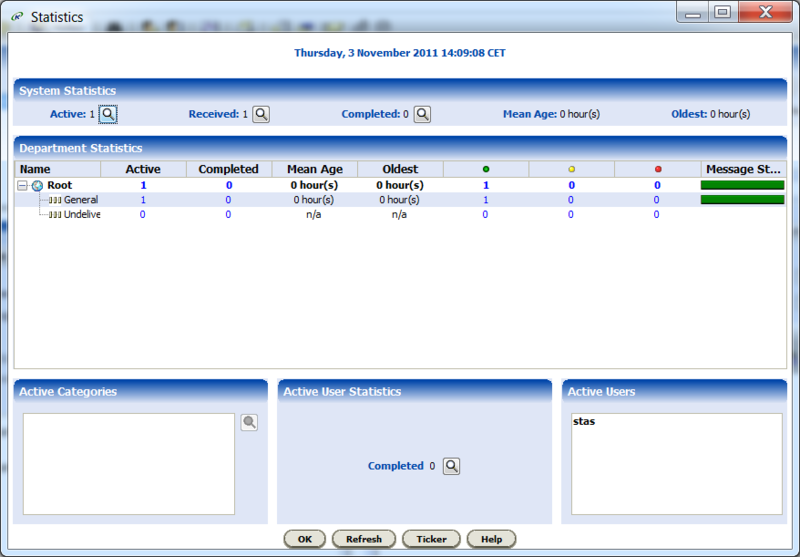
Where can I see the statistics of messages by queue and the correspondence to the level of message service in this queue (green, yellow and red column).
The administrative part is divided into system and content parts. In the system part, administrators can determine the POP3 accounts that will be checked, the outgoing server and other parameters that relate to the functioning of the system (cluster) as a whole. In the content part, supervisors can define new categories, queues, rules, message templates for different cases of responses, system users. It looks something like this:
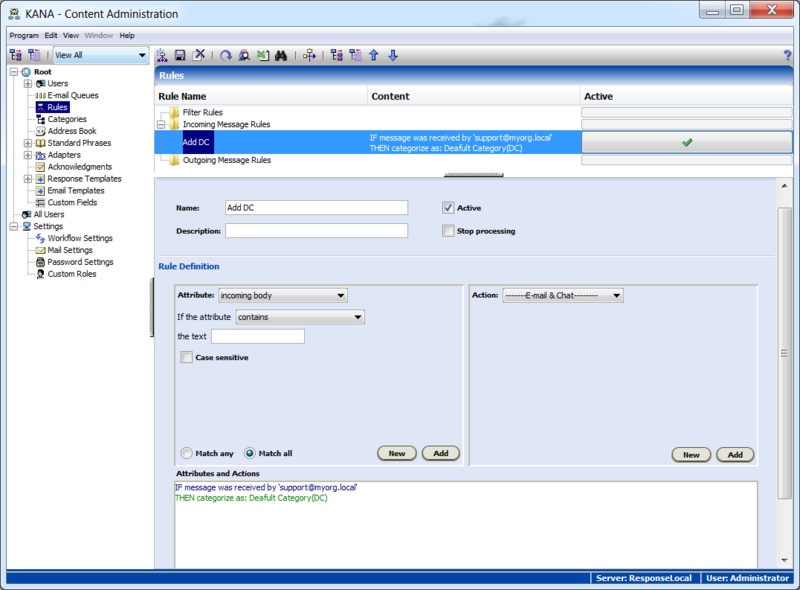
This screen shows the editing rule, which at the moment will check incoming messages for compliance with a specific mailbox ([email protected]) and apply the category “Default Category” to messages received through this address. The system of rules is quite ramified, it allows you to filter messages both by all standard fields of the message header and by the text of the message (regular expressions can be used). Actions that can be set in the rules include such features as: categorizing a message, moving to an inbox to a specific agent or queue, sending a 2nd line support message (to a mailbox outside KANA Response) with monitoring the response, calling an arbitrary url with parameters to be filled out depending on current message (for example, receiving client status at his address from a billing system),
At the system level, KANA Response works with Oracle / MSSQL / DB2 databases, AIX / RH Linux / Windows / Solaris OS. A KANA Response server can consist of either a single server or a server cluster, and all KANA Response components can be run on more than one node, which makes it possible to increase the productivity of the application. I installed the server, which handles about 10 million messages a year and about 200 simultaneous agents, the maximum installation I know about is about 500 thousand-1 million messages a day and several thousand agents working simultaneously.
Next I’ll try to tell you how the KANA Response product from KANA helps to solve this problem ., which is one of the leaders in this market in America / England and gradually in Western Europe.
KANA Response is more than other KANA solutions, a product out of the box. The main task of the server side is to pick up incoming mail through pop3 accounts, and using a system of rules to categorize and distribute messages into queues that have different priorities, SLAs and agents that can respond to messages from this queue. Also, with the help of categorization (both with the help of rules and with the help of a self-learning module), messages are delivered to the agent with the response template already attached. The client part is a java application that can be downloaded as an applet, as a Java WebStart application, or installed on a workstation as a local application.
The working application of the agent looks something like this:
On the left is the agent’s current mailbox, where letters from the queues to which he is subscribed are sent, taking into account the priority of the queue and the message age. Below it is the selected incoming message. You can immediately see all messages from this client or all messages related to the current message thread. You can switch to a detailed view, which shows the attached documents, service information, the complete source code of the message, message history.
On the right is the response form, where you can select the message category (the category can add a response template to the message), greeting phrases, signatures. And of course, the answer editor. The editor can work in both HTML and plain text format.
There is also a statistics window for monitoring the current state:
Where can I see the statistics of messages by queue and the correspondence to the level of message service in this queue (green, yellow and red column).
The administrative part is divided into system and content parts. In the system part, administrators can determine the POP3 accounts that will be checked, the outgoing server and other parameters that relate to the functioning of the system (cluster) as a whole. In the content part, supervisors can define new categories, queues, rules, message templates for different cases of responses, system users. It looks something like this:
This screen shows the editing rule, which at the moment will check incoming messages for compliance with a specific mailbox ([email protected]) and apply the category “Default Category” to messages received through this address. The system of rules is quite ramified, it allows you to filter messages both by all standard fields of the message header and by the text of the message (regular expressions can be used). Actions that can be set in the rules include such features as: categorizing a message, moving to an inbox to a specific agent or queue, sending a 2nd line support message (to a mailbox outside KANA Response) with monitoring the response, calling an arbitrary url with parameters to be filled out depending on current message (for example, receiving client status at his address from a billing system),
At the system level, KANA Response works with Oracle / MSSQL / DB2 databases, AIX / RH Linux / Windows / Solaris OS. A KANA Response server can consist of either a single server or a server cluster, and all KANA Response components can be run on more than one node, which makes it possible to increase the productivity of the application. I installed the server, which handles about 10 million messages a year and about 200 simultaneous agents, the maximum installation I know about is about 500 thousand-1 million messages a day and several thousand agents working simultaneously.