 September 16, 2011 at 21:41
How-to-style VPN server (pptpd + mysql + radius) on CentOS6
 Although how-to-style articles are not very commented on, and mostly not with positive comments, however, it is them that are most often added to bookmarks.
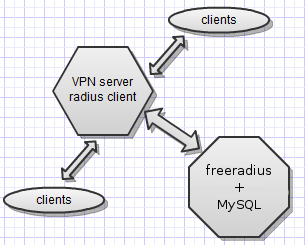
 Here I will try to describe the process of installing and configuring a VPN server on CentOS6 with users in MySQL and authorizing via radius for an encrypted connection using ms-chap-v2 and mppe.
Preamble
Where do these articles come from? Everything is simple. When we look for job seekers, for example, for the position of system administrator, then after selecting candidates for a preliminary interview, test tasks are compiled, implemented on our own, and then we offer them to be solved by applicants. To complete the tasks, the applicant is provided with a virtual machine, Internet access, and a certain time. Time is calculated simply - our implementation * 2. At the same time, you can consider that all the necessary solutions (how-to) can be found on the Internet, however, we take this into account, and therefore we do not take ready-made solutions, but compile and solve them ourselves first, on fresh distributions. By the way, there are times when we come across certain problems during implementation (small, undocumented pranks of developers), and in the case of
Given
KVM virtual machine with white IP and freshly installed CentOS6 x86_64 minimal.
Task
1. Install and configure in a bunch of pptpd, freeradius2, radiusclient-ng and mysql.
2. Create 2 clients to connect to the configured VPN server, with access to no through NAT. One client with dynamic address acquisition, the second with a constant IP.
3. Transfer pool of addresses for distribution to dynamic clients from pptpd to radius.
Decision
The first step is to install all the necessary packages. radiusclient-ng and pptpd are not in standard repositories, so for radiusclient-ng we will connect an EPEL repository, and download the pptpd package directly. next, configure mysql and set the password: Actually, let's move on to pptpd configuration. We bring the configuration files to the following form: we are done with pptpd, go on to configure radiusclient-ng: The first problem we encountered is the reluctance of pptpd to work with radiusclient-ng because of the paths where it is installed, so we create a soft link as follows and comment out the file /etc/radiusclient-ng/radiusclient.conf line otherwise swears at an unknown parameter.
# rpm -Uhv fedora-epel.mirror.lstn.net/6/x86_64/epel-release-6-5.noarch.rpm

# yum install freeradius freeradius-mysql radiusclient-ng radiusclient-ng-utils freeradius-utils mysql mysql-devel mysql-server

#rpm -Uhv poptop.sourceforge.net/yum/stable/packages/pptpd-1.3.4-2.el6.x86_64.rpmmysql_secure_installation# cat /etc/pptpd.conf
option /etc/ppp/options.pptpd
logwtmp
localip 192.168.80.1
remoteip 192.168.80.5-35# cat /etc/ppp/options.pptpd
name pptpd
refuse-pap
refuse-chap
refuse-mschap
require-mschap-v2
require-mppe-128
proxyarp
lock
nobsdcomp
novj
novjccomp
nologfd
plugin radius.so
plugin radattr.so# ln -s /etc/radiusclient-ng /etc/radiusclient#bindaddr *edit / etc / radiusclient-ng / servers, add the local radius server that the client will contact
localhost YouRsUpErpAAsThe second problem we had to deal with was the absence of mircosoft attributes in the radiusclient-ng package, after googling, the necessary artibuts were found. copy existing files with attributes from / usr / share / radiusclient-ng / to / etc / radiusclient-ng /
# cp /usr/share/radiusclient-ng/diction* /etc/radiusclient-ng/to / etc / radiusclient-ng / create a dictionary.microsoft file with the following contents: edit the file / etc / radiusclient-ng / radiusclient .conf for the subject, edit the file / etc / radiusclient-ng / dictionary, adding to the end with the client also finished, we proceed to configure mysql:
VENDOR Microsoft 311 Microsoft


ATTRIBUTE MS-CHAP-Response 1 string Microsoft

ATTRIBUTE MS-CHAP-Error 2 string Microsoft

ATTRIBUTE MS-CHAP-CPW-1 3 string Microsoft

ATTRIBUTE MS-CHAP-CPW-2 4 string Microsoft

ATTRIBUTE MS-CHAP-LM-Enc-PW 5 string Microsoft

ATTRIBUTE MS-CHAP-NT-Enc-PW 6 string Microsoft

ATTRIBUTE MS-MPPE-Encryption-Policy 7 string Microsoft

ATTRIBUTE MS-MPPE-Encryption-Type 8 string Microsoft

ATTRIBUTE MS-MPPE-Encryption-Types 8 string Microsoft

ATTRIBUTE MS-RAS-Vendor 9 integer Microsoft

ATTRIBUTE MS-CHAP-Domain 10 string Microsoft

ATTRIBUTE MS-CHAP-Challenge 11 string Microsoft

ATTRIBUTE MS-CHAP-MPPE-Keys 12 string Microsoft

ATTRIBUTE MS-BAP-Usage 13 integer Microsoft

ATTRIBUTE MS-Link-Utilization-Threshold 14 integer Microsoft

ATTRIBUTE MS-Link-Drop-Time-Limit 15 integer Microsoft

ATTRIBUTE MS-MPPE-Send-Key 16 string Microsoft

ATTRIBUTE MS-MPPE-Recv-Key 17 string Microsoft

ATTRIBUTE MS-RAS-Version 18 string Microsoft

ATTRIBUTE MS-Old-ARAP-Password 19 string Microsoft

ATTRIBUTE MS-New-ARAP-Password 20 string Microsoft

ATTRIBUTE MS-ARAP-PW-Change-Reason 21 integer Microsoft

ATTRIBUTE MS-Filter 22 string Microsoft

ATTRIBUTE MS-Acct-Auth-Type 23 integer Microsoft

ATTRIBUTE MS-Acct-EAP-Type 24 integer Microsoft

ATTRIBUTE MS-CHAP2-Response 25 string Microsoft

ATTRIBUTE MS-CHAP2-Success 26 string Microsoft

ATTRIBUTE MS-CHAP2-CPW 27 string Microsoft

ATTRIBUTE MS-Primary-DNS-Server 28 ipaddr Microsoft

ATTRIBUTE MS-Secondary-DNS-Server 29 ipaddr Microsoft

ATTRIBUTE MS-Primary-NBNS-Server 30 ipaddr Microsoft

ATTRIBUTE MS-Secondary-NBNS-Server 31 ipaddr Microsoft

VALUE MS-BAP-Usage Not-Allowed 0

VALUE MS-BAP-Usage Allowed 1

VALUE MS-BAP-Usage Required 2

VALUE MS-ARAP-PW-Change-Reason Just-Change-Password 1

VALUE MS-ARAP-PW-Change-Reason Expired-Password 2

VALUE MS-ARAP-PW-Change-Reason Admin-Requires-Password-Change 3

VALUE MS-ARAP-PW-Change-Reason Password-Too-Short 4

VALUE MS-Acct-Auth-Type PAP 1

VALUE MS-Acct-Auth-Type CHAP 2

VALUE MS-Acct-Auth-Type MS-CHAP-1 3

VALUE MS-Acct-Auth-Type MS-CHAP-2 4

VALUE MS-Acct-Auth-Type EAP 5

VALUE MS-Acct-EAP-Type MD5 4

VALUE MS-Acct-EAP-Type OTP 5

VALUE MS-Acct-EAP-Type Generic-Token-Card 6

VALUE MS-Acct-EAP-Type TLS 13
dictionary /etc/radiusclient-ng/dictionaryINCLUDE /etc/radiusclient-ng/dictionary.microsoft
INCLUDE /etc/radiusclient-ng/dictionary.meritthe freeradius-mysql package contains the necessary files to import them into mysql, they are located in / etc / raddb / sql / mysql / we
edit the admin.sql file to set a password different from the standard one , we connect to mysql, create a DB, import tables and create users then we create users and their settings should be as follows fill the table radgroupreply and so on, to get the next fill the table radreply to set a permanent ip for the first client
vim admin.sql

:%s/radpass/radpass235/g

:wq
mysql -p

mysql> create database radius;

mysql> \. admin.sql

mysql> use radius;

mysql> \. schema.sql
mysql> INSERT INTO radusergroup (username,groupname) values ('user1','static-ip-vpn');
mysql> INSERT INTO radusergroup (username,groupname) values ('user2','dinamic-ip-vpn');mysql> select * from radusergroup;
+----------+----------------+----------+
| username | groupname | priority |
+----------+----------------+----------+
| user1 | static-ip-vpn | 1 |
| user2 | dinamic-ip-vpn | 1 |
+----------+----------------+----------+mysql> INSERT INTO radcheck (username,attribute,op,value) values ('user1','User-Password','==','pass1');
mysql> INSERT INTO radcheck (username,attribute,op,value) values ('user2','User-Password','==','pass2');mysql> select * from radcheck;
+----+----------+---------------+----+-------+
| id | username | attribute | op | value |
+----+----------+---------------+----+-------+
| 1 | user1 | User-Password | == | pass1 |
| 2 | user2 | User-Password | == | pass2 |
+----+----------+---------------+----+-------+mysql> INSERT INTO radgroupreply (groupname, attribute, op, value) values ('dinamic-ip-vpn','Service-Type',':=','Framed-User');mysql> select * from radgroupreply;
+----+----------------+--------------------+----+---------------------+
| id | groupname | attribute | op | value |
+----+----------------+--------------------+----+---------------------+
| 1 | dinamic-ip-vpn | Service-Type | := | Framed-User |
| 2 | dinamic-ip-vpn | Framed-Protocol | := | PPP |
| 3 | dinamic-ip-vpn | Framed-Compression | := | Van-Jacobsen-TCP-IP |
| 4 | static-ip-vpn | Framed-Compression | := | Van-Jacobsen-TCP-IP |
| 5 | static-ip-vpn | Framed-Protocol | := | PPP |
| 6 | static-ip-vpn | Service-Type | := | Framed-User |
+----+----------------+--------------------+----+---------------------+mysql> INSERT INTO radreply (username, attribute, op, value) values ('user1','Framed-IP-Netmask',':=','255.255.255.255');
mysql> INSERT INTO radreply (username, attribute, op, value) values ('user1','Framed-IP-Address',':=','192.168.80.90');mysql> select * from radreply;
+----+----------+-------------------+----+-----------------+
| id | username | attribute | op | value |
+----+----------+-------------------+----+-----------------+
| 1 | user1 | Framed-IP-Netmask | := | 255.255.255.255 |
| 2 | user1 | Framed-IP-Address | := | 192.168.80.90 |
+----+----------+-------------------+----+-----------------+
As a result, we entered this database of 2 clients, user1 with the password pass1 and static ip - 192.168.80.90, and user2 with the password pass2 and getting a dynamic ip from the pool specified in the pptpd settings. Here, users are deliberately divided into groups, taking into account the further increase in customers, it was possible to simply create all the attributes for both customers in the radreply table, but with a large number of customers, it is more convenient to use groups where the same attributes are indicated for customers of the group. Also, in groups you can specify different address pools and much more, but we won’t talk about that now, because we need to solve the problem on time.
Go to the radius settings. Here I will give examples of files in which changes were made:
/etc/raddb/clients.conf Third problem
client 127.0.0.1 {

secret = YouRsUpErpAAs

shortname = localhost

nastype = other

}
, at the time of debugging, when radius was not yet connected to mysql, they were faced with the fact that if the clients in the / etc / raddb / users file were not written at the beginning of the file, nothing worked.
/ etc / raddb / users It is necessary to register this so that there are no multiple connections with the same login at the same time /etc/raddb/radiusd.conf in the modules section we remove comments from /etc/raddb/sql.conf we write the data for connecting to mysql / etc / raddb / sites-enabled / default in the authorize, session, post-auth and accounting sections enable sql in the authorize sections enable mschap / etc / raddb / modules / mschap Perhaps the task has been practically solved, some touches remained:
DEFAULT Simultaneous-Use := 1

 Fall-Through = 1
$INCLUDE sql.confpassword = "radpass235"mschap {
use_mppe = yes
require_encryption = yes
require_strong = yes
}Configure iptables and enable forward to release clients to the world /etc/sysctl.conf Already at this stage, if we run the installed services, we can connect to our machine via vpn, it remains only to transfer the pool of addresses issued to dynamic clients from pptpd to radius. There are several options for this, down to putting the pool in mysql. We use a simple option. / etc / raddb / modules / ippool in the ippool main_pool section, make edits for our address pool in the file / etc / raddb / sites-enabled / default, add them to the corresponding sections next, create files where the pool will be stored and add it to / etc / raddb / users
iptables -I INPUT -p gre -j ACCEPT

iptables -I INPUT -p tcp -m state --state NEW -m tcp --dport 1723 -j ACCEPT

iptables -I INPUT -m state --state RELATED,ESTABLISHED -j ACCEPT

iptables -I FORWARD -s 192.168.80.0/24 -o eth0 -j ACCEPT

iptables -I FORWARD -d 192.168.80.0/24 -i eth0 -j ACCEPT

iptables -t nat -I POSTROUTING -s 192.168.80.0/24 -o eth0 -j MASQUERADE
net.ipv4.ip_forward = 1
# sysctl -prange-start = 192.168.80.35
range-stop = 192.168.80.65accounting {
main_pool
}
post-auth {
main_pool
}touch /etc/raddb/db.ipindex /etc/raddb/db.ippool
chmod 664 /etc/raddb/db.ipindex /etc/raddb/db.ippool
chown root:radiusd /etc/raddb/db.ipindex /etc/raddb/db.ippoolDEFAULT Pool-Name := main_pool
Fall-Through = Yesrestart radius, and try connecting to the machine via vpn, everything should work. We can see detailed connection statistics in the radius.radacct table of the
selected addresses from the pool, you can see the command:
rlm_ippool_tool -av /etc/raddbdb/db.ippool /etc/raddbdb/db.ipindexAfterword
I deliberately emphasized the problems that we had to face. We spent a little over an hour deploying this system. 2.5 hours were allotted for candidates. None of the 4 applicants completed this task in full. Only one of them almost reached the end of the journey. With him, perhaps we will continue to cooperate.
Of course, I understand that not all employers use this method of testing job seekers. However, I think this is one of the best ways to really test the knowledge and capabilities of candidates. After all, if the candidate has solved (or almost solved) a similar problem, then after some time, joining the team and immersion in the network structure, it is quite possible to rely on him.
I could name the article - “How we choose workers”, and describe the process of preliminary selection and practical assignment in general terms, but then, the article would not have its value as near-technical, and would not be in the form of how-to, but it would be less useful, in my opinion. I know that there are several similar articles, up to linking with abills, but they are more than one and a half years old and they are under other distros.
UPD: perhaps job seekers read Habr, and, at last, will see the solution of the task which they did not pass.
UPD2: Regarding the lack of time for implementation, they write that 2.5 hours is not enough. I emphasize that time is not the main , although significant indicator. The main thing is the “right way”.
UPD3:Inspired by the comments about the pptp protocol sludge. The situation is identical with l2tp.
Instead of pptpd, put xl2tpd.
#yum install xl2tpdThe settings files are reduced to the following form:
# cat /etc/xl2tpd/xl2tpd.conf

[global]

port = 1701

auth file = /etc/xl2tpd/l2tp-secrets

access control = no

rand source = dev

[lns default]

exclusive = no

ip range = 192.168.80.5-192.168.81.35

local ip = 192.168.80.1

require chap = yes

refuse pap = yes

require authentication = yes

name = VPNserver

ppp debug = yes

pppoptfile = /etc/ppp/options.xl2tpd

length bit = yes

flow bit = yes
# cat /etc/ppp/options.xl2tpd
ipcp-accept-local
ipcp-accept-remote
lcp-echo-failure 30
lcp-echo-interval 5
noccp
nodeflate
auth
crtscts
idle 1800
mtu 1410
mru 1410
defaultroute
debug
proxyarp
connect-delay 5000
lock
plugin radius.so
plugin radattr.so








