Read the QR code
- Tutorial
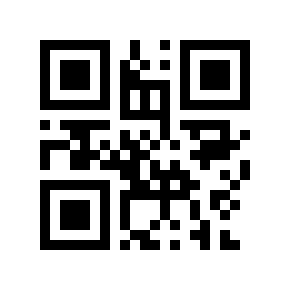 Sometimes such situations arise when you need to read a QR code, but there is no smartphone at hand. What to do? It only comes to mind to try to read by hand. If someone has encountered such situations or who is just curious about how the QR code is read by machines, then this article will help you understand this problem.
 The article discusses the basic features of QR codes and the method of decoding information without the use of computers.
Illustrations: 14, characters: 8 510.
For those who do not know what a QR code is , there is a good article in the English Wikipedia. You can also read the thematic blog on Habré and some good articles on related topics that can be found by searching .
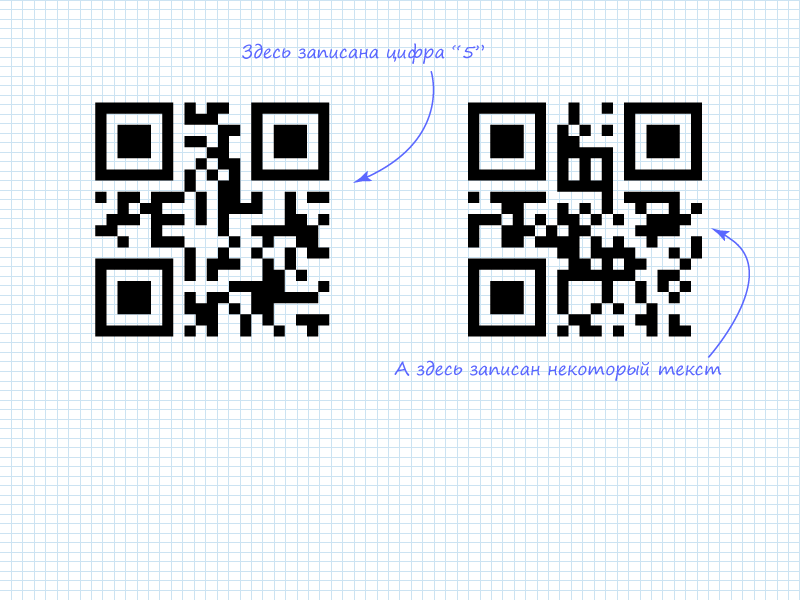
We will consider the solution of the problem of directly reading information from a QR picture using two codes as an example. The information was encoded in the online generator QR Coder.ru .
To understand how to extract data from code, you need to understand the algorithm. There are several standards in the QR code family, their basic principles can be found in the specifications. I will briefly explain: the data that needs to be encoded is divided into blocks depending on the encoding mode. A header is added to the data divided into blocks, indicating the mode and number of blocks. There are also such modes in which a more complex structure of information placement is used. We will not consider these modes due to the fact that manually extracting information from them is impractical. However, based on the principles described below, you can adapt to these modes.
In case of incorrect reading of the data, special codes are used in the QR code, which are able to correct errors in reading. These are the so-called Reed-Solomon codes . We will not consider the principle of calculating codes, as well as correcting errors in information blocks, this is the topic of a separate article. Reed-Solomon (RS) error correction codes are recorded after all information data. This greatly simplifies the task of directly reading information: you can simply read the data without touching the codes. As practice shows, usually most of the QR matrix is occupied by corrective RS codes.
According to the standard, data with RS-codes are “mixed” before being written to the picture. For these purposes, special masks are used. There are 8 algorithms, among which the best is chosen. The selection criteria are based on a fine system, which can also be read about in the specification.
The "mixed" data is recorded in a special sequence on a template image, where technical information for decoding devices is added. Based on the described algorithm, we can distinguish a scheme for extracting data from a QR code:

Here, a green felt-tip pen highlights the points that will need to be performed when reading the code directly. The remaining items can be omitted due to the fact that the reading is done by a person.
Step 0. QR code

Looking at the pictures, you can see several distinct areas. These areas are used to detect a QR code. These data are not of interest from the point of view of the recorded information, but they need to be crossed out or just remember their location so that they do not interfere. The rest of the code field carries useful information. It can be divided into two parts: system information and data. There is also information about the version of the code. The maximum amount of data that can be written to the code depends on the version of the code. When upgrading, special blocks are added, for example, like here:
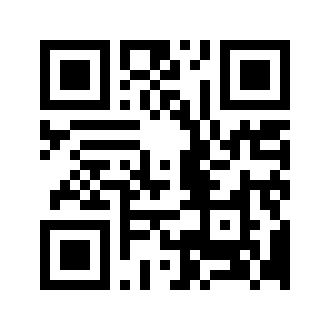
On them, you can navigate and understand which version of QR is in front of you. High version codes are also usually impractical to read manually.
The placement of system information is shown in the figure:
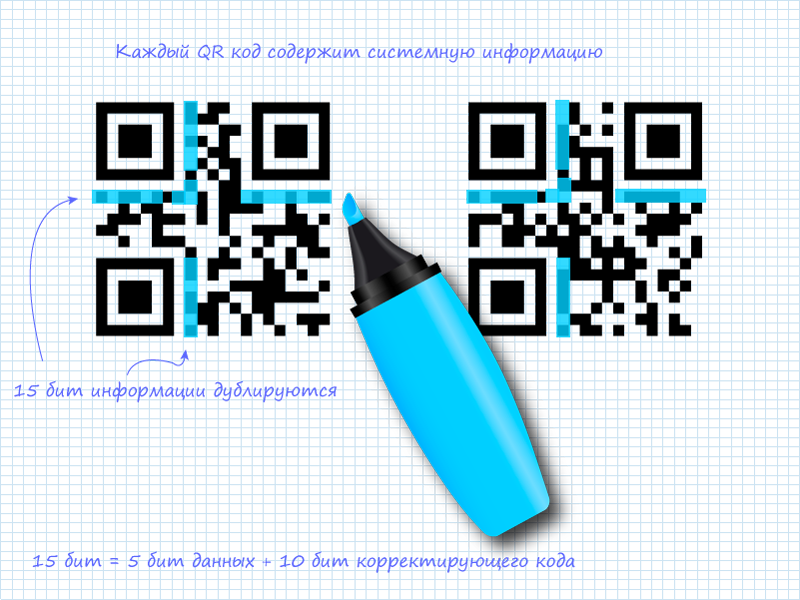
System information is duplicated, which can significantly reduce the likelihood of errors during code detection and reading. System information is 15 bits of data, among which the first 5 is useful information, and the remaining 10 is BCH (15,5) code, which allows you to correct errors in system data. RS codes are also classified as BCH codes. Please note that in the figure, two strips of 15 bits do not intersect.
Step 1. Reading 5 bits of system information
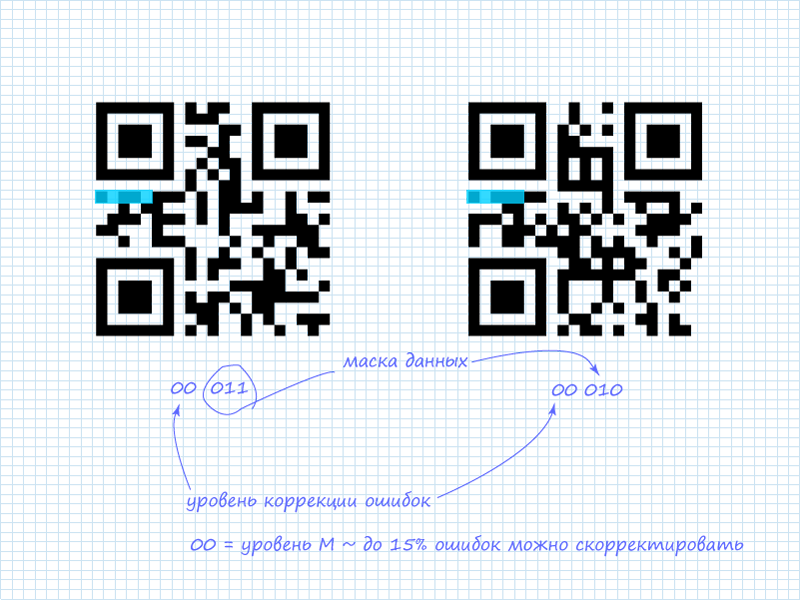
As already mentioned, only the first 5 bits are of interest. Of which 2 bits indicate the level of error correction, and the remaining 3 bits indicate which mask of the 8 available is applied to the data. In the considered QR codes, system information contains:
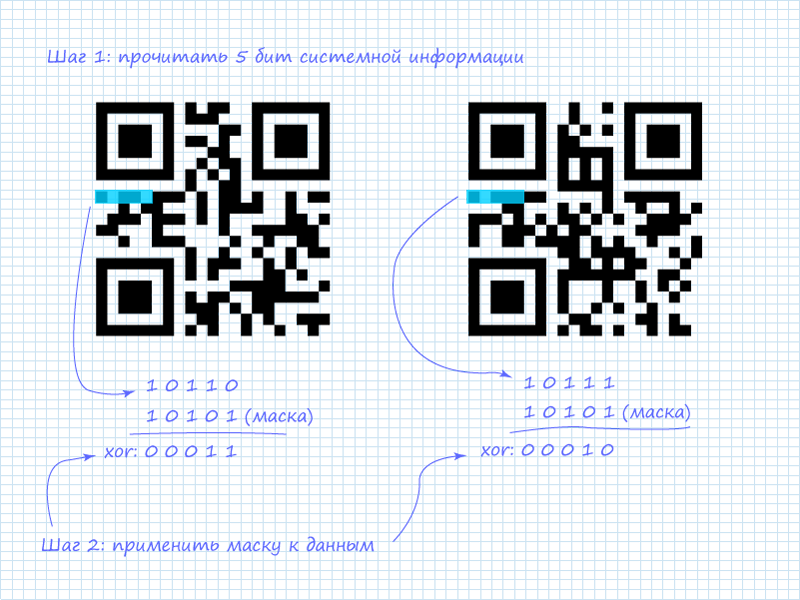
Step 2. Mask for system information
In addition to the already announced schemes for protecting system information, in addition, a static mask is used that applies to any system information. It has the form: 101010000010010 . Since only the first 5 bits are of interest, the mask can be shortened and easily remembered: 10101 (ten - one hundred and one). After applying the operation “exclusive or” (xor) we obtain information.
Possible error correction levels:
| L | 01 |
| M | 00 |
| Q | eleven |
| H | 10 |
Possible masks:
| 000 | (i + j) mod 2 = 0 |
| 001 | i mod 2 = 0 |
| 010 | j mod 3 = 0 |
| 011 | (i + j) mod 3 = 0 |
| 100 | ((i div 2) + (j div 3)) mod 2 = 0 |
| 101 | (ij) mod 2 + (ij) mod 3 = 0 |
| 110 | ((ij) mod 2 + (ij) mod 3) mod 2 = 0 |
| 111 | ((i + j) mod 2 + (ij) mod 3) mod 2 = 0 |
Step 3. Reading the data header
To understand what data you have to deal with, you must first read the 4-bit header, which contains information about the mode. The specifics of reading data are shown in the picture:
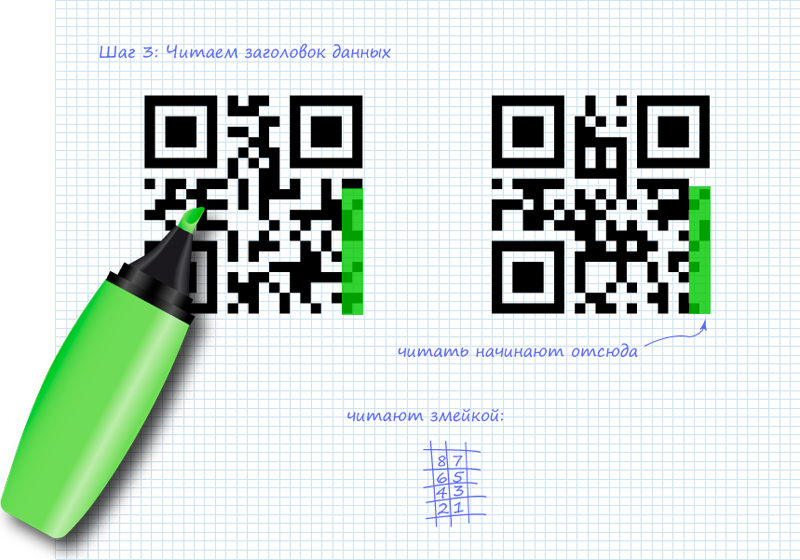
List of possible modes:
| ECI | 0111 |
| Numeric | 0001 |
| Alphanumeric | 0010 |
| 8-bit (byte) | 0100 |
| Kanji | 1000 |
| Structured addition | 0011 |
| Fnc1 | 0101 (1st position) 1001 (2nd position) |
Step 4. Applying the mask to the header
After extracting 4 bits that describe the mode, you need to apply a mask to them.
In our case, two masks use different masks. The mask is defined by the expression in the table above. If this expression reduces to TRUE (true) for a bit with coordinates (i, j) , then the bit is inverted, otherwise everything remains unchanged. The origin in the upper left corner (0,0) . Looking at the expressions, you can notice patterns in them. For the QR codes in question, the masks will look like this:


We get the modes:
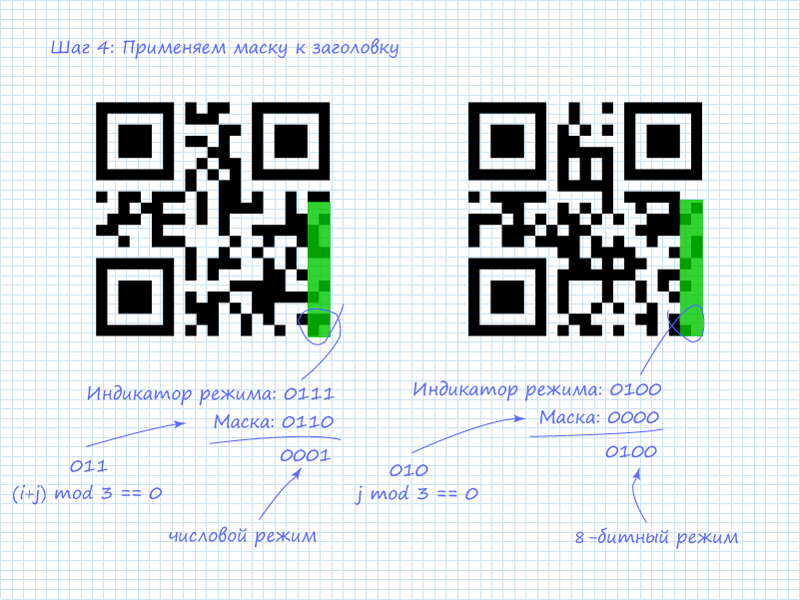
Step 5. Reading Data
After receiving data about the mode, you can start reading the information. It should be noted that it is most interesting to read numerical and alphanumeric data, since they are easily interpreted. But also do not be afraid of 8-bit. It can also be easily interpreted information. For example, many online QR text generators encode in this mode using ASCII . Another reason why you should initially read the mode is that the number of data packets depends on it. Which also depends on the version of the code. For versions one through nine of block lengths for more readable modes:
| Numeric | 10 bits / 4 bits |
| Alphanumeric | 9 bit |
| 8-bit (byte) | 8 bit |
The first block after the mode pointer is the number of characters. For the numeric mode, the number is encoded in the next 10 bits, and for the 8-bit mode in 8 bits (I apologize for the tautology).

The figure shows that in the left QR code, as noted, the number 5 is written down. This can be seen by the number of characters indicator and 4 bits following it. In numerical mode, along with 10-bit blocks, 4-bit blocks are used to save space, if there is no need for a 10-bit volume. 4 characters are encrypted in the right code. At the moment, it is not known what is encrypted in it. Therefore, it is necessary to proceed to reading the next column to extract all 4 blocks of information.
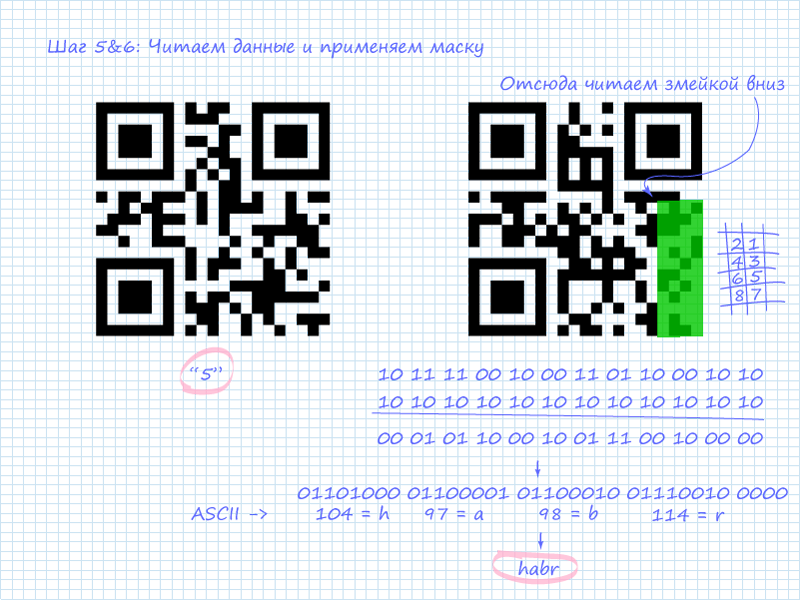
The figure shows that all 4 packets are ASCII codes of Latin letters that form the word “habr”.
Of course, the best way remains to get the phone out of your pocket and, pointing the camera at the QR image, read all the information. However, in emergency cases, the described technique may come in handy. Of course, you won’t hold in your head all the indexes of modes and types of masks, as well as ASCII characters, but you can remember popular combinations (at least those that are discussed in the article).
Specification:
BS ISO / IEC 18004: 2006. Information technology. Automatic identification and data capture techniques. QR Code 2005 bar code symbology specification. London: BSI. 2007. p. 126. ISBN 978-0-580-67368-9.
PS Follow the rules of the resource and the conditions of Creative Commons Attribution 3.0 Unported (CC BY 3.0)
PPS If you made a mistake with the blog, then tell me where I will transfer it.









