
Database protection and hacking on the example of the "Spare parts catalog" program
If you want to protect the database that is used in your program, then this information will be useful to you. Perhaps you need to improve security, for example, encrypting the database values and decrypting them at the output.
So. There is a program with a DATA folder, I really want to get data from it.
There are several options.
First you need to find out in what format the data is stored in the program. You can use the free TrID program . Trying ...
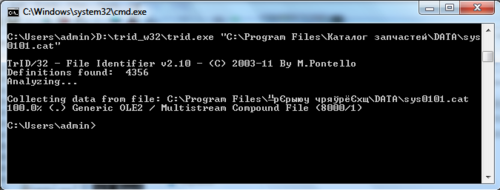
Sadness. Something not known. It looks like some kind of proprietary format based on ole datastore. If this is true and the developers decided to bother and write their own DBMS, then extracting the data will be very difficult and time consuming. It will be easier to use option 1.
But, all programmers are lazy and most likely this is some kind of well-known format. For example Access or Firebird. I would do that. I looked in the directory with the program, there are no libraries.
Explore further. Download a very useful free utility with Process explorer , which shows all the program accesses to the registry, files and everything that is possible.
We start, configure, so that only one catalog.exe process is monitored - the main executable file of the program.

Run the program and see where it goes.
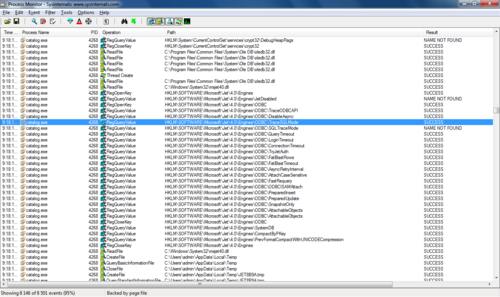
ABOUT! It uses an ODBC data source. Most likely, the used database is access! We put ourselves a plus sign. We look further. There is an interesting key in the TraceSQLMode registry. Googling it turns out that all requests can be written to a file. Change the key and look for the file. Found:

We look at requests: The nameplate is called spare, which in translation means a spare part. So this is not an auxiliary database and the names of the parts are really stored there. Excellent. We look further. The database file is being accessed not in the program directory. So it is temporarily copied there. We try to open in access - without result, does not understand.
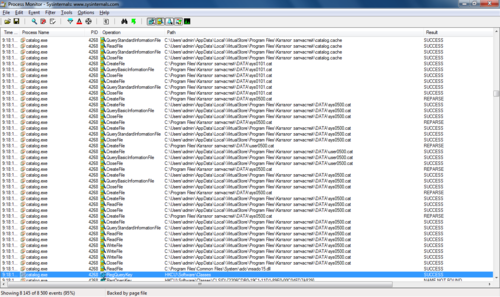
We take an action in the program, switch well to another position in the directory, look more closely at the log:

Before the request, the file is modified, something is written to it. Probably it is either decrypted or the file header changes. Now this is no longer important, because we understand that if you copy this file before the request, then with a greater probability it will turn out to be working.
So you need to somehow suspend the program until the request, while the file is working. That's right, a trace in the debugger. Download the debugger, for example, the free OllyDbg weighing 1.3MB.
We start in the administrator mode if you have windows vista and higher.
We join the running process (attach).

Select our process:

We return to Process Explorer and look at the function call stack (in the event context menu): You

can set a breakpoint on the CloseHandle file closing call in the kernel32.dll system module.
Go to this module in the debugger:
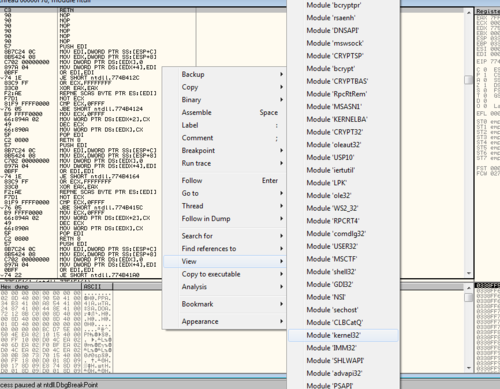
Find the desired function:

Put the Breakpoint - F2.
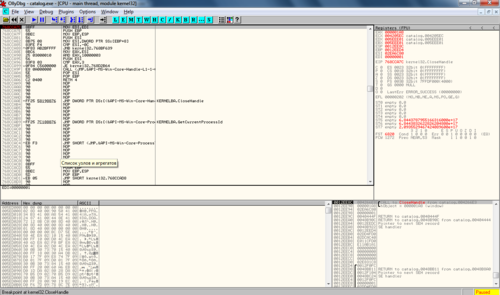
Next, run the program by pressing F9. And we do some action in the experimental program. The program will stop at the breakpoint.
We trace (F8) in the debugger until the registry access records appear before executing the request. This will mean that the database file is modified to connect to it and it is readable.
After that, go to the file and copy it to another place:
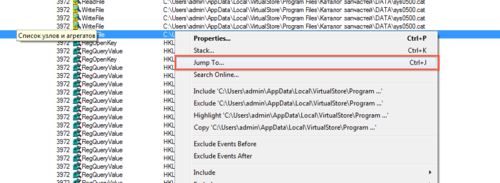
We look at the file now:
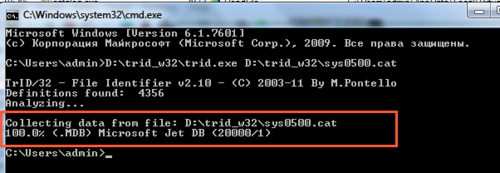
100% mdb! This is an MS Access file. Rename, open, make sure that everything is fine.
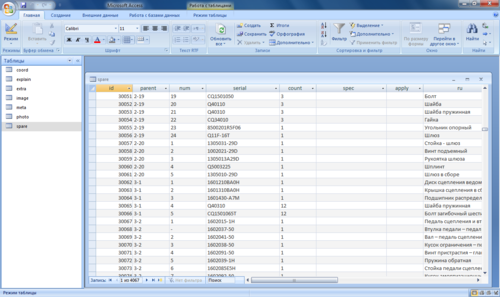
We have successfully obtained a database suitable for further modifications or conversion to another format.
Since I started to write, I will post a script on groovy to convert data from MS Access to PostgreSQL database.
here it is: Started by the interpreter: Conclusions: To protect the database, you must either (the most reliable) write data in its own format, or encrypt the values in the database and unzip it directly when displayed, as well as use auxiliary protection methods, for example, encrypt the file itself, change the signature file, use the built-in database encryption.
PS The author of this article is Alexander Surovtsev. If you liked the material, help him please get an invite to Habr. Unfortunately, I handed out my invites. His email address is surovtsev.alex on gmail.com, twitter is mobal1 Thank you very much!
So. There is a program with a DATA folder, I really want to get data from it.
There are several options.
- The first option. You can go the hard way by taking screenshots and exporting applications one at a time in excel. But this is a long way and uninteresting.
- The second option. Think and decode data.
First you need to find out in what format the data is stored in the program. You can use the free TrID program . Trying ...
Sadness. Something not known. It looks like some kind of proprietary format based on ole datastore. If this is true and the developers decided to bother and write their own DBMS, then extracting the data will be very difficult and time consuming. It will be easier to use option 1.
But, all programmers are lazy and most likely this is some kind of well-known format. For example Access or Firebird. I would do that. I looked in the directory with the program, there are no libraries.
Explore further. Download a very useful free utility with Process explorer , which shows all the program accesses to the registry, files and everything that is possible.
We start, configure, so that only one catalog.exe process is monitored - the main executable file of the program.
Run the program and see where it goes.
ABOUT! It uses an ODBC data source. Most likely, the used database is access! We put ourselves a plus sign. We look further. There is an interesting key in the TraceSQLMode registry. Googling it turns out that all requests can be written to a file. Change the key and look for the file. Found:
We look at requests: The nameplate is called spare, which in translation means a spare part. So this is not an auxiliary database and the names of the parts are really stored there. Excellent. We look further. The database file is being accessed not in the program directory. So it is temporarily copied there. We try to open in access - without result, does not understand.
SELECT

…

FROM spare LEFT JOIN photo ON photo.serial = spare.serial
We take an action in the program, switch well to another position in the directory, look more closely at the log:
Before the request, the file is modified, something is written to it. Probably it is either decrypted or the file header changes. Now this is no longer important, because we understand that if you copy this file before the request, then with a greater probability it will turn out to be working.
So you need to somehow suspend the program until the request, while the file is working. That's right, a trace in the debugger. Download the debugger, for example, the free OllyDbg weighing 1.3MB.
We start in the administrator mode if you have windows vista and higher.
We join the running process (attach).
Select our process:
We return to Process Explorer and look at the function call stack (in the event context menu): You
can set a breakpoint on the CloseHandle file closing call in the kernel32.dll system module.
Go to this module in the debugger:
Find the desired function:
Put the Breakpoint - F2.
Next, run the program by pressing F9. And we do some action in the experimental program. The program will stop at the breakpoint.
We trace (F8) in the debugger until the registry access records appear before executing the request. This will mean that the database file is modified to connect to it and it is readable.
After that, go to the file and copy it to another place:
We look at the file now:
100% mdb! This is an MS Access file. Rename, open, make sure that everything is fine.
We have successfully obtained a database suitable for further modifications or conversion to another format.
Since I started to write, I will post a script on groovy to convert data from MS Access to PostgreSQL database.
here it is: Started by the interpreter: Conclusions: To protect the database, you must either (the most reliable) write data in its own format, or encrypt the values in the database and unzip it directly when displayed, as well as use auxiliary protection methods, for example, encrypt the file itself, change the signature file, use the built-in database encryption.
import groovy.sql.Sql

 java.util.Properties prop = new java.util.Properties();

 prop.put(“charSet”, “cp1251”);

sourceSql = Sql.newInstance(‘jdbc:odbc:catalog2’,prop)

targetSql = Sql.newInstance(“jdbc:postgresql://localhost:5432/catalog”,”catalog”,”catalog”, “org.postgresql.Driver”)

def images = targetSql.dataSet(“image”);

sourceSql.eachRow(‘select * from image’) {

 def id = it.id

 images.add(id:id,block:it.block);

 def image=it.getProperty(“image”)

 if (image) {

 File f = new File(“D:/trid_w32/images/” + id + “.png”);

 f.append(image);

 }

}

def coords = targetSql.dataSet(“coord”);

sourceSql.eachRow(‘select * from coord’) {

 coords.add(id:it.id,block:it.block,x:it.x,y:it.y,r:it.r);

}

def spares = targetSql.dataSet(“spare”);

sourceSql.eachRow(‘select * from spare’) {

 spares.add(id:it.id,parent:it.parent,num:it.num,serial:it.serial,count:it.count,spec:it.spec,apply:it.apply,ru:it.ru,cn:it.cn);

}
groovy имя_скрипта.groovyPS The author of this article is Alexander Surovtsev. If you liked the material, help him please get an invite to Habr. Unfortunately, I handed out my invites. His email address is surovtsev.alex on gmail.com, twitter is mobal1 Thank you very much!