August 8, 2011 at 16:15
QNX RTOS: Flow Planning
 Continuation of the series of notes on the QNX real-time operating system . This time I would like to talk about thread scheduling in QNX6 * . As readers (who read the previous note in the series ) already know , the QNX6 microkernel controls threads, not processes. And it is the microkernel that loads the context of the thread that should receive control at the next moment. The choice of thread that will be executed by the processor (i.e. actively use processor time) is the scheduling of threads.
When thread scheduling occurs
The QNX Neutrino microkernel does not work continuously, but receives control only in the case of system calls, exceptions, and interrupts. Also, the micronucleus during its work performs flow planning. From this we can draw the correct conclusion that the operation of scheduling flows does not occur by itself, but by some event. In fact, there are few such events:
- Crowding out. If a thread with a higher priority than the one currently executing has transitioned to the ready state (READY), the microkernel will stop the thread that is currently executing, switch contexts, and start the thread with the higher priority. The thread that was running before will remain the first in the execution queue.
- Blocking. A thread during its execution (i.e., during operation) may call a function that will block it. For example, it will try to capture a semaphore or transmit a message using a system function
MsgSend()(directly or indirectly). In this case, the kernel will remove such a process from the execution queue and transfer control to another thread. - Assignment (transfer of control, yield). A thread can voluntarily transfer control if it calls a function
sched_yield(). In this case, the thread is placed last in the execution queue and the microkernel transfers control to another thread (maybe the one that just gave control).
Flow Parameters Affecting Planning
One of the core functions of the QNX Neutrino microkernel ( and perhaps the most important after messaging ) is thread scheduling. It is the microkernel that switches contexts and selects which thread will execute at the next point in time. The micronucleus does all this not just like that and not at the request of its left heel, but based on the following flow parameters:
- Stream priority (stream priority level). Each thread in the QNX6 RTOS runs at a specific priority. The higher the priority, the more likely the thread to get the processor in the first place. If there are two or more threads in the READY state (ready for execution) in the system, the microkernel will transfer control to the thread whose priority is higher.
- Discipline of planning. Each thread in the system is executed with a certain planning discipline. The microkernel takes into account the planning discipline when there are two or more threads in the READY state in the system that are running at the same priority.
-pprogram procnto. It should also be noted that at zero (lowest) priority, a thread is executed idle, which always gets control if the system has no more threads with higher priorities in the READY state. The operating system supports several QNX6 disciplines flow planning: the FIFO , rotary (circular, round-robin, RR) and sporadic **. This thread attribute will only be considered if the microkernel has to choose between threads with the same priority level. Planning disciplines will be described later.
There is another factor that affects the order of switching flows. All threads ready to run and use the processor (i.e. threads in READY state) are queued. There are 256 such queues in the system (by the number of priorities). All things being equal, when the microkernel has to choose among two threads with the same priority level, the thread that is the first in the queue will start executing. Once again, when crowding out a stream takes precedence, it is placed first in the queue, and upon assignment (call
sched_yield()), the stream becomes last in the queue.FIFO Planning Discipline
If the flow is given the FIFO planning discipline (First In First Out, first in, first out), then it can run for as long as you like. Control will be transferred to another thread only if the thread is superseded by a higher priority thread, the thread is blocked or voluntarily gives up control. When using this planning discipline, a thread that performs lengthy mathematical calculations can completely capture the processor (i.e., it will not allow threads with the same and lower priority to run).
Carousel discipline planning
This planning discipline is completely similar to FIFO, except that the thread is not executed "endlessly", but only works for a certain time slot (timeslice). After the time quantum expires, the microkernel puts the process at the end of the queue of threads ready for execution, and control is transferred to the next thread (at the same priority level). If at this priority level there are no other threads in the READY state, then another thread is allocated a time slice.
The quantum of time that is allocated to threads with a carousel discipline for scheduling for work can be determined using the function
sched_rr_get_interval(). In fact, the timeslice is exactly four times the ticksize. In turn, the clock interval is 1ms in systems with a processor of 40MHz and higher and 10ms in systems with a slower processor *** . It turns out that in the usual x86 computers and laptops, the quantum of time is 4ms.Sporadic Planning Discipline
As in FIFO scheduling, a thread for which sporadic scheduling is applied is executed until it is blocked or replaced by a thread with a higher priority. In addition, just as in adaptive planning, a flow for which sporadic planning is applied gets a lower priority. However, sporadic planning gives significantly more precise flow control.
In sporadic planning, the priority of a thread can dynamically change between foreground priority (foreground, normal priority) and background (lowered) priority. The following parameters are used to control this sporadic transition:
- Initial budget of a thread (initial budget) (C) - the amount of time during which a thread can execute with normal priority (N) before getting a lower priority (L).
- Low priority (L) - The priority level to which the priority of the stream will be reduced. With a lower priority (L), the thread runs in the background. If the thread has a normal priority (N), it runs with foreground priority.
- Replenishment period (T) - the period of time during which the thread can spend its execution budget.
- The maximum number of current replenishment (max number of pending replenishments) - this value sets a limit on the number of replenishment operations performed, thereby limiting the amount of system resources allocated to the discipline of sporadic planning.
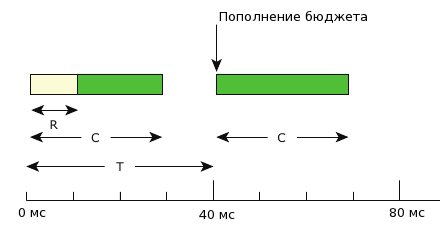
Fig. 1. The replenishment of the flow execution period occurs periodically.
With a normal priority N, the flow is executed for the period of time established by its initial execution budget C. After this period expires, the priority of the flow is reduced to a low level L until a replenishment operation occurs.
Imagine, for example, a system in which the flow is never blocked or interrupted - fig. 2.
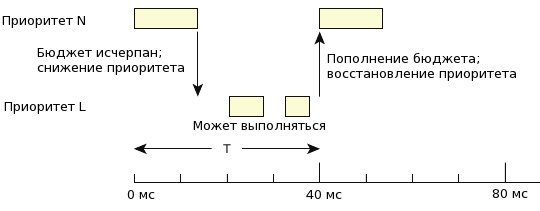
Fig. 2. The priority of the thread is reduced until its execution budget is replenished.
In this case, the thread will go to a level with a lower priority (background mode), at which its execution will depend on the priority of other threads in the system.
As soon as replenishment occurs, the priority of the flow rises to the initial level. Thus, in a properly configured system, a thread runs every time period T for a maximum time C. This ensures that every thread executed with priority N will use only C / T percent of system resources.
When a thread blocks several times, several replenishment operations can occur at different points in time. This may mean that the flow execution budget within the time period T will reach the value of C; however, during this period the budget may not be continuous.

Fig. 3. The priority of the flow varies between high and low
. Figure 3 shows that for each 40 ms replenishment period T, the budget for the execution of stream C is 10 ms.
- The flow is blocked after 3 ms; therefore, the 3 ms replenishment operation will be scheduled for execution in 40 ms, i.e. at that time, the completion of the first replenishment period.
- Flow execution resumes at the 6th millisecond, and this moment marks the beginning of the next replenishment period T. There is still a 7 ms margin in the flow execution budget.
- The flow is executed without blocking for 7 ms, as a result of which the flow execution budget is exhausted, and the priority of the flow is reduced to level L, at which it can or cannot get control. A 7 ms replenishment is planned for the 46th millisecond (40 + 6), i.e. after period T.
- At the 40th millisecond, the flow budget is replenished by 3 ms (see step 1 in the diagram), as a result of which the priority of the flow rises to normal.
- The thread spends 3 ms of its budget and then switches back to lower priority.
- At the 46th millisecond, the thread budget is replenished by 7 ms (see step 3), and the thread again receives normal priority.
How to set the priority and discipline of planning from the program
Each thread at startup inherits its priority and planning discipline from the parent thread. During operation, the thread may change these attributes. For this purpose, the following functions are present in QNX6:
| POSIX call | Description |
|---|---|
sched_getparam() | Get priority. |
sched_setparam() | Set priority. |
sched_getscheduler() | Get the discipline of planning. |
sched_setscheduler() | Establish a discipline of planning. |
SchedGet()and SchedSet().A bit of administration
In the previous article, I already referred to the command
pidin. This time we will meet two more teams that are specific to QNX. Every QNX6 administrator must know and be able to use these commands. And, perhaps, of the most important teams this is use. The utility is
usein some way an analogue of the command man. The utility allows you to get help on the executable module (binary executable file, script or shared library). The principle of operation is usesomewhat different from man, because all help information is stored in the executable module itself, and not separately. The command is called, quite simply, for example:# use sleep
sleep - suspend execution for an interval (POSIX)
sleep time
Where:
time is the number of seconds to sleep and can be a non-negative
floating point number (0 <= time <= 4294967295).The utility
usedisplays a little help on working with the team, a full description is available in the help system. Another useful command that must be in the arsenal of every self-respecting QNX6 administrator is this
pidin. This utility provides various kinds of information about the system, including the running threads and processes (in this case, the utility is similar to the utility ps). For example, to view general information about the system, you should run the following command:# pidin in
CPU:X86 Release:6.5.0 FreeMem:166Mb/255Mb BootTime:Jul 05 15:53:27 MSKS 2011
Processes: 43, Threads: 107
Processor1: 131758 Pentium II Stepping 5 2593MHz FPUCalling the utility without parameters displays information on all processes and threads. To get information on the process of interest, just specify the key
-P, for example:# pidin -P io-audio
pid tid name prio STATE Blocked
90127 1 sbin/io-audio 10o SIGWAITINFO
90127 2 sbin/io-audio 10o RECEIVE 1
90127 3 sbin/io-audio 10o RECEIVE 1
90127 4 sbin/io-audio 10o RECEIVE 1
90127 5 sbin/io-audio 50r INTR
90127 6 sbin/io-audio 50r RECEIVE 7You can see how the process uses memory, to do this, run the following command:
# pidin -P io-audio mem
     pid tid name               prio STATE            code  data        stack
   90127   1 sbin/io-audio       10o SIGWAITINFO      128K  112K  8192(516K)*
   90127   2 sbin/io-audio       10o RECEIVE          128K  112K  4096(132K)
   90127   3 sbin/io-audio       10o RECEIVE          128K  112K  8192(132K)
   90127   4 sbin/io-audio       10o RECEIVE          128K  112K  4096(132K)
   90127   5 sbin/io-audio       50r INTR             128K  112K  4096(132K)
   90127   6 sbin/io-audio       50r RECEIVE          128K  112K  4096(132K)
            libc.so.3          @b0300000             472K   12K
            a-ctrl-audiopci.so @b8200000              12K  4096
            deva-mixer-ac97.so @b8204000              24K  8192
Even information about shared libraries used is displayed. It is very convenient, in my opinion. The utility
pidinsupports a lot of commands and options, a list and description of which can be found in the QNX help system. And the last one for today, but not by value, is a utility
slay. As you might guess, this command is used to send signals to processes. By default, a SIGTERM signal is sent, which usually leads to termination of the process. You can specify another signal that you want to send to the process. This use is slaysimilar to the kill command , but most interestingly, the slay commandaccepts not only the process identifier (PID), but also the process name. This is also very convenient for administration. In addition to sending signals, the utility can be used to change the priority or discipline of process planning. If you want to change the characteristics of a single stream, you can specify a key -T. The following few commands change the priority and discipline of planning 3 process threads io-audio:[22:47:33 root]# pidin -P io-audio
pid tid name prio STATE Blocked
90127 1 sbin/io-audio 10o SIGWAITINFO
90127 2 sbin/io-audio 10o RECEIVE 1
90127 3 sbin/io-audio 10o RECEIVE 1
90127 4 sbin/io-audio 10o RECEIVE 1
90127 5 sbin/io-audio 50r INTR
90127 6 sbin/io-audio 50r RECEIVE 7
[22:47:36 root]# slay -T 3 -P 11r io-audio
[22:47:38 root]# pidin -P io-audio
pid tid name prio STATE Blocked
90127 1 sbin/io-audio 10o SIGWAITINFO
90127 2 sbin/io-audio 10o RECEIVE 1
90127 3 sbin/io-audio 11r RECEIVE 1
90127 4 sbin/io-audio 10o RECEIVE 1
90127 5 sbin/io-audio 50r INTR
90127 6 sbin/io-audio 50r RECEIVE 7A full description of the utility is
slayavailable in the QNX help system. Just in case, I would like to note that in QNX6 there are also familiar UNIX utilities
psand kill. However, use in QNX6 much more convenient it is pidinand slaybecause they take into account the specifics of the system.Conclusion
After reading this article, you’ve got an idea of thread scheduling in QNX6, sufficient knowledge of planning priorities and disciplines, system functions and utilities for managing processes and threads. QNX also has an interesting technology, Adaptive Partitioning (adaptive decomposition), which allows you to form groups of processes and assign them a percentage of CPU time. In order not to bring everything together, I will try to describe this technology in one of the following notes.
List of references
- Real-time operating system QNX Neutrino 6.3. System architecture. ISBN 5-94157-827-X
- Real-time operating system QNX Neutrino 6.3. User's manual. ISBN 978-5-9775-0370-9
- Rob Krten, “Introduction to QNX Neutrino 2. A Guide for Real-Time Application Developers,” 2nd Edition. ISBN 978-5-9775-0681-6
* QNX6 in this article refers to QNX 6.5.0. Since the QNX Neutrino kernel can be modified in one of the following versions, the flow planning mechanisms outlined here may change.
** In QNX6 there is also another planning discipline (OTHER, o), which is identical to the carousel (round-robin, RR, r).
*** The tick interval (ticksize) can be changed, for example, using the function
ClockPeriod().