 July 12, 2011 at 17:57
Review ASUS EeePC 1215p netbook
Good afternoon!
In September 2010, boomburum already did a general review of the EeePC 1215 netbook line, but I want to focus on a more specific model, namely 1215p, which I decided to purchase for personal use.
I will try to repeat at least in this post, and write more new information about this model.
Last month, there was a need to purchase a netbook / laptop in addition to a stationary computer, it often happens that you need to see something at work or make a transfer through the WebMoney electronic payment system, but I did not really want to install special software and store confidential information on the office computer.
The main criteria for choosing were:
At first, my eyes fell on the Acer Aspire One AO721-148ki, but it did not fit the battery life, and even a discrete graphics card did not outweigh this minus.
Immediately I want to apologize for the relatively low quality of the photos compared to the above post.
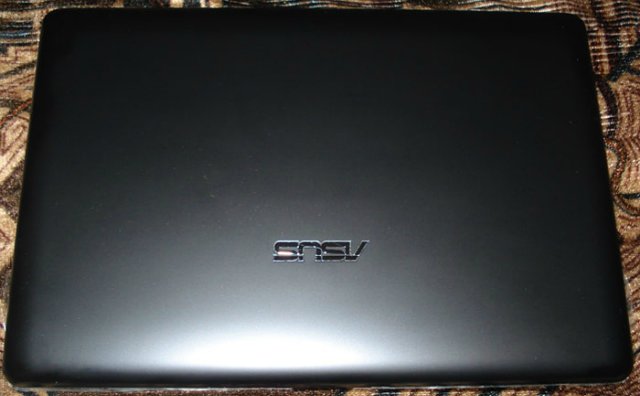
The whole body, both outside and inside, was very easily soiled.
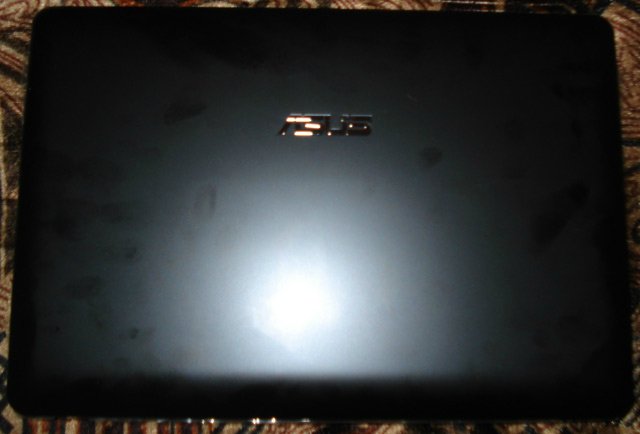
Therefore, you can not do without napkins.

But back to the netbook. I just want to note that I should not have removed the factory sticker on the inside.
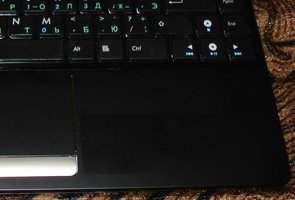
If anyone knows what can be done with this, please unsubscribe in the comments. Napkins do not help at all.
Wipe the area under the Zippo gasoline sticker. Everything has become perfectly clean.
The connectors on the sides are similar to the n-model, with the exception of the HDMI port. USB 3.0 is naturally also not.

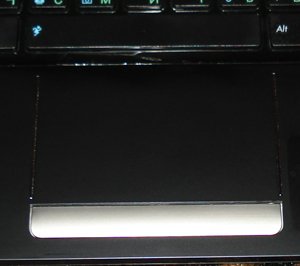
Multi-touch touchpad that even runs on Windows® 7 Starter
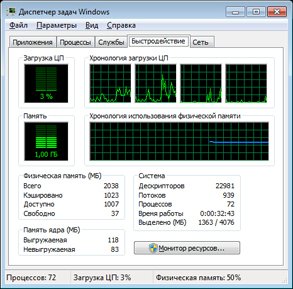
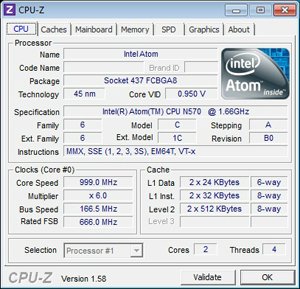
Processor: Intel® Atom ™ N570 (Dual Core; 1.6GHz) Processor (System writes 1.66GHz)
Video system: Intel® Graphics Media Accelerator 3150 (256MB)
RAM: 2x1024MB DDR2 (Maximum 2GB)
Hard disk: 320GB + 500GB on EeeStorage ( Initially, two disks are available for use: 102399MB and 187466MB)
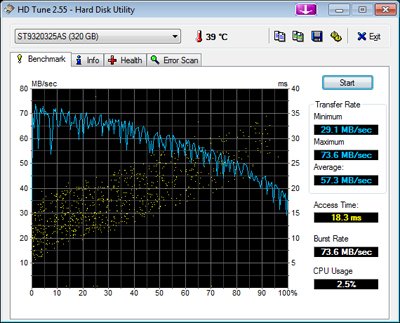
Measurements were carried out in the HDTune 3.50 program
Screen : 12.1``, 1366х768 (WXGA +), LED, glossy (Glare)
Interfaces: 3xUSB2.0, VGA-out (D-Sub), RJ45 (10 / 100Mbit / s), Mic-In, Head-out, SD / MMC (SDHC, SDXC)
Optical drive: none
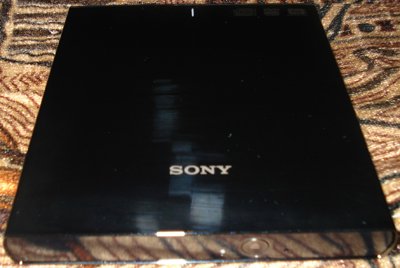
The external DVD-RW Sony NEC Optiarc DRX-S77U Black is used as an optical drive:
Sound and camera: HD Audio; stereo speakers; built-in microphone; 0.3MPix
Wireless: WLAN 802.11b / g / n; Bluetooth v3.0
Touchpad: Multi-touch
Battery: Li-Ion (10.95V, 5200mAh, 56Wh, 6 cells, replaceable)

Charging: 100-240V, 50 / 60Hz (universal input) / 19V, 40W (output)
Operating system: Microsoft® Windows 7 Starter + ASUS ExpressGate
Dimensions: 296x203x23 ~ 27 mm
Weight: 1.45 kg (with battery)
Case: glossy black
Windows 7
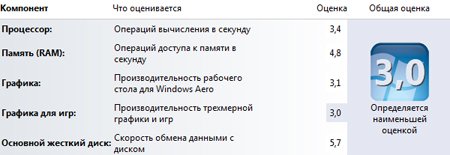
Score : 3DMark '03 test results:
Benchmark
Width 1024
Height 768
Pixel Processing None
Texture Filtering Optimal
Max Anisotropy 4
Vertex Shaders Optimal
3DMark Score 736 3DMarks Game Tests
GT1 - Wings of Fury 27.6 fps Game Tests
GT2 - Battle of Proxycon 5 , 1 fps Game Tests
GT3 - Troll's Lair 4.0 fps Game Tests
GT4 - Mother Nature 4.1 fps Game Tests
CPU Score 278 CPUMarks CPU Tests
CPU Test 1 27.6 fps CPU Tests
CPU Test 2 5.5 fps CPU Tests
Fill Rate (Single-Texturing) 404.7 MTexels / s Feature Tests
Fill Rate (Multi-Texturing) 504.1 MTexels / s Feature Tests
Vertex Shader 1.6 fps Feature Tests
Pixel Shader 2.0 8.3 fps Feature Tests
Ragtroll 1.9 fps Feature Tests
No sounds 0.0 fps Not supported Sound Tests
24 sounds 0.0 fps Not supported Sound Tests
60 sounds 0.0 fps Not supported Sound Tests
Initially, the following software was installed on the netbook:
I use this model for only two weeks, but so far nothing particularly upset except the case.
The netbook does a good job of watching videos, surfing, working with graphics in Adobe Photoshop CS4, and professional - website development. In terms of games, it was not possible to test yet.
If you want to learn something more about this netbook, both externally / physically and internally / software, write, I will try to write.
In September 2010, boomburum already did a general review of the EeePC 1215 netbook line, but I want to focus on a more specific model, namely 1215p, which I decided to purchase for personal use.
I will try to repeat at least in this post, and write more new information about this model.
Introduction
Last month, there was a need to purchase a netbook / laptop in addition to a stationary computer, it often happens that you need to see something at work or make a transfer through the WebMoney electronic payment system, but I did not really want to install special software and store confidential information on the office computer.
The main criteria for choosing were:
- the most important thing is the screen - I wanted something between compactness and convenience, to carry even a 15-inch * beech is not very comfortable, and the 10-inch is too small, in particular because of the low (non-standard) resolution, so it was accepted the decision to take a 12-inch netbook.
- processor - definitely needed a dual-core
- RAM - at least 2 gigabytes
- hard drive - at least 250 gigabytes
At first, my eyes fell on the Acer Aspire One AO721-148ki, but it did not fit the battery life, and even a discrete graphics card did not outweigh this minus.
Appearance
Immediately I want to apologize for the relatively low quality of the photos compared to the above post.
The whole body, both outside and inside, was very easily soiled.
Therefore, you can not do without napkins.
But back to the netbook. I just want to note that I should not have removed the factory sticker on the inside.
If anyone knows what can be done with this, please unsubscribe in the comments. Napkins do not help at all.
Update as of July 13, 2011 9:15 p.m.
Wipe the area under the Zippo gasoline sticker. Everything has become perfectly clean.
The connectors on the sides are similar to the n-model, with the exception of the HDMI port. USB 3.0 is naturally also not.
Multi-touch touchpad that even runs on Windows® 7 Starter
Main characteristics
Processor: Intel® Atom ™ N570 (Dual Core; 1.6GHz) Processor (System writes 1.66GHz)
Video system: Intel® Graphics Media Accelerator 3150 (256MB)
RAM: 2x1024MB DDR2 (Maximum 2GB)
Hard disk: 320GB + 500GB on EeeStorage ( Initially, two disks are available for use: 102399MB and 187466MB)
Measurements were carried out in the HDTune 3.50 program
Screen : 12.1``, 1366х768 (WXGA +), LED, glossy (Glare)
Interfaces: 3xUSB2.0, VGA-out (D-Sub), RJ45 (10 / 100Mbit / s), Mic-In, Head-out, SD / MMC (SDHC, SDXC)
Optical drive: none
The external DVD-RW Sony NEC Optiarc DRX-S77U Black is used as an optical drive:
Sound and camera: HD Audio; stereo speakers; built-in microphone; 0.3MPix
Wireless: WLAN 802.11b / g / n; Bluetooth v3.0
Touchpad: Multi-touch
Battery: Li-Ion (10.95V, 5200mAh, 56Wh, 6 cells, replaceable)
Charging: 100-240V, 50 / 60Hz (universal input) / 19V, 40W (output)
Operating system: Microsoft® Windows 7 Starter + ASUS ExpressGate
Dimensions: 296x203x23 ~ 27 mm
Weight: 1.45 kg (with battery)
Case: glossy black
Tests
Windows 7
Score : 3DMark '03 test results:
Benchmark
Width 1024
Height 768
Pixel Processing None
Texture Filtering Optimal
Max Anisotropy 4
Vertex Shaders Optimal
3DMark Score 736 3DMarks Game Tests
GT1 - Wings of Fury 27.6 fps Game Tests
GT2 - Battle of Proxycon 5 , 1 fps Game Tests
GT3 - Troll's Lair 4.0 fps Game Tests
GT4 - Mother Nature 4.1 fps Game Tests
CPU Score 278 CPUMarks CPU Tests
CPU Test 1 27.6 fps CPU Tests
CPU Test 2 5.5 fps CPU Tests
Fill Rate (Single-Texturing) 404.7 MTexels / s Feature Tests
Fill Rate (Multi-Texturing) 504.1 MTexels / s Feature Tests
Vertex Shader 1.6 fps Feature Tests
Pixel Shader 2.0 8.3 fps Feature Tests
Ragtroll 1.9 fps Feature Tests
No sounds 0.0 fps Not supported Sound Tests
24 sounds 0.0 fps Not supported Sound Tests
60 sounds 0.0 fps Not supported Sound Tests
Software
Initially, the following software was installed on the netbook:
- Microsoft Windows 7 x86 Starter
- ASUS WebStorage
- AsusScreensaver
- ASUSUpdate for Eee PC
- AsusVibe2.0
- Capshook
- Chicken Invaders 2
- E-cam
- Eee Docking 3.8.3
- Eeeplendid
- Fontontizer
- Game park console
- Hotkey service
- Instanton
- Liveupdate
- Super hybrid engine
- WidComm Bluetooth Software
- There is an interesting application, verbatim: “Windows Live Mesh ActiveX crawling element for remote plug-in”, it also stood by default.
- In addition, drivers for all equipment are installed, and the Microsoft Office 2010 installation kit
Conclusion
I use this model for only two weeks, but so far nothing particularly upset except the case.
The netbook does a good job of watching videos, surfing, working with graphics in Adobe Photoshop CS4, and professional - website development. In terms of games, it was not possible to test yet.
If you want to learn something more about this netbook, both externally / physically and internally / software, write, I will try to write.









