 June 14, 2011 at 17:48
Let's talk about margin, he's margin (part 1)
Seeing when newcomers make page after page, they make a lot of mistakes by margining margins and not completely understanding how this very margin actually works, I decided to write this article.
It will definitely be useful for beginning coders, but I doubt the professionals, since a person who has been engaged in layout for several years is already obliged to “memorize” all the features of this property by heart.
In this part of the article I will write about vertical margin. We will talk about horizontal in the next part.
To begin with, we will briefly examine what units of measurement are, what they mean and which ones to use margins for indentation.
Cm, mm, inch, pc, pt - absolute units of measure. Recommended for printing documents.
Px, em, ex,%- relative units used for monitors.
For margin, I use px and % , and em - to indicate font sizes. Ex (in IE ex = em / 2) - I do not recommend using, because in each browser it is interpreted differently.
In general, in which unit you would not specify the indentation or font size: the browser converts everything into pixels, without taking into account the viewing area.
The viewing area is where the user sees the contents of the site without scrolling the screen. Each user has a different one.
Each typesetter knows that any element can be represented in the form of 4 areas (margin, border, padding and content).

Margin is an indent. The vertical and horizontal construction of margins are different.
As I wrote above, the sizes for margin can be put in em, ex, px - hard task and in% - are considered relative to some area.
I will give an example of one of the most frequent mistakes made by beginner typesetters.
There are 2 divas: first and vnem div second. Please note that I did not set the width property to any divas (we'll talk about this later). Now we are only interested in margin, which is equal to margin: 30% 0 0;
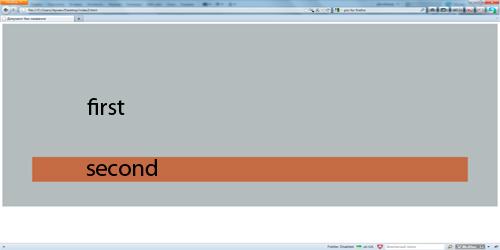
I hope everyone knows how margin is considered in this case, just in case I’ll remind you what counts clockwise, that is: the indent will be 30% on top, 0 on the right, 0 on the bottom and 0 on the left, since I didn’t specify anything , then the margin takes the value of the opposite side, that is, in this case, if the margin on the right is 0, then the margin on the left, if not specified, is also 0.
But now we are interested in margin, which is 30%, it is indented from above. Where do these 30% come from?
Many people think and believe it is wrong that 30% are taken from the top of the entire page.

But this is not true!
Since in this case, the second div is embedded in the first div, the margin-top: 30% will be considered relative to the width of the parent div second, that is, relative to the width of the first div!
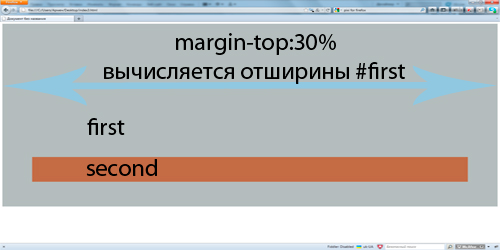
In this case, the width of the first div by default is auto, so the div takes all the free space in width, and 30% of the margin top for the second div will be calculated from this width.
When the parent diva decreases, the indent from the top of the second diva will also decrease.
Margin can also be negative. In this case, the element vertically allows you to "drop in" on another element or "go down" outside of its container.
For example: two divas lying one below the other.

if we add the first diva

Error!
If the margins are of the same name (both margins are either a negative or a positive number), then in this case a large number is taken modulo, and a smaller one is not taken into account.
In this case, the lower div will “drop” onto the upper div at 100px, and 50px will not be taken into account.
The same is true for positive margins, the lower div will “leave” from the top by 100px, and 50px will not be taken into account.
Consider the following example.
There are 2 divas, one below the other. As you can see, the margin bot of the first is negative, and the margin top of the second is positive, what will happen in this situation? For opposite margins, addition will occur, i.e.: -100 + 50 = -50. Accordingly, the lower div will rise 50px up. We are going further. Two divas, one nested in the other.
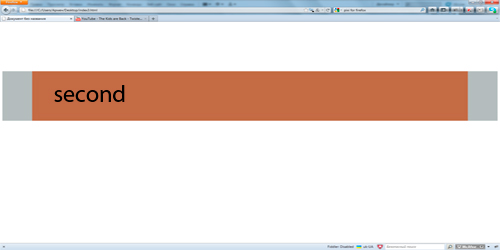
If we add the margin-top 200px to the internal diva in the CSS, then, here is another mistake! Some people think that the inner margin should “move away” from its parent 200px down and its parent will remain in place, and thereby stretch. But no matter how! If the parent el has no limiting factors (I will write about these factors a little lower), then the margin goes from the internal element to the external. Then, according to the old scheme, margin is selected: if they are of the same name, then a larger one is selected, if they are of the same name, then addition occurs. And the result But what if we don’t need it and we want the div-parent to stay in place, and the div-child to move 200px down? You can undo this action in relation to the parent, there are several ways.
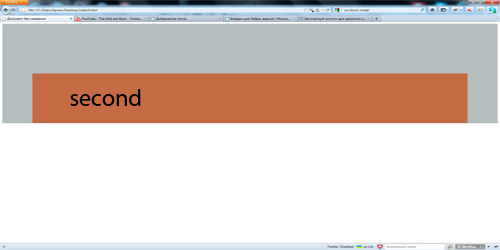
1. set padding to the parent block
2. set border to the parent block
3. set the overflow to the parent block, any value except visible (works everywhere except the old IEs)
And voila
Thank you for your attention, I hope I managed to clarify to newcomers what margin is and how to and where to count it from.
If the article turned out to be useful and there is a desire to read the sequel, then in the next part I will describe horizontal margins. There things are not as simple as it seems at first glance;)
It will definitely be useful for beginning coders, but I doubt the professionals, since a person who has been engaged in layout for several years is already obliged to “memorize” all the features of this property by heart.
In this part of the article I will write about vertical margin. We will talk about horizontal in the next part.
To begin with, we will briefly examine what units of measurement are, what they mean and which ones to use margins for indentation.
Cm, mm, inch, pc, pt - absolute units of measure. Recommended for printing documents.
Px, em, ex,%- relative units used for monitors.
For margin, I use px and % , and em - to indicate font sizes. Ex (in IE ex = em / 2) - I do not recommend using, because in each browser it is interpreted differently.
In general, in which unit you would not specify the indentation or font size: the browser converts everything into pixels, without taking into account the viewing area.
The viewing area is where the user sees the contents of the site without scrolling the screen. Each user has a different one.
Each typesetter knows that any element can be represented in the form of 4 areas (margin, border, padding and content).
Margin is an indent. The vertical and horizontal construction of margins are different.
As I wrote above, the sizes for margin can be put in em, ex, px - hard task and in% - are considered relative to some area.
I will give an example of one of the most frequent mistakes made by beginner typesetters.
There are 2 divas: first and vnem div second. Please note that I did not set the width property to any divas (we'll talk about this later). Now we are only interested in margin, which is equal to margin: 30% 0 0;
#first{

 padding: 100px;

 background: #b5bcbc;

}

#second{

 height: 100px;

 background: #b06b48;

 margin: 30% 0 0;

}
I hope everyone knows how margin is considered in this case, just in case I’ll remind you what counts clockwise, that is: the indent will be 30% on top, 0 on the right, 0 on the bottom and 0 on the left, since I didn’t specify anything , then the margin takes the value of the opposite side, that is, in this case, if the margin on the right is 0, then the margin on the left, if not specified, is also 0.
But now we are interested in margin, which is 30%, it is indented from above. Where do these 30% come from?
Many people think and believe it is wrong that 30% are taken from the top of the entire page.
But this is not true!
Since in this case, the second div is embedded in the first div, the margin-top: 30% will be considered relative to the width of the parent div second, that is, relative to the width of the first div!
In this case, the width of the first div by default is auto, so the div takes all the free space in width, and 30% of the margin top for the second div will be calculated from this width.
When the parent diva decreases, the indent from the top of the second diva will also decrease.
Margin can also be negative. In this case, the element vertically allows you to "drop in" on another element or "go down" outside of its container.
For example: two divas lying one below the other.
if we add the first diva
margin-bottom: -100pxand the second,
the following will happen.
But ... here comes the big mistake of the newcomers.
Many people think that since the upper div has a margin-bot -100px, and the lower div, the margin-top is 50px, the lower div will “drop” to the upper div by -150px.margin-top: -50px#first{
height: 200px;
background: #69c;
margin: 0 0 -100px;
}
#second{
height: 200px;
background: #f60;
margin: -50px 100px 0;
}
Error!
If the margins are of the same name (both margins are either a negative or a positive number), then in this case a large number is taken modulo, and a smaller one is not taken into account.
In this case, the lower div will “drop” onto the upper div at 100px, and 50px will not be taken into account.
The same is true for positive margins, the lower div will “leave” from the top by 100px, and 50px will not be taken into account.
Consider the following example.
There are 2 divas, one below the other. As you can see, the margin bot of the first is negative, and the margin top of the second is positive, what will happen in this situation? For opposite margins, addition will occur, i.e.: -100 + 50 = -50. Accordingly, the lower div will rise 50px up. We are going further. Two divas, one nested in the other.
#first{

 height: 200px;

 background: #69c;

 margin: 0 0 -100px;

}

#second{

 height: 200px;

 background: #f60;

 margin: 50px 100px 0;

}
first

second
#first{

 background: #b5bcbc;

}

#second{

 height: 200px;

 background: #b06b48;

}
If we add the margin-top 200px to the internal diva in the CSS, then, here is another mistake! Some people think that the inner margin should “move away” from its parent 200px down and its parent will remain in place, and thereby stretch. But no matter how! If the parent el has no limiting factors (I will write about these factors a little lower), then the margin goes from the internal element to the external. Then, according to the old scheme, margin is selected: if they are of the same name, then a larger one is selected, if they are of the same name, then addition occurs. And the result But what if we don’t need it and we want the div-parent to stay in place, and the div-child to move 200px down? You can undo this action in relation to the parent, there are several ways.
#second{

 height: 200px;

 background: #b06b48;
margin-top: 200px;

}
1. set padding to the parent block
2. set border to the parent block
3. set the overflow to the parent block, any value except visible (works everywhere except the old IEs)
And voila
Thank you for your attention, I hope I managed to clarify to newcomers what margin is and how to and where to count it from.
If the article turned out to be useful and there is a desire to read the sequel, then in the next part I will describe horizontal margins. There things are not as simple as it seems at first glance;)









