
PHP + Word

What if I need to create many Word files of the same type, but of different contents? For example, fill out forms, receipts.
There are 3 options:
1) use one of the libraries for working with Word documents
2) save the document in docx format, open it with the archiver and inside we will see "\ word \ document.xml" - pure xml that you can work with via str_replace (thanks Enuriru for a hint)
3) use a third-party service that will do most of the work for me
The first option fell off immediately, because it was necessary to create a document with complex formatting, and to create it manually, prescribing numerous parameters for each line, there was no time and desire.
The second option is good and simple when we work with word documents in .docx format, but unfortunately it does not support .doc format.
While developing the third option, I came across an interesting LiveDocx solution .
Advantages:
- a template file can be created in the usual way through Word
- presentation a document in doc, docx, rtf, pdf formats
- no need to bother with submitting a Word document via html or XML
- ease of connection
- reliability - the service exists for a long time and there is even a ready-made library from Zend for it
Minuses:
- the free version is limited per 250 generated documents per day
- the template cannot be changed (for example, you cannot generate a table with the number of rows equal to the number of elements in the database)
This is what the file sent by the customer looked like.

Let's get started.
1) First you need to mark up the template. We open the file and mark the necessary fields with special mergeField Word variables, here is how it is done in Word 2007:
- Insert => Express blocks => Field
A window appears.
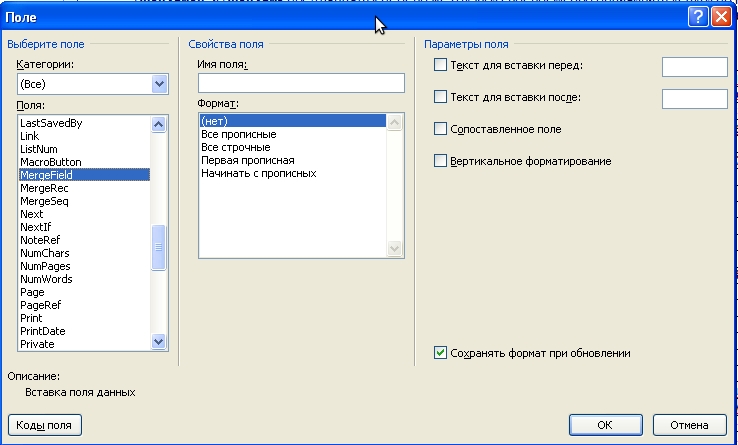
Choose the type of field: MergeField => In the field name we write the name of the variable => Click OK.
So we mark the whole document, we get something similar to:

We save the document, put it in the directory of our application.
2) Work with the code
Register on the LiveDocx website , get the username and password.
If you are a happy / unhappy owner of the Zend Framework, then everything is quite simple, LiveDocx support comes right out of the box:
    // Создаём объект для работы с сервисом и передаём свой логин и пароль
    $livDoc = new Zend_Service_LiveDocx_MailMerge(array(
        'username' => 'yourusername',
        'password' => 'yourpassword'
   ));
    // Передаём значения для наших mergeFields в Word шаблоне
    $livDoc->assign('orderNum','Номер заказа');
    $livDoc->assign('orderDay',date('d', 'Дата заказа'));
    // Задаём путь к файлу шаблона и передаём его объекту
    $documentPath = 'contract_bid_for_customer.doc';
    $livDoc->setLocalTemplate($documentPath);
    // заполняем документ с помощью сервиса
    $livDoc->createDocument();
    $doc = $livDoc->retrieveDocument('doc');
    // отдаём готовый документ для скачки
    header("Cache-Control: public");
    header("Content-Description: File Transfer");
    $fileName = "Документ.doc";
    header("Content-Disposition: attachment; filename=$fileName");
    header("Content-Type: application/msword");
    header("Content-Transfer-Encoding: binary");
    echo $doc;
    die;
If you prefer plain php, then you will not stay hungry either.
For work, you need the included soap module, in most cases it is turned on by default, but check how things are with you:
phpinfo ();
SOAP section
You should see Soap client enabled and Soap server enabled.
    // Выключаем WSDL кэширование
    ini_set ('soap.wsdl_cache_enabled', 0);
    // Выставляем временную зону
    date_default_timezone_set('Europe/Moscow');
    // Создаём экземпляр объекта Soap и передаём ему свои учетные данные
    $soap = new SoapClient('https://api.livedocx.com/1.2/mailmerge.asmx?WSDL');
    $soap->LogIn(
        array(
            'username' => 'yourusername',
            'password' => 'yourpassword'
        )
    );
    // Путь к файлу шаблона
    $data = file_get_contents('contract_bid_for_customer.doc');
    // Установка расширения файла .doc и параметров кодирования
    $soap->SetLocalTemplate(
        array(
            'template' => base64_encode($data),
            'format'   => 'doc'
        )
    );
    // Задаём значения переменным
    $fieldValues = array (
        'orderNum'  => 'Номер заказа',
        'orderDay'  => 'Дата заказа'
    );
    // Эта хитрая функция преобразует массив c переменными в то что понимает SOAP
    function assocArrayToArrayOfArrayOfString ($assoc)
    {
        $arrayKeys   = array_keys($assoc);
        $arrayValues = array_values($assoc);
        return array ($arrayKeys, $arrayValues);
    }
    // Передаём переменные в наш LiveDocx объект
     $soap->SetFieldValues(
        array (
            'fieldValues' => assocArrayToArrayOfArrayOfString($fieldValues)
        )
    );
    // Формируем документ
    $soap->CreateDocument();
    $result = $soap->RetrieveDocument(
        array(
            'format' => 'doc'
        )
    );
    $doc = base64_decode($result->RetrieveDocumentResult);
    // Разрываем сессию с SOAP
    $soap->LogOut();
    // Отдаём вордовский файл
    header("Cache-Control: public");
    header("Content-Description: File Transfer");
    $fileName = "Документ.doc";
    header("Content-Disposition: attachment; filename=$fileName");
    header("Content-Type: application/msword");
    header("Content-Transfer-Encoding: binary");
    echo $doc;
    die;
3) At the output we have such a file

LiveDocx also supports other formats: DOCX, RTF and PDF.
You can read more here:
livedocx.com
phplivedocx.org/articles/getting-started-with-phplivedocx
blog.zendguru.com/2010/02/13/creating-word-processing-document-using-zend_service_livedocx