
 May 20, 2011 at 10:12
TDD in JavaScript. Application development
Hello. This article focuses on the Development through Testing (TDD) methodology for use with JavaScript.
I will write only briefly about the TDD methodology; more detailed information can be obtained from the link above.
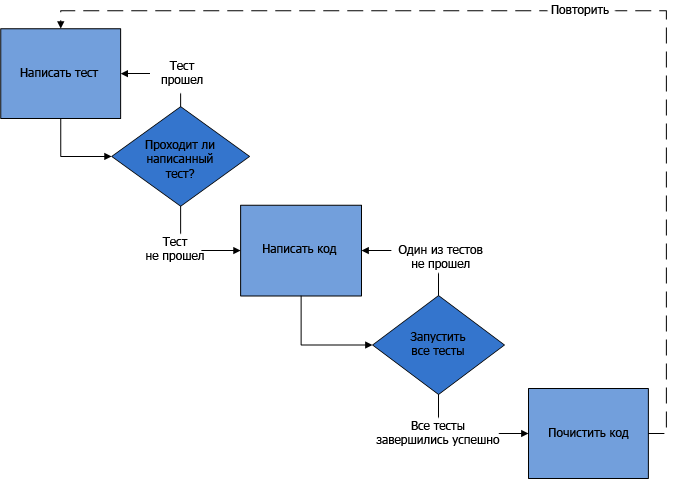
Development through testing implies that before writing code, you must:
So, closer to the topic.
Testing library : QUnit is an easy-to-use library with all the necessary functionality.
We conceptually divide all objects in the system into 3 categories:
Why split up? The completeness of the test coverage of its functionality will depend on the type of object. Basic objects - as much as possible, Modules - about 70%, Auxiliary objects - only for designing an object (more on this later) and checking the result.
In this case, we use the simplest name:
All application objects will begin with the word Application
There are many more interesting naming methods, including and hiding names from the global scope, but this article is not about that.
Because I like the principle “Simple is better than complex” (c), then the implementation of objects will be as simple and (which is very important!) compatible with the TDD methodology:
Basic and Modules Auxiliary objects Why exactly? Let's start with the statement of the problem: the application will be developed according to the TDD methodology, i.e. it is necessary to implement access to private class methods for testing (there are several opinions about the need to test private methods. I am testing). According to generally accepted standards of method in JavaScript, starting with an underscore, it is a private (many IDE it does not show in the Hint available methods), but really, this method is available - the error will not be thrown when accessing, say .
Let's say we need to develop some kind of auxiliary module, which should return the generated html with information about the user.
Let's start with the test: Run the test. Obviously, the test fails because such an object does not exist. We create the object. The test passed, go to the next test. This object belongs to the type of auxiliary objects , i.e. tests will only be written to verify the result and design. What is design using the TDD methodology? This is a description of class methods and their interaction using tests. And implementation:

Further on the documentation it is seen that the user information consists of: photos, name and detailed information. Therefore, we will design in this way: Run - the new tests did not pass. We are writing an implementation. Now you need to test the implementation of the methods. For testing, we will create a mock object (a stub for testing) and conduct testing in its context. Tests failed, you must write an implementation that will allow the tests to pass. The basic principle of TDD is to write only what is necessary for the test to pass the code. Nothing extra. Because the object belongs to the type of auxiliary objects


, then more detailed tests on the functionality of private methods will not be written. It remains only to write a test that checks the result of the object, in this case the getHTML method. That's all. More detailed checks for non-existent parameters, etc. will not be performed, because the object is auxiliary, for base classes or modules it would be necessary to write additional tests that check the status, repeated calls, work with the DOM tree, and so on. Now you need to write the final implementation of the object, because the test that was written did not pass.

The tests have passed, we can do the final refactoring: add additional checks, css for a more beautiful design and more. But most importantly - now we are sure that nothing will break. Almost sure. Of course, TDD is not a cure for all diseases, but for a constantly evolving project, it is simply irreplaceable.
Using the TDD methodology increases development time by approximately 40%, but reduces the time of bug fixing at times. Maintaining and developing a project becomes much easier, it becomes more stable and consistent, and QA can only thoroughly test the interface. Just today, two modules of my project were tested - one using TDD, the second without. The result speaks in favor of TDD - in the first QA module, only minor problems with graphics were found in IE9, but in the second there was an unpleasant bug that would have been 100% detected during development through testing.
Also an urgent problem for developers is the lack of preliminary design. If the task seems simple, then many are immediately involved in implementation, considering designing a waste of time. Designing is great. Many situations where it is embarrassing to show your final code could have been avoided by prior design.
On this, perhaps, I will finish. The article turned out to be more than I expected, but only a small part of TDD in JavaScript is covered.
If you want, I can continue about TDD and Ajax, testing complex modules, asynchronous state testing, automatically generated mock objects and frameworks for this.
Thanks for attention. See you again.
I will write only briefly about the TDD methodology; more detailed information can be obtained from the link above.
Development through testing implies that before writing code, you must:
- create a test that will test non-existent code, the test will fail accordingly
- write code and make sure the test passes
- clean code
- repeat
So, closer to the topic.
Technical means
Testing library : QUnit is an easy-to-use library with all the necessary functionality.
Object Concept
We conceptually divide all objects in the system into 3 categories:
- Basic . These are classes that form the core of the system, responsible for working with storages (for example, GoogleGears, IndexedDb, etc.), interaction between modules, language packs, user settings, etc.
- Modules . These are classes in which the basic functionality of a module is implemented (for example, a module for displaying call history, chat module, etc.)
- Auxiliary objects . Objects having a small functionality and solving a specific small task (for example, an object showing a tooltip, field validator, etc.)
Why split up? The completeness of the test coverage of its functionality will depend on the type of object. Basic objects - as much as possible, Modules - about 70%, Auxiliary objects - only for designing an object (more on this later) and checking the result.
Naming Objects
In this case, we use the simplest name:
All application objects will begin with the word Application
- Base - Application_Core_ObjectName
- Modules - Application_Module_ModuleName
- Helper objects - Application_Helper_ModuleName (if the object only works with a specific module) _ObjectName
There are many more interesting naming methods, including and hiding names from the global scope, but this article is not about that.
Object implementation
Because I like the principle “Simple is better than complex” (c), then the implementation of objects will be as simple and (which is very important!) compatible with the TDD methodology:
Basic and Modules Auxiliary objects Why exactly? Let's start with the statement of the problem: the application will be developed according to the TDD methodology, i.e. it is necessary to implement access to private class methods for testing (there are several opinions about the need to test private methods. I am testing). According to generally accepted standards of method in JavaScript, starting with an underscore, it is a private (many IDE it does not show in the Hint available methods), but really, this method is available - the error will not be thrown when accessing, say .
function Application_Core_FuncName() {


  this.publicMethod = function() {

  }


  this._privateMethod = function() {

  }


}


* This source code was highlighted with Source Code Highlighter.
var Application_Helper_HelperName = {

  init: function() {

  },


  publicMethod: function() {

  },


  _privateMethod: function() {

  }

};


* This source code was highlighted with Source Code Highlighter.
Application_Helper_HelperName._privateMethod()Development
Let's say we need to develop some kind of auxiliary module, which should return the generated html with information about the user.
Let's start with the test: Run the test. Obviously, the test fails because such an object does not exist. We create the object. The test passed, go to the next test. This object belongs to the type of auxiliary objects , i.e. tests will only be written to verify the result and design. What is design using the TDD methodology? This is a description of class methods and their interaction using tests. And implementation:
module("User Info");


test("main", function() {

  equals(typeof(Application_Helper_UserInfo), "object", "Check object");

})


* This source code was highlighted with Source Code Highlighter.

var Application_Helper_UserInfo = {


};


* This source code was highlighted with Source Code Highlighter.
module("User Info");


test("main", function() {

  equals(typeof(Application_Helper_UserInfo), "object", "Check object");


  equals(Application_Helper_UserInfo.hasOwnProperty("getHTML"), true, "Check existing method getHTML");


});


* This source code was highlighted with Source Code Highlighter.
var Application_Helper_UserInfo = {


  getHTML: function() {

  }


};


* This source code was highlighted with Source Code Highlighter.
Further on the documentation it is seen that the user information consists of: photos, name and detailed information. Therefore, we will design in this way: Run - the new tests did not pass. We are writing an implementation. Now you need to test the implementation of the methods. For testing, we will create a mock object (a stub for testing) and conduct testing in its context. Tests failed, you must write an implementation that will allow the tests to pass. The basic principle of TDD is to write only what is necessary for the test to pass the code. Nothing extra. Because the object belongs to the type of auxiliary objects
module("User Info");


test("main", function() {

  equals(typeof(Application_Helper_UserInfo), "object", "Check object");


  equals(Application_Helper_UserInfo.hasOwnProperty("getHTML"), true, "Check existing method getHTML");


  equals(Application_Helper_UserInfo.hasOwnProperty("_getPhoto"), true, "Check existing private method _getPhoto");


  equals(Application_Helper_UserInfo.hasOwnProperty("_getUsername"), true, "Check existing private method _getUsername");


  equals(Application_Helper_UserInfo.hasOwnProperty("_getInfo"), true, "Check existing method _getInfo");


});


* This source code was highlighted with Source Code Highlighter.

var Application_Helper_UserInfo = {


  getHTML: function() {

  },


  _getPhoto: function() {

  },


  _getUsername: function() {

  },


  _getInfo: function() {

  }

};


* This source code was highlighted with Source Code Highlighter.
module("User Info");


test("main", function() {

  equals(typeof(Application_Helper_UserInfo), "object", "Check object");


  equals(Application_Helper_UserInfo.hasOwnProperty("getHTML"), true, "Check existing method getHTML");


  equals(Application_Helper_UserInfo.hasOwnProperty("_getPhoto"), true, "Check existing private method _getPhoto");


  equals(Application_Helper_UserInfo.hasOwnProperty("_getUsername"), true, "Check existing private method _getUsername");


  equals(Application_Helper_UserInfo.hasOwnProperty("_getInfo"), true, "Check existing method _getInfo");


  var mockUserInfo = {

    username: 'Name',

    photo: 'photo.png',

    info: 'Information'

  };


  var photo = Application_Helper_UserInfo._getPhoto.call(mockUserInfo);


  equals(photo, 'photo.png', 'Checking photo');


  var username = Application_Helper_UserInfo._getUsername.call(mockUserInfo);


  equals(username, 'Name', 'Checking username');


  var info = Application_Helper_UserInfo._getInfo.call(mockUserInfo);


  equals(info, 'Information', 'Checking information');

});


* This source code was highlighted with Source Code Highlighter.

var Application_Helper_UserInfo = {


  getHTML: function() {

  },


  _getPhoto: function() {


    return this.photo;

  },


  _getUsername: function() {


    return this.username;

  },


  _getInfo: function() {


    return this.info;

  }

};


* This source code was highlighted with Source Code Highlighter.
, then more detailed tests on the functionality of private methods will not be written. It remains only to write a test that checks the result of the object, in this case the getHTML method. That's all. More detailed checks for non-existent parameters, etc. will not be performed, because the object is auxiliary, for base classes or modules it would be necessary to write additional tests that check the status, repeated calls, work with the DOM tree, and so on. Now you need to write the final implementation of the object, because the test that was written did not pass.
module("User Info");


test("main", function() {

  equals(typeof(Application_Helper_UserInfo), "object", "Check object");


  equals(Application_Helper_UserInfo.hasOwnProperty("getHTML"), true, "Check existing method getHTML");


  equals(Application_Helper_UserInfo.hasOwnProperty("_getPhoto"), true, "Check existing private method _getPhoto");


  equals(Application_Helper_UserInfo.hasOwnProperty("_getUsername"), true, "Check existing private method _getUsername");


  equals(Application_Helper_UserInfo.hasOwnProperty("_getInfo"), true, "Check existing method _getInfo");


  var mockUserInfo = {

    username: 'Name',

    photo: 'photo.png',

    info: 'Information'

  };


  var photo = Application_Helper_UserInfo._getPhoto.call(mockUserInfo);


  equals(photo, 'photo.png', 'Checking photo');


  var username = Application_Helper_UserInfo._getUsername.call(mockUserInfo);


  equals(username, 'Name', 'Checking username');


  var info = Application_Helper_UserInfo._getInfo.call(mockUserInfo);


  equals(info, 'Information', 'Checking information');


  var html = Application_Helper_UserInfo.getHTML.call(mockUserInfo);


  if (html != undefined && html.indexOf('id="application_helper_userinfo"') != -1 && html.indexOf('Name') != -1 && html.indexOf('photo.png') != -1 && html.indexOf('Information') != -1) {


    ok(true, "HTML ok");


  } else {

    ok(false, "HTML does not pass");

  }


});


* This source code was highlighted with Source Code Highlighter.
var Application_Helper_UserInfo = {


  getHTML: function() {

    var html = '';

    html += '' + Application_Helper_UserInfo._getPhoto.call(this) + '';

    html += '' + Application_Helper_UserInfo._getUsername.call(this) + '';

    html += '' + Application_Helper_UserInfo._getInfo.call(this) + '';

    html += '';

    return html;

  },


  _getPhoto: function() {


    return this.photo;

  },


  _getUsername: function() {


    return this.username;

  },


  _getInfo: function() {


    return this.info;

  }

};


* This source code was highlighted with Source Code Highlighter.

The tests have passed, we can do the final refactoring: add additional checks, css for a more beautiful design and more. But most importantly - now we are sure that nothing will break. Almost sure. Of course, TDD is not a cure for all diseases, but for a constantly evolving project, it is simply irreplaceable.
Using the TDD methodology increases development time by approximately 40%, but reduces the time of bug fixing at times. Maintaining and developing a project becomes much easier, it becomes more stable and consistent, and QA can only thoroughly test the interface. Just today, two modules of my project were tested - one using TDD, the second without. The result speaks in favor of TDD - in the first QA module, only minor problems with graphics were found in IE9, but in the second there was an unpleasant bug that would have been 100% detected during development through testing.
Also an urgent problem for developers is the lack of preliminary design. If the task seems simple, then many are immediately involved in implementation, considering designing a waste of time. Designing is great. Many situations where it is embarrassing to show your final code could have been avoided by prior design.
On this, perhaps, I will finish. The article turned out to be more than I expected, but only a small part of TDD in JavaScript is covered.
If you want, I can continue about TDD and Ajax, testing complex modules, asynchronous state testing, automatically generated mock objects and frameworks for this.
Thanks for attention. See you again.