Action Request System: Introducing
It has been quite a while since I got a new job. From that moment, I actually began to study this new technology for myself. I suggest you study it with me as you write / read new entries on this topic. I found very few mentions in RuNet about it, so I decided to fill the gap. So, let's begin.
In principle, you can read this paragraph on the English Wikipedia.(although the material nevertheless differs: it is more in-depth here, on the wiki it is more superficial. But there is more coverage) so it is desirable to read it. To begin with, we will decipher an abbreviation: Action Request System. True, I could not give an adequate translation system for its purpose. Well, we will analyze the functionality by bones and each for himself will decide how to correctly translate this name of the action system on request. It was created by the American company BMC. This application has a client-server architecture. The client environment can be divided into two types: for users (directly, an environment that draws all forms, takes data, and so on) and for developers - an IDE on the Eclipse platform, in which all user applications are developed.
For starters, I’ll talk about how and where to run this system.
The following platforms are officially supported (excerpt from the documentation):
Now we give the general structure of the system:

Considering the scheme from the point of view of the user (presented above), the ARS architecture can be divided into 4 levels:
That is, a set of forms, links, filters and escalations can nominally be called an application. We will analyze all these incomprehensible words point by point.
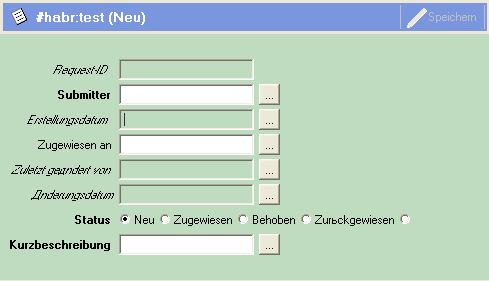
Forms are, oddly enough, the most classic forms in the understanding of visual programming. That is, a certain window on the screen where numerous control elements can be placed, such as buttons, text fields, drop-down lists, checkboxes and so on. Forms come in several forms, only one of which is designed to store data recorded in its fields. But this will be discussed in later entries on this subject. The following is a completely typical example of a form in ARS.
These are not the usual menus that you are used to seeing in applications (File-> Action, Help-> About, and so on). These menus are more like drop-down lists, after clicking on an element of which the value of the selected element will be entered in the field associated with this menu. For example, there is a text field (Dynamic Group Access field):
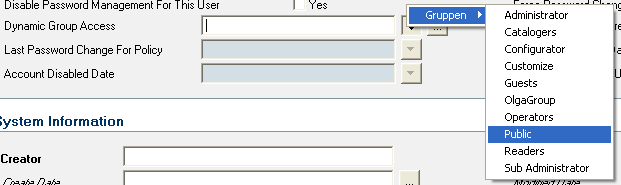
When you click on the button, a menu will still appear familiar to everyone, BUT next to the button. For example, we want to enter a country there, and not its name, but its conditional code (uk, rus, fr, ge). The menu, for example, has two levels, where the first level is the mainland, and the second is the country itself. Usual names (United Kingdom, Russia, Germany) will be displayed in the drop-down menu, and when you click on an item, its short designation will appear. Thus, it turns out something between the normal menu and the drop-down list.
Here the name is rather strange. Why they are so called (Active Links) is known for certain, probably, only to a small circle of developers from BMC Software. It remains for us to speculate. However, their essence is quite simple. These are some of the objects that fire on the user action to which they are attached:
Filters are easiest to explain to people who are familiar with databases as triggers, that is, they are essentially the same as active links, but they are executed ex post on the server side. The following explanation can be given to people who are not familiar with databases. Imagine that you are tasting excellent French wine in order to determine the variety and harvest of grapes, but you are not shown a bottle or a label. When you inhale a bouquet of wine it can be compared with an active link, and when you took a sip and already felt the taste, the filter (taste buds) worked, which told you about the taste of this wine. Of course, experienced sommeliers will start arguing with me, proving that the task can be solved by simply inhaling the aroma, but why scratch the right ear with the left hand?
They can be compared to Cron on * NIX or the task scheduler on Microsoft Windows. These are almost independent elements that perform specified actions at a specific time. For example, every Saturday at 23:00 a table with temporary data can be cleared.
As already mentioned, there are other objects of a higher level than those listed. These include:
But really, why? Have you ever thought about this article? That's right. In fact, ARS is a great platform for quickly creating applications that can work in both the BMC Remedy ARS User special environment and in your web browser. Developers are almost completely deprived of the need to write code, except in rare cases where it is necessary to write a direct query to the database. Such developers, frankly, are cheap for the company, in terms of the minimum cost of their training and input into the project. That is, if we have a large project in which there are not enough workers, we can just hire a developer from the side, train him in a couple of weeks and put him to work. A dream, isn't it?
Related links:
- ARS at Wikipedia
- Tips and solutions for ARS problems
- Website of the developer company
What it is?
In principle, you can read this paragraph on the English Wikipedia.(although the material nevertheless differs: it is more in-depth here, on the wiki it is more superficial. But there is more coverage) so it is desirable to read it. To begin with, we will decipher an abbreviation: Action Request System. True, I could not give an adequate translation system for its purpose. Well, we will analyze the functionality by bones and each for himself will decide how to correctly translate this name of the action system on request. It was created by the American company BMC. This application has a client-server architecture. The client environment can be divided into two types: for users (directly, an environment that draws all forms, takes data, and so on) and for developers - an IDE on the Eclipse platform, in which all user applications are developed.
AR System Structure
For starters, I’ll talk about how and where to run this system.
The following platforms are officially supported (excerpt from the documentation):
- 32 or 64 bit x86 PC - Windows 2003 (32 or x64)
- Sun SPARC - Solaris 9
- IBM pSeries and Power5 or later - IBM AIX 5L 5.3
- PA-RISC - HP-UX 11iv2
- HP Integrity / Itanium - HP-UX 11iv2
- 64 bit PC - Red Hat Enterprise Linux 4 (x64 only)
- 64 bit PC - Novell SuSE Linux 9 (x64 only)
Now we give the general structure of the system:
Considering the scheme from the point of view of the user (presented above), the ARS architecture can be divided into 4 levels:
- Client level - either a client application from Remedy User or a web client that does not require the installation of additional software;
- Mid Tier - a level that appeared relatively recently in connection with the addition of a web client that provides a web browser connection to the AR System server;
- ARS server - directly the server application itself, which processes user requests;
- Data level - databases in which ARS stores all information about applications created on its basis.
- forms;
- menu;
- Active links
- Filters
- escalation.
That is, a set of forms, links, filters and escalations can nominally be called an application. We will analyze all these incomprehensible words point by point.
Forms
Forms are, oddly enough, the most classic forms in the understanding of visual programming. That is, a certain window on the screen where numerous control elements can be placed, such as buttons, text fields, drop-down lists, checkboxes and so on. Forms come in several forms, only one of which is designed to store data recorded in its fields. But this will be discussed in later entries on this subject. The following is a completely typical example of a form in ARS.
Menu
These are not the usual menus that you are used to seeing in applications (File-> Action, Help-> About, and so on). These menus are more like drop-down lists, after clicking on an element of which the value of the selected element will be entered in the field associated with this menu. For example, there is a text field (Dynamic Group Access field):
When you click on the button, a menu will still appear familiar to everyone, BUT next to the button. For example, we want to enter a country there, and not its name, but its conditional code (uk, rus, fr, ge). The menu, for example, has two levels, where the first level is the mainland, and the second is the country itself. Usual names (United Kingdom, Russia, Germany) will be displayed in the drop-down menu, and when you click on an item, its short designation will appear. Thus, it turns out something between the normal menu and the drop-down list.
Active links
Here the name is rather strange. Why they are so called (Active Links) is known for certain, probably, only to a small circle of developers from BMC Software. It remains for us to speculate. However, their essence is quite simple. These are some of the objects that fire on the user action to which they are attached:
- click on the button;
- saving information in the form;
- hovering over the checkbox mark;
- etc.
Filters
Filters are easiest to explain to people who are familiar with databases as triggers, that is, they are essentially the same as active links, but they are executed ex post on the server side. The following explanation can be given to people who are not familiar with databases. Imagine that you are tasting excellent French wine in order to determine the variety and harvest of grapes, but you are not shown a bottle or a label. When you inhale a bouquet of wine it can be compared with an active link, and when you took a sip and already felt the taste, the filter (taste buds) worked, which told you about the taste of this wine. Of course, experienced sommeliers will start arguing with me, proving that the task can be solved by simply inhaling the aroma, but why scratch the right ear with the left hand?
Escalations
They can be compared to Cron on * NIX or the task scheduler on Microsoft Windows. These are almost independent elements that perform specified actions at a specific time. For example, every Saturday at 23:00 a table with temporary data can be cleared.
Other objects
As already mentioned, there are other objects of a higher level than those listed. These include:
- Active link guides are essentially a combination of links that run one after another;
- Filter guides - similar to links;
- Applications - serve for logical grouping of forms with the aim of their more convenient search.
Why is this necessary?
But really, why? Have you ever thought about this article? That's right. In fact, ARS is a great platform for quickly creating applications that can work in both the BMC Remedy ARS User special environment and in your web browser. Developers are almost completely deprived of the need to write code, except in rare cases where it is necessary to write a direct query to the database. Such developers, frankly, are cheap for the company, in terms of the minimum cost of their training and input into the project. That is, if we have a large project in which there are not enough workers, we can just hire a developer from the side, train him in a couple of weeks and put him to work. A dream, isn't it?
Related links:
- ARS at Wikipedia
- Tips and solutions for ARS problems
- Website of the developer company









