 March 11, 2011 at 21:01
Localization of the site interface using PHP, Smarty and Gettext
It all started with the fact that it was necessary to add Russian localization to the existing site. After I studied this topic for several days and there was a multiple rake, in the end I got a working site. And now I want to share the recipe for multilingual localization.
Tested and tested on PHP 5.3.3 (Linux) / PHP 5.3.1 (Windows) + Smarty 3.0.7. In this case, a Russian version was created for an existing site in English.
I do not spend an educational program on the topic “how it works” (it is on phpclub ), but I offer simple instructions and a description of the possible problems that I encountered during implementation.
So,
Problems that may arise:
The tsmarty2c utility can process plural forms and use ngettext calls, but Poedit refused to accept them from me.
I hope that this topic will help you save your time and encourage the creation of even better, high-quality sites =)
Tested and tested on PHP 5.3.3 (Linux) / PHP 5.3.1 (Windows) + Smarty 3.0.7. In this case, a Russian version was created for an existing site in English.
I do not spend an educational program on the topic “how it works” (it is on phpclub ), but I offer simple instructions and a description of the possible problems that I encountered during implementation.
So,
- Download the Smarty Gettext plugin (required version 1.0b1, not 0.9.1, which is offered!): Download , read more about the plugin (recommended)
- We take the block.t.php file from there and put it in the smarty / plugins directory
- Create the locale folder in the root of the site (you can also in another place, but just follow the paths), and the ru folder in it
- In the ru folder, create the LC_MESSAGES folder - here the language files for the Russian language will be stored
- After that, you need to go through all the * .tpl files and surround all the lines that should be translated with the tag {t}, like this: You
can read the format of the tag {t} in the documentation for the Smarty Gettext plugin
{t}Members{/t}

{t 1=$user}Here is your payment for %1{/t} - Now, using the tsmarty2c.php utility from the Smarty Gettext plugin, a string database is created, which will need to be translated into other languages. Initially, it was supposed to run the utility from the command line, passing it the names of folders / files, but I offer a modified version that looks for * .tpl files in the ./templates folder , parses the lines in them and puts them in the ./locale/langfrases.c file - tsmarty2c.phps
- To create language files, I suggest using Poedit , a cross-platform language file editor.
You should create a new directory in it (File-Create directory), indicating on the tab “Paths” the path to the locale folder , which should already contain the langfrases.c file (be careful - Poedit categorically does not like extra spaces at the end of the path!). The directory should be saved in the LC_MESSAGES folder under the name messages.po . After that, the editor will scan the specified path for files containing strings and offer to translate them: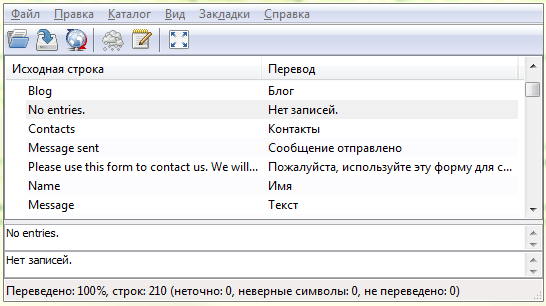
As a result, after saving the directory in the LC_MESSAGES folder , you should get two files - messages.mo andmessages.po containing string translations into Russian - Now that we have a language file with line breaks, you need to connect it to the site. Suppose there are two languages - English and Russian. In this case, two locales are used - en_US and ru_RU.utf8 . In order to use it in PHP we need the following code ( download ):
$lang = 'ru_RU.utf8';
if (!defined('LC_MESSAGES')) define('LC_MESSAGES', 5); // в Windows эта константа может быть не определена
setlocale(LC_MESSAGES, $lang); // устанавливаем локаль
if  (!isset ($_COOKIE['lang'])) setcookie('lang', $lang, 1640995200); // сохраняем язык в Cookie
bind_textdomain_codeset("messages", 'UTF8'); // устанавливаем кодировку файла messages.mo
if ($lang == 'ru_RU.utf8') {
    // подключаем файлы русской локализации
    bindtextdomain("messages", "./locale");
    textdomain("messages");
}
else {
    // возвращаем английский язык
    bindtextdomain("messages", "");
}
Problems that may arise:
- The messages.mo file on Windows is cached, and changes to it are visible only after rebooting Apache.
- If you pass the setlocale function a value other than LC_MESSAGES, then problems may arise due to the fact that in Russian the fractional part is separated by a comma, and in English by a period. Since the locale also begins to affect the representation of numbers in PHP, the fractional part is lost when querying MySQL.
- Locales ru_RU.utf8 and ru_RU may differ on the server. If you simply specify ru_RU, then there is a chance to get question marks instead of letters.
The tsmarty2c utility can process plural forms and use ngettext calls, but Poedit refused to accept them from me.
I hope that this topic will help you save your time and encourage the creation of even better, high-quality sites =)









