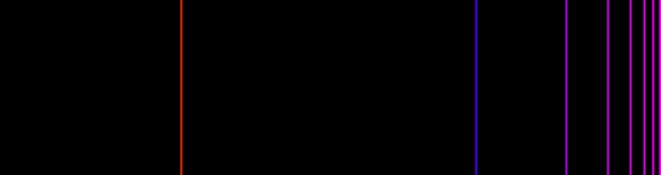
Spectrum of visible radiation in computer graphics
RGB
One of the main modes of color representation in computer graphics is the RGB mode - a mixture of red, green and blue. To set any color, you need to assign three variables R, G, B values from 0 to 255. Thus, you can get the color of any shade, any brightness.
Representation of some colors in RGB mode
• (255,0,0)

• (0,255,0)

• (255,255,0)

• (0,0,255)

• (0,255,255)

• (255,0,255)

Physical representation of color
Light is an e / m wave with an interval of wavelengths: 380-760 nm.
In this article, we will use the representation of light using the wavelength.
From physical observations it is known that red lies in the wavelength range (610; 760), orange - (590; 610), yellow - (570; 590), green - (540; 570), blue - (510; 540) blue - (480; 510), violet - (380; 480) nm.
If you look at the continuous spectrum of visible radiation, then you can highlight certain colors on it, between which there is a smooth transition.

Therefore, in our method, using experimental data, we determine in which of the color intervals the input wavelength is located, and then from the obtained empirical ratio it can be switched to RGB mode.
Consider converting the wavelength to RGB for green. We know that the green color lies in the range (540; 570). Suppose the true green color falls on the wavelength lying in the center of this interval: 555 nm. Therefore, at a given wavelength in RGB mode, it will look like this (0.255.0). With increasing wavelength, the green color smoothly turns into yellow (255,255,0). At the border of these two colors i.e. at about a wavelength of 570 nm, the RGB representation will look like (127,255.0). For this interval, you can write the formula for the transition from the wavelength to the amount of red, green, blue in RGB mode.
Analyzing the boundaries of the indicated wavelength interval, you can notice that the blue component is not present in it, so you can immediately write: B = 0. It is also seen that the green component G = 255 does not change. But for the red component we write R = [127.5 * (lamda-555) / (570-555)], where [] is the operation of extracting the integer part. The expression is not simplified to preserve the meaning of building a dependency.
When the wavelength falls into the interval (540.555), the green color smoothly turns into blue.
On the left border of this interval, the color in the RGB mode has the form: (0.255.127). Comparing the left (0.255.127) and right (0.255.0) border of the interval, we have R = 0, G = 255
A, the amount of the blue component (B) decreases from 127 to 0. The transition can be performed using the following formula: R = [127.5 * (1 - (lamda-540) / (555-540))]
Using the above principle, we can obtain transition formulas for all intervals of the spectrum, and implement them in the form of functions for each component.
Implementation
function Red(l:integer):byte;
var n:byte;
begin
if (l>560)and(l<=760) then n:=255;
if (l>495)and(l<=555) then n:=0;
if (l>570)and(l<=580) then n:=round(127.5+127.5*(l-570)/10);
if (l>555)and(l<=570) then n:=round(127.5*(l-555)/15);
if (l>480)and(l<=495) then n:=round(127.5-127.5*(l-480)/15);
if (l>380)and(l<=480) then n:=round(255-127.5*(l-380)/100);
Red:=n;
end;
function Blue(l:integer):byte;
var n:byte;
begin
if (l>380)and(l<=525) then n:=255;
if (l>555)and(l<=760) then n:=0;
if (l>540)and(l<=555) then n:=round(127.5-127.5*(l-540)/15);
if (l>525)and(l<=540) then n:=round(255-127.5*(l-525)/15);
Blue:=n;
end;
function Green(l:integer):byte;
var n:byte;
begin
if (l>525)and(l<=580) then n:=255;
if (l>380)and(l<=495) then n:=0;
if (l>610)and(l<=760) then n:=round(63.5-63.5*(l-610)/150);
if (l>600)and(l<=610) then n:=round(127.5-63.5*(l-600)/10);
if (l>590)and(l<=600) then n:=round(190.5-63.5*(l-590)/10);
if (l>580)and(l<=590) then n:=round(255-63.5*(l-580)/10);
if (l>495)and(l<=510) then n:=round(127.5*(l-495)/15);
if (l>510)and(l<=525) then n:=round(127.5+127.5*(l-510)/15);
Green:=n;
end;
procedure TForm1.FormDblClick(Sender: TObject);
var n,k:integer;
begin
for k:=20 to 360 do
for n:=760 to 1520 do
form1.Canvas.pixels[n-760,k]:= RGB(Red(round(n/2)),Green(round(n/2)),Blue(round(n/2)));
end;
...
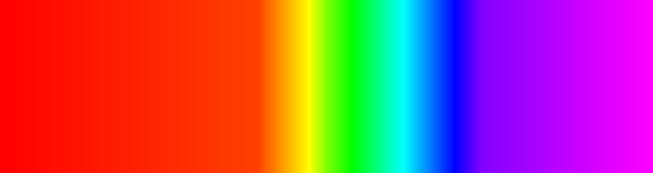
The results are shown below:
Applying certain conditions to the construction, we can obtain the emission spectrum of a hydrogen atom: