Generating image with waveform from mp3 files using PHP
I would like to share one of the ways to implement an audio player for sites using jQuery. Namely, a player in the style of the popular Soundcloud service , made in HTML + CSS + JS. In pursuit of a recent article about an interesting jPlayer player .
The player itself consists of jPlayer, a certain amount of simple layout, and the main component - a picture from the waveform of the file being played (this is a clear picture that shows the signal amplitudes, plotted on a timeline).
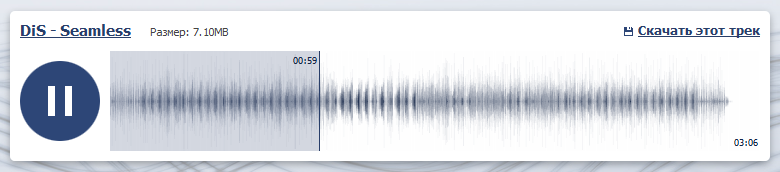
You can get acquainted with the results of this completion by downloading the archive with everything you need: http://test.dis.dj/wave/ (there is also a demo of the player’s interface and an archive with it).
Having found the script in google at http://andrewfreiday.com/2010/04/29/generating-mp3-waveforms-with-php/ , and making sure that it works properly, I decided to slightly finish it to fit my needs. Namely, add the console mode to it, and also make the picture transparent in the middle where the waveform is located, and opaque at the edges, so that you can display the playback progress directly in the player, as is done with Soundcloud.
The script works like this: transcodes the file into wave format by calling the lame encoder, then parses the received file and generates amplitudes, filling them with an array. Then a picture is generated from these amplitudes, which is then compressed and given as a result of the work.
You can use the resulting script as follows:
The layout is completely simple - an absolute layer with waveform as a background or picture, as it is more convenient, below it are two more absolute layers, to which JS sets the width (progress bar for playing and downloading). All this stuff is wrapped in another layer c
The finished result can be observed at http://dis.dj/music/seamless.html .
The player is rendered into any container, for this you need to call it like any other jQuery plugin:
The data on the length and time is needed for a beautiful display before loading the track, we assume that this information is already cached somewhere.
The player interacts with the “outside world” using calls:
The player itself consists of jPlayer, a certain amount of simple layout, and the main component - a picture from the waveform of the file being played (this is a clear picture that shows the signal amplitudes, plotted on a timeline).
You can get acquainted with the results of this completion by downloading the archive with everything you need: http://test.dis.dj/wave/ (there is also a demo of the player’s interface and an archive with it).
Now more about the process
Having found the script in google at http://andrewfreiday.com/2010/04/29/generating-mp3-waveforms-with-php/ , and making sure that it works properly, I decided to slightly finish it to fit my needs. Namely, add the console mode to it, and also make the picture transparent in the middle where the waveform is located, and opaque at the edges, so that you can display the playback progress directly in the player, as is done with Soundcloud.
The script works like this: transcodes the file into wave format by calling the lame encoder, then parses the received file and generates amplitudes, filling them with an array. Then a picture is generated from these amplitudes, which is then compressed and given as a result of the work.
You can use the resulting script as follows:
- Make sure PHP is specified in the PATH variable in the system
- >
wave file.mp3- generates an image for a specific file - >
wave-all- generates images for all files in a folder - You can optionally use the file
index.phpby accessing it through a browser
The layout is completely simple - an absolute layer with waveform as a background or picture, as it is more convenient, below it are two more absolute layers, to which JS sets the width (progress bar for playing and downloading). All this stuff is wrapped in another layer c
position: relativein order to avoid impacts on the surrounding layout elements. The rest is the controls, hitch and decorations. The demo is available on the download page. The finished result can be observed at http://dis.dj/music/seamless.html .
Player use
The player is rendered into any container, for this you need to call it like any other jQuery plugin:
$(function(){
	$('#waveform').waveform({
		media: {
			oga: "http://dis.dj/files/tracks/DiS - Seamless.oga",
			m4a: "http://dis.dj/files/tracks/DiS - Seamless.m4a",
			mp3: "http://dis.dj/files/tracks/DiS - Seamless.mp3"
		},
		image: "http://dis.dj/files/tracks/DiS - Seamless.png",
		title: "DiS - Seamless",
		duration: 186,
		size: 7442977,
		durationFormatted: "3:06",
		sizeFormatted: "7.10MB",
		createDate: "5 \u0434\u0435\u043a\u0430\u0431\u0440\u044f 2010 03:32:20",
		path: "jplayer/"
	});
});
The data on the length and time is needed for a beautiful display before loading the track, we assume that this information is already cached somewhere.
The player interacts with the “outside world” using calls:
$(function(){
	$("#waveform").waveform("play");
	$("#waveform").waveform("pause");
	$("#waveform").waveform("stop");
	$("#waveform").waveform("getTrack"); // возвращает объект с инфо о треке (в формате, описанном выше)
	$("#waveform").waveform("setTrack", {…}); // ставит в плеер новый трек
	$("#waveform").waveform("getPlayer"); // возвращает инстанс jPlayer'а, с которым можно производить любые манипуляции (см. доку jPlayer)
});