 January 26, 2011 at 18:57
Introducing the tessnet2 OCR Library (C #)
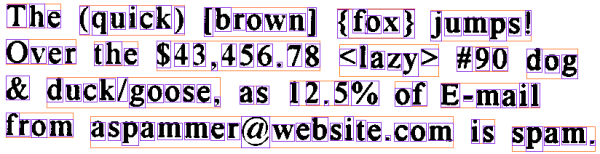
Just the other day I had a need to recognize simple text in the picture and there was absolutely no desire to implement my algorithm, because I am familiar with the theory and I know that this is not such a simple matter, so I immediately decided to study the market of ready-made libraries first. Just a few requests to google and I realized that nothing more suitable for me as a tessnet2 library can not be found. I constantly read the Habr and I know that there are a lot of articles devoted to the OCR theory and I was very surprised that there is nothing about the tessnet2 library.
tessnet2 is based on Tesseract OCR
The Tesseract OCR engine was one of the 3 best engines introduced in 1995 at the UNLV Accuracy test. Between 1995 and 2006, it was slightly modified, but it is probably one of the most accurate OCR engines available on open source. Code that is available will read binary, gray or color images and display text. TIFF reading is designed so that uncompressed TIFF images are read, or Libtiff can be added to read compressed images.
How to use Tessnet2 :
1. Download the library , add the link (reference) to Tessnet2.dll in the .NET project.
2. Download the language we need (I personally need English) ( tesseract-2.00.eng.tar.gz) and put it in the tessdata folder. The tessdata folder must be next to the executable file of our application.
In order to read text from a picture, such text is enough:
Bitmap image = new Bitmap("eurotext.tif");

tessnet2.Tesseract ocr = new tessnet2.Tesseract();

ocr.SetVariable("tessedit_char_whitelist", "0123456789"); // If digit only

ocr.Init(@"c:\temp", " eng ", false); // To use correct tessdata

List result = ocr.DoOCR(image, Rectangle.Empty);

foreach (tessnet2.Word word in result)

  Console.WriteLine("{0} : {1}", word.Confidence, word.Text);


* This source code was highlighted with Source Code Highlighter.
I was very happy with the result, so I immediately remembered that a few months ago I screwed the service to solve captchas for one project, I’ll say right away that nothing good came of it, I needed speed there, but I couldn’t get it there, t. to. such services are not able to provide it, and the result is usually deplorable, and it is understandable, because they pay from $ 1 for 1000 correctly entered captchas, which is terrible to say the least. Therefore, for the sake of experiment, I decided to play with this library using that example.
The initial data for us will be a captcha, on which we need to perform simple actions on two numbers and get an answer. It sounds pretty simple, but the problem is that all the symbols are of different colors and there is a dynamic background, sometimes even it is difficult for me (the person) to understand right away what is written there.
Immediately I bring the results of the program, after which I will tell you how it all works:
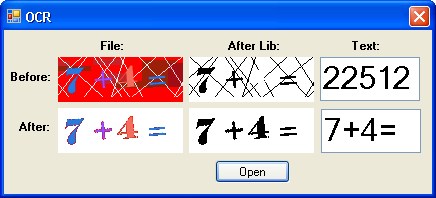
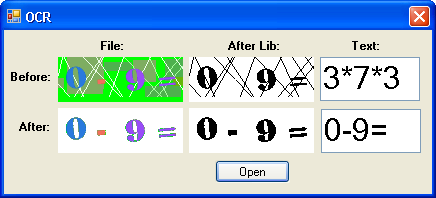
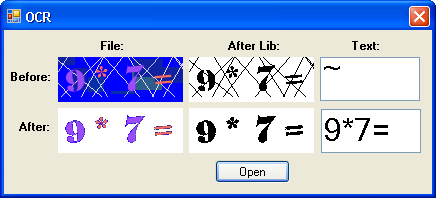
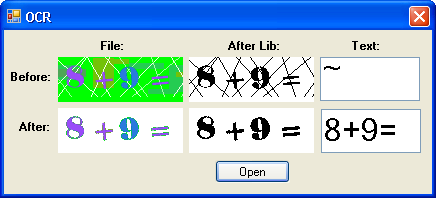
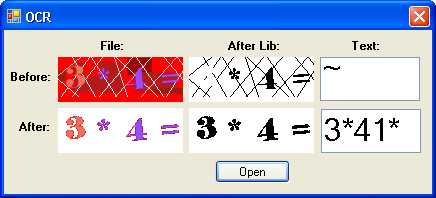
The screenshots clearly show that the library can not solve anything because of a bunch of lines, sometimes the background, which was not completely removed, also interferes. Therefore, I developed my own small algorithm for cleaning the picture, there is nothing grand in it, I just step back a few pixels from the edge and run through the rectangle and collect the colors there, also collect the colors after the first digit and before the sign (the latter is more of a hack, but t .k. the article is devoted to another, then left it like that). All I have to do then is paint over all the colors that came to my collection and are not white.
Of all the algorithms, only the area-filling algorithm on Bitmap can be most useful:
 void FloodFill(Bitmap bitmap, int x, int y, Color color)

    {

      BitmapData data = bitmap.LockBits(

        new Rectangle(0, 0, bitmap.Width, bitmap.Height),

        ImageLockMode.ReadWrite, PixelFormat.Format32bppArgb);

      int[] bits = new int[data.Stride / 4 * data.Height];

      Marshal.Copy(data.Scan0, bits, 0, bits.Length);


      LinkedList check = new LinkedList();

      int floodTo = color.ToArgb();

      int floodFrom = bits[x + y * data.Stride / 4];

      bits[x + y * data.Stride / 4] = floodTo;


      if (floodFrom != floodTo)

      {

        check.AddLast(new Point(x, y));

        while (check.Count > 0)

        {

          Point cur = check.First.Value;

          check.RemoveFirst();


          foreach (Point off in new Point[] {

        new Point(0, -1), new Point(0, 1),

        new Point(-1, 0), new Point(1, 0)})

          {

            Point next = new Point(cur.X + off.X, cur.Y + off.Y);

            if (next.X >= 0 && next.Y >= 0 &&

              next.X < data.Width &&

              next.Y < data.Height)

            {

              if (bits[next.X + next.Y * data.Stride / 4] == floodFrom)

              {

                check.AddLast(next);

                bits[next.X + next.Y * data.Stride / 4] = floodTo;

              }

            }

          }

        }

      }


      Marshal.Copy(bits, 0, data.Scan0, bits.Length);

      bitmap.UnlockBits(data);

    }

  }


* This source code was highlighted with Source Code Highlighter.
For those who are interested in experimenting, I attach the source code .
Total
We got acquainted with a rather interesting tessnet2 library, checked its operation in real conditions, achieved pretty good solving results for complex pictures (captcha), of course there are errors, but their number is negligible, especially for this type of captcha, you can add a check using regular expression and you will definitely know that the unraveled text corresponds to the desired format.









