Expanding the possibilities of StyleCop

StyleCop , a static C # code analyzer for style matching, was officially unveiled to the public in early 2008. By IT standards, this is quite a long time ago, but for some reason this useful tool has not yet received wide popularity (at least the one it deserves).
Below I will try to analyze the reasons, as well as talk about the new plugin for StyleCop.
Why is StyleCop not very popular?
In addition to developers who do not care about the coding style at all (hereinafter we will focus only on the C # language), too many errors at default settings scare away many. In my opinion, this is strange - if you are worried about the coding style, then it is natural to check all the settings, deciding for yourself which ones are suitable for following the chosen style.
But here the question arises - what is generally understood by the coding style? Is this some kind of unified style for everyone who writes in C #? Or is each team free to choose it as they wish?
It seems to me that the very idea of the existence of “uniform” rules is utopian. In general, there are some trends that more and more developers are beginning to adhere to over time. However, the language is developing, new constructions are being added (which means that there are more and more ways to use them), and a new wave of discussions and disputes begins.
Nevertheless, Jason Allor - the creator and main ideological inspirer of StyleCop - adheres to the position that the rules of style should be the same for everyone. As a result, these rules make up the very “default settings” that often stop those who would like to use StyleCop.
I would not like to provoke disputes about specific rules - in the end, the style proposed by StyleCop is used by some teams at Microsoft (which means it has a certain “confidence coefficient”). However, my personal experience shows that the principle of “local style” most often works - that is, his style is adopted in a team, in a department, or throughout the organization, and then is strictly observed.
Here I note that if your agreements are concluded only in oral agreements - you can assume that you do not have any agreements. Forced verification (for example, as one of the stages of assembly on the build server) is the only guarantee of their compliance. Here such tools as StyleCop show themselves in all their glory.
How can I fix the situation?
Fortunately, StyleCop has a fairly developed plug-in system, which allows to significantly expand its functionality (even the set of original rules itself is technically framed as a separate plug-in). But there are not so many plugins for StyleCop in the public domain. And most of those that can be found are a few scattered rules and look abandoned.
It seems to me that StyleCop would be more useful if it were not positioned as an instrument for adhering to a certain style, but would become a kind of “designer”, with which you could control compliance with the style that your team needs.
StyleCop +
About a year ago, with such thoughts, I started writing StyleCop + , another plugin for StyleCop. His main idea was and remains unchanged - without imposing specific rules, provide a wide range of possible checks to customize your own style.
The plugin was leisurely written in his spare time and gradually overgrown with new opportunities. In the end, I decided to share my best practices and started publishing it on CodePlex. Positive reviews showed that the work was done not in vain.
Below I would like to briefly talk about the main features of StyleCop +. If you are already using StyleCop, they may seem interesting to you, but if not, it may be that they were not enough for you, or maybe they will inspire you to write your own extensions.
Advanced naming rules
The history of the emergence of these rules is quite banal - our team adopted the m_field style for class fields (when the names of private fields begin with various prefixes, in particular m_ ). StyleCop only supports this.field- style (when private fields have no prefixes, but any access to the fields or methods of the class must be accompanied by the obligatory this to distinguish fields from, for example, method arguments). Moreover, StyleCop also contains a rule prohibiting the use of underscores in names in general.
I repeat, I do not presume to say which style is better. But the reality is that different styles already exist (even in .NET BCL you can observe groups of classes written by different commands at different times - and with different naming styles). And if so, then a tool for following the style is simply obliged to take into account all this diversity.
Thus, in StyleCop + there are rules that allow you to configure almost any system of naming objects. Functionally, they completely cover the basic Naming Rules ( SA13xx ), so you can simply disable the latter:
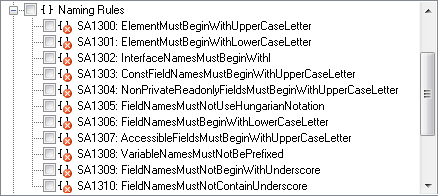
The method of configuring these rules is much similar to the same settings in ReSharper - you can use a wide range of entities, for each of which you can set your own naming patterns.

For example, the following rule says that the name must either start with the prefix m_ , followed by the name in camelStyle ( m_rulesMap ), or be completely written in PascalStyle ( RulesMap ).
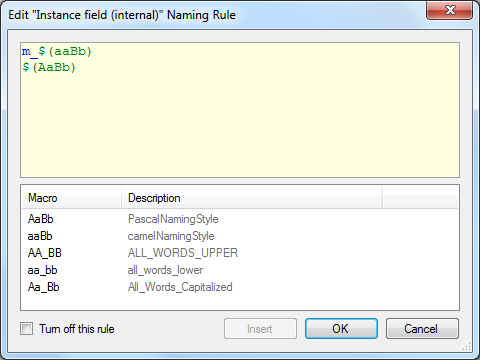
As you can see from the picture, in the naming patterns you can use a number of macros that describe the most common styles of capitalization.
Entities themselves are also quite a lot, and some of them are specially highlighted separately. For example, someone might not want to rename standard WinForms event handlers (such as buttonStart_Click) - which means that they may need their own rules, not those for ordinary methods. Or, someone may specifically call methods that are unit tests (for example, Setting_Null_Throws_Exception ). And the need to have different rules for class or field names, depending on access modifiers, is completely obvious.
Since capitalization is checked in the names, then you can’t do without setting your own list of abbreviations (here they mean any combination of capital letters that should be allowed as a separate word). Also, an option has recently appeared that allows you to ensure that the names of some derived classes necessarily end with the name of the base class (for example, this is common for Attribute , Exception , Stream etc., but someone may want to add their exceptions).
More custom rules
Like other plugins, StyleCop + contains various additional rules for checking style. There are not very many of them yet, but those that exist are quite flexible configured (thanks to the active users who suggested many interesting ideas).
A separate interface was created for these rules, which allows for more friendly editing of the settings (unlike the traditional interface on the Rules tab , here the settings are not limited to flags with Boolean values and apply to the rule itself).

Extended Original Rules
This is an experimental feature in which StyleCop + contains rules that “parasitize” the original StyleCop rules. For example, the useful rule SA1509: OpeningCurlyBracketsMustNotBePrecededByBlankLine also prohibits "built-in" blocks of code.
// some statements
...
{
    int a; // declaration of local variables required to set value of f1
    ...
    this.f1 = ...;
}
{
    int a; // declaration of local variables required to set value of f2
    ...
    this.f2 = ...;
}
Its "parasite rule" - SP1509 - contains a setting that allows this spelling to be allowed. The key point is that this rule does not contain native code that duplicates the original check. Instead, the “parasite rule” launches the original code from StyleCop, but imposes its own restrictions on the result (in the given example, it will not produce an error if it is caused by “built-in” code blocks).
Instead of a conclusion
If you are not using StyleCop yet - be sure to try it, it should become your must-have tool!
If you lack functionality, write extensions or look for existing ones!
As for StyleCop +, it continues to evolve. Download, use, ask questions on CodePlex. And if it so happens that it is he who will prompt at least one developer to start using StyleCop - we can assume that this project fulfilled its mission 100%!
Good luck!
____________________
- http://stylecop.codeplex.com - StyleCop on CodePlex
- http://stylecopplus.codeplex.com - StyleCop + on CodePlex
- http://blogs.msdn.com/b/sourceanalysis - Microsoft StyleCop Blog
- http://devjitsu.com/blog - Jason Allor Blog









