Installing the ATI Driver on Debian GNU / Linux
Intro
Once upon a time, when I started using Linux, I tried several distributions and settled on Debian. Since I don’t particularly play games, I immediately liked the GNOME desktop, because of its simplicity and convenience, and the system worked faster than Windows. After installing the system, I determined all the devices except the video card - at that time I had an ATI Radeon 9800 SE.
Installing the driver as in Windows failed immediately after I was surprised to find that there is no Debian in the installer interface, and if you choose Ubuntu, then everything dies.
Then I spent about a week installing version 8.6. Since then I changed my computer, but I'm a fan of AMD and the next video card I took was Radeon HD4850.
Getting started
First, you need the driver itself for installation . At the moment, the latest version is 10.5. After it is loaded, unpack the contents into the fglrx directory:
./ati-driver-installer-10-5-x86.x86_64.run --extract fglrxNote: the driver with the post fix “x86.x86_64” is suitable for both 32-bit and 64-bit systems.
First, you need to modify the ati-packager.sh script. For lenny : For squeeze : Thus, an indication of a version of Xs that does not exist in the distribution will be changed to the version supported by the system. Secondly, you need to change the rules script, the changes are the same for lenny and squeeze : Note:
cp ./fglrx/packages/Debian/ati-packager.sh ./ati-packager.sh

cat ./ati-packager.sh | sed -e 's/X_DIR=x710; X_NAME=lenny/X_DIR=x690; X_NAME=lenny/' > ./fglrx/packages/Debian/ati-packager.sh
cp ./fglrx/packages/Debian/ati-packager.sh ./ati-packager.sh
cat ./ati-packager.sh | sed -e 's/X_DIR=x710; X_NAME=lenny/X_DIR=x750; X_NAME=lenny/' > ./fglrx/packages/Debian/ati-packager.shcp ./Desktop/fglrx/packages/Debian/dists/lenny/rules rules
cat ./rules | sed -e 's/^\tdh_shlibdeps$/#\tdh_shlibdeps/' > ./fglrx/packages/Debian/dists/lenny/ruleswithout this, when assembling packages, an error will occur that there is no libatiuki.so.1 library. It is believed that if you create a link to this library, then everything will come together without problems. It didn’t work for me. There is also an opinion that changing the environment variable LD_LIBRARY_PATH may help, but this did not work for me either.
Now you need to copy the required library to / usr / lib /:
For 32-bit:
cp ./fglrx/arch/x86/usr/lib/libatiuki.so.1.0 /usr/lib/libatiuki.so.1
For 64 bit:
cp ./fglrx/arch/x86_64/usr/lib64/libatiuki.so.1.0 /usr/lib/libatiuki.so.1
Preparation for assembly is completed.
Package assembly
Now you need to install the following packages:
aptitude install debhelper module-assistantNext, the module-assistant will pull up all the necessary packages, including the kernel sources:
module-assistant prepareAlso, the latest drivers require libqtcore4. Further, the package assembly should go without errors:
./ati-installer.sh 10.5 --buildpkg Debian/lennyAfter which the packages should appear:
- fglrx-amdcccle
- fglrx-driver
- fglrx-driver-dev
- fglrx-kernel-src
You can install them like this:
dpkg --install —force-all *.debNote: there is also a gdebi utility that allows you to install packages with dependencies. I use dpkg out of habit.
Module assembly
The module is assembled in one command:
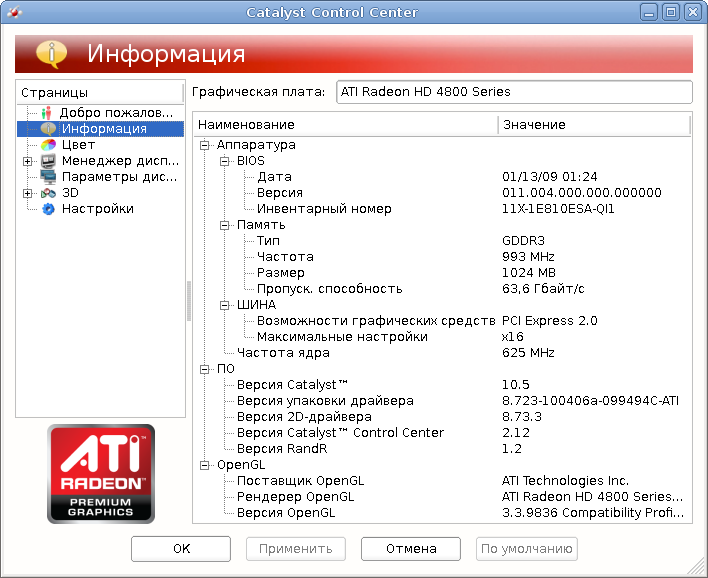
module-assistant auto-install fglrxAfter rebooting, we have:
Conclusion
I wrote from memory, since the last time I installed Debian a couple of months ago on an acquired ASUS K40AB laptop. In the described way, the drivers were cheered, a recent update to the free radeonhd driver caused a conflict that was resolved in a couple of minutes. I checked the installation on Debian lenny and squeeze on 32-bit and 64-bit systems.
PS: I wrote from memory so that errors are possible, but the essence is this.









