AMD Ryzen: what to look for when choosing a memory?
AMD Ryzen chips based on Zen architecture are highly productive, but at first they did not show top results in gaming tests. As it turned out, the cause of these troubles is easily eliminated - you just need a good video card (which is obvious) and the correct RAM if you want to get the most out of your new stone.
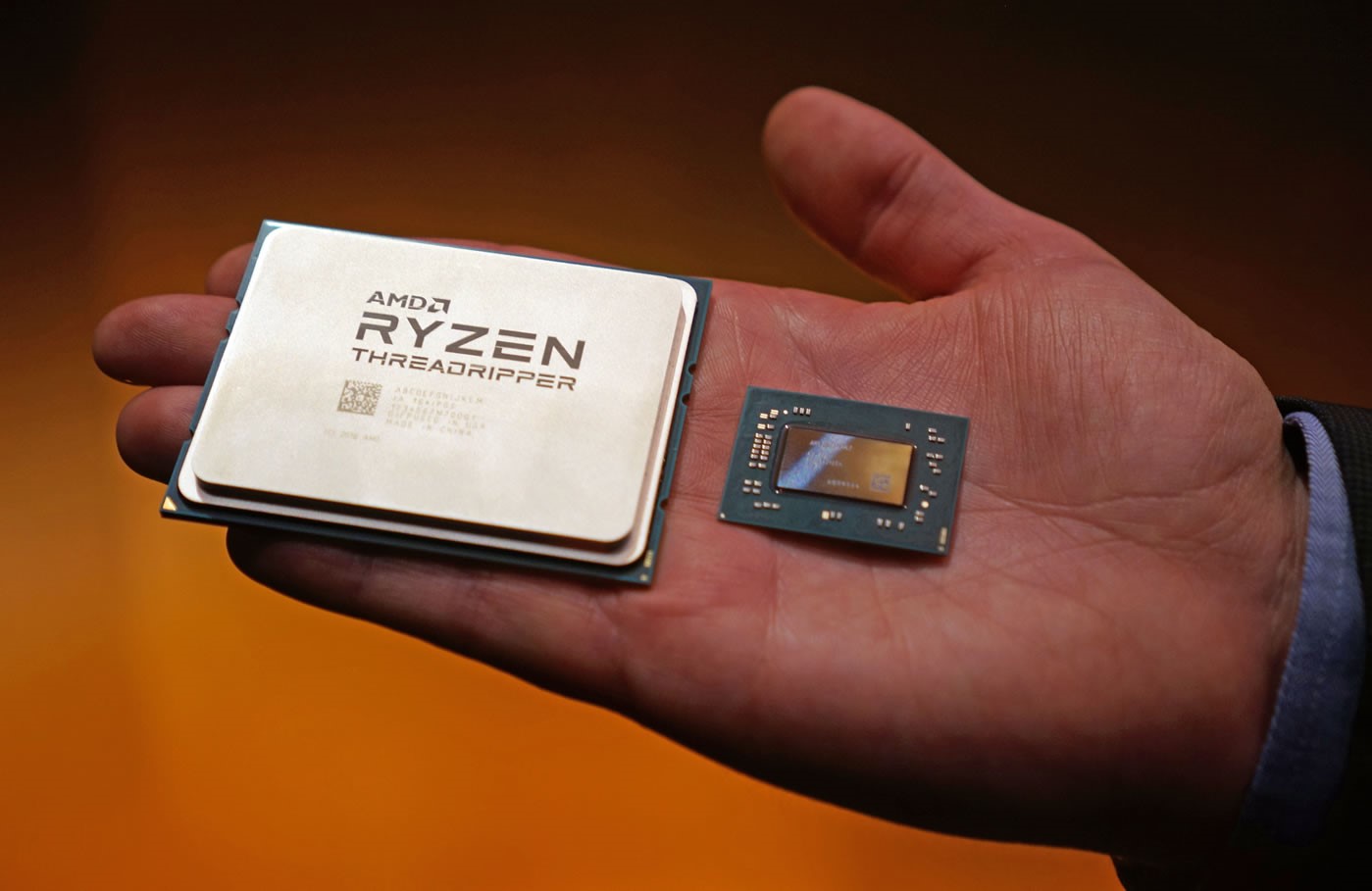
The successful entry of new AMD Ryzen processors to the market was a real breakthrough. Everyone who is familiar with the computer industry has heard about Ryzen and knows perfectly well that the new processors are one and a half times faster than the previous ones. Thus, the Ryzen platform performed its function for AMD, returning it to the racetrack. Now, the manufacturer again competes with Intel, instead of constantly catching up with its main competitor, lagging a step or two, as it was the last 10 years
, however, what can be said about the consumers who want to get out of the latest components, purchasing or collecting a powerful computer based on Ryzen to play it in the latest games? For this it was not enough just to buy a new motherboard and processor. A huge role is played by the choice of good and fast RAM.

At the heart of the Ryzen platform are processor cores of a completely new architecture - Zen. I must say, AMD put everything on Zen, and if this technology hadn’t “fired”, then the PC processor market has said goodbye to this remarkable manufacturer. The engineers have been working on Zen for many years, and as a result they have a module that really differs from all previous developments of the company:
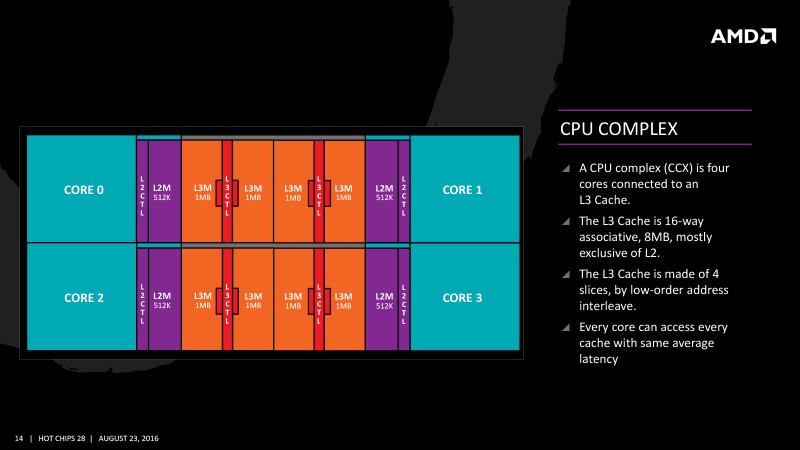
But here we are getting to the most interesting thing: in terms of working with memory, the Zen architecture looks ambiguous. On the one hand, the processor's cache began to work much better, the possibility of processing parallel instructions increased, and the associativity was doubled. Even before the first launch of the Ryzen processors, it was known that for loading instructions, AMD engineers endowed Zen with a 64-kilobyte L1 cache with four-fold associativity, and for data with a 32-kilobyte cache with eight-fold associativity. The second level cache is also made individual for each core and already contains 512 KB of data and instructions with support for 8-fold associativity. Data transfer between the first and second cache level occurs on the bus with a full duplex of 32 bytes per clock.

Level 3 cache (L3) holds 8 megabytes and is already socialized for every four cores. This decision was made by the manufacturer, because the processor chip consists of CPU-complexes, each of which has 4 cores. As you know, the Zen architecture is planned to be used for a variety of tasks, but in the case of Ryzen, the manufacturer simply placed two CCX (CPU-Complex) alongside, resulting in 8 cores. But what if the data will lie in the L3 cache, which belongs to another SSX? In this case, a special high-speed Infinity Fabric bus with traffic prioritization is used.
But we move further - the L3 data already gets into the cache from RAM. It uses a dual-channel memory controller that supports a maximum of two SDRAM DDR4 modules in each channel and operates on the same frequency with Infinity Fabric. Initially, AMD engineers were cautious and announced that the system can only work with DDR4-2133 / 2400/2667, and for that they had good reasons. In particular, if two memory modules are installed in each channel, the controller cannot always “pull out” the data transmission at the frequency supported by the memory itself. Due to the fact that the dual-channel controller is the "bottleneck" of the processor, it is necessary to choose memory very carefully, because even if theoretically the motherboard allows overclocking (and taking into account the available multipliers, modern memory can also work at 2933 MHz,
Commenting on the current situation, AMD has published in its blog a real study of various factors affecting the performance of the Ryzen platform in games. First of all, you need to check whether the latest version of AGESA 1.0.0.6 software (or higher) is installed on your system , which allows you to more precisely adjust the memory for maximum efficiency. The most recent AGESA code was introduced at the end of May, and a number of motherboard manufacturers did not immediately start installing it in the BIOS. But now AGESA 1.0.0.6 supports every vendor, so if necessary, you just need to update the BIOS.
Interestingly, together with AGESA 1.0.0.6, the Ryzen memory system has acquired two new functions - GDM and BGS. And although they significantly improve the life of "ordinary users" and partially compensate for the limitations of the memory controller, if you want to squeeze the maximum out of your system, even AMD engineers recommend turning them off. And now we will understand why.
The GearDown Mode (GDM) feature is automatically enabled for any memory running at speeds above DDR4-2666. GDM allows the RAM module to operate at half the frequency of its true capabilities when it is required to save the values (latching) of commands or addresses. Such a conservative approach allows achieving higher memory frequencies, increasing component compatibility and increasing stability. But for overclockers, this function negates all efforts, as it cancels the special values set in the BIOS.
The second function is BankGroupSwap (BGS). It is a new memory mapping mechanism in AGESA 1.0.0.6, which changes the way the physical memory addresses are accessed on the modules themselves. The idea is to optimize the processing of requests, taking into account the system architecture and the timings of specific modules installed in your computer. But as practice shows, the performance shift is not in favor of gaming applications, but rather helps to solve design problems.
Thus, if you want to maximize returns in games, you need to disable BankGroupSwap. And if you also carried out a careful selection of timings and achieved stable operation of the system with overclocked memory, you need to disable Geardown Mode.
Interesting results were also shown by comparing similar peer and two-rank modules. Despite the expectations of many reviewers, the installation of two-rank modules allows you to get a performance boost in games on Ryzen. As you know, with a peer module it is easier to achieve a higher frequency, while two-rank modules are distinguished by the possibility of parallel operation of installed modules due to the Rank Interleaving function. And in the case of gaming on Ryzen, this optimization is paying off.
When studying the effects of timings on gaming applications, AMD concluded that a good selection of parameters could lead to much better results in real games than using default settings or automatic settings, such as MSI A-XMP. Tests of the manufacturer have shown that by adjusting the timings manually, you can achieve better results than trusting overclocking the logic of the motherboard - even with the newest BIOS version.
However, there are third-party tests.which say the exact opposite: the frequency of the modules, which must be high, is more important. Will the installation of fast (and expensive) modules with large timings increase more significantly than manually setting the timings in the modules easier? The easiest thing to check is in a real experiment, the results of which we will publish soon.
To be continued…
Subscribe and stay with us - it will be interesting!
But for those who plan to assemble a PC on their own or buy a ready-made assembly, MSI gives a great New Year gift worth 10,000 rubles, which you can add to your build - a 16 GB HyperX Fury DDR4 memory kit. The number of memory modules is limited. Learn more about the action here .

For more information about Kingston and HyperX products, visit the company's official website .
The successful entry of new AMD Ryzen processors to the market was a real breakthrough. Everyone who is familiar with the computer industry has heard about Ryzen and knows perfectly well that the new processors are one and a half times faster than the previous ones. Thus, the Ryzen platform performed its function for AMD, returning it to the racetrack. Now, the manufacturer again competes with Intel, instead of constantly catching up with its main competitor, lagging a step or two, as it was the last 10 years
, however, what can be said about the consumers who want to get out of the latest components, purchasing or collecting a powerful computer based on Ryzen to play it in the latest games? For this it was not enough just to buy a new motherboard and processor. A huge role is played by the choice of good and fast RAM.
Ryzen architecture
At the heart of the Ryzen platform are processor cores of a completely new architecture - Zen. I must say, AMD put everything on Zen, and if this technology hadn’t “fired”, then the PC processor market has said goodbye to this remarkable manufacturer. The engineers have been working on Zen for many years, and as a result they have a module that really differs from all previous developments of the company:
- Zen cores work on a chip, sharing only the L3 cache (unlike the previous generation of the Bulldozer architecture, when parts of the core, the FPU, SIMD blocks and the L2 cache were shared between pairs of cores)
- In Zen, a micro-op cache (micro-op queue) appeared for the first time for AMD, which can significantly improve processor performance when executing repetitive computer code fragments (which has long been used in Intel processor cores)
- The new kernels received a basic integer pipeline with a length of 19 stages, as well as a completely separate pipeline of real computations. The cores themselves have not only their own execution units, but also their own schedulers (which allows Zen to process a large number of parallel instructions at once)
- Multiple improvements in conversion prediction systems, instruction sampling, and command execution optimization have helped Zen gain improved performance.
Cache and memory
But here we are getting to the most interesting thing: in terms of working with memory, the Zen architecture looks ambiguous. On the one hand, the processor's cache began to work much better, the possibility of processing parallel instructions increased, and the associativity was doubled. Even before the first launch of the Ryzen processors, it was known that for loading instructions, AMD engineers endowed Zen with a 64-kilobyte L1 cache with four-fold associativity, and for data with a 32-kilobyte cache with eight-fold associativity. The second level cache is also made individual for each core and already contains 512 KB of data and instructions with support for 8-fold associativity. Data transfer between the first and second cache level occurs on the bus with a full duplex of 32 bytes per clock.
Level 3 cache (L3) holds 8 megabytes and is already socialized for every four cores. This decision was made by the manufacturer, because the processor chip consists of CPU-complexes, each of which has 4 cores. As you know, the Zen architecture is planned to be used for a variety of tasks, but in the case of Ryzen, the manufacturer simply placed two CCX (CPU-Complex) alongside, resulting in 8 cores. But what if the data will lie in the L3 cache, which belongs to another SSX? In this case, a special high-speed Infinity Fabric bus with traffic prioritization is used.
But we move further - the L3 data already gets into the cache from RAM. It uses a dual-channel memory controller that supports a maximum of two SDRAM DDR4 modules in each channel and operates on the same frequency with Infinity Fabric. Initially, AMD engineers were cautious and announced that the system can only work with DDR4-2133 / 2400/2667, and for that they had good reasons. In particular, if two memory modules are installed in each channel, the controller cannot always “pull out” the data transmission at the frequency supported by the memory itself. Due to the fact that the dual-channel controller is the "bottleneck" of the processor, it is necessary to choose memory very carefully, because even if theoretically the motherboard allows overclocking (and taking into account the available multipliers, modern memory can also work at 2933 MHz,
AMD prioritized
Commenting on the current situation, AMD has published in its blog a real study of various factors affecting the performance of the Ryzen platform in games. First of all, you need to check whether the latest version of AGESA 1.0.0.6 software (or higher) is installed on your system , which allows you to more precisely adjust the memory for maximum efficiency. The most recent AGESA code was introduced at the end of May, and a number of motherboard manufacturers did not immediately start installing it in the BIOS. But now AGESA 1.0.0.6 supports every vendor, so if necessary, you just need to update the BIOS.
Interestingly, together with AGESA 1.0.0.6, the Ryzen memory system has acquired two new functions - GDM and BGS. And although they significantly improve the life of "ordinary users" and partially compensate for the limitations of the memory controller, if you want to squeeze the maximum out of your system, even AMD engineers recommend turning them off. And now we will understand why.
The GearDown Mode (GDM) feature is automatically enabled for any memory running at speeds above DDR4-2666. GDM allows the RAM module to operate at half the frequency of its true capabilities when it is required to save the values (latching) of commands or addresses. Such a conservative approach allows achieving higher memory frequencies, increasing component compatibility and increasing stability. But for overclockers, this function negates all efforts, as it cancels the special values set in the BIOS.
The second function is BankGroupSwap (BGS). It is a new memory mapping mechanism in AGESA 1.0.0.6, which changes the way the physical memory addresses are accessed on the modules themselves. The idea is to optimize the processing of requests, taking into account the system architecture and the timings of specific modules installed in your computer. But as practice shows, the performance shift is not in favor of gaming applications, but rather helps to solve design problems.
Thus, if you want to maximize returns in games, you need to disable BankGroupSwap. And if you also carried out a careful selection of timings and achieved stable operation of the system with overclocked memory, you need to disable Geardown Mode.
Interesting results were also shown by comparing similar peer and two-rank modules. Despite the expectations of many reviewers, the installation of two-rank modules allows you to get a performance boost in games on Ryzen. As you know, with a peer module it is easier to achieve a higher frequency, while two-rank modules are distinguished by the possibility of parallel operation of installed modules due to the Rank Interleaving function. And in the case of gaming on Ryzen, this optimization is paying off.
Is frequency or timing important?
When studying the effects of timings on gaming applications, AMD concluded that a good selection of parameters could lead to much better results in real games than using default settings or automatic settings, such as MSI A-XMP. Tests of the manufacturer have shown that by adjusting the timings manually, you can achieve better results than trusting overclocking the logic of the motherboard - even with the newest BIOS version.
However, there are third-party tests.which say the exact opposite: the frequency of the modules, which must be high, is more important. Will the installation of fast (and expensive) modules with large timings increase more significantly than manually setting the timings in the modules easier? The easiest thing to check is in a real experiment, the results of which we will publish soon.
To be continued…
Subscribe and stay with us - it will be interesting!
But for those who plan to assemble a PC on their own or buy a ready-made assembly, MSI gives a great New Year gift worth 10,000 rubles, which you can add to your build - a 16 GB HyperX Fury DDR4 memory kit. The number of memory modules is limited. Learn more about the action here .
For more information about Kingston and HyperX products, visit the company's official website .