TcxFilterControl and TcxDBFilterControl - advanced queries in the user's hands
In the work of almost any database, there comes a time when it makes no sense to show all the data, and sometimes it’s not possible. And then everyone begins to enthusiastically fence all sorts of forms for the initial selection of data, often with presets, for example, data only for today, only in “working” status, etc. If we are talking about displaying a list of complex documents, for example, invoices with 2 dozens of fields, then the window for setting conditions can have several tabs and still not solve all problems. But, as often happens, everything stolen is invented before us;)
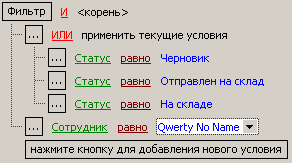
Fig. 1 TcxFilterControl in operation
The described problem is wonderfully solved by TcxFilterControl and TcxDBFilterControl from DevExpress. These 2 components are visual condition builders with the ability to get the appropriate SQL. Actually, DevExpress has a .Net line of products similar to what they do under Delphi, but they didn’t have to use it, so the rest is just about the VCL branch ...

Fig.2 TcxFilterControl / TcxDBFilterControl in the designer.
Unlike the independent implementation of the “search wizard”, this solution, at least at first, will be more scalable - when adding new fields in the query that we are filtering, the form needs to be completed, and FilterControl will pick up the fields immediately. Additional settings will be needed only if we want to see substitution lists in FilterControl. The main difference between these controls is that TcxDBFilterControl connects to TDataSet, and TcxFilterControl connects to TcxGridDBTableView. T.O. TcxDBFilterControl can be used even if there is no cxGrid in the project, which can be useful when upgrading old projects.
In TcxFilterControl and TcxDBFilterControl conditions are constructed in a tree view, so it’s pretty easy to understand what text the component will generate. To add a condition at the current level, select the "Add condition" item.
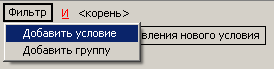
Fig. 3 adding a condition to FilterControl
To add a sublevel, select “Add group”.
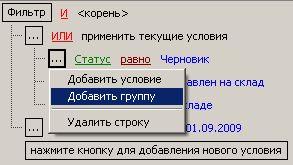
Fig.4 adding a group to FilterControl It captivates
that field name substitutions, condition substitutions (equal / not equal, greater / less, for dates generally have a huge selection of preconditions) work, substituting the desired values from lists, calendars, ...
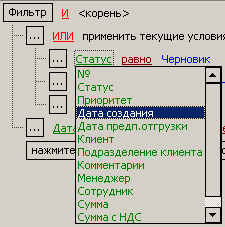
Fig .5 drop-down list of fields

Fig.
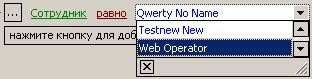
6 drop -down list of conditions on a field of type Date Fig. 7 drop-down list of employee names from the reference table
You can also specify various Boolean operations for values within a group and between groups of conditions.
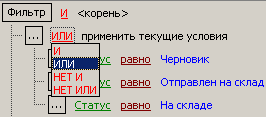
Fig.8 Boolean operations for values within a group
The result of TcxFilterControl / TcxDBFilterControl is that a string is generated that is suitable for use in the Filter property of any data sources (DataSet's) - this is how we get a local filter. With some caveats (the uniqueness of the field name within the current query), this condition can be added to the WHERE part of the query. For example, for Fig. 1, our FilterControl of the TcxFilterControl class, when accessing FilterControl.FilterText, returns
((ORDER_STATE = 1) OR (ORDER_STATE = 2) OR (ORDER_STATE = 3))
AND (EMP = 2304)
which is suitable for both the local filter and database query.
The result - having done what programmers using powerful tools are often blamed for - putting the component on the form;) we gave the user the opportunity to build queries very flexibly. There are 2 minuses - an ascetic appearance and some complexity for unprepared users. Pros are a scalable and flexible means of generating conditions at minimal cost.
Fig. 1 TcxFilterControl in operation
The described problem is wonderfully solved by TcxFilterControl and TcxDBFilterControl from DevExpress. These 2 components are visual condition builders with the ability to get the appropriate SQL. Actually, DevExpress has a .Net line of products similar to what they do under Delphi, but they didn’t have to use it, so the rest is just about the VCL branch ...
Fig.2 TcxFilterControl / TcxDBFilterControl in the designer.
Unlike the independent implementation of the “search wizard”, this solution, at least at first, will be more scalable - when adding new fields in the query that we are filtering, the form needs to be completed, and FilterControl will pick up the fields immediately. Additional settings will be needed only if we want to see substitution lists in FilterControl. The main difference between these controls is that TcxDBFilterControl connects to TDataSet, and TcxFilterControl connects to TcxGridDBTableView. T.O. TcxDBFilterControl can be used even if there is no cxGrid in the project, which can be useful when upgrading old projects.
In TcxFilterControl and TcxDBFilterControl conditions are constructed in a tree view, so it’s pretty easy to understand what text the component will generate. To add a condition at the current level, select the "Add condition" item.
Fig. 3 adding a condition to FilterControl
To add a sublevel, select “Add group”.
Fig.4 adding a group to FilterControl It captivates
that field name substitutions, condition substitutions (equal / not equal, greater / less, for dates generally have a huge selection of preconditions) work, substituting the desired values from lists, calendars, ...
Fig .5 drop-down list of fields
Fig.
6 drop -down list of conditions on a field of type Date Fig. 7 drop-down list of employee names from the reference table
You can also specify various Boolean operations for values within a group and between groups of conditions.
Fig.8 Boolean operations for values within a group
The result of TcxFilterControl / TcxDBFilterControl is that a string is generated that is suitable for use in the Filter property of any data sources (DataSet's) - this is how we get a local filter. With some caveats (the uniqueness of the field name within the current query), this condition can be added to the WHERE part of the query. For example, for Fig. 1, our FilterControl of the TcxFilterControl class, when accessing FilterControl.FilterText, returns
((ORDER_STATE = 1) OR (ORDER_STATE = 2) OR (ORDER_STATE = 3))
AND (EMP = 2304)
which is suitable for both the local filter and database query.
The result - having done what programmers using powerful tools are often blamed for - putting the component on the form;) we gave the user the opportunity to build queries very flexibly. There are 2 minuses - an ascetic appearance and some complexity for unprepared users. Pros are a scalable and flexible means of generating conditions at minimal cost.









