
 February 14, 2010 at 21:11
The computer of your dreams. Part 4: Platform
Part 1 | Part 2 | Part 3 The
previous parts are highly recommended for reading.
Once upon a time, when the trees were large, the grass was green, and the air was clean, the IBM PC came into being. The open modular architecture of the system, the possibility of expansion and standardization of components have led to the immense popularity of these computers. And although modern computers have gone quite far from their predecessor, they are still its followers and continue to carry the general principles laid down back then, back in the 80s.
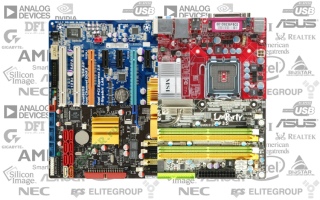
The motherboard or motherboard during this time managed to survive many changes. Initially, being only a substrate for placing other components, it began to acquire various additional features and functions.
Progress has done its job. A good set of integrated devices, a rich assortment of interfaces and wide software capabilities are what distinguish modern motherboards from their progenitors.
The motherboard is not just a piece of iron, but the basis of the platform on which the computer is built. It is she who determines his many possibilities both at the current moment and in the future. Therefore, the correct choice of the motherboard is one of the most important steps when buying a computer.
In total, there are more than a dozen different form factors of motherboards and many of their varieties. We are only interested in the two most widely used today - ATX and ITX.
The standard ATX form factor motherboard has a size of 305x244mm. Often there are models cut in width (305x210mm). Top products are sometimes available in the EATX version (305x330mm), and solutions for dual-processor systems in the WATX (356x425mm). And if standard ATX-boards and their stripped-down versions easily fit in any ATX-case, then the EATX motherboard will not go anywhere, not to mention the huge WATX.
MiniATX motherboards have a size of 244x244mm and are primarily intended for small cases of the same form factor, although no one bothers to install them in a full-fledged “tower”, since the vast majority of cases are universal.
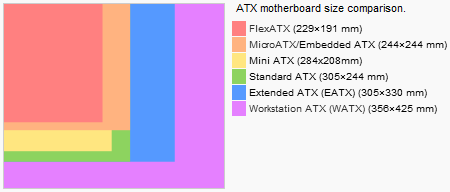
Among the ITX form factor, we are only interested in one variation - MiniITX. The motherboards of this form factor have a size of only 215x179mm, but otherwise they are very similar to ATX - the mount, the location of external ports and the internal organization of these motherboards are based on the same standards as ATX. Such a peculiar micro-micro-ATX.
However, we will not delve into the issue of sizes and fixtures - it will be discussed in more detail in the sixth part of the material, when it comes to cases.
Now we are more interested in the issue of ergonomics of motherboards, and in particular the influence of the form factor on it.
Obviously, the larger the motherboard, the more various elements can be placed on it, and the freer they will be. On the other hand, the increase in size is not always convenient, and from the economic side is not profitable.
The decisive factor in this matter is the ingenuity of engineers developing the device. A competent layout of the motherboard will save you from problems in the future with the prevention and upgrade of the system.
The need for certain solutions can be argued for a long time, it is easier to understand the main mistakes on the one hand, and the rules of good form on the other.
The worst enemy of any motherboard designer is primarily video cards. Good long graphics cards with a 2/3-slot cooling system block a rather significant area of the motherboard. A good engineer is simply obliged to make sure that certain elements do not fall into this area.
To illustrate the main design mistakes, I selected several motherboards for random lynching.
The first and, perhaps, the most unpleasant mistake is to block the SATA and PATA connectors. You can clearly see what the installation of a large video card in the second slot will lead to - the user will lose a good half of the drive connection interfaces. And on some devices and in the first slot, a video card can block a lot of things ...


There is a rather interesting way out of the situation, very popular today, but unfortunately, it is found only on models that are not too cheap: In the first version, the PATA connector is also installed side by side and is also laid to one side. This is undoubtedly a plus. For models, simply more competent placement will be simpler enough: But it’s just in this case that the engineers did not take into account that the first video card will support the RAM connectors. On some motherboards, the video card generally completely covers these latches. Agree - removing a video card every time to gain access to the RAM is not very pleasant. This is the second design mistake. The third mistake - the arrangement of elements is not quite in place.
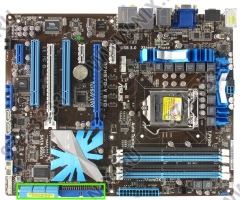
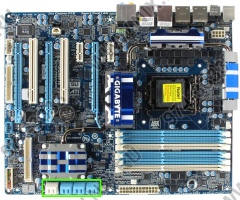
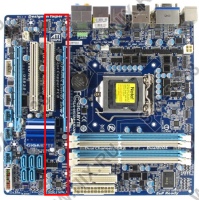
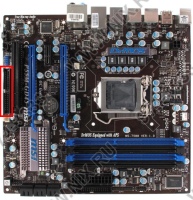
Here, for example, the PATA port was dragged to the far corner. It is clear, of course, that rarely anyone needs it now, but if the need arises, you can forget about the neat arrangement of cables. If at all there is enough length to reach the device ...
On this, I think, there will be enough examples. Looking at the photo of the motherboard, you can figure out its shortcomings yourself.
Now you can draw a slightly more generalized conclusion and form the rules of good tone:
And finally, a couple of examples of well-arranged motherboards:
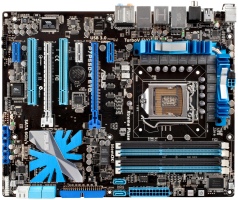
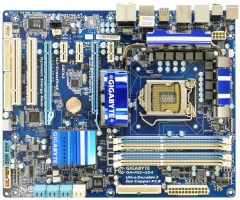
Good motherboards are those that have 4 slots for RAM. This is understandable - a kind of "standard" when buying a PC is a set of two identical memory modules (for working in dual-channel mode), respectively, 2 connectors are already occupied and for the prospects of further upgrading, two more are likely to be needed. The Intel S1366 platform has a generally three-channel memory controller, from here it becomes clear that you need to have as many as six slots. But you can look from the other side. In the previous parts, we found out that the multi-channel mode of working with memory with a modern PS gives a rather small increase in productivity, and the three-channel mode due to its delays is generally a dubious pleasure. And the amount of memory is also a moot point. Think well Do you need to upgrade the memory subsystem? Wouldn't it be necessary, by the time it was not enough, to send the whole PC to retire? In general, the number of slots for RAM equal to twice the number of channels is certainly good, but if the budget is limited, you should not throw poop into a piece of iron just because it turned out to be somewhat deprived of this characteristic.
More complicated with MiniITX boards. Most solutions have generally one memory slot. There are, of course, boards with 2 slots - but only in the upper price category. However, given the purpose of the systems assembled on the basis of MiniITX boards, one slot is enough for them.
Some motherboards offer the ability to install different types of memory. This is especially common among motherboards for the Intel Core 2 platform, since the memory controller of these processors is located in the north bridge and is universal - it supports both DDR2 and DDR3. At the same time, it is not natural to make different types of memory work, but the solution is generally interesting.
Of all the variety of expansion slots, only PCI-Express and PCI survived to this day.
The interface is modern and versatile. Suitable for connecting in general, anything. A feature of its architecture is the ability to create both high-speed and low-speed expansion slots, highlighting the required number of data lines - this is how the x16, x8, x4, x2 and x1 options are born. The trick is that the main contacts (including power) are located at the beginning of the slot, which provides software compatibility of devices and slots with any ratio of "X". Another issue is hardware compatibility. If, for example, we push the x1 device into the x16 slot easily, then for the reverse combination we already need ahammerthe so-called "open slot" that does not have a back wall. Or a full-fledged x16 slot, but with only one soldered line. In some cases, the number of lines on the slot can generally be controlled dynamically, but more on that later.
The manufacturers of video cards were the farthest away from using PCIe capabilities. With the advent of the new interface, they received their second (and much more successful) birth of the technology of combining several video chips - NVIDIA SLI and ATI CrossFire. Initially, the scalability of performance when using them was rather low, and the technologies themselves are damp and inconvenient (which only ATI’s master cards, special external cables, etc. cost), and gradually the situation improved. Now multi-GPU technologies are much more useful than at the time of their appearance.
Allows you to combine two, three, or four identical video cards in the system in order to increase productivity. Naturally, this requires, firstly, the presence of the required number of slots on the motherboard, and secondly, two-way hardware support. With the latter, NVIDIA is especially bad at the camp - the company is very greedy for its technology, and support for it with the help of third-party chipsets appeared not so long ago and only on the top models of motherboards for the Intel S1366 platform. CrossFireX (AMD / ATI technology came to be called after a good file revision) is another matter, which is supported everywhere and everywhere, which makes it very popular.
An alternative to all alternatives is the recent development of Lucid, a Hydra chip that allows you to combine different video cards from different manufacturers in the system. The effectiveness of such a solutionsomewhat lame , but the fact itself is very interesting.
But we are not talking about smart chips, but about the PCIe interface. And here also reefs meet. The default configuration of the PCIe slot for a video card is 16x. However, modern chipsets support a total of no more than 20-30 lines. Subtract lines from here for x1-x4 slots, lines for various controllers ... Well, there are not enough slots for two full-fledged x16 slots.
There are several exits from here.
After the failure of the R600, AMD said that all of their top-end graphics cards will now be released in the form of multi-chip solutions based on mainstream GPUs. They gradually moved away from the mainstream (well, you see, 400 bucks for 5870 is not middle class), but many-chip ones continue to follow. HD3870X2, HD4870X2, HD5970 - all the top dual-chip solutions. NVIDIA did not really appreciate this initiative, saying that their GPUs in a single-chip configuration are capable of much, but still in the end they started riveting sandwiches in large quantities - 9800GX2 and GTX295 (they got their popular name for the layout - the video cards were assembled on two printed circuit boards, however, the second revision of the GTX295 has already become single-board). As for the upcoming Fermi novelty, the GF100 graphics processor combines as many as 4 video cores (though Fermi is already a bit from another opera).
Multi-chip video cards, by the way, can also be combined in one system in two pieces (3 or 4, alas, it is impossible. However, it is not necessary).
Hybrid CrossFireX and Hybrid SLI allow you to combine the integrated graphics core of the chipset and a discrete graphics card into a "single ecosystem." There are two modes of operation. In the first case, the integrated graphics will help discrete, removing part of the load from it. The event is very doubtful and it can only be useful if the integrated video core is relatively good (HD4200, GF8400), and the discrete graphics card is weak on the contrary. Another option is economical. With a simple main video core, its frequencies and voltage are seriously reset (NVIDIA cards can turn off altogether), and the image output is transferred to the integrated graphics. The goal is to save energy. Not that it strongly influenced the environment, but given the gluttony of modern video cards (ironically, the abbreviation GTX on the Russian layout turns into PEC, perfectly characterizing the video cards,
Do not forget the same about the ability to easily install multiple video cards, without their software integration. It may be necessary, for example, to connect a large number of monitors. Well, or for calculations using GPGPU.
Thus, some rotated individuals can cram up to 14 video chips into their system - 7 slots, each with a single-slot HD5970 or GTX295 with a water block. I did not say that)))

I’m probably not going to sort out the issues of connecting other expansion cards to low-speed PCIe and regular PCI options - with this, everything is clear.
We are primarily interested in Serial ATA . All modern motherboards have 4-8 SATA-300 ports, and the question of their quantity is one of those moments that distinguish hardware from different price segments. The younger models are deprived of these ports and, as a rule, have only 4 ports. On the other hand, it is again worth assessing the need for a large quantity. A pair of hard drives, one optical drive, and one port "in reserve." Quite enough. It’s another matter if you are going to store a large personal collection on the screws, or, what’s the last detail - you are building a file server. In this case, four ports may not be enough. For the same reason, MiniITX boards, as file server platforms, unfortunately fly by - they have two SATA ports at best.
The need for SATA-600, which is slowly being introduced in older motherboards, is now very doubtful. The vast majority of hard drives with read / write operations can hardly squeeze out speeds of more than 100MB / s - the outdated SATA-150 would be enough for them. SSD drives will be faster, but they do not exceed the threshold of 300mb / s. As for the read / write speed from the HDD cache, it will be higher on both sides with SATA-600 support, but on the whole it will hardly affect performance.
As for PATA and the interface for floppods - despite their complete irrelevance (Intel, for example, sawed them out of its chipsets along with the advent of the S775 platform, i.e. quite a while ago), manufacturers continue to unsolder them on motherboards. Perhaps useful.
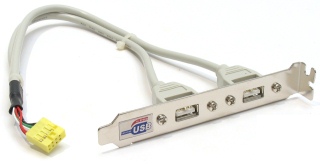
The middle of external interfaces reigns over the well-known USB version 2.0. The number of ports brought to the rear wall is of course important, but do not chase it with holy fanaticism - even the most seedy motherboards have at least 2 dual-port pads soldered from which additional ports can be plugged into the stub or muzzle of the system unit.
As for USB 3.0, the words said above about SATA-600 are still valid.
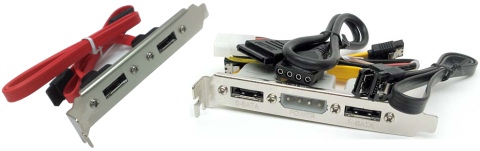
Another important interface is External SATA (eSATA). There are two varieties. Standard eSATA only supports data transfer, so the power for the device will have to be taken from somewhere else. Much more interesting is the Power eSATA connector, which uses a USB bus to transfer power. It is most often found on modern motherboards. However, again, do not be upset if the manufacturer deprived the motherboard of the necessary connectors. There are special brackets that allow you to turn a regular SATA connector into eSATA.
FireWire is not found on all motherboards, but not everyone needs it. Personally, I know only two widespread ways to use this interface - connecting cameras and external sound cards. PS / 2
connectors are still found on the vast majority of motherboards. True, some manufacturers install them not in 2 pieces, but one is universal. Well, the old COM and LPT, if they are found on modern motherboards, are most often in the form of unsoldered pads.
The first on the list is the sound adapter . They have been putting them in motherboards for 100 years already.
In general, users can be divided into two conditional groups: those whom the built-in sound suits, and those whom it does not suit. In general, there are no intermediate options here.
In the first case, by and large, it does not matter to you on which chip the integrated sound is built, and what characteristics it has. In the second - you are not interested in the device itself. For the sim paragraph on integrated sound, you can end =)
Network adapteralso an integral part of modern motherboards. In bearded times, cheap and integrated network cards shit because they slowed down the system with more or less high network activity. With today's performance of the CPU of the brakes, they can add about 1-2%, i.e. within the measurement error.
Another issue is that integrated network cards may not support Wake On Lan, and, more importantly, network booting (relevant for terminals). The rest is not worth delving into the question. A gigabit network is soldered on the board - and good.
By the way, motherboards for workstations often often solder network cards in the amount of two pieces. To whom and why this is necessary, let us leave it outside the scope of this material.
Now this is the point that should be considered in more detail.
About video adapters, a lot has been said in the previous parts, so that basic information can be gleaned from there.
However, integrated graphics has a number of its features.
Firstly, it is integrated into the motherboard (yes, yes, thank you). This already suggests that a full-fledged device, originally produced on its own PCB, cannot be placed here. Special solutions are required. At the same time, it is logical to assume a serious limitation of TDP - remember how modern video cards are fed and cooled and imagine such a design on the motherboard =) Integrated solutions, as a rule, do not have their own video memory (or have it in a very small amount - 128MB for Radeon HD4200 in some motherboards based on AMD 785/790), and they eat it from RAM.
Secondly, integrated graphics was initially aimed at the office segment. For those devices whose purpose is simply to display the image on the screen. In recent years, there has been a tendency to orient integrated graphics to home multimedia systems - GPUs are becoming more powerful, are acquiring support for hardware video decoding, and the range of output ports is expanding. However, the performance of even the fastest solutions (and today it is the aforementioned HD4200) is at the low-end sector level. For the beginnings requiring high power - whether it’s games (meaning full-fledged modern 3D games, rather than office entertainment from Alawar and co), 3D modeling or GPGPU calculations - integrated solutions will not work.
Otherwise, nothing special can be said.
Although, if you move away from the video adapters directly ...
The year 2009 was marked by a very large perversion - Intel decided to abandon the release of chipsets with integrated graphics, but began to shove this very graphics into its own central processors of the Clarkdale family. A very original move, which has its advantages.
However, the cons turned out to be more significant.
For this integrated graphics to function, a motherboard on a specific chipset is required. Well, let them survive this turn of events. If not for the price. Accustomed to the low cost of motherboards with integrated graphics, I wanted to see the corresponding devices in the range from $ 50 to $ 100. However, even the simplest MiniATX solutions in retail appeared at a price exceeding those same 100 bucks. Not to mention the "full" devices, the cost of which exceeds $ 150. Competitive solutions based on the aforementioned AMD 785 will start at $ 80, and for 100 evergreen presidents you can buy a very solid full-fledged ATX mother with a good elemental base and rich capabilities.
In this situation, one could assume that the integrated Intel video core is faster than competing solutions, but in reality - nothing outstanding. For example, recent testing of the focenter showed that only a higher frequency potential allowed it to not drain the competitor dry.
In general, it’s not that a complete feil, but it didn’t work out at Intel’s revolution.
And from the point of view of a rational approach, the use of this combination is doubly doubtful - for home multimedia PCs it is more profitable to choose the 775 or AM3 platform, and for the productive systems, this integrated graphics is generally not needed.
Let's start with the element base. Motherboard manufacturers love to boast about thick PCB-based conductors, low RDS transistors, ferrite core chokes, and solid state capacitors. In theory, this all brings considerable profit, but in reality there is only benefit from the latter, and this benefit is purely a technological plan - solid-state Conders are less prone to failure due to overheating. Even more expensive motherboards are usually performed on a PCB with a large number of layers, which is also generally positive, but again not critical.
This is about quality.
In contrast to quality, a quantitative approach can be preached.
Power to the motherboard is supplied through several lines, but the main one is + 12V. The 12 volts received from it are already converted to the desired voltage using power converters. In theory, there are only three of them - one per processor, RAM and chipset with controllers. In practice, a voracious processor is installed at least 2-3 converters. Minimum, because then the fun begins. How many power phases does a top motherboard need? 4? 8? 16? Fly low! ASUS offers pieces of iron with as many as 32 phases of CPU power (and 3 more for RAM).
It is easy to figure out that if the processor supports the motherboard, then it supports it without 32 phases and ferrite chokes.
Why then is all this necessary? From the point of view of the company, it is clear why - people hawks all this with redoubled joy. And from the point of view of the consumer? Theoretically, all these improvements to the power subsystem and the element base should improve the overclocking potential of the motherboard. However, there is a limit to everything. Practice shows the presence of excellently accelerating models with 4-phase power supply and without any “thick copper conductors”. Even extreme overclockers often choose proven models with 8-phase power. A good overclocking potential is still a specific line of boards or even a model. But not quantitative characteristics.
Further more. They put a wagon of converters on a poor motherboard. But far from all will be used all the time. “So let's turn them off!” And at the same time we’ll stick a hefty ECO GREEN sticker on the box and we will inspire the consumer that when they buy our products they simply make a hell of a contribution to the issues of economy and ecology ”- these are the trends of recent years. In fact, even according to the most optimistic tests, it is possible to reduce power consumption in this way by only 5-10 watts. If you calculate the numbers for the year, with a PC running around the clock, you can save on a few bottles of beer ...
In general, all this cat-talk around motherboards reminds me of pure audiophilia. Everything for fans of warm 32-phase acceleration and thick copper =) Nuff said.
Another point relates directly to the power supply to the motherboard. The ATX standard provides a 24-pin connector for powering the motherboard and a separate optional 4-pin CPU connector. The latter can be either 8-pin (which is necessary for good overclocking of processors with high TDP, and requires a corresponding output from the power supply), or be absent altogether (hello to systems on Intel Atom).
Another area in which manufacturers strive to stand out.
In general, you need to cool on the motherboard:
More important is the number of fan headers on the motherboard. And the ability to control their speed. Ideally, this is PWM, in a simpler case, a standard 3-pin connector and voltage control. However, this factor is uncritical - no one bothers to power the fans from other sources.
This may include:
The software part of the motherboard is one of the most important points. The quality of the software component largely determines the success of overclocking. After all, as was already noted above, the system can simply work on any compatible hardware, but to reveal its full potential ... The
classic implementation of the software part is the BIOS (there is an alternative in the form of EFI, but it has not yet found wide application).
With the BIOS Setup features, let's get started.
The required minimum of variable parameters includes:
The frequency of the system bus or system generator;
Processor multiplier;
A set of RAM dividers (the larger this set, the better);
Memory timings;
The voltage at the processor core;
RAM voltage.
This is a kind of “minimal set”, and even if its motherboard cannot provide it, there is a direct way to it for scrap =) Fortunately, these options are available on the vast majority of motherboards.
Advanced models provide more flexible configuration and a wide range of additional options: chipset supply voltage, PCIE bus frequency, etc. The more parameters that can be changed, the generally better.
Epic fail in this regard - Intel motherboards. At a rather considerable price, they do not provide half of the “necessary set” ...
Still good motherboards support the following functions:
Disaster Recovery. If it is impossible to start the system due to overclocking, the motherboard automatically resets to stable, which eliminates the need to crawl inside the system with tweezers in search of the Clear CMOS jumper. A good motherboard, by the way, does not reset all settings during a disaster recovery, but only those that are responsible for frequencies and voltages - you won’t have to configure everything from scratch.
Profiles The logical development of the previous function. Allows you to save several different settings profiles for quick switching between them.
Support EPP / XMP. Support for special memory profiles that allow overclocking modules to automatically start at the right frequencies and voltages (those that JEDEC standards do not allow to register directly in SPD modules).
Flashing function. Allows you to download BIOS updates without using a special flasher program.
DualBIOS. One of the proprietary features of Gigabyte motherboards (and maybe not only them) - allows you to use a backup BIOS chip in case of failure of the main one.
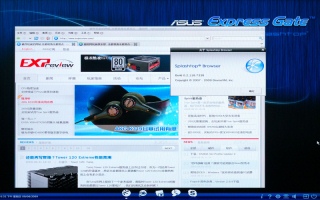
Another interesting feature of some motherboards is the integrated operating system. Exactly. A Flash chip with a miniature Linux distribution and a couple of programs (browser, messenger, etc.) is soldered on the motherboard itself. There are two implementations so far - ASUS Express Gate and MSI Winki.
The practical usefulness of such a solution is doubtful, but I just could not mention it.
It would seem that this is one of the main points when choosing a motherboard, but not. Motherboards today have reached a point where the difference in performance between them is too small to take into account. Most often it is 0-3%, i.e. is within the margin of error. Sometimes in individual tests you can observe a difference of up to 5%, but this is quite rare. The days of racing for the performance of motherboards are over, and the main role is now played by their technical and software capabilities.
On this note, another big question can be considered resolved. I hope that after reading this article there are less white spots in the matter of choosing a computer.
The next part of the material will be devoted to the problem of data storage.
Well, again, I apologize for the big delay in the release of this part. I’m trying to improve myself, but it still doesn’t work out ...

previous parts are highly recommended for reading.
Once upon a time, when the trees were large, the grass was green, and the air was clean, the IBM PC came into being. The open modular architecture of the system, the possibility of expansion and standardization of components have led to the immense popularity of these computers. And although modern computers have gone quite far from their predecessor, they are still its followers and continue to carry the general principles laid down back then, back in the 80s.
The motherboard or motherboard during this time managed to survive many changes. Initially, being only a substrate for placing other components, it began to acquire various additional features and functions.
Progress has done its job. A good set of integrated devices, a rich assortment of interfaces and wide software capabilities are what distinguish modern motherboards from their progenitors.
The motherboard is not just a piece of iron, but the basis of the platform on which the computer is built. It is she who determines his many possibilities both at the current moment and in the future. Therefore, the correct choice of the motherboard is one of the most important steps when buying a computer.
Part 4. Platform
Form Factor and Ergonomics
In total, there are more than a dozen different form factors of motherboards and many of their varieties. We are only interested in the two most widely used today - ATX and ITX.
The standard ATX form factor motherboard has a size of 305x244mm. Often there are models cut in width (305x210mm). Top products are sometimes available in the EATX version (305x330mm), and solutions for dual-processor systems in the WATX (356x425mm). And if standard ATX-boards and their stripped-down versions easily fit in any ATX-case, then the EATX motherboard will not go anywhere, not to mention the huge WATX.
MiniATX motherboards have a size of 244x244mm and are primarily intended for small cases of the same form factor, although no one bothers to install them in a full-fledged “tower”, since the vast majority of cases are universal.
Among the ITX form factor, we are only interested in one variation - MiniITX. The motherboards of this form factor have a size of only 215x179mm, but otherwise they are very similar to ATX - the mount, the location of external ports and the internal organization of these motherboards are based on the same standards as ATX. Such a peculiar micro-micro-ATX.
However, we will not delve into the issue of sizes and fixtures - it will be discussed in more detail in the sixth part of the material, when it comes to cases.
Now we are more interested in the issue of ergonomics of motherboards, and in particular the influence of the form factor on it.
Obviously, the larger the motherboard, the more various elements can be placed on it, and the freer they will be. On the other hand, the increase in size is not always convenient, and from the economic side is not profitable.
The decisive factor in this matter is the ingenuity of engineers developing the device. A competent layout of the motherboard will save you from problems in the future with the prevention and upgrade of the system.
The need for certain solutions can be argued for a long time, it is easier to understand the main mistakes on the one hand, and the rules of good form on the other.
The worst enemy of any motherboard designer is primarily video cards. Good long graphics cards with a 2/3-slot cooling system block a rather significant area of the motherboard. A good engineer is simply obliged to make sure that certain elements do not fall into this area.
To illustrate the main design mistakes, I selected several motherboards for random lynching.
The first and, perhaps, the most unpleasant mistake is to block the SATA and PATA connectors. You can clearly see what the installation of a large video card in the second slot will lead to - the user will lose a good half of the drive connection interfaces. And on some devices and in the first slot, a video card can block a lot of things ...


There is a rather interesting way out of the situation, very popular today, but unfortunately, it is found only on models that are not too cheap: In the first version, the PATA connector is also installed side by side and is also laid to one side. This is undoubtedly a plus. For models, simply more competent placement will be simpler enough: But it’s just in this case that the engineers did not take into account that the first video card will support the RAM connectors. On some motherboards, the video card generally completely covers these latches. Agree - removing a video card every time to gain access to the RAM is not very pleasant. This is the second design mistake. The third mistake - the arrangement of elements is not quite in place.


Here, for example, the PATA port was dragged to the far corner. It is clear, of course, that rarely anyone needs it now, but if the need arises, you can forget about the neat arrangement of cables. If at all there is enough length to reach the device ...
On this, I think, there will be enough examples. Looking at the photo of the motherboard, you can figure out its shortcomings yourself.
Now you can draw a slightly more generalized conclusion and form the rules of good tone:
- The processor socket should not be too close to other elements (as well as too close to the edges of the board) so that there are no problems when installing a massive cooler;
- The power connectors of the motherboard and processor should be located in the upper part of the motherboard, in their usual places. Still, the power supply in most cases is also located on top, and cable management is also calculated for standard placement. An attempt to push these connectors into the center of the motherboard does not lead to anything good in both cases;
- SATA and PATA connectors should be located on the right side of the motherboard, while long wide video cards should not overlap them. It is very good if these connectors are laterally oriented;
- The latches of the RAM slots should not overlap the video card;
- The video card also should not overlap all PCI slots - at least 1-2 should remain available;
- On the back of the motherboard in the area of the processor socket, the number of protruding contacts should be minimized (it is important for installing coolers with a backplate, more in the sixth part of the material).
And finally, a couple of examples of well-arranged motherboards:


RAM
Good motherboards are those that have 4 slots for RAM. This is understandable - a kind of "standard" when buying a PC is a set of two identical memory modules (for working in dual-channel mode), respectively, 2 connectors are already occupied and for the prospects of further upgrading, two more are likely to be needed. The Intel S1366 platform has a generally three-channel memory controller, from here it becomes clear that you need to have as many as six slots. But you can look from the other side. In the previous parts, we found out that the multi-channel mode of working with memory with a modern PS gives a rather small increase in productivity, and the three-channel mode due to its delays is generally a dubious pleasure. And the amount of memory is also a moot point. Think well Do you need to upgrade the memory subsystem? Wouldn't it be necessary, by the time it was not enough, to send the whole PC to retire? In general, the number of slots for RAM equal to twice the number of channels is certainly good, but if the budget is limited, you should not throw poop into a piece of iron just because it turned out to be somewhat deprived of this characteristic.
More complicated with MiniITX boards. Most solutions have generally one memory slot. There are, of course, boards with 2 slots - but only in the upper price category. However, given the purpose of the systems assembled on the basis of MiniITX boards, one slot is enough for them.
Some motherboards offer the ability to install different types of memory. This is especially common among motherboards for the Intel Core 2 platform, since the memory controller of these processors is located in the north bridge and is universal - it supports both DDR2 and DDR3. At the same time, it is not natural to make different types of memory work, but the solution is generally interesting.
Expansion slots
Of all the variety of expansion slots, only PCI-Express and PCI survived to this day.
PCI Express
The interface is modern and versatile. Suitable for connecting in general, anything. A feature of its architecture is the ability to create both high-speed and low-speed expansion slots, highlighting the required number of data lines - this is how the x16, x8, x4, x2 and x1 options are born. The trick is that the main contacts (including power) are located at the beginning of the slot, which provides software compatibility of devices and slots with any ratio of "X". Another issue is hardware compatibility. If, for example, we push the x1 device into the x16 slot easily, then for the reverse combination we already need a
The manufacturers of video cards were the farthest away from using PCIe capabilities. With the advent of the new interface, they received their second (and much more successful) birth of the technology of combining several video chips - NVIDIA SLI and ATI CrossFire. Initially, the scalability of performance when using them was rather low, and the technologies themselves are damp and inconvenient (which only ATI’s master cards, special external cables, etc. cost), and gradually the situation improved. Now multi-GPU technologies are much more useful than at the time of their appearance.
Multiple Graphics Configurations
Allows you to combine two, three, or four identical video cards in the system in order to increase productivity. Naturally, this requires, firstly, the presence of the required number of slots on the motherboard, and secondly, two-way hardware support. With the latter, NVIDIA is especially bad at the camp - the company is very greedy for its technology, and support for it with the help of third-party chipsets appeared not so long ago and only on the top models of motherboards for the Intel S1366 platform. CrossFireX (AMD / ATI technology came to be called after a good file revision) is another matter, which is supported everywhere and everywhere, which makes it very popular.
An alternative to all alternatives is the recent development of Lucid, a Hydra chip that allows you to combine different video cards from different manufacturers in the system. The effectiveness of such a solutionsomewhat lame , but the fact itself is very interesting.
But we are not talking about smart chips, but about the PCIe interface. And here also reefs meet. The default configuration of the PCIe slot for a video card is 16x. However, modern chipsets support a total of no more than 20-30 lines. Subtract lines from here for x1-x4 slots, lines for various controllers ... Well, there are not enough slots for two full-fledged x16 slots.
There are several exits from here.
- The first option is to install two full-fledged slots, but unsolder in the second an incomplete number of lines. Thus, asymmetric 16 + 4 configurations are born.
- The second option is to dynamically change the configuration of the slots (mentioned above). If only one slot is occupied, 16 lines are allocated to it. If both - 8 lines each. Such a control scheme is a privilege of more expensive sets of system logic.
- As you might guess, in both of the above cases we get a sharp drop in the bandwidth of the slots. And if x8 speed is generally enough even for high-performance solutions, then x4 is already not enough. This is where the incidentally doubled bandwidth of PCI-Express 2.0 comes in.
- The third option is to install special switch chips, for example, NVIDIA nForce 200. They allow you to increase the number of available PCIe lanes. Such a move is used mainly on motherboards, where 4 or more video cards are installed.
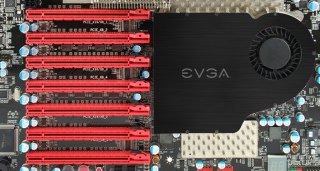

Multi-chip graphics cards
After the failure of the R600, AMD said that all of their top-end graphics cards will now be released in the form of multi-chip solutions based on mainstream GPUs. They gradually moved away from the mainstream (well, you see, 400 bucks for 5870 is not middle class), but many-chip ones continue to follow. HD3870X2, HD4870X2, HD5970 - all the top dual-chip solutions. NVIDIA did not really appreciate this initiative, saying that their GPUs in a single-chip configuration are capable of much, but still in the end they started riveting sandwiches in large quantities - 9800GX2 and GTX295 (they got their popular name for the layout - the video cards were assembled on two printed circuit boards, however, the second revision of the GTX295 has already become single-board). As for the upcoming Fermi novelty, the GF100 graphics processor combines as many as 4 video cores (though Fermi is already a bit from another opera).
Multi-chip video cards, by the way, can also be combined in one system in two pieces (3 or 4, alas, it is impossible. However, it is not necessary).
Hybrid configurations
Hybrid CrossFireX and Hybrid SLI allow you to combine the integrated graphics core of the chipset and a discrete graphics card into a "single ecosystem." There are two modes of operation. In the first case, the integrated graphics will help discrete, removing part of the load from it. The event is very doubtful and it can only be useful if the integrated video core is relatively good (HD4200, GF8400), and the discrete graphics card is weak on the contrary. Another option is economical. With a simple main video core, its frequencies and voltage are seriously reset (NVIDIA cards can turn off altogether), and the image output is transferred to the integrated graphics. The goal is to save energy. Not that it strongly influenced the environment, but given the gluttony of modern video cards (ironically, the abbreviation GTX on the Russian layout turns into PEC, perfectly characterizing the video cards,
Multi-Monitor Configurations
Do not forget the same about the ability to easily install multiple video cards, without their software integration. It may be necessary, for example, to connect a large number of monitors. Well, or for calculations using GPGPU.
Thus, some rotated individuals can cram up to 14 video chips into their system - 7 slots, each with a single-slot HD5970 or GTX295 with a water block. I did not say that)))
I’m probably not going to sort out the issues of connecting other expansion cards to low-speed PCIe and regular PCI options - with this, everything is clear.
Internal interfaces
We are primarily interested in Serial ATA . All modern motherboards have 4-8 SATA-300 ports, and the question of their quantity is one of those moments that distinguish hardware from different price segments. The younger models are deprived of these ports and, as a rule, have only 4 ports. On the other hand, it is again worth assessing the need for a large quantity. A pair of hard drives, one optical drive, and one port "in reserve." Quite enough. It’s another matter if you are going to store a large personal collection on the screws, or, what’s the last detail - you are building a file server. In this case, four ports may not be enough. For the same reason, MiniITX boards, as file server platforms, unfortunately fly by - they have two SATA ports at best.
The need for SATA-600, which is slowly being introduced in older motherboards, is now very doubtful. The vast majority of hard drives with read / write operations can hardly squeeze out speeds of more than 100MB / s - the outdated SATA-150 would be enough for them. SSD drives will be faster, but they do not exceed the threshold of 300mb / s. As for the read / write speed from the HDD cache, it will be higher on both sides with SATA-600 support, but on the whole it will hardly affect performance.
As for PATA and the interface for floppods - despite their complete irrelevance (Intel, for example, sawed them out of its chipsets along with the advent of the S775 platform, i.e. quite a while ago), manufacturers continue to unsolder them on motherboards. Perhaps useful.
External interfaces
The middle of external interfaces reigns over the well-known USB version 2.0. The number of ports brought to the rear wall is of course important, but do not chase it with holy fanaticism - even the most seedy motherboards have at least 2 dual-port pads soldered from which additional ports can be plugged into the stub or muzzle of the system unit.
As for USB 3.0, the words said above about SATA-600 are still valid.
Another important interface is External SATA (eSATA). There are two varieties. Standard eSATA only supports data transfer, so the power for the device will have to be taken from somewhere else. Much more interesting is the Power eSATA connector, which uses a USB bus to transfer power. It is most often found on modern motherboards. However, again, do not be upset if the manufacturer deprived the motherboard of the necessary connectors. There are special brackets that allow you to turn a regular SATA connector into eSATA.
FireWire is not found on all motherboards, but not everyone needs it. Personally, I know only two widespread ways to use this interface - connecting cameras and external sound cards. PS / 2
connectors are still found on the vast majority of motherboards. True, some manufacturers install them not in 2 pieces, but one is universal. Well, the old COM and LPT, if they are found on modern motherboards, are most often in the form of unsoldered pads.
Integrated devices
The first on the list is the sound adapter . They have been putting them in motherboards for 100 years already.
In general, users can be divided into two conditional groups: those whom the built-in sound suits, and those whom it does not suit. In general, there are no intermediate options here.
In the first case, by and large, it does not matter to you on which chip the integrated sound is built, and what characteristics it has. In the second - you are not interested in the device itself. For the sim paragraph on integrated sound, you can end =)
Network adapteralso an integral part of modern motherboards. In bearded times, cheap and integrated network cards shit because they slowed down the system with more or less high network activity. With today's performance of the CPU of the brakes, they can add about 1-2%, i.e. within the measurement error.
Another issue is that integrated network cards may not support Wake On Lan, and, more importantly, network booting (relevant for terminals). The rest is not worth delving into the question. A gigabit network is soldered on the board - and good.
By the way, motherboards for workstations often often solder network cards in the amount of two pieces. To whom and why this is necessary, let us leave it outside the scope of this material.
Video adapter
Now this is the point that should be considered in more detail.
About video adapters, a lot has been said in the previous parts, so that basic information can be gleaned from there.
However, integrated graphics has a number of its features.
Firstly, it is integrated into the motherboard (yes, yes, thank you). This already suggests that a full-fledged device, originally produced on its own PCB, cannot be placed here. Special solutions are required. At the same time, it is logical to assume a serious limitation of TDP - remember how modern video cards are fed and cooled and imagine such a design on the motherboard =) Integrated solutions, as a rule, do not have their own video memory (or have it in a very small amount - 128MB for Radeon HD4200 in some motherboards based on AMD 785/790), and they eat it from RAM.
Secondly, integrated graphics was initially aimed at the office segment. For those devices whose purpose is simply to display the image on the screen. In recent years, there has been a tendency to orient integrated graphics to home multimedia systems - GPUs are becoming more powerful, are acquiring support for hardware video decoding, and the range of output ports is expanding. However, the performance of even the fastest solutions (and today it is the aforementioned HD4200) is at the low-end sector level. For the beginnings requiring high power - whether it’s games (meaning full-fledged modern 3D games, rather than office entertainment from Alawar and co), 3D modeling or GPGPU calculations - integrated solutions will not work.
Otherwise, nothing special can be said.
Although, if you move away from the video adapters directly ...
The year 2009 was marked by a very large perversion - Intel decided to abandon the release of chipsets with integrated graphics, but began to shove this very graphics into its own central processors of the Clarkdale family. A very original move, which has its advantages.
However, the cons turned out to be more significant.
For this integrated graphics to function, a motherboard on a specific chipset is required. Well, let them survive this turn of events. If not for the price. Accustomed to the low cost of motherboards with integrated graphics, I wanted to see the corresponding devices in the range from $ 50 to $ 100. However, even the simplest MiniATX solutions in retail appeared at a price exceeding those same 100 bucks. Not to mention the "full" devices, the cost of which exceeds $ 150. Competitive solutions based on the aforementioned AMD 785 will start at $ 80, and for 100 evergreen presidents you can buy a very solid full-fledged ATX mother with a good elemental base and rich capabilities.
In this situation, one could assume that the integrated Intel video core is faster than competing solutions, but in reality - nothing outstanding. For example, recent testing of the focenter showed that only a higher frequency potential allowed it to not drain the competitor dry.
In general, it’s not that a complete feil, but it didn’t work out at Intel’s revolution.
And from the point of view of a rational approach, the use of this combination is doubly doubtful - for home multimedia PCs it is more profitable to choose the 775 or AM3 platform, and for the productive systems, this integrated graphics is generally not needed.
Power Subsystem and Element Base
Let's start with the element base. Motherboard manufacturers love to boast about thick PCB-based conductors, low RDS transistors, ferrite core chokes, and solid state capacitors. In theory, this all brings considerable profit, but in reality there is only benefit from the latter, and this benefit is purely a technological plan - solid-state Conders are less prone to failure due to overheating. Even more expensive motherboards are usually performed on a PCB with a large number of layers, which is also generally positive, but again not critical.
This is about quality.
In contrast to quality, a quantitative approach can be preached.
Power to the motherboard is supplied through several lines, but the main one is + 12V. The 12 volts received from it are already converted to the desired voltage using power converters. In theory, there are only three of them - one per processor, RAM and chipset with controllers. In practice, a voracious processor is installed at least 2-3 converters. Minimum, because then the fun begins. How many power phases does a top motherboard need? 4? 8? 16? Fly low! ASUS offers pieces of iron with as many as 32 phases of CPU power (and 3 more for RAM).
It is easy to figure out that if the processor supports the motherboard, then it supports it without 32 phases and ferrite chokes.
Why then is all this necessary? From the point of view of the company, it is clear why - people hawks all this with redoubled joy. And from the point of view of the consumer? Theoretically, all these improvements to the power subsystem and the element base should improve the overclocking potential of the motherboard. However, there is a limit to everything. Practice shows the presence of excellently accelerating models with 4-phase power supply and without any “thick copper conductors”. Even extreme overclockers often choose proven models with 8-phase power. A good overclocking potential is still a specific line of boards or even a model. But not quantitative characteristics.
Further more. They put a wagon of converters on a poor motherboard. But far from all will be used all the time. “So let's turn them off!” And at the same time we’ll stick a hefty ECO GREEN sticker on the box and we will inspire the consumer that when they buy our products they simply make a hell of a contribution to the issues of economy and ecology ”- these are the trends of recent years. In fact, even according to the most optimistic tests, it is possible to reduce power consumption in this way by only 5-10 watts. If you calculate the numbers for the year, with a PC running around the clock, you can save on a few bottles of beer ...
In general, all this cat-talk around motherboards reminds me of pure audiophilia. Everything for fans of warm 32-phase acceleration and thick copper =) Nuff said.
Another point relates directly to the power supply to the motherboard. The ATX standard provides a 24-pin connector for powering the motherboard and a separate optional 4-pin CPU connector. The latter can be either 8-pin (which is necessary for good overclocking of processors with high TDP, and requires a corresponding output from the power supply), or be absent altogether (hello to systems on Intel Atom).
Cooling system
Another area in which manufacturers strive to stand out.

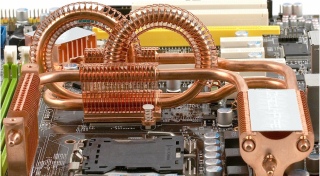
In general, you need to cool on the motherboard:
- Chipset;
- Additional switch chips;
- Transistors in the power subsystem.
- The cooling system becomes very cumbersome and hinders the installation of other devices;
- Combining all the elements into a single circuit with heat pipes leads to the fact that the hotter elements remain as hot as they were, but at the same time they begin to boil the elements, which are initially not very hot;
- Heat pipes often pass not through the base of the radiators, but through their top, which in general turns them into an exclusively decorative element;
- Small chipset fans cannot provide a good airflow, so they usually increase the speed of rotation. This move doesn’t add much performance, but they make noise oh how bad ...;
- Standard chipset water blocks, as a rule, are made according to the most elementary scheme, as a result of which they are ineffective.
More important is the number of fan headers on the motherboard. And the ability to control their speed. Ideally, this is PWM, in a simpler case, a standard 3-pin connector and voltage control. However, this factor is uncritical - no one bothers to power the fans from other sources.
Overclocker Buns
This may include:
- POST code indicator;
- POWER and RESET buttons;
- Points for measuring stress;
- Buttons, pens and remotes (yes, yes, and it happens) for quick overclocking.
Software part
The software part of the motherboard is one of the most important points. The quality of the software component largely determines the success of overclocking. After all, as was already noted above, the system can simply work on any compatible hardware, but to reveal its full potential ... The
classic implementation of the software part is the BIOS (there is an alternative in the form of EFI, but it has not yet found wide application).
With the BIOS Setup features, let's get started.
The required minimum of variable parameters includes:
The frequency of the system bus or system generator;
Processor multiplier;
A set of RAM dividers (the larger this set, the better);
Memory timings;
The voltage at the processor core;
RAM voltage.
This is a kind of “minimal set”, and even if its motherboard cannot provide it, there is a direct way to it for scrap =) Fortunately, these options are available on the vast majority of motherboards.
Advanced models provide more flexible configuration and a wide range of additional options: chipset supply voltage, PCIE bus frequency, etc. The more parameters that can be changed, the generally better.
Epic fail in this regard - Intel motherboards. At a rather considerable price, they do not provide half of the “necessary set” ...
Still good motherboards support the following functions:
Disaster Recovery. If it is impossible to start the system due to overclocking, the motherboard automatically resets to stable, which eliminates the need to crawl inside the system with tweezers in search of the Clear CMOS jumper. A good motherboard, by the way, does not reset all settings during a disaster recovery, but only those that are responsible for frequencies and voltages - you won’t have to configure everything from scratch.
Profiles The logical development of the previous function. Allows you to save several different settings profiles for quick switching between them.
Support EPP / XMP. Support for special memory profiles that allow overclocking modules to automatically start at the right frequencies and voltages (those that JEDEC standards do not allow to register directly in SPD modules).
Flashing function. Allows you to download BIOS updates without using a special flasher program.
DualBIOS. One of the proprietary features of Gigabyte motherboards (and maybe not only them) - allows you to use a backup BIOS chip in case of failure of the main one.
Another interesting feature of some motherboards is the integrated operating system. Exactly. A Flash chip with a miniature Linux distribution and a couple of programs (browser, messenger, etc.) is soldered on the motherboard itself. There are two implementations so far - ASUS Express Gate and MSI Winki.

The practical usefulness of such a solution is doubtful, but I just could not mention it.
Performance
It would seem that this is one of the main points when choosing a motherboard, but not. Motherboards today have reached a point where the difference in performance between them is too small to take into account. Most often it is 0-3%, i.e. is within the margin of error. Sometimes in individual tests you can observe a difference of up to 5%, but this is quite rare. The days of racing for the performance of motherboards are over, and the main role is now played by their technical and software capabilities.
On this note, another big question can be considered resolved. I hope that after reading this article there are less white spots in the matter of choosing a computer.
The next part of the material will be devoted to the problem of data storage.
Well, again, I apologize for the big delay in the release of this part. I’m trying to improve myself, but it still doesn’t work out ...