 October 28, 2009 at 06:06 a.m.
Dandy emulation. Nestopia with support for the new ZNS extension (Zipped NES)
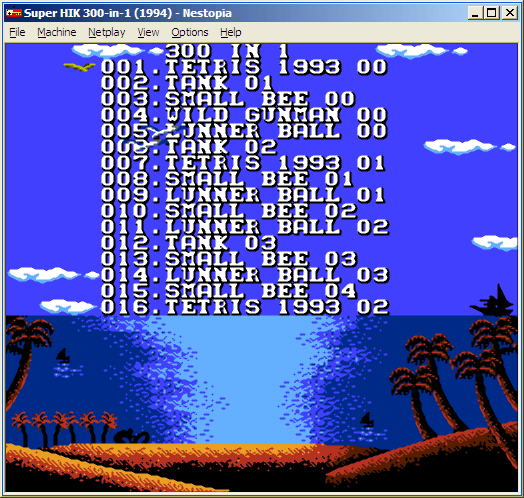 Does this screenshot not remind you of anything? I doubt it. Chinese friends did their best - I'm sure most of you now remember your first cartridge for Dandy . There were a few simple games on the cartridge that bored on the first day. But do you remember this menu with beautiful views on each page, pleasant music and even a small romantic plot? Yes hell you remember! Probably every child in this country played Dandy. We spent hours watching TV screens, changing cartridges one by one, and it didn’t matter to us at all that this was some kind of pirate clone of the Japanese NES, and all the more it wasn’t interesting why all the copyrights were erased in games on our cartridges. Does anyone then even understand what it is? =)
Today, there is absolutely no need to buy this console to remember everything and go through Super Mario or Contra again. There is an army of emulators for every taste and color, dumps of almost all games have long been available on the network. Every self-respecting emulator can open games directly from archives. This is very convenient, because most often dumps of games are distributed in a compressed form. Only there is one nuisance - it’s stupid to associate the .zip extension directly with the program, but I would like to start games from archives with one click. Therefore, I suggest using the ZNS extension (Zipped NES) for compressed NES files.
In my opinion, the best NES emulator is Nestopia. The author tries to support all new cartridge dumps. There is support for zip and 7z archives. The only thing left is to add a new extension to the program.

After a little editing of the settings dialog and the file open window, the program learned to work well with ZNS files. Now you can safely store all the dumps of games in zip or 7z archives, just changing their extension. You can, of course, store .nes files without compression, but compressing them, we lose nothing, but save space on your hard drive :)
Download
- nestopia.zip (1.1MB) - Nestopia v1.40 and 15 simple games;
- nestopia_megapack.zip (9.7 MB) - Nestopia v1.40 and a set of 80 of the most popular games.









