 June 10, 2009 at 00:17
Keyboard Solo for Linux
It turns out that for three years now there has been a native version of the 8th version of “Solo on the Keyboard” for Linux ! It was written using GTK2, pretty well (by the standards of usability, at least), it is actively supported, there are assemblies for most distributions, almost the full functionality of the Windows version is implemented. It is especially nice that this is not a port from Windows, but rather a clone - written from scratch, with the highest respect for programming standards in * nix.
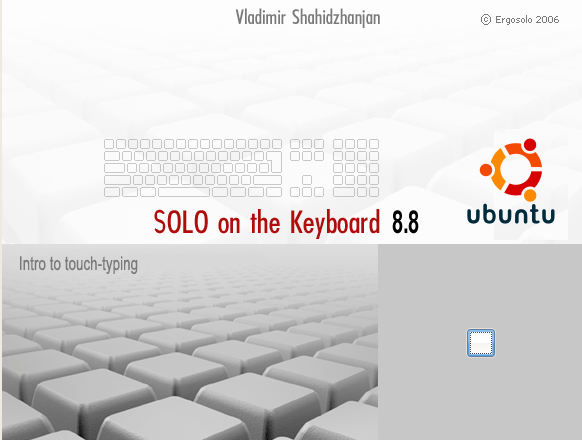
The program, like its Windows version, offers free lessons (40 first lessons) - registration is required for further training. Registration costs 150 rubles, you can pay directly from the site in many ways, including SMS.
About Solo on the Keyboard
“Solo on the keyboard” appeared quite a long time ago - personally, my acquaintance with this program took place about 8 years ago. And after getting to know Linux, both Windows and Solo on the Keyboard remained on the sidelines with the emergency lights turned on. Although I regularly tried various blind typing tutorials for Linux, I still haven’t met such a step-by-step structure and carefully composed lessons. I learned to type in Cyrillic blindly using the “keyboard without Russian letters” method, but I still have not mastered the blind method in Latin letters, so the news (albeit belatedly) from the appearance of the native “Solo” for Linux, I hope, will be shared by many users And those who tried to learn the blind method of recruitment on other simulators and were disappointed or considered that it was “not his”,
Usability
Before downloading the Linux version, I was already accustomed to expecting something using Mono or Java, but there were only GTK2 libraries in the dependencies, which pleased me. Further, as the “proprietary” software was supposed to be, a certain wizard-like binary installer was expected, and again by - the collected RPM and DEB packages (as well as assemblies for PCBSD), beautifully laid out in catalogs with distribution names, were laid out on the site .
Of the several beta- and pre- versions presented, I downloaded the latest available at the time of writing article - pre4. After installing all the packages and running the program, again, they were pleasantly pleased with the pleasant design and user-friendly interface.

Courses for different languages are designed as separate packages, so you can download only those that are of interest.
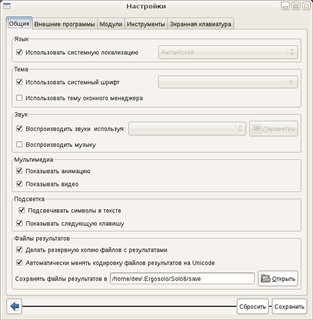
The settings were no less pleased - it is clear that the program was written with experience in developing and working in Linux - this is always noticeable ;-) (clickable) Next, the courses themselves and the lessons themselves. Then the first trifle got out - too small font is set by default. This is treated, however, in the settings, but still fonts require a little more careful attention in the final version. As well as one-and-a-half spacing between lines make text more difficult to read. There are some small things in the main window of the exercise, but I would attribute this to “nice to have” bugs, and, I believe, in the final version it will all look beautiful “out of the box” (maybe these are nuances that are relevant only in the assembly for Ubuntu).


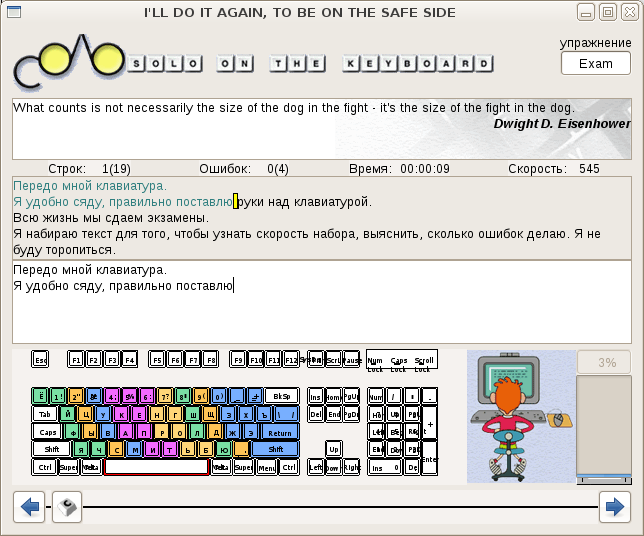
Then everything goes stably and predictably, lessons are taught one by one, there are statistics, there are passwords for users and all sorts of pleasant things.
Installation
I will give an example installation for Ubuntu Jaunty. For obvious reasons, these repositories do not have these packages in the repositories, so you need to download .deb packages and install them manually.
Actually, that's all. Bugreports can be written on the site’s forum .
Use it!
The program, like its Windows version, offers free lessons (40 first lessons) - registration is required for further training. Registration costs 150 rubles, you can pay directly from the site in many ways, including SMS.
About Solo on the Keyboard
“Solo on the keyboard” appeared quite a long time ago - personally, my acquaintance with this program took place about 8 years ago. And after getting to know Linux, both Windows and Solo on the Keyboard remained on the sidelines with the emergency lights turned on. Although I regularly tried various blind typing tutorials for Linux, I still haven’t met such a step-by-step structure and carefully composed lessons. I learned to type in Cyrillic blindly using the “keyboard without Russian letters” method, but I still have not mastered the blind method in Latin letters, so the news (albeit belatedly) from the appearance of the native “Solo” for Linux, I hope, will be shared by many users And those who tried to learn the blind method of recruitment on other simulators and were disappointed or considered that it was “not his”,
Usability
Before downloading the Linux version, I was already accustomed to expecting something using Mono or Java, but there were only GTK2 libraries in the dependencies, which pleased me. Further, as the “proprietary” software was supposed to be, a certain wizard-like binary installer was expected, and again by - the collected RPM and DEB packages (as well as assemblies for PCBSD), beautifully laid out in catalogs with distribution names, were laid out on the site .
Of the several beta- and pre- versions presented, I downloaded the latest available at the time of writing article - pre4. After installing all the packages and running the program, again, they were pleasantly pleased with the pleasant design and user-friendly interface.
Courses for different languages are designed as separate packages, so you can download only those that are of interest.
The settings were no less pleased - it is clear that the program was written with experience in developing and working in Linux - this is always noticeable ;-) (clickable) Next, the courses themselves and the lessons themselves. Then the first trifle got out - too small font is set by default. This is treated, however, in the settings, but still fonts require a little more careful attention in the final version. As well as one-and-a-half spacing between lines make text more difficult to read. There are some small things in the main window of the exercise, but I would attribute this to “nice to have” bugs, and, I believe, in the final version it will all look beautiful “out of the box” (maybe these are nuances that are relevant only in the assembly for Ubuntu).


Then everything goes stably and predictably, lessons are taught one by one, there are statistics, there are passwords for users and all sorts of pleasant things.
Installation
I will give an example installation for Ubuntu Jaunty. For obvious reasons, these repositories do not have these packages in the repositories, so you need to download .deb packages and install them manually.
- We follow the link on the site to the file archive: ergosolo.ru/download/linux . We select the latest version (pre4, in our case), architecture (i586) and distribution (Ubuntu).
- There are two packages in the catalog - one represents the program itself, the second is an example of a plugin for Solo, it is not necessary to download it. Download the first .deb:
wget ergosolo.ru/download/linux/pre4/i586/Ubuntu_8.10/solo8_8.X.pre4-8_i386.deb - Go back to the directory with the choice of architectures and select noarch / DEBS . From there, you can download all .deb packages, or you can selectively (I had problems with packages for translit lessons - I deleted them).
- Assuming that we downloaded all the packages into one directory (let's say / tmp), we install them all together:
sudo dpkg -i /tmp/*.deb - That's it, you can run the solo8 command - later in the settings you can click the button “Put a shortcut on the desktop”
(brr, vinduz ...)and run it from there.
Actually, that's all. Bugreports can be written on the site’s forum .
Use it!









