May 29, 2009 at 14:35
Chrome linker. Create an analogue of Linkification for Google Chrome
It describes the creation of the first version. You can read about the latest version here .
I recently switched from firefox to google chrome due to its lightness and minimalism. However, many of the goodies of Firefox extensions were sorely lacking. For example - Linkification, an addon that converts text urls to html links I very often need, and it’s not sweet without it.
As you know, a week ago, the first version of Google Chrome (dev) was released, which supports extensions. And, despite the fact that the API has not yet been completed and is very buggy, I decided to quickly create an extension that would implement Linkification’s functionality.
The following is a description of the process of creating the extension and a link to the result.
As far as I found out, extensions in Google Chrome consist of:
1. manifest.json is a required extension description file and links to other files.
2. toolstrip-html-files describing the buttons that appear below the chrome.
3. content scripts - javascript files that control the content of web pages.
4. Any other files that you want to use, such as images, HTML pages for pop-up windows, etc.
First, I had the idea to make a button and a content script, and so that this content script is controlled by this button. Unfortunately, communication between toolbars and content scripts is still buggy now. I didn’t succeed, so it will be in the next version when the normal IPA comes out. So, this version without a button and a topic for talking between toolbars and content scripts, I will not touch on for now.
This version of the extension consists of 2 files, this is a manifest file and a javascript content script that, when a page loads, takes all the text on it and replaces text links with text links.
The manifest file looks like this: In addition to the uninteresting description, name, and version, it is present. Here it is described which js file should be loaded, as well as matches for addresses. I wrote 3, file, http, and https, you might need to add. By the way, you can’t write "*", swears. The second file is javascript, which changes all text links to real ones. I stole it from userjs.org, and it looks like this: I deleted all sorts of window.body.onload from there because the content scripts are executed after the document is loaded.
To check how everything works, in the shortcut settings for chrome, add --load-extension = "C: \ Users \ Alex \ Desktop \ chrome-linker" to the path where the last, of course, is the path to the file folder. When restarting, chrome downloaded the extension, and going to a typical warez site with links highlighted all the speedshare links. Hurrah. It remains to collect the extension in a crx file and put it free.
There is very easy to describe this process. You need to download Python 2.6 , download the script to build from here and execute: Done, the file chrome-linker.crx appeared in my download folder. You can download it from my home page: here it is! After installation, go to chrome: // extensions /
. You should see something like the following:
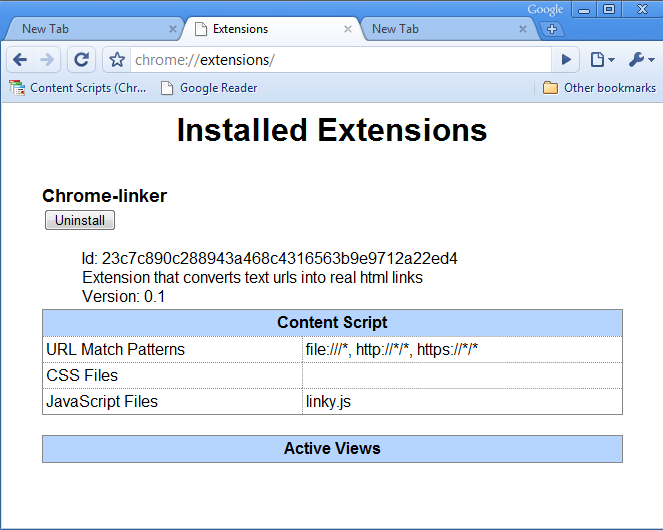
Hurray! Now all urls will be links.
UPD 1. ID in the manifest is not necessary, it is generated by the build script, I apologize for misinformation.
, UPD 2. Most likely, communication with content scripts was buggy due to my curvature. The Google Subscript extension works fine, using communication between toolbars and content scripts. So I will soon make a new version and describe in a new post
P.S. 1. When the API will be released, I will make a new version with normal interfaces, unless of course someone wants to.
P.S. 2. In the case, write in komenty about typos in PM, that I am a terrible writer, and so I know.
I recently switched from firefox to google chrome due to its lightness and minimalism. However, many of the goodies of Firefox extensions were sorely lacking. For example - Linkification, an addon that converts text urls to html links I very often need, and it’s not sweet without it.
As you know, a week ago, the first version of Google Chrome (dev) was released, which supports extensions. And, despite the fact that the API has not yet been completed and is very buggy, I decided to quickly create an extension that would implement Linkification’s functionality.
The following is a description of the process of creating the extension and a link to the result.
As far as I found out, extensions in Google Chrome consist of:
1. manifest.json is a required extension description file and links to other files.
2. toolstrip-html-files describing the buttons that appear below the chrome.
3. content scripts - javascript files that control the content of web pages.
4. Any other files that you want to use, such as images, HTML pages for pop-up windows, etc.
First, I had the idea to make a button and a content script, and so that this content script is controlled by this button. Unfortunately, communication between toolbars and content scripts is still buggy now. I didn’t succeed, so it will be in the next version when the normal IPA comes out. So, this version without a button and a topic for talking between toolbars and content scripts, I will not touch on for now.
This version of the extension consists of 2 files, this is a manifest file and a javascript content script that, when a page loads, takes all the text on it and replaces text links with text links.
The manifest file looks like this: In addition to the uninteresting description, name, and version, it is present. Here it is described which js file should be loaded, as well as matches for addresses. I wrote 3, file, http, and https, you might need to add. By the way, you can’t write "*", swears. The second file is javascript, which changes all text links to real ones. I stole it from userjs.org, and it looks like this: I deleted all sorts of window.body.onload from there because the content scripts are executed after the document is loaded.
{

 "content_scripts": [

 {

 "js": [

 "linky.js"

 ],

 "matches": [

 "",

 "http://*/*",

 "https://*/*"

 ]

 }

 ],

 "description": "Extension that converts text urls into real html links",

 "name": "Chrome-linker",

 "version": "0.1"

}
 "content_scripts": [

 {

 "js": [

 "linky.js"

 ],

 "matches": [

 "file:///*",

 "http://*/*",

 "https://*/*"

 ]

 }

 ],
 var urlRegex = /\b(((https?|ftp|irc|file|s?news):\/\/|(mailto|s?news):)[^\s\"<>\{\}\'\(\)]*)/g;

 //^^^Medium version

 //var urlRegex = /\b(((https?):\/\/)[^\s\"<>\{\}\'\(\)]*)/g;

 //^^^Small version


 //Set this to a class name if you want it to use a style from a stylesheet.

 var linkClass='';

 var preCreatedA=null;


 var elms = document.evaluate('//body//text()[not(ancestor::a)][not(ancestor::script)][not(ancestor::style)]', document, null, XPathResult.UNORDERED_NODE_SNAPSHOT_TYPE, null);

 for (var i = 0, elm; elm = elms.snapshotItem(i); i++) {

 linkifyNode(elm,document);

 }


 function linkifyNode(node,mydoc){

 var i,tmpData,foundPos,matchedText,middleText,endText,v;

 var newLinkElement,linkTextNode,skip=0;

 if(node){

 if (node.data){

 tmpData=node.data;

 foundPos=tmpData.search(urlRegex);

 if (foundPos>=0){

 matchedText=RegExp.$1;

 middleText=node.splitText(foundPos);

 middleText.deleteData(0,matchedText.length);

 if (preCreatedA){

 newLinkElement=preCreatedA.cloneNode(false);

 } else{

 newLinkElement=mydoc.createElement('a');

 newLinkElement.setAttribute('target','_blank');

 if (linkClass!=''){

 newLinkElement.setAttribute('class',linkClass);

 }

 preCreatedA=newLinkElement.cloneNode(false);

 }

 newLinkElement.setAttribute('href',matchedText);

 linkTextNode=mydoc.createTextNode(matchedText);

 newLinkElement.appendChild(linkTextNode);

 node.parentNode.insertBefore(newLinkElement,middleText);

 v=node.parentNode.style.display;

 //Check if we have a block element, and if not, flash it to

 //avoid the redraw bug.

 if (v!='block'){

 node.parentNode.style.display='none';

 node.parentNode.style.display=v;

 }

 skip=1;

 }

 }

 }

 return skip;

 }
To check how everything works, in the shortcut settings for chrome, add --load-extension = "C: \ Users \ Alex \ Desktop \ chrome-linker" to the path where the last, of course, is the path to the file folder. When restarting, chrome downloaded the extension, and going to a typical warez site with links highlighted all the speedshare links. Hurrah. It remains to collect the extension in a crx file and put it free.
There is very easy to describe this process. You need to download Python 2.6 , download the script to build from here and execute: Done, the file chrome-linker.crx appeared in my download folder. You can download it from my home page: here it is! After installation, go to chrome: // extensions /
C:\Users\Alex\Downloads>chromium_extension.py --indir=c:\Users\Alex\Desktop\chrome-linker --outfile=chrome-linker.crx

[INFO] Generated extension ID: 23C7C890C288943A468C4316563B9E9712A22ED4

[INFO] created extension package chrome-linker.crx

[INFO] chrome-linker.crx contents:

[INFO] linky.js

[INFO] manifest.json
. You should see something like the following:
Hurray! Now all urls will be links.
UPD 1. ID in the manifest is not necessary, it is generated by the build script, I apologize for misinformation.
, UPD 2. Most likely, communication with content scripts was buggy due to my curvature. The Google Subscript extension works fine, using communication between toolbars and content scripts. So I will soon make a new version and describe in a new post
P.S. 1. When the API will be released, I will make a new version with normal interfaces, unless of course someone wants to.
P.S. 2. In the case, write in komenty about typos in PM, that I am a terrible writer, and so I know.